

 gioblu
bus.reply() does not work when using ThroughSerial
Since yesterday I started to develop a PC Keyboard to Arduino project via ThroughSerial. What I want to achieve is an easy stand-alone prototype tool that can emulate a full-featured keyboard (as buttons) by sending virtual keycodes (byte) and keystate information such as "down", "up", "press" and "released" states (byte) to the Arduino. This can be handy to prototype, do a quick conditional test, navigate thru LCD menus etc, emulate hardware, any button(-state) or to provide a full-featured real-time virtual keyboard to the project in a breeze.
I also want to keep the default debug/monitor facility, or to exchange config information so it must be bi-directional. However there is no bi-directional ThroughSerial example like SoftwareBitBang SendAndReceive, only Transmitter or Receiver examples.
I set up a test project and used the transmiter example in the WINX86 directory and modify it into functions that will be exposed via an Win32 DLL. The reason I do it this way is because want to use it in a Delphi project (and there is no pascal version) to create the actual program, visuals and controls. The test setup is working perfectly fine however in one direction. I read some PJON docs and other bi-directional examples and modified it to a PJON_HALF_DUPLEX communication.
However, when I do a bus reply() after a receive at the Arduino side, it will never trigger the receive handler at the Windows C++ side. After this the bus is locked and will never receive anything. I tried everything, in different order, different options, etc, it will never be triggered (debugged with Visual Studio by set a breakpoint at receiveHandler() function in the C++ file, it will never stop there).
Here is my arduino sketch:
#define TS_BYTE_TIME_OUT 15000
#define TS_RESPONSE_TIME_OUT 60000
/* Maximum accepted timeframe between transmission and synchronous
acknowledgement. This timeframe is affected by latency and CRC computation.
Could be necessary to higher this value if devices are separated by long
physical distance and or if transmitting long packets. */
#define TS_COLLISION_DELAY 3000
#define PJON_INCLUDE_TS true

#include <PJON.h>

#include <SPI.h>
#include <font.h>
#include <LM15SGFNZ07.h>

#define PIN_LCD_LED1    3
#define PIN_LCD_LED2    6
#define PIN_LCD_CS      9
#define PIN_LCD_RST     5
#define PIN_LCD_RS      4

#define COLOR_FG 0xFFF
#define COLOR_BG 0x22F


LM15SGFNZ07 lcd( PIN_LCD_CS , PIN_LCD_RST , PIN_LCD_RS );

// <Strategy name> bus(selected device id)
PJON<ThroughSerial> bus(44);

void receiveHandler(uint8_t *payload, uint16_t length, const PJON_Packet_Info &packet_info) {
  /* Make use of the payload before sending something, the buffer where payload points to is
     overwritten when a new message is dispatched */

  char sLength[3];
  char sData[PJON_PACKET_MAX_LENGTH]; // Needed to 'filter' garbage leftovers after payload's length,
                                      // it is not null terminated or cleared.

   // Clear data
  memset( &sData[0], 0, sizeof( sData ));
   // Copy data
  strncpy( &sData[0], &payload[0], length );

  String(length).toCharArray(sLength, 3);

  lcd.clear( COLOR_BG );
  lcd.drawString(sData, 1, 1, COLOR_FG, COLOR_BG);
  lcd.drawString(sLength, 1, 20, COLOR_FG, COLOR_BG);

  if( payload[0] == 'B' || strcmp((char*)&sData[0], (char*)"Hello World" ) == 0 )
  {
    // Can't do this:
    //if(!bus.update()) // If all packets are delivered, send another
    // bus.reply(&sData[0], length);

    digitalWrite(LED_BUILTIN, HIGH);
    delay(5);
    digitalWrite(LED_BUILTIN, LOW);
    delay(5);

    //bus.send_packet_blocking(45, "Hello world", 11 );
  }
}

void errorHandler(uint8_t code, uint16_t data, void *custom_pointer)
{
  char sCode[5] = "     ";
  String(code).toCharArray(sCode, 3);

  //lcd.clear( COLOR_BG );
  lcd.drawString(sCode, 1, 50, COLOR_FG, COLOR_BG);
};


void setup() {

   // Serial setup
  Serial.begin(115200); //9600);

   // init the lcd
  lcd.init();
  delay(1000);
  lcd.clear( COLOR_BG );


   // Set backlight
  pinMode( PIN_LCD_LED1  , OUTPUT );
  pinMode( PIN_LCD_LED2  , OUTPUT );


   // Maximum brightness
  analogWrite( PIN_LCD_LED1, 0xFF );
  analogWrite( PIN_LCD_LED2, 0xFF );

  pinMode(LED_BUILTIN, OUTPUT);
  digitalWrite(LED_BUILTIN, LOW); // Initialize LED 13 to be off

  bus.strategy.set_serial(&Serial);
  bus.set_communication_mode( PJON_HALF_DUPLEX );
  //bus.include_sender_info(false);
  //bus.set_synchronous_acknowledge(false);
  bus.set_receiver( receiveHandler );

  bus.begin();
  //bus.send_packet_blocking(45, "Hello world", 11 );
};

void loop()
{
  bus.receive();
  bus.update();
}
Here is my Visual Studio C++ DLL code:
#include "pjonser32.h"


static void dataReceiveHandler( uint8_t *payload, uint16_t length )
{
	if (pReceiveCallbackProc != NULL)
	{
		try {
			pReceiveCallbackProc(payload, length);
		}
		catch (const char* msg)
		{
			errorCode = PJON_ERR_CALLBACK_EXCEPTION;
			bRecvPollenabled = false;
			pReceiveCallbackProc = NULL;
		}
	}
}


static void receiveHandler(uint8_t *payload, uint16_t length, const PJON_Packet_Info &packet_info)
{
	// I set the breakpoint here, never called:
       dataReceiveHandler( payload, length);
};


bool  __stdcall recvhndlr(PJONReceiveCallbackProc pReceiveProc)
{
	errorCode = PJON_ERR_NO_ERROR;

	if (pReceiveProc != NULL)
	{
		char sTest[] = "TEST\0";

		pReceiveCallbackProc = pReceiveProc;
		dataReceiveHandler( (uint8_t*)&sTest[0], 4 );

		if( errorCode != PJON_ERR_NO_ERROR )
		 {
			pReceiveCallbackProc = NULL;
		 }
	}
	else { pReceiveCallbackProc = NULL; }

	bRecvPollenabled = (errorCode == PJON_ERR_NO_ERROR && pSerialBus != NULL);

	return (errorCode == PJON_ERR_NO_ERROR);
}

bool  __stdcall recvupd()
{
	if (bRecvPollenabled)
	{
		try {
			pSerialBus->receive();
			pSerialBus->update();
		}
		catch (const char* msg)
		{
			return false;
		}

		return true;
	}

	return false;
}


static void errorHandler(uint8_t code, uint16_t data, void *custom_pointer)
{
	errorCode = code;
};


bool __stdcall stop()
{
	    bRecvPollenabled = false;

		if (pSerialBus != NULL)
		{
			delete pSerialBus;
			pSerialBus = NULL;

			if (pSerialHandle != NULL)
			{
				delete pSerialHandle;
				pSerialHandle = NULL;
			}

			return true;
		}

		return false;
}

byte __stdcall lasterr()
{
	byte err = errorCode;
	errorCode = 0;
	return err;
}

bool __stdcall start(byte iComPort, DWORD dBitRate, byte iDeviceId, byte iTargetDeviceId)
{
		if (pSerialBus != NULL)
		{
			errorCode = PJON_ERR_ALREADY_INIT;
			return false;
		}

		bRecvPollenabled = false;

		bool bResult = ( iComPort > 0 && (dBitRate >= 75 && dBitRate <= 115200) && iDeviceId > 0 && iTargetDeviceId > 0 && iDeviceId != iTargetDeviceId);
		char sCom[] = "COM\0\0\0";


		if (bResult)
		{
			_itoa_s(iComPort, &sCom[3], 3, 10);

			// PJON instantiation...
			try {
				pSerialBus = new PJONThroughSerial( iDeviceId );
			}
			catch (const char* msg)
			{
				errorCode = PJON_ERR_CANNOT_INIT;
				bResult   = false;
			}
		}
		else { errorCode = PJON_ERR_WRONG_PARAMS; }

		if (bResult)
		{

			// Set here the COM port assigned to the device you want to communicate with
			tstring commPortName = tstring(TEXT(&sCom[0]));

			try {
				// Opening serial...
				pSerialHandle = new Serial(commPortName, dBitRate, false, false);

				// Setting serial...
				pSerialBus->strategy.set_serial(pSerialHandle);
				pSerialBus->set_communication_mode( PJON_HALF_DUPLEX );
				//pSerialBus->include_sender_info(false);
				//pSerialBus->set_synchronous_acknowledge(false);

				// Opening bus...
				pSerialBus->begin();
				pSerialBus->set_receiver(receiveHandler);
				pSerialBus->set_error(errorHandler);
			}
			catch (const char* msg)
			{
				errorCode = PJON_ERR_CANNOT_OPEN_COM;
				bResult = false;
			}
		}

		if (bResult)
		{
			errorCode         = PJON_ERR_NO_ERROR;
			deviceSourceBusId = iDeviceId;
			deviceTargetBusId = iTargetDeviceId;
			bRecvPollenabled = (pReceiveCallbackProc != NULL);
		}
		else { stop(); }

		return bResult;
}


bool  __stdcall send(byte* uByteData, DWORD iLength)
{
	errorCode = (pSerialBus == NULL)?PJON_ERR_NOT_INIT:(iLength > 0?PJON_ERR_NO_ERROR: PJON_ERR_NO_CONTENT);

	if( errorCode == PJON_OK )
	{
		bool b = bRecvPollenabled;
		bRecvPollenabled = false;

		if (pSerialBus->send_packet(deviceTargetBusId, (char*)uByteData, iLength) == PJON_ACK)
		{
				pSerialBus->receive(1000); // 1000000);
				pSerialBus->update();
				bRecvPollenabled = b;

				return ( errorCode == PJON_OK );
		}
		else {
				 // Looks silly however errorHandler() can be triggered and maybe global var has been changed
				if (errorCode == PJON_OK)
				{
					errorCode = PJON_ERR_CANNOT_SEND;
				}
			}

		bRecvPollenabled = b;
	}

	return false;
}
And the h file:
extern "C"


#include <stdio.h>
#include <iostream>
// PJON library
#include <inttypes.h>
#include <stdlib.h>
#include <string.h>
#include <chrono>


#ifndef WINX86
#define WINX86 true
#endif

#define TS_BYTE_TIME_OUT 15000

#define TS_RESPONSE_TIME_OUT 60000
/* Maximum accepted timeframe between transmission and synchronous
acknowledgement. This timeframe is affected by latency and CRC computation.
Could be necessary to higher this value if devices are separated by long
physical distance and or if transmitting long packets. */

#define TS_COLLISION_DELAY 3000

 // Include only Serial
#define PJON_INCLUDE_TS true

#include <PJON.h>

#include <WinSDKVer.h>

#define WIN32_LEAN_AND_MEAN             // Exclude rarely-used stuff from Windows headers
// Windows Header Files:
#include <windows.h>

// types
#define PSerial Serial*
#define PJONThroughSerial   PJON<ThroughSerial>
#define PPJONThroughSerial  PJON<ThroughSerial>*
typedef void (__stdcall *PJONReceiveCallbackProc)( uint8_t* uData, uint16_t iLength );


// 'consts'
#define PJON_OK						0
#define PJON_ERR_NO_ERROR			0
#define PJON_ERR_CANNOT_INIT			1
#define PJON_ERR_CANNOT_OPEN_COM		2
#define PJON_ERR_CANNOT_SEND			3
#define PJON_ERR_NOT_INIT			4
#define PJON_ERR_NO_CONTENT			5
#define PJON_ERR_ALREADY_INIT		6
#define PJON_ERR_WRONG_PARAMS		7
#define PJON_ERR_CALLBACK_EXCEPTION 8
#define PJON_ERR_CONNECTION_LOST     PJON_CONNECTION_LOST
#define PJON_ERR_PACKETS_BUFFER_FULL PJON_PACKETS_BUFFER_FULL
#define PJON_ERR_CONTENT_TOO_LONG    PJON_CONTENT_TOO_LONG
#define PJON_ERR_ID_ACQUISITION_FAIL PJON_ID_ACQUISITION_FAIL
#define PJON_ERR_DEVICES_BUFFER_FULL PJON_DEVICES_BUFFER_FULL

// vars
byte						deviceSourceBusId    = 45;
byte						deviceTargetBusId    = 44;
byte						errorCode            = 0;
PSerial					pSerialHandle        = NULL;
PPJONThroughSerial		pSerialBus           = NULL;
PJONReceiveCallbackProc pReceiveCallbackProc = NULL;
bool                    bRecvPollenabled     = false;
The def file:
LIBRARY pjonser32
EXPORTS
 start
 recvhndlr
 recvupd
 send
 lasterr
 stop
And the Delphi Form file:
unit main;

interface

uses
  Windows, Messages, SysUtils,  Classes, Graphics,
  Controls, Forms, Dialogs,  StdCtrls, ExtCtrls;

type
 TPJONReceiveCallbackProc = procedure( uData : PChar; iLength : DWORD ); stdcall;
 PPJONReceiveCallbackProc = ^TPJONReceiveCallbackProc;

  TForm1 = class(TForm)
    Button1: TButton;
    Label1: TLabel;
    Edit1: TEdit;
    Label2: TLabel;
    Edit2: TEdit;
    Label3: TLabel;
    cbSerialPower: TCheckBox;
    Timer1: TTimer;
    procedure Button1Click(Sender: TObject);
    procedure FormCreate(Sender: TObject);
    procedure FormDestroy(Sender: TObject);
    procedure cbSerialPowerClick(Sender: TObject);
    procedure Timer1Timer(Sender: TObject);
  private
    { Private declarations }
  public
    { Public declarations }
  end;

const
 PJONSER_DLLNAME = 'pjonser32.dll';


// Error codes
const
 PJON_OK                      = 0;
 PJON_ERR_NO_ERROR            = 0;
 PJON_ERR_CANNOT_INIT         = 1;
 PJON_ERR_CANNOT_OPEN_COM     = 2;
 PJON_ERR_CANNOT_SEND         = 3;
 PJON_ERR_NOT_INIT            = 4;
 PJON_ERR_NO_CONTENT          = 5;
 PJON_ERR_ALREADY_INIT        = 6;
 PJON_ERR_WRONG_PARAMS        = 7;
 PJON_ERR_CALLBACK_EXCEPTION  = 8;


 PJON_ERR_CONNECTION_LOST     = 101;
 PJON_ERR_PACKETS_BUFFER_FULL = 102;
 PJON_ERR_CONTENT_TOO_LONG    = 104;
 PJON_ERR_ID_ACQUISITION_FAIL = 105;
 PJON_ERR_DEVICES_BUFFER_FULL = 254;

var
  Form1: TForm1;


function pjonSerialStart( iComPort : byte; dBitRate : DWORD; iDeviceId : byte; iTargetDeviceId : byte ) : bool; stdcall; external PJONSER_DLLNAME name 'start';
function pjonSerialSetReceiveHandlerProc( pReceiveProc : PPJONReceiveCallbackProc ) : bool; stdcall; external PJONSER_DLLNAME name 'recvhndlr';
function pjonSerialReceiveUpdate() : bool; stdcall; external PJONSER_DLLNAME name 'recvupd';
function pjonSerialSend( uByteData : PChar; iLength : DWORD ) : bool; stdcall; external PJONSER_DLLNAME name 'send';
function pjonSerialLastErr() : byte; stdcall; external PJONSER_DLLNAME name 'lasterr';
function pjonSerialStop() : bool; stdcall; external PJONSER_DLLNAME name 'stop';


implementation

{$R *.dfm}

procedure ReceiveCallbackProc( uData : PChar; iLength : DWORD ); stdcall;
begin
 Form1.Edit2.Text:= string( uData );
 Form1.Label3.Caption:=IntToStr( iLength )+' - '+IntToStr( pjonSerialLastErr() );
end;


procedure TForm1.Button1Click(Sender: TObject);
begin
 pjonSerialSend( PChar( Edit1.Text+#0 ), length( Edit1.Text ) );
 Label2.Caption:=IntToStr( pjonSerialLastErr() );
end;

procedure TForm1.FormCreate(Sender: TObject);
begin
 pjonSerialSetReceiveHandlerProc( @ReceiveCallbackProc );
end;

procedure TForm1.FormDestroy(Sender: TObject);
begin
  pjonSerialStop();
end;

procedure TForm1.cbSerialPowerClick(Sender: TObject);
begin
 if( cbSerialPower.Checked ) then
  begin
   cbSerialPower.Checked:= pjonSerialStart( 1, 115200, 45, 44 );
   if( cbSerialPower.Checked ) then
    begin
      pjonSerialSend( PChar( Edit1.Text+#0 ), length( Edit1.Text ) );
    end;

    Label2.Caption:=IntToStr( pjonSerialLastErr() );
  end;

 if( NOT cbSerialPower.Checked ) then
  pjonSerialStop();
end;

procedure TForm1.Timer1Timer(Sender: TObject);
begin
 pjonSerialReceiveUpdate();
end;

end.
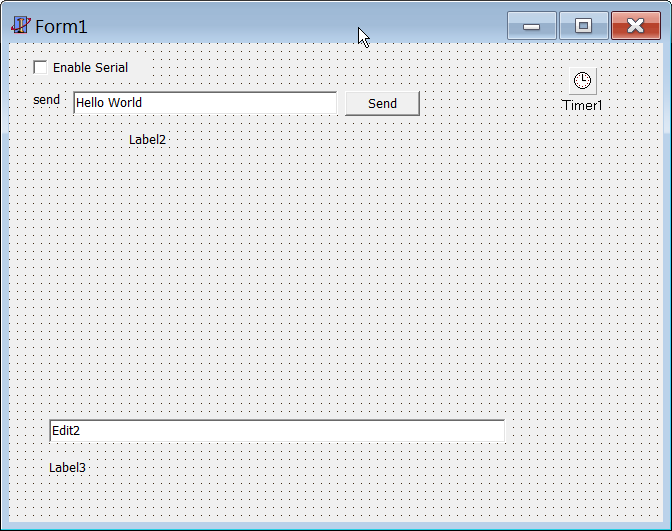
Can it be solved? Many thanks for any reply.

Ciao @codebeat-nl your project seems really interesting! You may are experiencing a bug, if using an Arduino compatible device with a hardware serial port, the hang may be triggered by a collision (both devices transmits at the same time) although I am still digging to understand.
If you want to go further without waiting for the fix:
- Call
bus.set_synchronous_acknowledge(false)on both sides - Structure the exchange to avoid any possible collision or the chance that 2 packets are sent at the same time, that means to use a master slave approach where the master provokes a slave response: master request -> (small delay) -> slave response
Following point 1 and 2 should be a safe workaround and also a stable procedure. I am sorry, I hope to get a fix for this as soon as possible.
Feel free to request for support if required :)

@codebeat-nl it seems a fairly easy way to get a clean and professional custom solution, an example could be a cool entry point for other users like me that have never tried Delphi before. Will study that more in detail.
Ciao @codebeat-nl did the solutions 1 or 2 solved your issue? Thank you again :)
Ciao @gioblu , thanks for the replies. Nearly close to the weekend I just want to let you know I am working on it, the solutions you provide doesn't help because I tried that before. With bus.set_synchronous_acknowledge(false) it lost it's security to be reliable (unreliable like a normal serial connection).
However, make some progress at the keyboard 'interface' design, it is working great and missing bidirectional doesn't have to be a problem (when doing it the 'smart' way) to be a keyboard or mouse emulator.
To be a simple solution to everybody, out-of-the-box solution, bidirectional must be possible because it also provides debug possibilities. So this is still a wanted/required feature.
Just want to let you know, please don't close the question/bug. This weekend I will try to show my findings.
Ciao @codebeat-nl thank you very much for your answer, For sure, feel free to contact me directly on gitter if you need my support.
[edited] Sorry, false positive. :) My issue seems to be not not related to this.

Ciao @codebeat-nl I think I may have found the problem thanks to the report of @Girgitt, Could you give it a try and see if the latest referenced commit solves your issue on Windows? Thank you again :)