
pink-pony
 pink-pony copied to clipboard
 ginkgo
Pink Pony is a 3D racing game with ponies!
Pink Pony
Pink Pony is a colorful tron-like 3D racing game with ponies and computer-controlled opponents, as well as multiplayer split-screen support for up to four people via keyboard or game controller.
Pink Pony can be played both on Linux and Windows and is both free and open source.
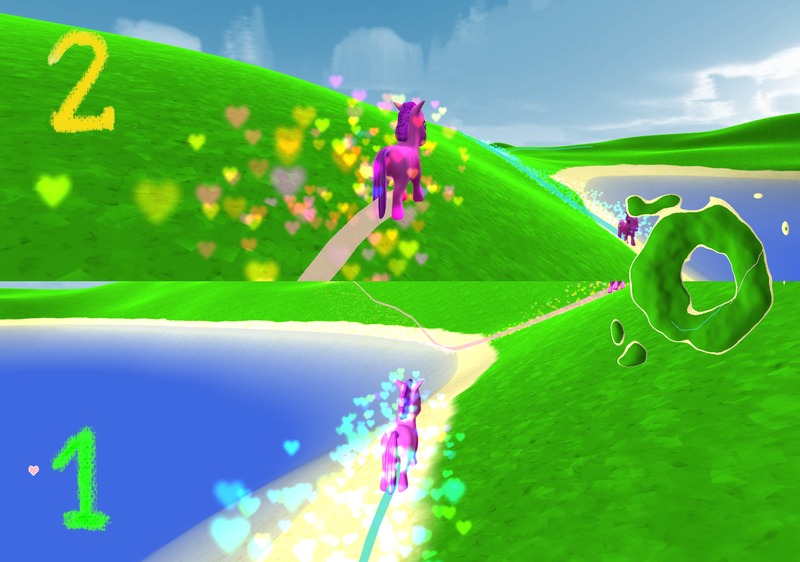
Visit the Pink Pony website for information on downloading and playing the game.
Hacking on Pink Pony
Compiling
You will need the following tools and libraries to build the game:
- SCons
- GLFW
- Imath
- DevIL
- protobuf (You also need protobuf-compiler on ubuntu)
- SDL_mixer
- FTGL
- libsigc++
Just build the game with scons in the current directory. If you have
a dualcore CPU, you can use scons -j2 for parallel building.
Playing
To start the game, call ./Pony. ESC stops the game.
Installation
Pink Pony can be started directly in the source directory. If you want to
install it in at a permanent location in the system, then you can use the
files in the install directory for this.
The shell script pink-pony is a simple wrapper that checks if a config file
is installed in the user's home directory and creates one if need be. It then
starts the game with this config file.
The location of the game resource files can be configured in the pony.options
config file. This way no patching of the source should be necessary.
Configuration (pony.options)
You can configure a lot of things in the game's config file, which is created
in ~/.config/pony.options by default.
You can supply an alternative config file as option in the ./Pony call.
Below is an example pony.options file.
// Window properties

width = 800;
height = 600;
swap_interval = 0;
window_mode = window;
fsaa_samples = 2;
polygon_mode = fill;

// Resource directory

resource_dir = "/usr/share/games/pink-pony/";

// Particles

pony_explosion_particles = 5000;
heart_explosion_particles = 1000;
pony_particle_rate = 10;
use_particles = true;

// Level properties

levels_file = "levels.xml";
selected_level = 3;
heightmap_file = "levels/heart.png";
level_size = (1500 90 1500);
water_level = 30;
heightmap_specular = (1 1 1 1);
heightmap_diffuse = (0 0 0 0);
heightmap_shininess = 50;
heightmap_velvet_coeff = 1.5;
sand_texture = "textures/sand.png";
grass_texture = "textures/grass.png";
noise_texture = "textures/noise.png";
sky_texture = "textures/sky.png";

// Light properties

light_specular = (1 1 1 1);
light_diffuse = (1 1 1 1);
light_ambient = (0.05 0.05 0.05 1);
light_dir = (0.742781 0.371391 -0.107086);
hemilight_pole = (0 1 0);
hemilight_sky = (0.75 0.75 0.75 1);
hemilight_ground = (0.25 0.25 0.25 1);

// Camera properties

camera_fov = 45;
camera_near = 5;
camera_far = 6000;
camera_distance = 15;
camera_height = 6;
pony_height = 3;

// Game properties

ai_count = 0;
player_count = 1;
heart_count = 3;
pony_start_speed = 15;
pony_min_speed = 5;
pony_max_speed = 50;
pony_acceleration = 25;
pony_turn_speed = 1.25;
water_tolerance = 1;
show_minimap = true;
pony_up[0] = 283;
pony_down[0] = 284;
pony_left[0] = 285;
pony_right[0] = 286;
pony_up[1] = 87;
pony_down[1] = 83;
pony_left[1] = 65;
pony_right[1] = 68;
pony_up[2] = 310;
pony_down[2] = 307;
pony_left[2] = 306;
pony_right[2] = 308;
pony_up[3] = 73;
pony_down[3] = 75;
pony_left[3] = 74;
pony_right[3] = 76;
pony_slope_acceleration = 0;
permute_start_positions = false;
randomize_start_positions = true;
min_start_distance = 200;

// General appearance

digit_one = "textures/one.png";
digit_two = "textures/two.png";
digit_three = "textures/three.png";
digit_four = "textures/four.png";
heart_mesh = "models/Heart.pmesh";
use_water_fallback = "true";

// Pony appearance

pony_shader = "GLSL/pony";
pony_velvet_coeff = 2;
pony_texture = "textures/pony.png";
pony_mesh = "models/Pony-animated.pmesh";
pony_color[0] = (1 0.75 0.792968 1);
pony_color[1] = (0.25 0.875 0.8125 1);
pony_color[2] = (1 0.839844 0 1);
pony_color[3] = (0.484375 0.984375 0 1);

// Sounds

background_music = "music/To be happy.mp3";
music_volume = 63;
Overriding game resources
The game's maps, models, textures, and sounds are loaded at runtime, so you may
modify these files to create a custom experience. To do this, copy the game's
resources directory from it's installed location to a new location and change
the resource_dir property in pony.options. For example, on Ubuntu you can
run the following command to copy the pink-pony directory into your home folder.
$ cp -r /usr/share/games/pink-pony/ ~/pink-pony
Then, you can set your pony.options like so. Replace <myuser> with your
username!
resource_dir = "/home/<myuser>/pink-pony/";
From this point you can override the resource files.
Creating custom maps
Once you've taken the steps above to create your own game resources folder, you
can create new maps by modifying the levels.xml file.
Maps are represented by a grayscale image, with black (#000000) being the
lowest level of terrain and white (#FFFFFF) being the highest. See the images
in levels/ for examples. Create a new image and place it in your levels/
directory and add a new <level> node to levels.xml containing the filename
of your map image. Here's an example custom levels.xml file.
<levels>
  <level name="Flower Atoll"  file="levels/flower.png"  size="(1500 80 1500)" water_level="60"/>
  <level name="Flower"  file="levels/flower.png"  size="(1500 80 1500)" water_level="45"/>
  <level name="Lagoon"  file="levels/heart.png"   size="(1500 90 1500)" water_level="45"/>
  <level name="Heart"   file="levels/heart.png"   size="(1500 90 1500)" water_level="30"/>
  <level name="Ring"    file="levels/ring.png"    size="(1500 90 1500)" water_level="30"/>
  <level name="Long"    file="levels/long.png"    size="(1500 90 1500)" water_level="30"/>
  <level name="Strange" file="levels/strange.png" size="(1500 90 1500)" water_level="30"/>
  <!-- This one is the custom one! -->
  <level name="My Awesome Map!" file="levels/awesome.png" size="(1500 90 1500)" water_level="30"/>
</levels>
License
Different parts of Pink Pony are available under different terms.
Unless otherwise noted in this file (see below), everything is copyright © 2009 by ginkgo and available under the terms of the GNU General Public License of the Free Software Foundation, either version 3 of the License, or (at your option) any later version.
| Filename | License | Copyright | Notes |
|---|---|---|---|
| resources/models/Pony.mesh.xml | GPL-3.0+ | © 2009 tornado | Animated by Skorpio |
| resources/models/pony.blend | GPL-3.0+ | © 2009 tornado | Animated by Skorpio |
| resources/textures/pony.png | GPL-3.0+ | © 2009 tornado | |
| resources/textures/pony-blue.png | GPL-3.0+ | © 2009 tornado | Modified by qubodup |
| resources/music/To be happy.mp3 | CC-BY-SA-3.0 | © renich | Reencoded by ginkgo |
| resources/textures/sky.png | CC-BY-3.0 | © brisingre | Modified by Iwan Gabovitch |
| resources/fonts/dijkstra.ttf | Unknown | Unknown | http://lucacardelli.name/indexartifacts.html |
| resources/textures/grass.png | CC0-1.0 | Public domain | By Iwan Gabovitch |
| resources/textures/sand.png | CC0-1.0 | Public domain | By Iwan Gabovitch |
| resources/sounds/heart.wav | CC0-1.0 | Public domain | By Iwan Gabovitch |
| resources/sounds/explosion.wav | CC0-1.0 | Public domain | By Iwan Gabovitch |
The pony AI has been implemented by MCMic.
 ginkgo