
aniwatch-api
 aniwatch-api copied to clipboard
 ghoshRitesh12
API serving anime data from hianime.to

Aniwatch API







[!IMPORTANT]
- https://api-aniwatch.onrender.com is only meant to demo the API and has rate-limiting enabled to minimise bandwidth consumption. It is recommended to deploy your own instance for personal use by customizing the api as you need it to be.
- This API is just an unofficial api for hianime.to and is in no other way officially related to the same.
- The content that this api provides is not mine, nor is it hosted by me. These belong to their respective owners. This api just demonstrates how to build an api that scrapes websites and uses their content.
Table of Contents
- Installation
- Local
- Docker
- Host your instance
- Vercel
- Render
- Documentation
- GET Anime Home Page
- GET Anime About Info
- GET Search Results
- GET Search Suggestions
- GET Producer Animes
- GET Genre Animes
- GET Category Anime
- GET Estimated Schedules
- GET Anime Episodes
- GET Anime Episode Servers
- GET Anime Episode Streaming Links
- Development
- Contributors
- Thanks
- Support
- License
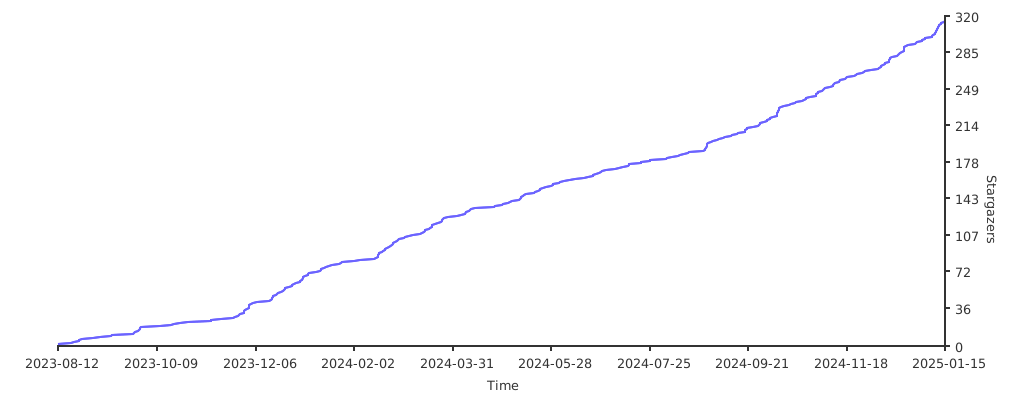
- Star History
💻 Installation
Local
-
Clone the repository and move into the directory.
git clone https://github.com/ghoshRitesh12/aniwatch-api.git cd aniwatch-api -
Install all the dependencies.
npm i #or yarn install or pnpm i -
Start the server!
npm start #or yarn start or pnpm startNow the server should be running on http://localhost:4000
Docker
Docker image is available at GitHub Container Registry.
Run the following commands to pull and run the docker image.
docker pull ghcr.io/ghoshritesh12/aniwatch
docker run -p 4000:4000 ghcr.io/ghoshritesh12/aniwatch
The above command will start the server on port 4000. You can access the server at http://localhost:4000 and you can also change the port by changing the -p option to -p <port>:4000.
You can also add the -d flag to run the container in detached mode.
⛅ Host your instance
[!CAUTION]
For personal deployments, refrain from having an env named
ANIWATCH_API_HOSTNAME. You may face rate limitting and other issues if you do.
Vercel
Deploy your own instance of Aniwatch API on Vercel.
[!NOTE]
When deploying to vercel, set an env named
IS_VERCEL_DEPLOYMENTtotrueor anything, but this env should be present.
Render
Deploy your own instance of Aniwatch API on Render.

📚 Documentation
The endpoints exposed by the api are listed below with examples that uses the Fetch API, but you can use any http library.
GET Anime Home Page
Endpoint
https://api-aniwatch.onrender.com/anime/home
Request sample
const resp = await fetch("https://api-aniwatch.onrender.com/anime/home");
const data = await resp.json();
console.log(data);
Response Schema
{
  genres: ["Action", "Cars", "Adventure", ...],
  latestEpisodeAnimes: [
    {
      id: string,
      name: string,
      poster: string,
      duration: string,
      type: string,
      rating: string,
      episodes: {
        sub: number,
        dub: number,
      }
    },
    {...},
  ],
  spotlightAnimes: [
    {
      id: string,
      name: string,
      jname: string,
      poster: string,
      description: string,
      rank: number,
      otherInfo: string[],
      episodes: {
        sub: number,
        dub: number,
      },
    },
    {...},
  ],
  top10Animes: {
    today: [
      {
        episodes: {
          sub: number,
          dub: number,
        },
        id: string,
        name: string,
        poster: string,
        rank: number
      },
      {...},
    ],
    month: [...],
    week: [...]
  },
  topAiringAnimes: [
    {
      id: string,
      name: string,
      jname: string,
      poster: string,
    },
    {...},
  ],
  topUpcomingAnimes: [
    {
      id: string,
      name: string,
      poster: string,
      duration: string,
      type: string,
      rating: string,
      episodes: {
        sub: number,
        dub: number,
      }
    },
    {...},
  ],
  trendingAnimes: [
    {
      id: string,
      name: string,
      poster: string,
      rank: number,
    },
    {...},
  ],
}
🔼 Back to Top
GET Anime About Info
Endpoint
https://api-aniwatch.onrender.com/anime/info?id={anime-id}
Query Parameters
| Parameter | Type | Description | Required? | Default |
|---|---|---|---|---|
id |
string | The unique anime id (in kebab case). | Yes | -- |
Request sample
const resp = await fetch(
  "https://api-aniwatch.onrender.com/anime/info?id=attack-on-titan-112"
);
const data = await resp.json();
console.log(data);
Response Schema
{
  anime: [
    info: {
      id: string,
      name: string,
      poster: string,
      description: string,
      stats: {
        rating: string,
        quality: string,
        episodes: {
          sub: number,
          dub: number
        },
        type: string,
        duration: string
      },
      promotionalVideos: [
        {
          title: string | undefined,
          source: string | undefined,
          thumbnail: string | undefined
        },
        {...},
      ],
      characterVoiceActor: [
        {
          character: {
            id: string,
            poster: string,
            name: string,
            cast: string
          },
          voiceActor: {
            id: string,
            poster: string,
            name: string,
            cast: string
          }
        },
        {...},
      ]
    }
    moreInfo: {
      aired: string,
      genres: ["Action", "Mystery", ...],
      status: string,
      studios: string,
      duration: string
      ...
    }
  ],
  mostPopularAnimes: [
    {
      episodes: {
        sub: number,
        dub: number,
      },
      id: string,
      jname: string,
      name: string,
      poster: string,
      type: string
    },
    {...},
  ],
  recommendedAnimes: [
    {
      id: string,
      name: string,
      poster: string,
      duration: string,
      type: string,
      rating: string,
      episodes: {
        sub: number,
        dub: number,
      }
    },
    {...},
  ],
  relatedAnimes: [
    {
      id: string,
      name: string,
      poster: string,
      duration: string,
      type: string,
      rating: string,
      episodes: {
        sub: number,
        dub: number,
      }
    },
    {...},
  ],
  seasons: [
    {
      id: string,
      name: string,
      title: string,
      poster: string,
      isCurrent: boolean
    },
    {...}
  ]
}
🔼 Back to Top
GET Search Results
Endpoint
# basic example
https://api-aniwatch.onrender.com/anime/search?q={query}&page={page}

# advanced example
https://api-aniwatch.onrender.com/anime/search?q={query}&genres={genres}&type={type}&sort={sort}&season={season}&language={sub_or_dub}&status={status}&rated={rating}&start_date={yyyy-mm-dd}&end_date={yyyy-mm-dd}&score={score}
Query Parameters
| Parameter | Type | Description | Required? | Default |
|---|---|---|---|---|
q |
string | The search query, i.e. the title of the item you are looking for. | Yes | -- |
page |
number | The page number of the result. | No | 1 |
type |
string | Type of the anime. eg: movie |
No | -- |
status |
string | Status of the anime. eg: finished-airing |
No | -- |
rated |
string | Rating of the anime. eg: r+ or pg-13 |
No | -- |
score |
string | Score of the anime. eg: good or very-good |
No | -- |
season |
string | Season of the aired anime. eg: spring |
No | -- |
language |
string | Language category of the anime. eg: sub or sub-&-dub |
No | -- |
start_date |
string | Start date of the anime(yyyy-mm-dd). eg: 2014-10-2 |
No | -- |
end_date |
string | End date of the anime(yyyy-mm-dd). eg: 2010-12-4 |
No | -- |
sort |
string | Order of sorting the anime result. eg: recently-added |
No | -- |
genres |
string | Genre of the anime, separated by commas. eg: isekai,shounen |
No | -- |
[!TIP] For both
start_dateandend_date, year must be mentioned. If you wanna omit date or month specify0instead. Eg: omitting date -> 2014-10-0, omitting month -> 2014-0-12, omitting both -> 2014-0-0
Request sample
// basic example
const resp = await fetch(
  "https://api-aniwatch.onrender.com/anime/search?q=titan&page=1"
);
const data = await resp.json();
console.log(data);

// advanced example
const resp = await fetch(
  "https://api-aniwatch.onrender.com/anime/search?q=girls&genres=action,adventure&type=movie&sort=score&season=spring&language=dub&status=finished-airing&rated=pg-13&start_date=2014-0-0&score=good"
);
const data = await resp.json();
console.log(data);
Response Schema
{
  animes: [
    {
      id: string,
      name: string,
      poster: string,
      duration: string,
      type: string,
      rating: string,
      episodes: {
        sub: number,
        dub: number,
      }
    },
    {...},
  ],
  mostPopularAnimes: [
    {
      episodes: {
        sub: number,
        dub: number,
      },
      id: string,
      jname: string,
      name: string,
      poster: string,
      type: string
    },
    {...},
  ],
  currentPage: 1,
  totalPages: 1,
  hasNextPage: false,
  searchQuery: string,
  searchFilters: {
    [filter_name]: [filter_value]
    ...
  }
}
🔼 Back to Top
GET Search Suggestions
Endpoint
https://api-aniwatch.onrender.com/anime/search/suggest?q={query}
Query Parameters
| Parameter | Type | Description | Required? | Default |
|---|---|---|---|---|
q |
string | The search suggestion query. | Yes | -- |
Request sample
const resp = await fetch(
  "https://api-aniwatch.onrender.com/anime/search/suggest?q=monster"
);
const data = await resp.json();
console.log(data);
Response Schema
{
  suggestions: [
    {
      id: string,
      name: string,
      poster: string,
      jname: string,
      moreInfo: ["Jan 21, 2022", "Movie", "17m"]
    },
    {...},
  ],
}
🔼 Back to Top
GET Producer Animes
Endpoint
https://api-aniwatch.onrender.com/anime/producer/{name}?page={page}
Path Parameters
| Parameter | Type | Description | Required? | Default |
|---|---|---|---|---|
name |
string | The name of anime producer (in kebab case). | Yes | -- |
Query Parameters
| Parameter | Type | Description | Required? | Default |
|---|---|---|---|---|
page |
number | The page number of the result. | No | 1 |
Request sample
const resp = await fetch(
  "https://api-aniwatch.onrender.com/anime/producer/toei-animation?page=2"
);
const data = await resp.json();
console.log(data);
Response Schema
{
  producerName: "Toei Animation Anime",
  animes: [
    {
      id: string,
      name: string,
      poster: string,
      duration: string,
      type: string,
      rating: string,
      episodes: {
        sub: number,
        dub: number,
      }
    },
    {...},
  ],
  top10Animes: {
    today: [
      {
        episodes: {
          sub: number,
          dub: number,
        },
        id: string,
        name: string,
        poster: string,
        rank: number
      },
      {...},
    ],
    month: [...],
    week: [...]
  },
  topAiringAnimes: [
    {
      episodes: {
        sub: number,
        dub: number,
      },
      id: string,
      jname: string,
      name: string,
      poster: string,
      type: string
    },
    {...},
  ],
  currentPage: 2,
  totalPages: 11,
  hasNextPage: true,
}
🔼 Back to Top
GET Genre Animes
Endpoint
https://api-aniwatch.onrender.com/anime/genre/{name}?page={page}
Path Parameters
| Parameter | Type | Description | Required? | Default |
|---|---|---|---|---|
name |
string | The name of anime genre (in kebab case). | Yes | -- |
Query Parameters
| Parameter | Type | Description | Required? | Default |
|---|---|---|---|---|
page |
number | The page number of the result. | No | 1 |
Request sample
const resp = await fetch(
  "https://api-aniwatch.onrender.com/anime/genre/shounen?page=2"
);
const data = await resp.json();
console.log(data);
Response Schema
{
  genreName: "Shounen Anime",
  animes: [
    {
      id: string,
      name: string,
      poster: string,
      duration: string,
      type: string,
      rating: string,
      episodes: {
        sub: number,
        dub: number,
      }
    },
    {...},
  ],
  genres: ["Action", "Cars", "Adventure", ...],
  topAiringAnimes: [
    {
      episodes: {
        sub: number,
        dub: number,
      },
      id: string,
      jname: string,
      name: string,
      poster: string,
      type: string
    },
    {...},
  ],
  currentPage: 2,
  totalPages: 38,
  hasNextPage: true
}
🔼 Back to Top
GET Category Anime
Endpoint
https://api-aniwatch.onrender.com/anime/{category}?page={page}
Path Parameters
| Parameter | Type | Description | Required? | Default |
|---|---|---|---|---|
category |
string | The category of anime. | Yes | -- |
Query Parameters
| Parameter | Type | Description | Required? | Default |
|---|---|---|---|---|
page |
number | The page number of the result. | No | 1 |
Request sample
// categories -> "most-favorite", "most-popular", "subbed-anime", "dubbed-anime", "recently-updated", "recently-added", "top-upcoming", "top-airing", "movie", "special", "ova", "ona", "tv", "completed"

const resp = await fetch("https://api-aniwatch.onrender.com/anime/tv?page=2");
const data = await resp.json();
console.log(data);
Response Schema
{
  category: "TV Series Anime",
  animes: [
    {
      id: string,
      name: string,
      poster: string,
      duration: string,
      type: string,
      rating: string,
      episodes: {
        sub: number,
        dub: number,
      }
    },
    {...},
  ],
  genres: ["Action", "Cars", "Adventure", ...],
  top10Animes: {
    today: [
      {
        episodes: {
          sub: number,
          dub: number,
        },
        id: string,
        name: string,
        poster: string,
        rank: number
      },
      {...},
    ],
    month: [...],
    week: [...]
  },
  currentPage: 2,
  totalPages: 100,
  hasNextPage: true
}
🔼 Back to Top
GET Estimated Schedules
Endpoint
https://api-aniwatch.onrender.com/anime/schedule?date={date}
Query Parameters
| Parameter | Type | Description | Required? | Default |
|---|---|---|---|---|
date (yyyy-mm-dd) |
string | The date of the desired schedule. (months & days must have 2 digits) | Yes | -- |
Request sample
const resp = await fetch(
  "https://api-aniwatch.onrender.com/anime/schedule?date=2023-01-14"
);
const data = await resp.json();
console.log(data);
Response Schema
{
  scheduledAnimes: [
    {
      id: string,
      time: string, // 24 hours format
      name: string,
      jname: string,
    },
    {...}
  ]
}
🔼 Back to Top
GET Anime Episodes
Endpoint
https://api-aniwatch.onrender.com/anime/episodes/{animeId}
Path Parameters
| Parameter | Type | Description | Required? | Default |
|---|---|---|---|---|
animeId |
string | The unique anime id. | Yes | -- |
Request sample
const resp = await fetch(
  "https://api-aniwatch.onrender.com/anime/episodes/steinsgate-3"
);
const data = await resp.json();
console.log(data);
Response Schema
{
  totalEpisodes: 24,
  episodes: [
    {
      number: 1,
      title: "Turning Point",
      episodeId: "steinsgate-3?ep=213"
      isFiller: false,
    },
    {...}
  ]
}
🔼 Back to Top
GET Anime Episode Servers
Endpoint
https://api-aniwatch.onrender.com/anime/servers?episodeId={id}
Query Parameters
| Parameter | Type | Description | Required? | Default |
|---|---|---|---|---|
episodeId |
string | The unique episode id. | Yes | -- |
Request sample
const resp = await fetch(
  "https://api-aniwatch.onrender.com/anime/servers?episodeId=steinsgate-0-92?ep=2055"
);
const data = await resp.json();
console.log(data);
Response Schema
{
  episodeId: "steinsgate-0-92?ep=2055",
  episodeNo: 5,
  sub: [
    {
      serverId: 4,
      serverName: "vidstreaming",
    },
    {...}
  ],
  dub: [
    {
      serverId: 1,
      serverName: "megacloud",
    },
    {...}
  ],
  raw: [
    {
      serverId: 1,
      serverName: "megacloud",
    },
    {...}
  ],
}
🔼 Back to Top
GET Anime Episode Streaming Links
Endpoint
https://api-aniwatch.onrender.com/anime/episode-srcs?id={episodeId}&server={server}&category={category}
Query Parameters
| Parameter | Type | Description | Required? | Default |
|---|---|---|---|---|
id |
string | The id of the episode. | Yes | -- |
server |
string | The name of the server. | No | "vidstreaming" |
category |
string | The category of the episode ('sub', 'dub' or 'raw'). | No | "sub" |
Request sample
const resp = await fetch(
  "https://api-aniwatch.onrender.com/anime/episode-srcs?id=steinsgate-3?ep=230&server=vidstreaming&category=dub"
);
const data = await resp.json();
console.log(data);
Response Schema
{
  headers: {
    Referer: string,
    "User-Agent": string,
    ...
  },
  sources: [
    {
      url: string, // .m3u8 hls streaming file
      isM3U8: boolean,
      quality?: string,
    },
    {...}
  ],
  subtitles: [
    {
      lang: "English",
      url: string, // .vtt subtitle file
    },
    {...}
  ],
  anilistID: number | null,
  malID: number | null,
}
🔼 Back to Top
👨💻 Development
Pull requests and stars are always welcome. If you encounter any bug or want to add a new feature to this api, consider creating a new issue. If you wish to contribute to this project, read the CONTRIBUTING.md file.
✨ Contributors
Thanks to the following people for keeping this project alive and relevant.
🤝 Thanks
🙌 Support
Don't forget to leave a star 🌟. You can also follow me on Twitter @_riteshghosh.
📜 License
This project is licensed under the MIT License - see the LICENSE file for more details.
Metadata
Owner
 ghoshRitesh12
Metadata
API serving anime data from hianime.to