

 ghaerr
Cannot write /tmp directory on FAT if login with root and use /tmp then exit and login with user
Hello @ghaerr ,
This is related to FAT permission, but /tmp directory cannot be written by user if I login with root and use /tmp by vi, then exit and login by user. This happens because permission of /tmp is kept by root after exit.
vi does not work after login by user.
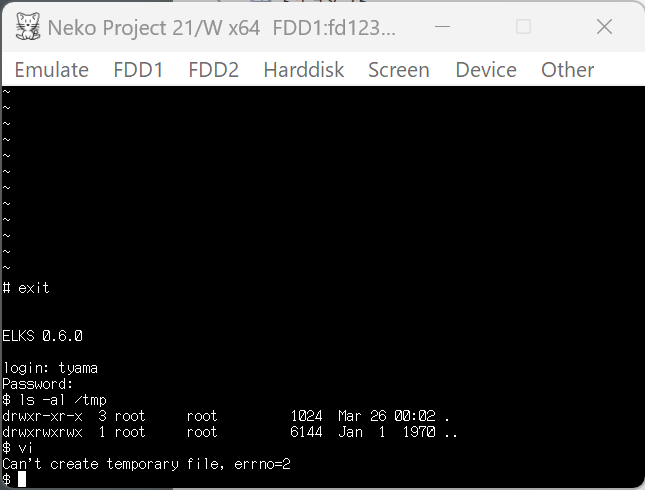
If /tmp is not used by root at all, then /tmp can be written by the user and the vi works.
Is it possible to make /tmp always can be written by anybody?
Thank you.

Hello @tyama501,
Is it possible to make /tmp always can be written by anybody?
It seems the FAT permissions emulation being performed by ELKS has some problems with directories, as ELKS may change the owner of a directory based on which user last accessed it, and/or whether its in a inode cache.
One idea would be to always force directories to be mode 0777, but that basically removes permissions from directories.
This could possibly be fixed just for /tmp by adding a chmod 777 /tmp in /etc/profile. Can you try that to see if that solves this problem, at least for the time being?
Thank you!

Hello @ghaerr ,
This could possibly be fixed just for /tmp by adding a chmod 777 /tmp in /etc/profile.
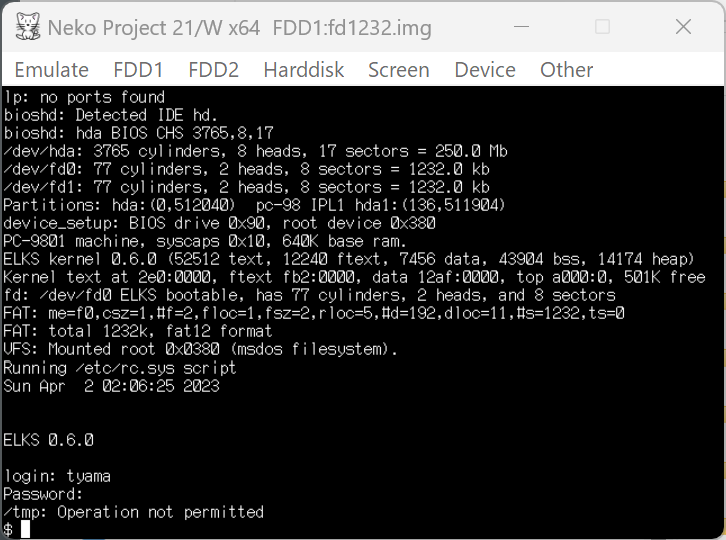
I could write /tmp with the user and the vi worked, but it says Operation not permitted when login with the user since chmod for /tmp is not allowed by the user.
Thank you.
I could write /tmp with the user and the vi worked, but it says Operation not permitted when login with the user since chmod for /tmp is not allowed by the user.
Looking at the kernel source, the directory permission for /tmp is affected by the current setting of umask 022 in /etc/profile. Perhaps change to umask 0, this should fix this issue until we think through the FAT permissions emulation in ELKS.
Thank you @ghaerr ,
I will try it later.
Another idea is that using chmod 777 tmp only when login with root since the user can get permission if it login before the root, but I don't know the profile can detect who I am.
Another idea is that using chmod 777 tmp only when login with root
Good idea, I will check if our shell has a variable for the current UID.
minixfs does not have this problem?
That's correct: MINIX fs actually stores the UID/GID and file permissions for each file, whereas FAT does not. FAT does not know a file UID nor its owner. That is what I was referring to saying "FAT permissions emulation": ELKS is emulating a UID and file permission for each file. It does so by assigning the UID based on whomever first opens it (and doesn't revert it in the file cache, a further problem). In addition, the file permissions is set to 0777 & ~umask for directories and 07555 & ~umask for regular files. The file itself does not have any permissions, they are all faked.
Perhaps change to umask 0
This should work, but should not be executed on MINIX filesystems, so adding that for your system is a hack workaround, as changing that on a MINIX disk would be incorrect.
Hello @tyama501,
You could try adding this to your /etc/profile:
if test "$USER" = "root"; then chmod 777 /tmp; fi
However, it might be simpler just to add umask 0 instead.
Thank you!
Hello @ghaerr ,
if test "$USER" = "root"; then chmod 777 /tmp; fi
This worked for both the case user login before the root and the case user login after the root. So, I think this is good solution for now.
That's correct: MINIX fs actually stores the UID/GID
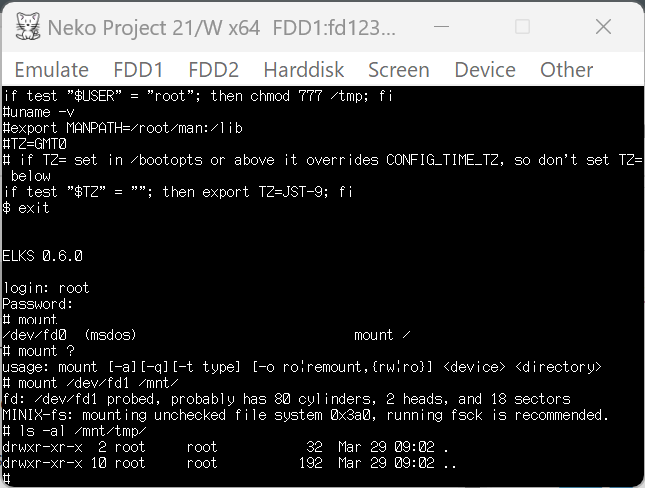
The reason why I asked this is that when I mounted IBM fd1440-minix.img and checked the permission of /mnt/tmp, there are no writable permissions for group and others. (I don't have emulators that can boot from minix disk.)
Thank you.
The reason why I asked this is that when I mounted IBM fd1440-minix.img and checked the permission of /mnt/tmp, there are no writable permissions for group and others.
It looks like /tmp is mode 07555 for MINIX filesystems, which should be changed. I'll fix that to 0777, thank you.
Closing this as discussed solutions workaround FAT filesystems which can't maintain UNIX-style file permissions.