

 ghaerr
RTC support
Hi, I've now assembled my own 80C188EB SBC that I've made following the reverse-engineering I did on the actual HDSL modem board I was running all my tests before. I need to test the ISA interface, but the SD works fine! On this SBC I've added some new "toys" that I didn't have on the modem. To being with, I've added a bq3285 RTC. I see there's no support for hardware RTC on ELKS, and that'll be really nice to have. This RTC won't behave as a PC's RTC since you have full access to the actual RTC's registers, rather than accessing them thru a buffered port.
Not sure if this is on the list of things to do, but it'll be cool.
There's also an ADC that I took out of the modem board, but I don't think it'll make sense to add it as an ELKS device. Finally, the secondary UART can be used with my board since I've added the secondary UART IRQ to one of the INT pins, so some work related to the secondary UART will come shortly as well. And I think I'm having an issue with the timers, since I can't get the "date" to increment, and one of my test apps that does a sleep(1) doesn't return of that. I'll have to dig deeper to understand what's the matter.

And I think I'm having an issue with the timers, since I can't get the "date" to increment, and one of my test apps that does a sleep(1) doesn't return of that. I'll have to dig deeper to understand what's the matter.
I've figured this out. The 80188EB user's manual stated this but it wasn't too clear about it:
The timer input pins affect timer counting in three ways (see Table 9-2). The programming of the External (EXT) and Retrigger (RTG) bits in the Timer Control register determines how the input signals are used. When the timers are clocked internally, the RTG bit determines whether the input pin enables timer counting or retriggers the current timing cycle.
In this case I wanted to have a continuous (i.e. keeping the timer enabled) timer 1 (timer 2 is not affected by this), so it means that the T1IN pin needs to be high in order for it to work. So this must have been why Timer0 didn't work back when we started the port, its T0IN pin must have been held low, thus not enabling it. I've pulled it high and I have the timer working back again!
Thank you, Santiago - To those of us so inclined your detailed reports are very interesting. It's almost like we can smell the smoke from the hot soldering iron and see the signals on the logic analyzer.
Looking forward to the next episodes. :-)
-M
- mai 2022 kl. 04:09 skrev Santiago Hormazabal @.***>:
And I think I'm having an issue with the timers, since I can't get the "date" to increment, and one of my test apps that does a sleep(1) doesn't return of that. I'll have to dig deeper to understand what's the matter.
I've figured this out. The 80188EB user's manual stated this but it wasn't too clear about it:
The timer input pins affect timer counting in three ways (see Table 9-2). The programming of the External (EXT) and Retrigger (RTG) bits in the Timer Control register determines how the input signals are used. When the timers are clocked internally, the RTG bit determines whether the input pin enables timer counting or retriggers the current timing cycle. In this case I wanted to have a continuous (i.e. keeping the timer enabled) timer 1 (timer 2 is not affected by this), so it means that the T1IN pin needs to be high in order for it to work. So this must have been why Timer0 didn't work back when we started the port, its T0IN pin must have been held low, thus not enabling it. I've pulled it high and I have the timer working back again!
— Reply to this email directly, view it on GitHub, or unsubscribe. You are receiving this because you are subscribed to this thread.

so it means that the T1IN pin needs to be high in order for it to work. So this must have been why Timer0 didn't work back when we started the port, its T0IN pin must have been held low, thus not enabling it.
That's good to know! I was wondering whether there might be something like this that caused the original problem, since it seemed strange that Timer 0 just wouldn't work on a well-known CPU. I'm glad you've now figured it out :)
Are you thinking of sending an update that uses Timer 0 as the base 8081x timer, and freeing up Timer 1 for other uses?

Are you thinking of sending an update that uses Timer 0 as the base 8081x timer, and freeing up Timer 1 for other uses?
No, let's keep the T1. No need to switch it.
And regarding the RTC, what's your opinion?
And regarding the RTC, what's your opinion?
Whoops, missed that, somehow didn't see the whole first comment of this issue.
Are you talking about adding a kernel RTC support for hardware real time information? That would be cool, if you have uses for it. This could be implemented as a character device, then use ioctl to access it, as Linux does. Can you explain your use case a bit more?
If you're talking about RTC for system timekeeping, then I have some other comments about how to get that done, as ELKS system time keeping is a bit of a mess, and handled by get/settimeofday and a user application clock.c.
Also looking forward to second UART support!
Are you talking about adding a kernel RTC support for hardware real time information? That would be cool, if you have uses for it. This could be implemented as a character device, then use
ioctlto access it, as Linux does. Can you explain your use case a bit more?
Yes, exactly this. Since my SBC (and most IBM PCs) have it, ELKS could benefit from fetching the date and time from it, and maybe using an app, we could also store ELKS' date time on it.
What do you think?
What do you think?
As far as interfacing with your RTC, why not? :)
It seems the main purpose would be for setting/getting date and time, rather than hardware real time timing. Does the chip maintain the date/time using a battery, and is this the same way the BIOS gets its date/time?
ELKS could benefit from fetching the date and time from it, and maybe using an app
We already have clock, which is used in the startup scripts, are you thinking of using another app to read/write the RTC? I would suggest, (unfortunately in a way, as clock.c is a bit of a mess) that we use the same command, possibly with a new option, to read/write the RTC. Actually, clock.c already supports reading an RTC, I haven't looked to see if that's compatible with what you're talking about or not. Your program, or clock.c, could communicate with a character device in the kernel, or could talk directly with the RTC.
However, ELKS is a bit of a mess when it comes to timekeeping. The kernel doesn't do any actual interfacing with hardware or software (BIOS) RTC, leaving that entirely to a user-mode application, clock.c. The kernel supports a simple get/settimeofday system call, but there's problems with setting the time (see elks/kernel/time.c), and I've worked around it rather than tried to rewrite it because of the complexity of getting timekeeping correct. As well, clock.c is a mess, it is apparently an ancient program, not well written, then hacked for ELKS BIOS RTC support, and we've also got PC-98 RTC support ifdef'd in there as well.
If on the other hand, you're thinking that the kernel should automatically get the system time, an easy way would be to add a routine that gets called from elks/init/main.c just before starting the init process. That routine would then effectively set the xtime_jiffies global as well as the possibly the kluged xtime timeval struct, like the sys_settimeofday() routine does.
If you're thinking of adding an RTC character device, that could work also, it could be read by a rewritten clock program and then have that set the kernel system time in the same manner it does now.
Whichever way we go, we have to continue to support PC-98 clock (in clock.c), and the get/settimeofday system calls, so that PC-98 and non-compatible IBM PC's still work. There is also the problem of UTC vs local time, which are sometimes different between physical hardware and QEMU. We need to be very careful about changing the way that clock works (unless we use a new or unused option) as it now works on all (but your) architectures including QEMU and also handles UTC vs local time which is sometimes different on QEMU vs real hardware.
Since my SBC (and most IBM PCs) have it
Cool - I wasn't aware there was a standard IBM PC RTC chip/interface. Will there be issues with going around the BIOS when talking directly with the RTC controller?
Sorry for the long post - the timekeeping in ELKS is kind of complicated!
For localtime vs UTC problem, dos saves files to FAT filesystem with localtime timestamps while ELKS saves with UTC timestamps. So if we save files with dos and see it on ELKS the timestamp is different even we set timezone correctly. If we save on ELKS and see it on dos it is also different. So I am now using ELKS as localtime equal to GTC assuming I am in England. This can read/write same time with dos FAT. (My RTC is localtime)

Hello @tyama501,
Thank you for the FAT bug report, I didn't realize FAT uses localtime on disk! Apart from that, I had thought we had worked out the ability to run localtime on the RTC, can that be made to work properly, other than FAT, e.g. date command etc?
Writing FAT using localtime should be a relatively easy fix, since we have the TZ= variable. In this case, the kernel would need to read it, which means it likely would have to be set in /bootopts, and its value saved during initialization. (PC-98 does not yet support /bootopts, but I created a stub for the single sector read function required to make this work in setup.S).
Thank you!
Thank you for the reply @ghaerr ,
Yes, the localtime in RTC works well other than FAT problem. If this is solved I can say I am living in Japan :)
Here is the document says FAT uses localtime.
https://docs.microsoft.com/en-us/windows/win32/sysinfo/file-times
Thank you.
Yes, the localtime in RTC works well other than FAT problem.
Are you using the ELKS TZ= environment variable to properly convert from/to UTC and localtime? There is a commented-out TZ string in /etc/profile, are you using that? Does your PC-98 clock.c program use that variable to read the RTC and then convert to UTC (or can it, since I understand you are forced into using UTC for the time being)?
The way we could make this work would be that the TZ= string is set in either /bootopts or /etc/profile, then used by clock when run from /etc/rc.sys to set the date/time in UTC using the settimeofday system call. Various functions which running in user mode then convert back to localtime using the libc functions, which read the TZ variable from the shell environment.
If the above could work now, then we could fix the FAT filesystem to use the localtime/UTC offset specified by the TZ variable to properly write file dates in localtime. We would do this with two changes, first the FAT filesystem driver fix, secondly, we will have to have the kernel read /bootopts and save the TZ offset internally (thus preventing changing TZ= without rebooting). The IBM PC already reads /bootopts, and I can help you to get /bootopts working on PC-98.
Does this sound like it will work for you?
〉Are you using the ELKS TZ= environment variable to properly convert from/to UTC and localtime? There is a commented-out TZ string in /etc/profile, are you using that? Does your PC-98 clock.c program use that variable to read the RTC and then convert to UTC (or can it, since I understand you are forced into using UTC for the time being)?
For now, actually I am not using TZ since etc/rc.sys has clock -s -u in default and I didn't want to set TZ everytime I build another image. (That means localtime = UTC)
But I have set TZ in profile as JST-9 before and it is working well with date, clock -w, clock -s without -u.
〉Does this sound like it will work for you?
I think so.
But I have set TZ in profile as JST-9 before and it is working well with date, clock -w, clock -s without -u.
Ok, I will produce a PR that allows you to (initially) compile in a fixed timezone (TZ=JST-9) specified in config for PC-98, and also include offset in FAT filesystem driver. This should allow you to test before /bootopts code working setting RTC to localtime and having FAT filesystem dates written in localtime, all working correctly, provided fixed timezone compiled in.
After that is proved working, we can work to getting /bootopts working, as well as possibly leave in option for compiled-in timezone so that TZ does not necessarily have to be set for testing.
Then, when @cocus adds hardware RTC support for 8081x, localtime vs UTC can be selected by similar use of the clock (or other application) -u parameter and TZ= string or kernel config timezone for proper operation. The kernel timezone config capability will be important for 8018x embedded operations since there will never be a /bootopts file.
Cool - I wasn't aware there was a standard IBM PC RTC chip/interface. Will there be issues with going around the BIOS when talking directly with the RTC controller?
Yes and no. As far as I can tell, the BIOS/CMOS way of accessing the RTC registers is by doing a simple out(fixed address, register number), then reading or writing to that fixed address will be routed to the RTC directly. In my SBC, you don't need to go thru all of that, you can just read or write directly to a port and you'll be talking to the RTC. IBM's implementation used an RTC which became almost industry standard, so the one I've used is no exception.
As a side note, I've disoldered the old ISA slot from the addon board I had on the modem and soldered it on my SBC, and after some minor tweaks, I've got it working. ISA slot isn't as reliable as it should be, but it works with the ne2k card!
As far as I can tell, the BIOS/CMOS way of accessing the RTC registers is by doing a simple out(fixed address, register number), then reading or writing to that fixed address will be routed to the RTC directly.
Ok, I get it now. I haven't looked in a while, but I'm pretty sure this is just the way that the current elkscmd/sys_utils/clock.c works - by reading and writing the CMOS RTC registers in BCD using IN and OUT instructions. I didn't realize that the RTC is essentially connected behind the CMOS register(s), keeping the time.
If the IBM implementation of this is industry standard, then I'll bet that clock.c is already doing close to what you need - perhaps you should take a quick look at it. As I mentioned, it's an old program, and now its got both IBM and PC-98 RTC support within it, along with the UTC/localtime conversions etc. Perhaps if your RTC is not too much different then clock.c can be split into platform-independent and dependent parts.
I've got it working. ISA slot isn't as reliable as it should be, but it works with the ne2k card!
Pretty cool! So is the ELKS network stack now running on your ROM/flash based system?
Hello @ghaerr ,
As I wrote on https://github.com/jbruchon/elks/pull/1274#issuecomment-1117580390, I have noticed an issue for "date" command.
When I tried to set date with TZ=JST-9, I couldn't set proper time.
The time is set with +9.
I assume this is because date command set UTC instead of local time.
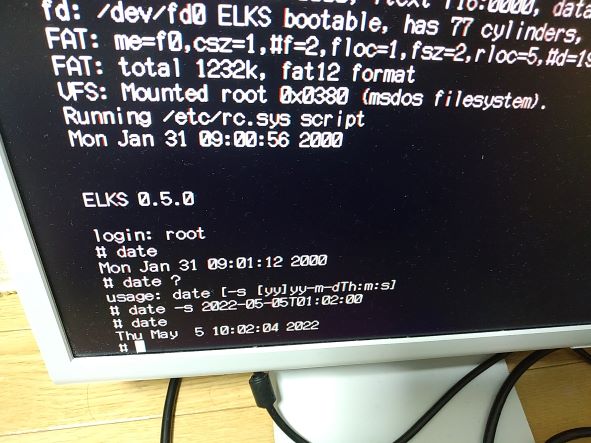
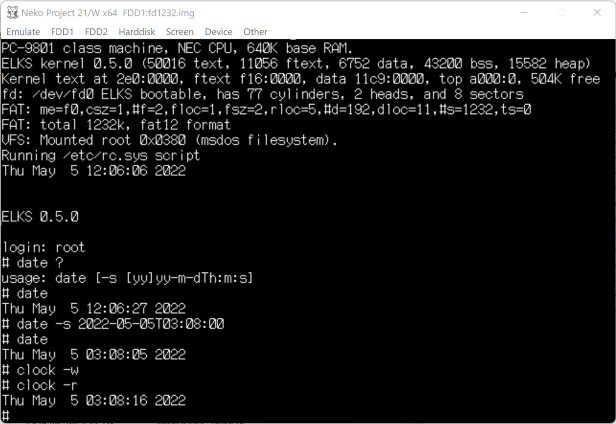
After I export TZ=0 then I could set proper time and write it to RTC with clock -w command.
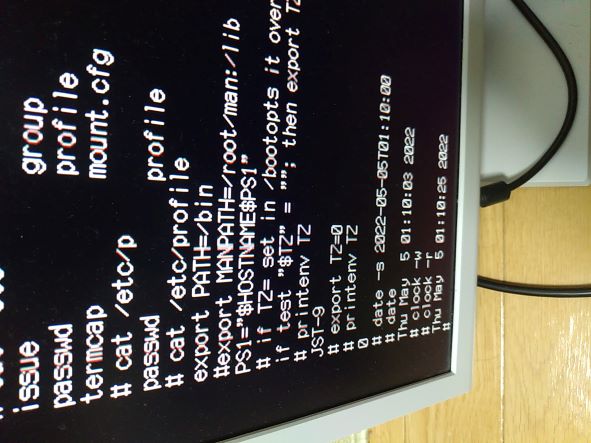
I think expecting UTC time to set is not user-friendly...
Hello @tyama501,
I think expecting UTC time to set is not user-friendly...
Agreed. Looking at elkscmd/sh_utils/date.c, the date is not corrected for localtime in utc_mktime() function. Can you try adding the following code directly at the end of that function:
 /* convert to seconds */
    ret *= 60L;
   ret += t->tm_sec;
// <--- add these two lines below
  tzset();
  ret += timezone;   /* correct for localtime */

  /* return the result */
   return ret;
}
If this works, I will prepare a cleanup PR for it.
Thank you!
If the IBM implementation of this is industry standard, then I'll bet that clock.c is already doing close to what you need - perhaps you should take a quick look at it. As I mentioned, it's an old program, and now its got both IBM and PC-98 RTC support within it, along with the UTC/localtime conversions etc. Perhaps if your RTC is not too much different then clock.c can be split into platform-independent and dependent parts.
I'll have a look at it, but sounds like it should.
Pretty cool! So is the ELKS network stack now running on your ROM/flash based system?
Yeah, we're back on track as I were with the hacked modem!
I've modified the clock.c so it talks directly to the rtc. In theory it should work, but for some reason it's not working. It's not the code's fault, I think I'm not setting something correctly. Also, the 32kHz crystal doesn't always start, which is kind of strange. It's not the RST line of the chip, it might be the supply rail of the chip. Not sure. But when the crystal runs, the rtc advances its own time. Writing to it doesn't update its value, even if it's locking the values properly while updating. I'm quite puzzled, but I'm still debugging it. In the meantime, I've added the INP and OUT keywords/tokens to basic, which aren't part of the Sinclair spec, but rather more like QBasic did. I'll open a PR for these later.
@ghaerr , Opening message for the basic still says Sinclair Basic, aren't we going to change it to ELKS Basic?
In the meantime, I've added the INP and OUT keywords/tokens to basic, which aren't part of the Sinclair spec, but rather more like QBasic did. I'll open a PR for these later.
Sounds good. Are you going to debug the RTC with BASIC? :)
Actually the INP(port) and OUT port, value are documented in basic/README.md as not yet implemented, and part of Sinclair basic.
Opening message for the basic still says Sinclair Basic, aren't we going to change it to ELKS Basic?
Yes, we should. @cocus, can you make that change when you submit your IN/OUT PR?
Yes, we should. @cocus, can you make that change when you submit your IN/OUT PR?
Sure. "ELKS Basic" sounds good?
Also, the 32kHz crystal doesn't always start, which is kind of strange. It's not the RST line of the chip, it might be the supply rail of the chip. Not sure. But when the crystal runs, the rtc advances its own time. Writing to it doesn't update its value, even if it's locking the values properly while updating.
Is the RTC internal to the 8018x? Wondering whether this is SW or HW issue...
Is the RTC internal to the 8018x? Wondering whether this is SW or HW issue...
Nope, it's an external chip (bq3285) that I've got on a free sample batch from TI like 15 years ago. So it could be a mixture of HW and SW. I need to review some other projects that do directly talk to a similar RTC to cross check if I'm doing it okay or not.
debug with BASIC
(I would like to have PEEK/POKE command to debug codes from background/other screen.)
I would like to have PEEK/POKE command to debug codes from background/other screen.
What sort of things would you debug? I assume you'd want to use the proposed extension in README.md that would also pass a segment value so that you could peek/poke anywhere in main memory?
On another note, I've started a separate project 86sim which includes a single-file 8086 disassembler. This would be small enough to fit into an ELKS cmd (hd perhaps, or a new disasm?) that could be passed a segment:offset and it would display disassembled code, which I think would be useful. I have been thinking about where to put it in ELKS.
The project also includes an 8086 simulator, but its memory requirements are too large to run on ELKS.
This would be small enough to fit into an ELKS cmd (hd perhaps, or a new disasm?) that could be passed a segment:offset and it would display disassembled code, which I think would be useful.
Wow!! That's great!
I assume you'd want to use the proposed extension in README.md that would also pass a segment value so that you could peek/poke anywhere in main memory?
Yes, I sometime wanted to see the memory value like interrupt vector from background.