
angular2-highcharts

angular2-highcharts copied to clipboard
 gevgeny
how to change the chart title
I am using angular 4 in my case and have following html
  <chart type="StockChart" [options]="options" >
    <series  (mouseOver)="onSeriesMouseOver($event)"></series>
  </chart>
and in chart.component.ts
import { Component } from '@angular/core';

@Component({
	selector: 'lineChart',
	templateUrl: './lineChart.component.html'
})
export class LineChartComponent {
	private config: any;
	private title: string;
	private series: Object;
	private options: any;
	private highStockComponent: any;

	constructor() {
		this.title = "simple chart";

        this.options = {
            title : { text : this.title },
            series: [{
                data: [29.9, 71.5, 106.4, 129.2,124],
            }]
        };
		this.highStockComponent = this;
    }

	onSeriesMouseOver(e){
	}
	changeTitle(){
		this.title = "changed simple chart";
		this.highStockComponent.chart.redraw;
	}
}
on the click of button, I want to change the chart title. What mistake I am making as it is giving me following error. when I click the button.
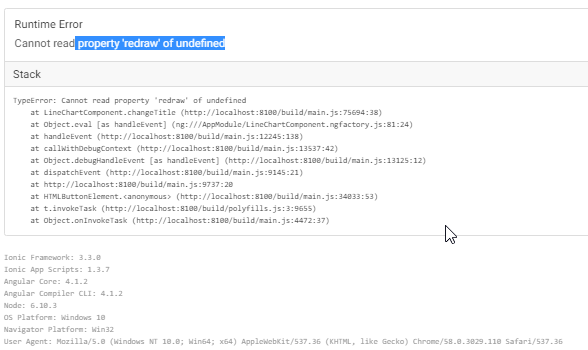
Similarly I want to update chart if any of series data gets updated.
Anxiously waiting for the reply.

@qasimraza1979 you need to call update(options: ChartOptions, redraw?: boolean) method of the chartObject following this instead of the chart.redraw.
