

 getsentry
"Copy" Button for Exception Text in the stack trace
Problem Statement
I think it would be nice to have a "Copy" Button for Exception Text in the stack trace area.
Sometimes I just want to copy paste the text of the exception for pasting it in a email or somewhere else. Because of all this restrictions in the browser copy paste became impossible.
Solution Brainstorm
simply put at the end of the like a "copy" button that loads the text of the exception in the Clipboard.
Product Area
Issues

![getsantry[bot] avatar](https://avatars.githubusercontent.com/in/66573?v=4 "Published by a pub.dev verified publisher")
@ecxod thanks for the feature request!
To copy the stack trace text, one way to do that would be to toggle "raw stack trace" in the three dot menu to the right:
Does this solve your issue, or would a copy button on the formatted stack trace still be useful?

@ecxod thanks for the feature request!
To copy the stack trace text, one way to do that would be to toggle "raw stack trace" in the three dot menu to the right:
Does this solve your issue, or would a copy button on the formatted stack trace still be useful?
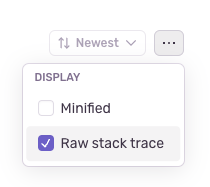
Not OP, but I would find a copy button very useful, to avoid having to switch to the raw stack trace, selecting the text manually, and then copying. This multi-step process could be replaced with a single click one with the help of a dedicated button ❤️

Especially since the dropdown menu was introduced, which added another step, it's become more of a hassle. Making the UI remember the raw setting could also be helpful, though a simple copy button as OP suggested is the most likely best approach as it removes basically every hurdle

A version of this request has come up before: https://github.com/getsentry/sentry/issues/56992#issuecomment-1738246087. It's definitely something we would consider doing. Both that ticket and this one are now in our backlog for consideration, and we'll update here once there's any news to share.

Hi, Wave is very interested in this - has there been any progress on it?

Hi, @jjanczyszyn - we haven't made any progress on this yet, but it is in our backlog. We will update here when we have any news to share!


Hey all, going to pick this up since it seems like this feature is in high demand.
@ecxod @fokkoru @jjanczyszyn @eduardb @Plancke
Let me first clarify what exactly y'all are looking to be easily copy-able
Are you referring to the top level exception text (# 1), the code in the stack trace (# 2), or the entire raw stack trace that @malwilley referred to previously?

Hi @MichaelSun48, that's great news!
I'm personally interested in copying the entire raw stack trace, as then I can paste it in IntelliJ for further analysis. Cheers!
@eduardb - we have a Command + Option + C keyboard shortcut that copies the event details in Markdown, specifically formatted for LLMs. (we'll be adding a UI entrypoint soon). Does that help with your use case?

@eduardb - we have a Command + Option + C keyboard shortcut that copies the event details in Markdown, specifically formatted for LLMs. (we'll be adding a UI entrypoint soon). Does that help with your use case?
@rachrwang No, not at all. My use-case is pasting it into IntelliJ IDEA, but what gets copied with this shortcut is not something that the IDE can interpret, I just tested.
@eduardb is the raw stacktrace something you can paste into intellij idea? I know some stacktraces with threads might still not be formatted correctly for that.

@eduardb is the raw stacktrace something you can paste into intellij idea? I know some stacktraces with threads might still not be formatted correctly for that.
@scttcper Yes. It works pretty much all the time for me when I manually copy paste it, at least for my use-cases (Android and Python).
The tool I am talking about is called "Analyze Stack Trace or Thread Dump", it's in the menu under "Code", or you can Cmd+Shift+A for it.