

 getsentry
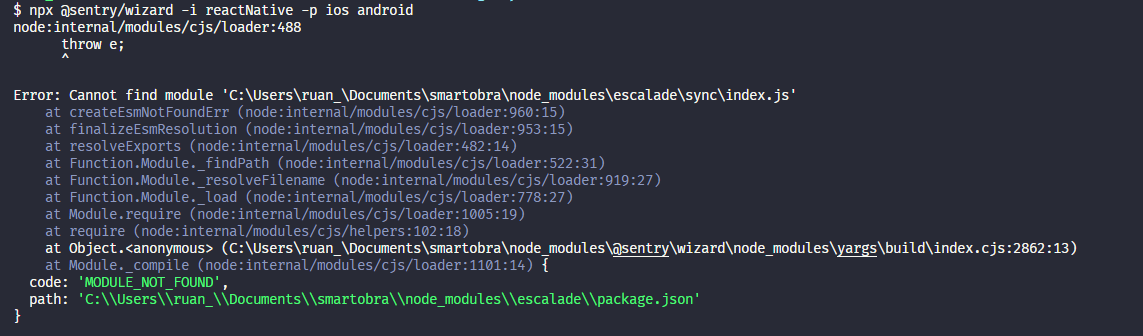
Error when running the @sentry/wizard script
I am trying to set up sentry in my react native project. But when I try to execute the script "npx @sentry/wizard -i reactNative -p ios android" this error occurs
Environment
Node v16.13.0
React native "react-native": "0.63.4",
Sentry "@sentry/react-native": "^3.4.2",
Steps to Reproduce
- Execute the command
Actual Result


@ruanblima Can you give the full stacktrace of the error, please? It's hard to say why it's not finding a module without knowing what module it is and what code is trying to load that module.

This issue has gone three weeks without activity. In another week, I will close it.
But! If you comment or otherwise update it, I will reset the clock, and if you label it Status: Backlog or Status: In Progress, I will leave it alone ... forever!
"A weed is but an unloved flower." ― Ella Wheeler Wilcox 🥀
![github-actions[bot] avatar](https://avatars.githubusercontent.com/in/15368?v=4 "Published by a pub.dev verified publisher")
@marandaneto - Do you have theories here? Is escalade something we use?
@lobsterkatie no idea, but apparently escalade is a dependency of yargs.
@ruanblima have you tried using a more recent version of node?
have you tried to clean the node_modules and install it again?
it does not seem related to Sentry itself.

This issue has gone three weeks without activity. In another week, I will close it.
But! If you comment or otherwise update it, I will reset the clock, and if you label it Status: Backlog or Status: In Progress, I will leave it alone ... forever!
"A weed is but an unloved flower." ― Ella Wheeler Wilcox 🥀
Closing the issue as a part of large repository cleanup, due to it being inactive and/or outdated. Please do not hesitate to ping me if it is still relevant, and I will happily reopen and work on it. Cheers!
I have a mono repo project for React Native. When I run wizard, I shown error:
Sentry Wizard failed with:
Command failed: yarn add @sentry/react-native
error Running this command will add the dependency to the workspace root rather than
the workspace itself, which might not be what you want - if you really meant it,
make it explicit by running this command again with the -W flag (or --ignore-workspace-root-check).


Protip: Add --debug to see whats going on
OR use --help to see your options
I tried again with a few commands to ignore the workspace
npx @sentry/wizard -s -i reactNative -W
npx @sentry/wizard -s -i reactNative -- -W
But it's not work How can I do that?
Thanks
