
grav-plugin-admin
 grav-plugin-admin copied to clipboard
 getgrav
Selectize field drops custom values after saving/refreshing input
Using the selectize field, when entering custom values these get dropped in refreshed input field. The number of dropped custom values depend on their position and the number of selected predefined options.
The page itself always contains the right value in the header.
To reproduce:
-
Fresh installation Grav v1.6.26 Core + Admin (same happens with Grav v1.7.0.rc14 Core + Admin)
-
In theme Quark, add the following to '/user/themes/quark/blueprints/default.yaml' as sibling to field
header.body_classes:header.selectize: type: selectize label: Selectize selectize: options: - text: "optionA" value: "optionA" - text: "optionB" value: "optionB" - text: "optionC" value: "optionC" validate: type: commalist -
Browse to '.../admin/pages/typography'. Form will look like:

-
When selecting predefined options and adding custom values, the following happens:
Input field Input field after saveing 1,2,3,4,5,6 -> 4,5,6 optionA, 1,2,3,4,5,6 -> optionA, 3,4,5,6 optionA, optionB, 1,2,3,4,5,6 -> optionA, optionB, 2,3,4,5,6 optionA, optionB, optionC, 1,2,3,4,5,6 -> optionA, optionB, optionC, 1,2,3,4,5,6 Note: Dropped custom values =
count(options) - count(options selected)Input field Input field after saving 1,2,3,4,5,6,optionA, 7,8,9,0 -> 4,5,6,optionA,7,8,9,0 1,2,3,4,5,6,optionA, optionB, 7,8,9,0 -> 4,5,6,optionA, optionB,7,8,9,0 1,2,3,4,5,6,optionA, optionB, optionC, 7,8,9,0 -> 4,5,6,optionA, optionB, optionC,7,8,9,0 Note: Dropped custom values =
count(options)
Notes:
- The values in the header of the Markdown page are always correct.
- The values shown in 'Page Source' view are always correct.
Eg. for input
1,2,3,4,5,6,optionA, optionB, 7,8,9,0, the HTML is:<input name="data[header][selectize]" value="1,2,3,4,5,6,optionA,optionB,7,8,9,0" type="text" /> - The issue seems to be caused by script
/user/plugins/admin/themes/grav/js/admin.min.jswhen it creates the divs to emulate theselectizefield.

This is by design. The field stores the selected options and anything that is not part of options definition from the blueprint. Once saved these are now part of the value of the field and can be shown again in the dropdown list. However if you clear those out, there is no knowledge for the field to be able to display anything that is not available from the options list.
What you are looking for is to create your own options class, you can do so by using data-options@ and creating your own class definition (example).
With your class you can then have logic in place so that you constantly store any new added option and when it's time to display the options list, you have the full list constantly available.

@w00fz , I cannot imagine this is by design. Maybe I haven't explained the issue properly. I'll try again using different wordings.
TLDR:
- When adding values which are not predefined in the fields options list, values get dropped in UI after every save.
- The number of dropped values depends on the position of the extra values (prefix or postfix).
To reproduce:
- Fresh installation Grav v1.7.0-rc.17 Core + Admin
- In theme Quark, add the following to '/user/themes/quark/blueprints/default.yaml' as sibling to field header.body_classes:
header.selectize: type: selectize label: Selectize selectize: options: - text: "optionA" value: "optionA" - text: "optionB" value: "optionB" - text: "optionC" value: "optionC" validate: type: commalist - Browse to '.../admin/pages/typography'. Form will look like:
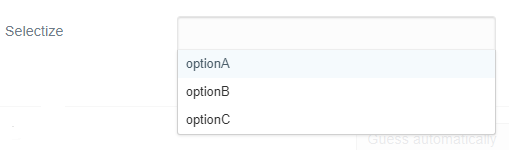
No predefined options selected
- Enter data:

- Save page
- After saving, Admin page now looks like:

- After saving, Admin page now looks like:
- Save page:
- After saving, Admin page now looks like:

- After saving, Admin page now looks like:
- Save page:
- After saving, Admin page now looks like:

- After saving, Admin page now looks like:
Note:
- At every save, 3 numbers are dropped from the beginning of the list in the Admin UI.
- The frontmatter of the page always contains the value that was shown in Admin on saving.
Select 1 predefined options:
-
Enter data:

-
Save page
- After saving, Admin page now looks like:

- After saving, Admin page now looks like:
-
Save page
- After saving, Admin page now looks like:

- After saving, Admin page now looks like:
-
Etcetera
Note:
- At every save, 2 numbers are dropped from the beginning of the list in the Admin UI.
- The frontmatter of the page always contains the value that was shown in Admin on saving.
Select 2 predefined options:
- Enter data:
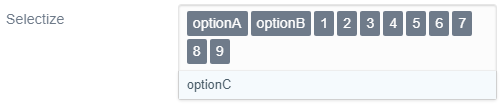
- Save page
- After saving, Admin page now looks like:

- After saving, Admin page now looks like:
- Save page (without any changes)
- Etcetera
Note:
- At every save, 1 value dropped from the numeric list
Select 3 predefined options:
- Enter data:

- Save page
- After saving, Admin page now looks like:

- After saving, Admin page now looks like:
Notes:
- When selecting 1 predefined options, 2 ( 3-1) numeric values get dropped in UI after every save
- When selecting 2 predefined options, 1 ( 3-2) numeric values get dropped in UI after every save
- When selecting 3 predefined options, 0 ( 3-3) numeric values get dropped in UI after every save
Ok I apologize, I did not understand your initial issue. Makes sense what you meant now and it is definitely not supposed to happen like that.
I will investigate this again.
Did you only try the latest testing release admin or did you also try the current develop version?
By the way, thank you also for your time and the effort put into explaining this so thoroughly again. I appreciate it.
Admin v1.10.0-rc.18 shows same results.
Below are some findings copied from the initial issue: First the endnotes, then the test results with different ordering of predefined options and extra values.
Endnotes:
- The values in the header of the Markdown page are always correct.
- The values shown in generated HTML are always correct.
Eg. for input
1,2,3,4,5,6,optionA, optionB, 7,8,9,0, the HTML is:<input name="data[header][selectize]" value="1,2,3,4,5,6,optionA,optionB,7,8,9,0" type="text" /> - The issue seems to be caused by script
/user/plugins/admin/themes/grav/js/admin.min.jswhen it creates the divs to emulate theselectizefield.
Test results:
-
When selecting predefined options and adding custom values, the following happens:
Input field Input field after saveing 1,2,3,4,5,6 -> 4,5,6 optionA, 1,2,3,4,5,6 -> optionA, 3,4,5,6 optionA, optionB, 1,2,3,4,5,6 -> optionA, optionB, 2,3,4,5,6 optionA, optionB, optionC, 1,2,3,4,5,6 -> optionA, optionB, optionC, 1,2,3,4,5,6 Note: Dropped custom values =
count(options) - count(options selected)Input field Input field after saving 1,2,3,4,5,6,optionA, 7,8,9,0 -> 4,5,6,optionA,7,8,9,0 1,2,3,4,5,6,optionA, optionB, 7,8,9,0 -> 4,5,6,optionA, optionB,7,8,9,0 1,2,3,4,5,6,optionA, optionB, optionC, 7,8,9,0 -> 4,5,6,optionA, optionB, optionC,7,8,9,0 Note: Dropped custom values =
count(options)
After further testing and investigation I can say the problem comes down to the way Selectize uses jQuery's $.extend to do a deep merge of the user and system settings and how $.extend of arrays is a merge at the index level rather than an append.
This means that because your stored value is:
['1', '2', '3', '4', '5', '6', 'optionA', 'optionB', 'optionC', '7', '8', '9', '0']
And the default options you provide are:
[{ text: 'optionA', value: 'optionA' }, { text: 'optionB', value: 'optionB' }, { text: 'optionC', value: 'optionC' }]
When Selectize gets initialize, it does a merge and replaces the first 3 indexes of your value with the options available, leaving to what you see as:
['4', '5', '6', 'optionA', 'optionB', 'optionC', '7', '8', '9', '0']
This is clearly a problem and I have tried to get around it without success. Fortunately though, I have found a way to get around it by using the select version of selectize, in multiple mode.
If you change your blueprint like below it should start working as expected:
header.selectize:
  type: select
  label: Selectize
  multiple: true
  array: true
  selectize:
    create: true
  options:
    - optionA
    - optionB
    - optionC
Using the 'select' fieldtype seems to be a solution, but...
- When saving, the order of the values has changed. Depending on the use of the values, this may cause downstream issues.
- While editing, the dropdown doesn't show the extra options which were deleted from the saved value, or deleted from newly entered values.
- It doesn't address the issue with existing 'selectize' fields.
I've been playing around with some JavaScript and have come up with a bit of logic, which might keep the 'selectize' field definition as is and solve the dropped values. See stackblitz (please open console in right-hand panel)
I've created two functions:
/**
 * Create new combined array of unique values from pre-defined options and extra values entered by user.
 * Only new values will be added, nothing removed.
 */
function newCombined(combined, newInput) {
  return [...new Set([...combined, ...newInput])];
}

/**
 * Create new dropdown by removing values entered in input field from all combined values
 */
function newDropdown(combined, newInput) {
  return combined.filter(option => !newInput.includes(option));
}
Tests:
// Options of 'selectize'
const options = ["optionA", "optionB", "optionC"];

// Previously saved values
const savedInput = ["1", "2", "optionA", "3", "4"];

let combined = newCombined(options, savedInput);

// After every change of input new combined values and new dropdown values are created
combined = newCombined(combined, newInput);
dropdown = newDropdown(combined, newInput);

// Result:

Empty input: []
Dropdown: ["optionA", "optionB", "optionC", "1", "2", "3", "4"]

Input same as saved value: ["1", "2", "optionA", "3", "4"]
Dropdown: ["optionB", "optionC"]

Add 'new': ["1", "2", "optionA", "3", "4", "new"]
Dropdown: ["optionB", "optionC"]

Remove 'new': ["1", "2", "optionA", "3", "4"]
Dropdown: ["optionB", "optionC", "new"]

Add 'optionC': ["1", "2", "optionA", "3", "4", "optionC"]
Dropdown: ["optionB", "new"]

Empty input: []
Dropdown: ["optionA", "optionB", "optionC", "1", "2", "3", "4", "new"]
Still hitting this issue now. Is there any possible solution to this? Or not really due to the jquery limitation?
@pamtbaau is there a way I can implement your functions?
