

 getcursor
The SUID sandbox helper binary was found, but is not configured correctly (Ubuntu 24.04)
When I tried to run the AppImage on my Ubuntu 24.04 machine it throws this error
[1299004:0825/180107.141125:FATAL:setuid_sandbox_host.cc(158)] The SUID sandbox helper binary was found, but is not configured correctly. Rather than run without sandboxing I'm aborting now. You need to make sure that /tmp/.mount_cursorQRdVpG/chrome-sandbox is owned by root and has mode 4755.
Trace/breakpoint trap (core dumped)
I tried a solution from stack overflow although it worked by adding --no-sandbox.

You can also use:
sysctl -w kernel.apparmor_restrict_unprivileged_userns=0

Not very reassuring if the first thing one sees is a fatal error like that without any useful explanation. All my other editors so far managed to not show such an error.

I don't like the workarounds disabling security features. Will this be fixed?

Same here and there is no really good feedback/interaction with developers, despite they use opensource code.

Any idea when this'll be fixed?
Kinda makes cursor unusable for most Ubuntu 24.04 users :shrug:

This worked for me,
./cursor-0.41.2x86_64.AppImage --appimage-extract
sudo chown root:root squashfs-root/chrome-sandbox
sudo chmod 4755 squashfs-root/chrome-sandbox
./squashfs-root/AppRun
I would not recommend to general set this:
sysctl -w kernel.apparmor_restrict_unprivileged_userns=0

@martinkrung I've also implemented the same solution from Claude. Thanks.

I'm still getting the SQLite errors even when using the --no-sandbox flag on fedora 40. I have the business plan so this needs to be fixed ASAP.

AppImage installation package, permission solution for Ubuntu 24.04
Ubuntu 24.04 restricts the use of non-privileged user namespaces. This affects all non-privileged programs on the system. An AppArmor configuration file must be written. You can install the AppImage tool written in Go by the inventor of the AppImage format.
mkdir -p /opt/appimages
url_path=`wget -q https://github.com/probonopd/go-appimage/releases/expanded_assets/continuous -O - | grep "appimaged-.*-x86_64.AppImage" | head -n 1 | cut -d '"' -f 2`
wget -c https://github.com/$url_path -P /opt/appimages/
chmod +x /opt/appimages/appimaged-851-x86_64.AppImage
/opt/appimages/appimaged-851-x86_64.AppImage
systemctl -l --no-pager --user status appimaged
After this, you just need to place the AppImage files in /usr/local/bin/ for automatic installation.

I use i3 (no desktop environment) and was not sure what to do after "installing" with the instructions above. Looking into it, the installation generates a .desktop file. It can be used manually with dex. On my system it looks like:
dex ~/.local/share/applications/appimagekit_4c4773f7793fefb107005d1970643fd6.desktop
In terms of security, this may be equivalent to just directly calling with --no-sandbox. The generated .desktop file has this line:
Exec=/opt/appimages/appimaged-860-x86_64.AppImage wrap "/usr/local/bin/cursor.AppImage" --no-sandbox %U

I created a script that solves most of the common issues Linux users face with the Cursor .AppImage application, making everything easier!
No more visiting the website to look for new versions or manually repeating tasks every time you want to update—this script handles all .AppImage-related updates and configurations for you.
See Cursor Setup Wizard in action below and see how it streamlines the entire process:
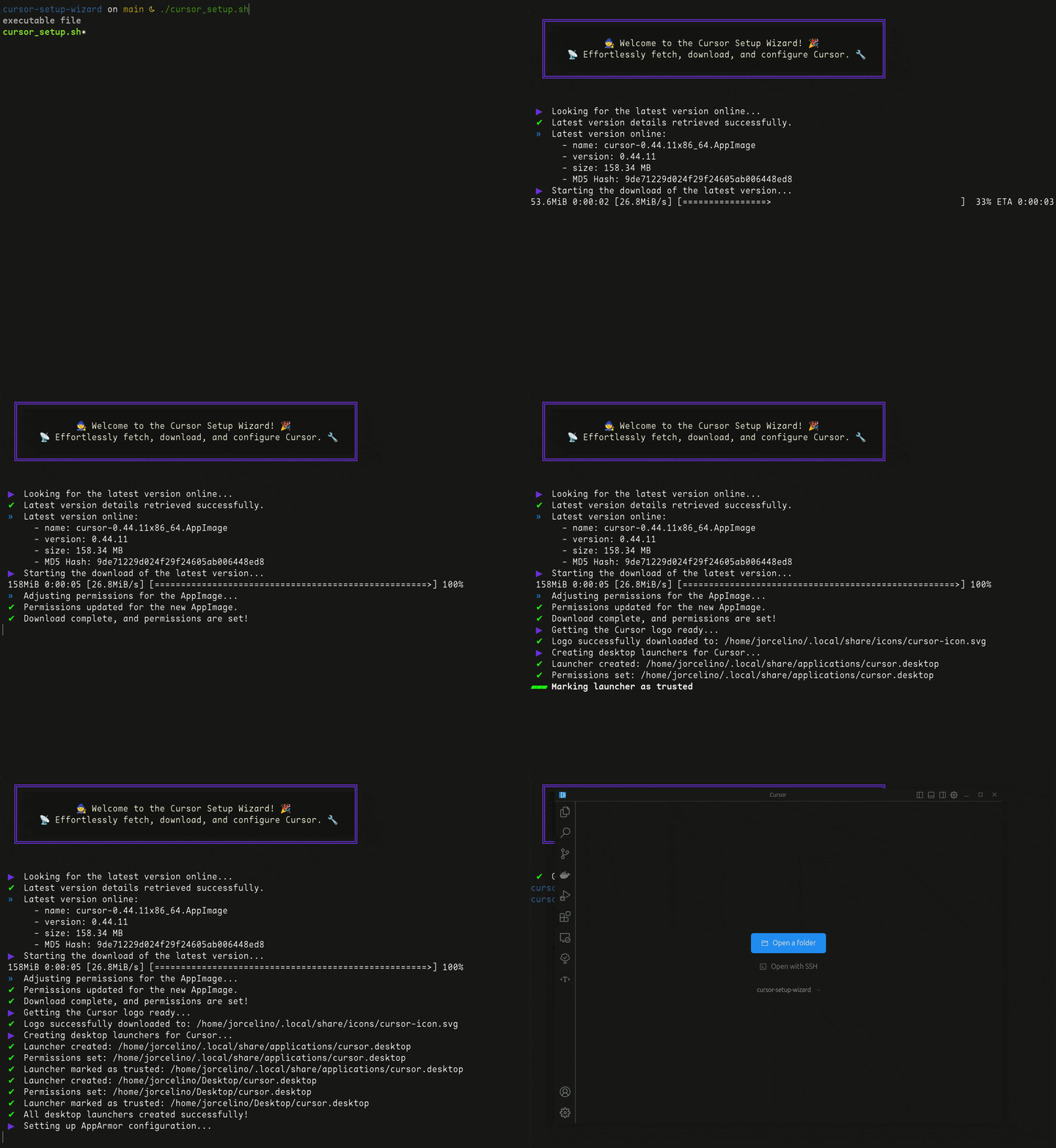
For full details and instructions, check out the repository's README.md. Here's a quick overview:
Highlights include:
- Simplifies Cursor .AppImage management: Fetch updates, manage configurations, and resolve common issues effortlessly.
- One command updates: Use the alias
cursor-setupin your terminal to check for updates and install the latest .AppImage version anytime. - Optimized defaults: Works out of the box with pre-configured settings tailored for most users.
- Customizable paths and themes: Easily modify paths, icons, and even colors to suit your preferences.
- Multi-shell support: Automatically adds aliases for Bash and Zsh for quick access.
- Detailed feedback: Logs every step of the process for transparency and easier troubleshooting.
- Automatic version checks: Fetches the latest version online and compares its MD5 hash with your local version to ensure you're always up-to-date.
- Comprehensive setup: Downloads the latest .AppImage, fetches the icon, creates desktop shortcuts, sets up AppArmor, and configures the "cursor" terminal command.
Go to the cursor-setup-wizard repository and give it a try! 🚀
If you have any suggestions or run into issues, feel free to open an issue in the repository—I’ll gladly help!

@jorcelinojunior I can't express my gratitude enough. I wish i found this thread much earlier. It would have saved me hours. Your script was flawless and set everything up just so. Cursor.ai and all Linux users owe you a gigantic thank you.

I want to share my solution that should be somewhat safer than simply disabling the entire OS security feature:
-
Create a
/etc/apparmor.d/appimage.cursorfile as root, with the following content:# Allow Cursor AppImages to run without AppArmor unprivileged user namespace restrictions abi <abi/4.0>, include <tunables/global> profile appimage.cursor /**/Cursor-*.AppImage flags=(unconfined) { userns, # Site-specific additions and overrides. See local/README for details. include if exists <local/appimage.cursor> } -
Run the following command as root to compile the
appimage.cursorAppArmor profile:apparmor_parser -r /etc/apparmor.d/appimage.cursor -
Run the following command as root to reload the AppArmor configuration:
systemctl reload apparmor -
Verify the result.

@brlin-tw That works perfectly, thank you!
For anyone else: be sure to restart apparmor after adding the file:
sudo systemctl restart apparmor

@redlotusaustin
For anyone else: be sure to restart apparmor after adding the file:
sudo systemctl restart apparmor
Thanks for pointing out! I've updated the instructions.
Issue still persists, do cursor devs plan to address this with a proper fix?

@leosh64
As this is rather a breakage caused by Ubuntu's security policy, the proper way Cursor can address it is to document the issue and the known workaround in their installation documentation.
I've seen this issue with AppImages across many projects. Feel free to automate the solution provided by martinkrung by inserting this function in your ~/.bashrc:
# Extract AppImage files and resolve the chrome-sandbox permission issue
function extract_appimage () {
  if [ -z "$1" ] || [ -z "$2" ]; then
    echo "Syntax: extract_appimage <appimage_file> <destination>"
    return
  fi

  if [ ! -f "$1" ]; then
    echo "ERROR: $1 does not exist"
    return
  fi

  chmod +x "$1"
  command_path=`pwd -P "$1"`
  eval "\"$command_path/$1\" --appimage-extract"

  if [ ! -d "squashfs-root" ]; then
    echo "ERROR: Could not extract appimage of $1"
    return
  fi

  mv "squashfs-root" "$2"
  chrome_path=`find "$2" -iname "chrome-sandbox"`
  sudo chown root:root "$chrome_path"
  sudo chmod 4755 "$chrome_path"
}
Using this you can extract any AppImage and give the chrome-sandbox within the permission it needs by executing extract_appimage <appimage_file> <destination>

I've seen this issue with AppImages across many projects. Feel free to automate the solution provided by martinkrung by inserting this function in your
~/.bashrc:...
How about packaging back to appimage?

I was getting the following error:
The setuid sandbox is not running as root. Common causes:
  * An unprivileged process using ptrace on it, like a debugger.
  * A parent process set prctl(PR_SET_NO_NEW_PRIVS, ...)
Failed to move to new namespace: PID namespaces supported, Network namespace supported, but failed: errno = Operation not permitted
and @brlin-tw 's solution worked for me.

Same here. Rather sad how cursor refuses to address this issue for a really long time now (almost a year now) and leaves it to the users to find a hack around the problem, other similar apps like windsurf do not have this problem. Does not give me a lot of confidence to expect cursor to address the problems their users have.
@johann-petrak
Same here. Rather sad how cursor refuses to address this issue for a really long time now (almost a year now) and leaves it to the users to find a hack around the problem, other similar apps like windsurf do not have this problem. Does not give me a lot of confidence to expect cursor to address the problems their users have.
This is a problem on the Ubuntu side. Many applications are affected.
Same here. Rather sad how cursor refuses to address this issue for a really long time now (almost a year now) and leaves it to the users to find a hack around the problem, other similar apps like windsurf do not have this problem. Does not give me a lot of confidence to expect cursor to address the problems their users have.
This is a problem on the Ubuntu side. Many applications are affected.
No it is not. It is a security feature of Ubuntu which most other applications know how to handle problerly, including Windsurf and others.
Same here. Rather sad how cursor refuses to address this issue for a really long time now (almost a year now) and leaves it to the users to find a hack around the problem, other similar apps like windsurf do not have this problem. Does not give me a lot of confidence to expect cursor to address the problems their users have.
This is a problem on the Ubuntu side. Many applications are affected.
No it is not. It is a security feature of Ubuntu which most other applications know how to handle problerly, including Windsurf and others.
feature that brings problem
@Flashwalker
feature that brings problem
Which is still a feature, just like the pain and suffering Wayland has given us.
Hi! From this conversation https://forum.cursor.com/t/request-for-cursor-ai-deb-package-for-ubuntu-users/36291/4 I found this script pretty handy https://gitlab.melroy.org/-/snippets/621
