

 gdh1995
Not working correctly with Vivaldi 5.1
Describe the bug
After upgrading to Vivaldi 5.1 most Vimium-commands stopped working for me.
Some errors are displayed in the extensions error-log:
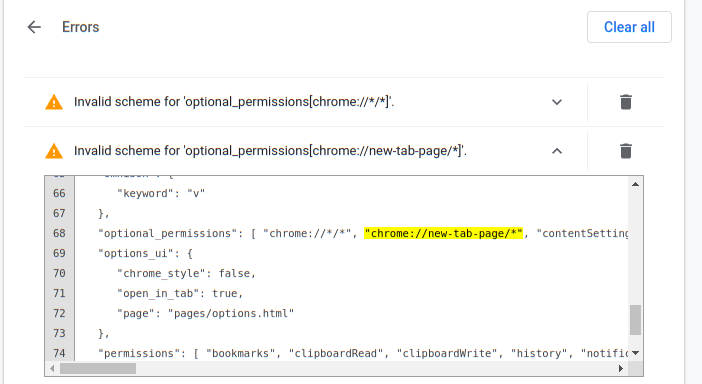
To Reproduce
Steps to reproduce the behavior:
- Upgrade to Vivaldi 5.1
- Go to any site, like https://reddit.com
- Try to open new tab / show Vomnibar or close tab using Vimium keyboard-shortcut
Browser, OS and Vimium C versions
- Browser name: Vivaldi
- Browser version: 5.1.2567.39 (Stable channel) stable (64-bit)
- Vimium C version: 1.96.6
- OS name and version: Linux 5.16.8-arch1-1 SMP PREEMPT Tue, 08 Feb 2022 21:21:08 +0000 x86_64 GNU/Linux

Um, the image is not an error, and you may ignore the invalid scheme warnings.
I can not reproduce this issue on Vivaldi 4.1.2567.39 for Win10 with a fresh profile. So, up to now,
- does
chrome-extension://hfjbmagddngcpeloejdejnfgbamkjaeg/pages/options.htmlwork on your Vivaldi? - please test these steps to get the potential log messages:
-
- Open
chrome://extensions/?id=hfjbmagddngcpeloejdejnfgbamkjaeg
- Open
-
- turn on the
developer modeswitch at the top right corner
- turn on the
-
- and then click a link of "
background page" in the "Inspect views" section.
- and then click a link of "
-
- then your browser will popup a debugging window and then the "
Console" panel has log information.
- then your browser will popup a debugging window and then the "
- if there's no error message, please press
<f12>on a website tab like https://reddit.com and then see itsConsolepanel

Thanks for the info, I followed your steps and there is the this error-message shown in the console:
Error in event handler: TypeError: Error in invocation of sessions.getRecentlyClosed(optional sessions.Filter filter, function callback): Error at parameter 'filter': Error at property 'maxResults': Value must be at most 25.
    at Object.p [as ai] (<URL>)
    at Object._u (<URL>)
    at Object.af (<URL>)
    at Object._u (<URL>)
    at Object.e.y._u (<URL>)
    at Array.y (<URL>)
    at i (<URL>)
Now we just need to find out where this value of "maxResults" is set :thinking:
Is there any error if press <f12> on a website tab like https://reddit.com/ and then see its Console panel?
The error is caused by an inner issue of Vivaldi, which may break Vomnibar.activate, but not other commands of Vimium C.
After some more experimenting, it looks like there are two behaviors contributing here:
- The above error in
sessions.getRecentlyClosedprevents any vomnibar-related functionality - After initially visiting (some?) pages by clicking a link, after the page loaded, Vimium-C is totally unresponsive and no keyboard-action triggers anything. However, reloading the page manually resolves this and Vimium-C starts working, except for the Vomnibar, of course
@gdh1995 If I understand you correctly, the first problem is caused by Vivaldi and we have a wait for a fix from them? I don't know, perhaps the second issue will also disappear once Vivaldi fixed the first :man_shrugging:
Thanks for looking into this so far. Perhaps the best option for me may be to downgrade to Vivaldi 5.0 for now. Because without the Vomnibar, browsing is no fun to me :grinning:
- Vimium C will work around it in a next version
- When you found "unresponsive", was the keyboard focus on the web page yet? I mean, it might be on not a page but your browser window, so JS code could not get any key
- If a page has focus but Vimium C still fails, please open the Developer Tools and put errors on
Consolehere. Thanks.
You may add this to key mappings to disable the session feature of Vomnibar (just for Vimium C v1.96.6 and Vivaldi 5.1):
map o Vomnibar.activate noSessions
Hello, Vimium C v1.97.0 should have fixed this, and you may remove noSessions and take a try.
V1.97.0 has a bug affecting order of Vomnibar suggestions, and I'll fix it in a next version.
Thanks @gdh1995 , I just tested and the Vomnibar is back for me, even without the noSessions parameter.
Great work! :+1:
Oh sorry but I forgot to check problems about other commands. Do Vimium C's other commands (other than Vomnibar) work on your Vivaldi now? If not, log messages and website URLs might help.
@gdh1995 thanks for asking. I haven't noticed any other regressions, though I'm only using a fraction of Vimium C's functionality (mostly searching, tab- and page-navigation). So I think we're fine here. If I stumble upon anything odd, I'll open another issue.
Thanks again for your great support!
In newer versions of Vivaldi, a similar problem surfaced now:
Perhaps it's related to / similar to fix like the error above.
The two warnings means two special features which can work only if your browser has enabled the #extensions-on-chrome-urls flag.
When the flag is disabled by default, the 2 warnings are shown, and there seems no way to avoid this behavior on Chromium-based browsers. You may just ignore them.
Thanks @gdh1995 , I have enabled the setting extensions-on-chrome-urls and it looks better.