

 gdh1995
Switching input source introduces unexpected bug in Chrome 96 at macOS 12.1
The incomplete (if there're any others) list includes:
map ' openUrl url="vimium://status\u0020toggle-next\u0020^\u0020'"
map , goPrevious
map . goNext
map ; visitPreviousTab acrossWindows
Nothing happened when stroking keys, even the HUD didn't show. And after a while it will restore; causes are unclear.


Chrome 96 on macOS 12.1 I didn't do anything, as far as I can recall. The last event is the release of 1.96.1, the 2nd is that of 1.96.0
When will it happen that "Nothing happened when stroking keys"? For example, did you trigger any command and then notice this issue?
What did you mean by after a while it will restore? So now do such keys work well?
Of course I have to touch the keyboard to notice the issue. It just does nothing, like I didn't touch the keyboard. It brokes down intermittently; maybe I triggered something subtle and inconspicuous, but I have no idea what's that. Is there any possibility in the commits after 1.95.0 (or 1.94.0 as I don't remember 1.95.0 actually released in Chrome and I've been visiting my local version number every day since the release note of 1.95.0) allowing such things to take place?
Problem founded: In Chinese input source, ; , . : differ with those in English input source.
You can test what key info Vimium C receives on https://gdh1995.cn/vimium-c/keyboard-test.html . Please check what it records when "the keyboard focus is in an input box", and when not.
Bug about input source must be introduced recently since I've been using Vimium-C for almost a year without this problem.
Maybe Chrome 96 should be blamed. In fact, Chrome for Linux has a keyboard layout bug in versions from 92 to 94.
Completely checking "Ignore keyboard layout" is the panacea! You suggested partially checking it in #523, but didn't aware of its bearing on not-only-English users. I recommend appending "For users using not only English input source, especially CJK users, please completely check it." to the options page.
It should not. This issue looks like a bug of Chrome, because event.key had never included IME-interpreted characters.
Could you do me a favor and put your test results in Chinese IME on https://gdh1995.cn/vimium-c/keyboard-test.html ?
https://user-images.githubusercontent.com/66708845/147462763-8ea36729-0e67-4655-9815-0905706ad044.mov
Seems a bug of Chrome 96. Google often adds some "features" into their browser which no normal people can image, and without any notification to developers - I can not find related items on https://chromestatus.com/features#milestone%3D96 .
Do what we can do. Neither partially checking nor unchecking will facilitate those users: they have to set overlapping and repeating mappings, or frequently switch between input sources. Complete check if want no bother.
update: https://bugs.chromium.org/p/chromium/issues/detail?id=1275011 reports a ~same~ similar issue on Chrome 98 (dev version).
update: it reports wrong lower-case letters in English mode, but this issue is in Chinese mode.
Maybe I do need some actions to work around it. But I haven't got any idea.
System's default simplified Chinese
---Original--- From: "Dahan @.> Date: Tue, Dec 28, 2021 00:30 AM To: @.>; Cc: @.>;"State @.>; Subject: Re: [gdh1995/vimium-c] Switching input source introduces unexpected bug in Chrome 96 at macOS 12.1 (Issue #526)
What's the name of your Chinese input source on macOS 12.1 ?
— Reply to this email directly, view it on GitHub, or unsubscribe. You are receiving this because you modified the open/close state.Message ID: @.***>
Thanks. I've reported in https://bugs.chromium.org/p/chromium/issues/detail?id=1282945 .
Hello Vimium C v1.99.0 has been available on Chrome, and please test this new option:
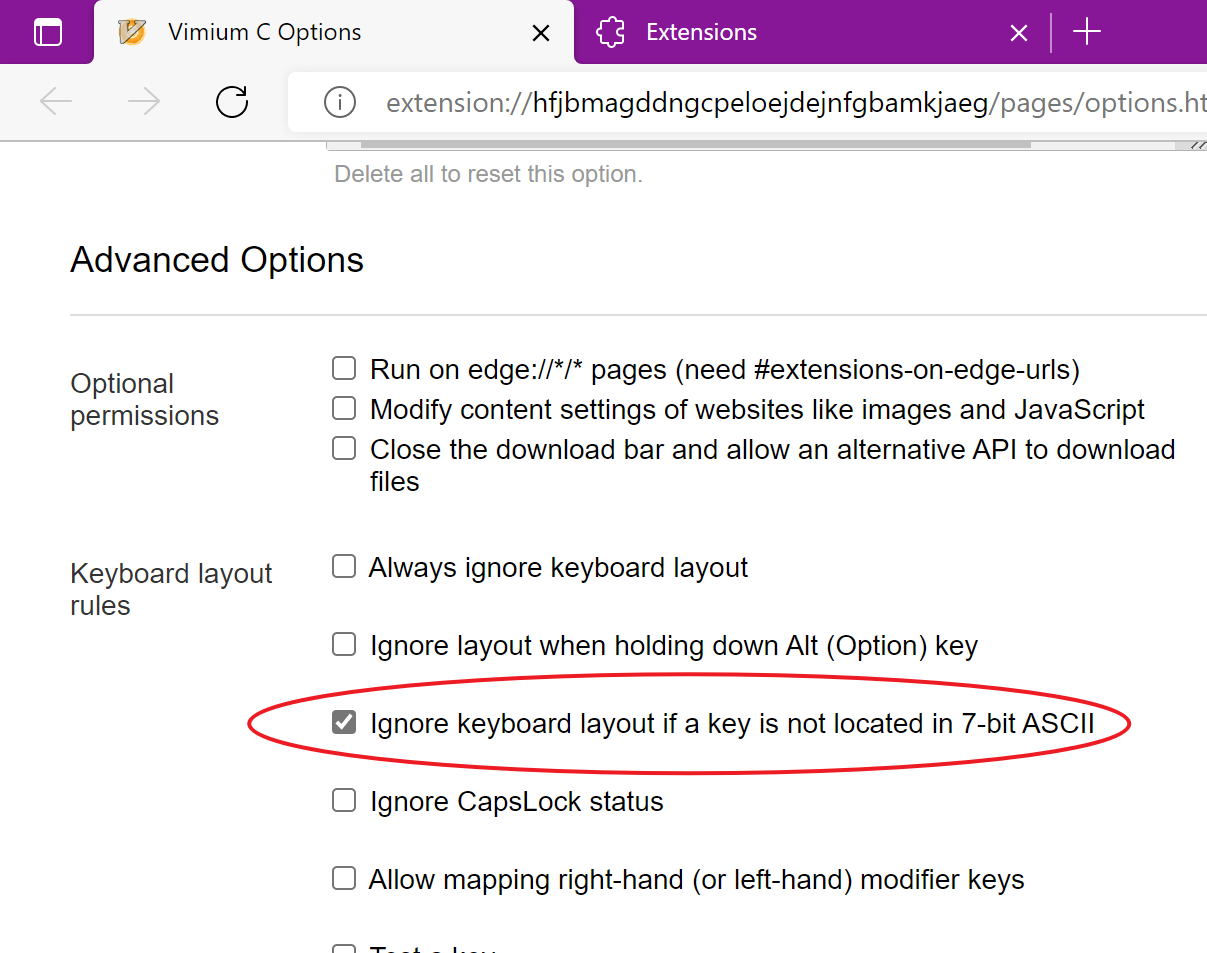
If you enable Ignore keyboard layout if a key is not located in 7-bit ASCII completely (it should have been partially selected), then Vimium C should support ., ,, ; even in a Chinese input source now.