

 gatsbyjs
gatsby hydration bug on dynamic route
Preliminary Checks
- [X] This issue is not a duplicate. Before opening a new issue, please search existing issues: https://github.com/gatsbyjs/gatsby/issues
- [X] This issue is not a question, feature request, RFC, or anything other than a bug report directly related to Gatsby. Please post those things in GitHub Discussions: https://github.com/gatsbyjs/gatsby/discussions
Description
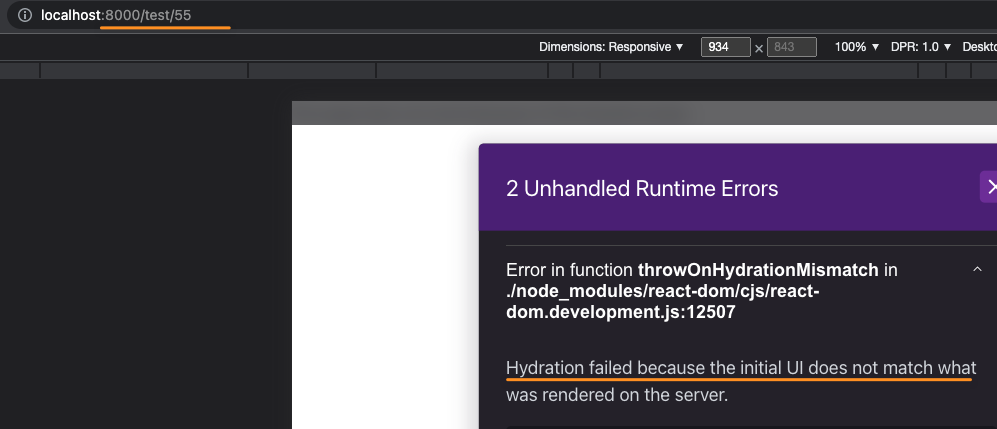
When Gatsby SSR is activated, and chakra provider is wrapping the root element, there is a hydration issue occurring, but only on dynamic pages.
so, pages/product.js is fine with on hydration issue, but
pages/product/[id].js receives a hydration issue.
This hydration error is only occurring when chakra provider is added to the gatsby site (as either a plugin, or manually to the gatsby-browser/gatsby-ssr files.


Reproduction Link
https://github.com/rwitchell/chakra-ui-gatsby-ssr-bug
Steps to Reproduce
- turn on DEV_SSR
- add a file
pages/[var].js, which outputs a div - refresh the page in browser ...
Expected Result
no hydration issue to occur.
Actual Result
i believe the gatsby client is wrapping an extra div around the rendered component.
Environment
System:
    OS: macOS 12.5.1
    CPU: (8) x64 Intel(R) Core(TM) i7-1068NG7 CPU @ 2.30GHz
    Shell: 5.8.1 - /bin/zsh
  Binaries:
    Node: 14.19.1 - ~/.nvm/versions/node/v14.19.1/bin/node
    Yarn: 1.22.19 - ~/.yarn/bin/yarn
    npm: 6.14.16 - ~/.nvm/versions/node/v14.19.1/bin/npm
  Browsers:
    Chrome: 105.0.5195.125
    Safari: 15.6.1
  npmPackages:
    gatsby: ^4.23.0 => 4.23.1
Config Flags
FAST_DEV: true, DEV_SSR: true

There are two issues here:
- i'm using a "client-only" route (for everyone playing at home: https://www.gatsbyjs.com/docs/reference/routing/file-system-route-api/#creating-client-only-routes) , but in my production site, i can pass apollo client to the getServerData in order to pull the data we need to render the component. Shouldn't that be enough for the node server to build the site and return the HTML for the initial cache miss / crawler?
if yes: it would be good to see gatsby updated to read files with square bracket notation during SSR. if no: it would be good to see better documentation or error handling around this feature is not possible. I'll research moving to "collection routes" in the mean time.
- the hydration error (
matching <div> in <div>) is confusing (not just for this error, but every time a component renders differently). For this issue: as the initial render did not give any output from thepages/test/[id].jsfile at all: the error should be aninfoinstead, and should explain something like "hydration didn't occur and a DOM replacement occurred because the original page is located in a file that is a client-only route."
Also, migrating a site from SPA to include SSR isn't smooth sailing due to the use of if(loading) return <loading> and if(profile) { show all of these elements } else { show all of these elements }, and that the SSR cache isn't flushing correctly that I need to stop/start the server to see updates.
A big help for me has been turning javascript on and off in the browser's tab in order to see the initial page load and confirm what a crawler will see. (a smaller help has been curl localhost:8000/page-name but it can be hard to find specific elements. Overall: there needs to be a better way to view pages for initial load & once javascript takes over (maybe a feature flag in gatsby to disable javascript from mounting, or something in storybook)
@rwitchell did you find a workaround? I'm facing the same issue, I'm using a client-only route, and I even tried to use
if (!isClient) return null;
but I'm still getting the same error which doesn't makes sense,
I'm using "gatsby": "^5.3.3",
and node 18.13.0

tested using the repo you provided (made things easier !)
please visit below linked gatsby docs page. https://www.gatsbyjs.com/docs/reference/config-files/gatsby-browser/#replaceHydrateFunction
create replaceHydrateFunction in the gatsy-browser file . And it is always good to do a gatsby clean to clear cache . make sure to import the ReactDOM
const ReactDOM = require('react-dom/client')
exports.replaceHydrateFunction = () => {
  return (element, container) => {
    const root = ReactDOM.createRoot(container)
    root.render(element)
  }
}
if you face errors alternatively try this :
import ReactDOM from "react-dom/client";
export const replaceHydrateFunction = () => {
  return (element, container) => {
    const root = ReactDOM.createRoot(container)
    root.render(element)
  }
}

@LekoArts & @ gatsby team , there are multiple discussions around the hydration errors, most of which can be solved by using the replaceHydrateFunction or that's what I have seen & experienced .(unless someone does wrong nesting of divs into p tags or something like that ).
I think it is a good idea to have a separate dedicated page for replaceHydrateFunction , explain the types of hydration errors it can fix and point users with hydration errors to that page .
Please don't do what @808vita is proposing as this is the incorrect fix. Don't use replaceHydrateFunction.

@LekoArts what is the alternative ? how should this be approached ?
I tested it out using the test repository that person created , replaceHydrateFunction did fix the errors on production build .
If this is outdated , requesting the same to be marked in the gatsby docs and suggest an alternative .
https://github.com/gatsbyjs/gatsby/discussions/17914 attaching link to a related discussion as a reference for others.
note for others: replaceHydrateFunction still works - did fix the console errors and will pass QA , if your company has a QA step .
export function replaceHydrateFunction() {
  return (element, container) => {
    const root = createRoot(container)
    root.render(element)
  }
}
After using this workaround and under gatsby 5 + react 18 since may 22, an upgrade from 5.9 to 5.10 makes two of my projects not rendering anymore: page built based on a specific width, hooks like useState and useEffect completely ignored, libraries like react-svg not building the svgs ... Only works in development mode but once a build is done I have the same issues that you can see for everyone.

export function replaceHydrateFunction() {
  return (element, container) => {
    const root = createRoot(container)
    root.render(element)
  }
}
After using this workaround and under gatsby 5 + react 18 since may 22, an upgrade from 5.9 to 5.10 makes two of my projects not rendering anymore: page built based on a specific width, hooks like useState and useEffect completely ignored, libraries like react-svg not building the svgs ... Only works in development mode but once a build is done I have the same issues that you can see for everyone.
the replaceHydrate worked perfectly in gatsby v5 project till start of march 2023 . We have stricter guidelines for upgrading a core item like gatsby .
and @Faxxiz Thanks for the details about the version upgrade -> so in one of the patches Gatsby introduced some stuff which broke the Gatsby brower api's replaceHydrate .
I glanced through all changelogs from v5 to v5.10 , there are no details about this breaking change , this should be part of the documentation . https://www.gatsbyjs.com/docs/reference/release-notes/gatsby-version-support/ https://www.gatsbyjs.com/docs/reference/release-notes/
this is very much like an issue that occurred with bootstrap 5, introduced a breaking change in a minor patch . posting details about last known working version will help many folks who are facing issues with QA .