

 garris
Inconsistent test results after upgrading to 5.3.0 with docker
Somewhat similar to #1298 ...
I'm getting random errors in my tests where the page is rendered in a really weird state. e.g. when rendering a desktop view the menu is rendered correctly with an input field for the search, but the page content is rendered like it would on a smartphone.
My testcase:
- change version in package.json
- rm yarn.lock
- yarn install
- yarn run backstop reference --docker --config=x --filter=1page
- yarn run backstop test --docker --config=x --filter=1page
- (repeat last step 4 more times)
Results vary depending on backstopjs version: 5.0.7 => All tests succeed 5.1.0 => All tests succeed 5.2.1 => Error: Cannot find module 'puppeteer' 5.3.0 =>
| viewport | Run 1 | Run 2 | Run 3 | Run 4 | Run 5 |
|---|---|---|---|---|---|
| 400px | ✅ | ✅ | ✅ | ✅ | ✅ |
| 800px | ❌ | ❌ | ❌ | ❌ | ✅ |
| 1024px | ❌ | ❌ | ❌ | ❌ | ❌ |
| 1440px | ✅ | ❌ | ❌ | ✅ | ❌ |
i.e. only smartphone is working
Here is an example of one image generated correctly and another for the same viewport wrong; notice that the right image is also cut off at the bottom; There is a line missing with the copyright notice etc.
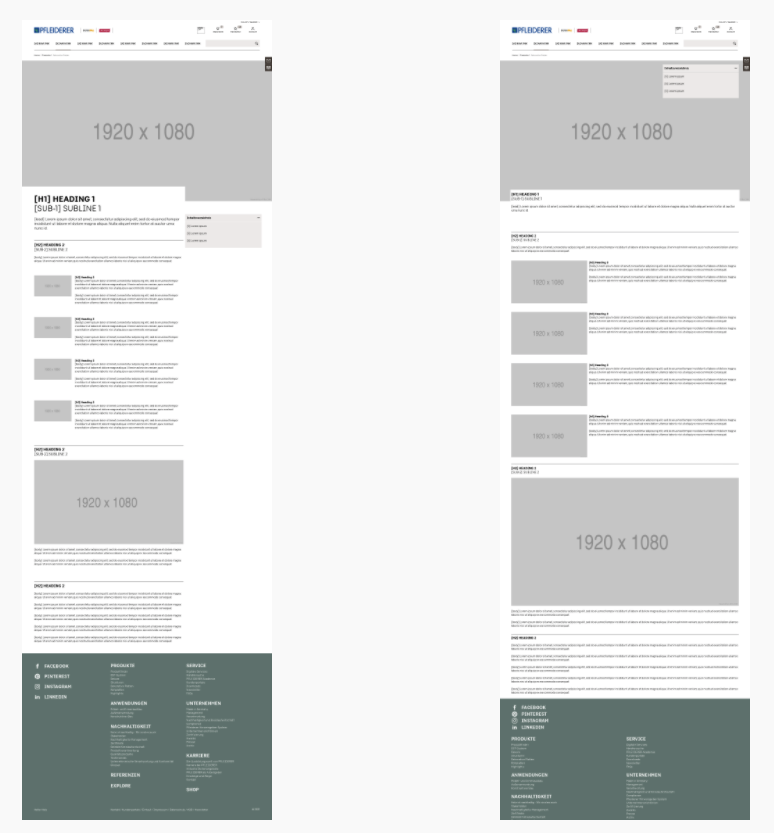

ok, i feel MUCH better knowing it isn't just us. And with ours, just like you, we've never seen the phone viewport fail but other viewports seem to fail at random.

@NochEinKamel @gilzow wow, sorry guys this one is a mystery.
@gilzow do your tests also run as expected with v5.1.0?
Looking at the commits -- the only impactful-looking commit was around mergeImgHack removal.
I'll try to take a look for anything else that might have changed and I'll see if I can do something to my tests to repro the issue.

well, i'll be. Downgraded to 5.1.0 and none of the scenarios / viewports that were failing in such odd ways are failing now. They all pass. I ran three sets of reference + tests via --docker and they all passed.
I'm out of time today but I'll run the tests in my pipelines tomorrow morning and let you know the results.
ok, running it in the pipelines also produces passing tests! For now, I'm downgrading and pinning to v5.1.0. As you look into what might have happened, if you need me to test things, let me know. Happy to do so.
@NochEinKamel @gilzow thank you for helping to isolate the issue! Since I haven't been able to repro it directly myself I may ask you to test a new release candidate to validate that I fixed the bad commit.
I will try to get to this today (day job and kids at home are major competition for my time) -- I feel bad that the latest release is hosed for a significant segment of users.
Cheers.
@gilzow @NochEinKamel I just created a docker repo for this issue. If either of you get a chance -- please try...
docker pull garris/github1303:latest
I reverted any changes between 5.1.0 and 5.3.0 which might be able to create the issue you are seeing. Let me know if this works as expected.
Thanks for looking into it @garris . I tried using that image, but only get an error back from docker:
Error response from daemon: pull access denied for garris/github1303, repository does not exist or may require 'docker login': denied: requested access to the resource is denied
Not 100% sure why - shouldn't it be listet on https://hub.docker.com/u/garris?
Ok, fixed -- it should be public now!
(Sorry, I thought these were automatically set to public)
Please give it another go. Also, here is the repo I created to troubleshoot the issue... https://github.com/garris/BackstopJS/tree/github_1303
Here are the steps I've taken:
- I've downgraded puppeteer to 5.5.0. This could be causing the problem.
- I've reverted a change here which should not have caused this problem -- but I reverted it anyway just because.
Again -- thanks for bearing with me -- This is a weird problem that I still can't reproduce.
garris/github1303:latest - produces similar results to 5.3.0 I ran the tests with v5.1.0 and with garris/github1303:latest, not changing config or scenarios, viewports, etc. You can see the reports, reference files, test files, etc for both attached.
garris-github1303.zip backstopjs-v510.zip
Yes, same for me. However I think the docker image is not built correct, because it installs the latest version from npm, and if you launch it with -v parameter:
docker run --rm -i garris/github1303:latest -v
BackstopJS v5.3.2
I managed to install 5.3.3(aka github1303 branch) on the docker image (run the image with bash entry point, install from github branch, commit to docker and use the committed image) and it seems to be working fine with my test cases.
I also replaced puppeteer inside the docker image and it really seems to come from there. v5 works, v6 works, v7 doesn't, v9 doesn't
@NochEinKamel Thank you for going the extra mile on getting that docker image configured correctly -- looks like you have isolated the problem.
The good news is that it is not BackstopJS -- it's puppeteer! 🥳 The bad news is that it is not BackstopJS -- it's puppeteer! 😭 (sorry -- it's the end of the day over here)
I think now the investigation needs to move over to puppeteer. But to be effective -- we'd want to understand CSS rule or property or combination that consistently causes the issue? I looked at one of @gilzow's results using diverged and found the following problem areas...

Also, @gilzow you mentioned that it renders consistently locally -- are you saying when you run docker locally (assuming you're on a mac?) that we don't see this inconsistency issue? Ideally we'd want to test your CSS in an isolated file and run a simple test multiple times and watch to see the rendering inconsistency.
Also, @gilzow you mentioned that it renders consistently locally -- are you saying when you run docker locally (assuming you're on a mac?) that we don't see this inconsistency issue?
I have backstopjs installed globally on my mac. If I run the tests against that installation (ie backstop reference) then all scenarios+viewports pass. If I then run those same tests with docker, via either backstop reference --docker or running them in my gitlab pipeline, the tests fail.
So I'm guessing the root issue isn't just puppeteer, but puppeteer in combination with docker?
... All I can come up with is an example that doesn't even work on 5.0.7 :-(
<style type="text/css">
@import url(https://fonts.googleapis.com/css?family=Open+Sans:400,700&display=swap&subset=cyrillic-ext);
* {
	font-family: Open Sans,"sans serif";
}
</style>
Hello World
Works fine without --docker, randomly fails viewports with --docker Removing the import yields consistent results with --docker
But that's probably a whole different issuee...
So, font loading? Is that the issue? I wonder if the issue is docker or, more likely, chromium on Linux?
Also, i think there is a font loading event we could listen to -- in your hello world test case, would the problem go away if you waited for a font loaded event?
No, sorry, that's something different.
Adding await page.evaluateHandle('document.fonts.ready'); to the onReady script fixes the hello world above but not my projects testcases.
So I'm guessing the root issue isn't just puppeteer, but puppeteer in combination with docker?
I've been seeing the similar problems which seem to point to puppeteer with docker. See https://github.com/garris/BackstopJS/issues/1318#issuecomment-841086680
I couldn't replicate broken screenshots after scrolling outside of docker

Same here. Switching from 5.1.0 (docker) to 5.3.4 makes test cases randomly fail. Often caused by a certain "offset" to the left/top. The captured area seems to have the correct size, it is simply the wrong area.
Also it seems that when we are not using selectorExpansion it does not seem to happen.

We are still getting exactly the same issue with the version 6.1.0, anyone has a workaround or fix for this?
