

 garris
Docker arm64 support (Apple Silicon M1)
The currently available docker images are only available to amd64 architecture: https://hub.docker.com/r/backstopjs/backstopjs/tags?page=1&ordering=last_updated
Soon Apple will change to architecture of all Macbooks to arm64. The current Macbook Pro 13 inch is already available with the M1 processor.
Therefore we need backstopjs images that are compatible with arm64.


We need to wait for release of https://github.com/puppeteer/puppeteer/pull/7099 because otherwise can't even npm install backstop, because of installation failures. (chrome binaries not found).
Then we need to configure the docker image to work with arm64 linux images. The node base image already supports that: https://hub.docker.com/_/node?tab=tags&page=1&ordering=last_updated
Next the built backstop docker image needs to be multi-arch build. (https://www.docker.com/blog/multi-arch-build-and-images-the-simple-way/)
@garris now that step 1 that was described by @felixblaschke seems to be resolved, how can we get m1 support? who can take the next steps?

Thanks @torbenberger, my question is, will the new image be backwards compatible?
If the new assets will be backwards compatible then you would just need to rework the build scripts and create a pull request for me.
I don't have an M1 device so I'd need you to validate the new builds.
Does that make sense?
@garris what do you mean by backwards compatible? not quite understanding tbh.
i have an m1 mac so i could validate the new builds :-)
Hi @torbenberger, sorry, my question is, will the new image continue to work on non-M1 hardware?
@garris i think there is something called "multi arch images" but this produces different images for amd64 and arm64 cpus afaik. so i think we would need to have 2 images to support both architectures. but probably someone with more docker and multiarch knowledge can bring light to the darkness on this topic. i'm not that experience with that
@torbenberger yes, I am not super knowledgeable about docker or M1 -- I don't want to break existing implementations so I just need someone to explain how this would work.

@apswak no progress here. I am a high-level docker user -- so I would need help to understand the most compatible way I can add support for this.
(This is a little baffling since I thought docker is supposed to solve the hardware abstraction problem 🤷♂️)
Shoot. Just ran into this after getting a new laptop (which is going to become more common with the new MacBook Pros out)
@felixblaschke any guidance you can add for updating the Docker image?

Shoot. Just ran into this after getting a new laptop (which is going to become more common with the new MacBook Pros out)
@felixblaschke any guidance you can add for updating the Docker image?
No sorry, I use a secondary x86 device or VM to execute tests.
I was able to get Backstop v4.3.2 to run on my M1 by adding the following to my config:
- added
--single-processtoengineOptions - added
--disable-dev-shm-usagetoengineOptions(OPTIONAL, running many tests can cause a memory issue) - added
--platform linux/amd64todockerCommandTemplate(OPTIONAL, removes a warning)
Example config:
{
  dockerCommandTemplate:
    'docker run --rm -it --net="host" --platform linux/amd64 --mount type=bind,source="{cwd}",target=/src backstopjs/backstopjs:{version} {backstopCommand} {args}',
  engine: 'puppeteer',
  engineOptions: {
    args: ['--no-sandbox', '--disable-dev-shm-usage', '--single-process'],
  }
}
I didn't have luck getting v5.4.4 to work.
@garris for v5.4.4 puppeteer isn't starting. Looks like it won't go into Single Threaded mode.
COMMAND | Executing core for "test"
createBitmaps | Selected 30 of 30 scenarios.
      COMMAND | Command "test" ended with an error after [1.575s]
      COMMAND | Error: Failed to launch the browser process!
                [1102/200139.436316:ERROR:stack_trace_posix.cc(676)] Failed to parse the contents of /proc/self/maps
                [1102/200139.686485:ERROR:stack_trace_posix.cc(676)] Failed to parse the contents of /proc/self/maps
                [1102/200139.686638:ERROR:stack_trace_posix.cc(676)] Failed to parse the contents of /proc/self/maps
                [1102/200139.711694:FATAL:zygote_main_linux.cc(161)] Check failed: sandbox::ThreadHelpers::IsSingleThreaded().
                #0 0x004006aa0f49 base::debug::CollectStackTrace()
                #1 0x004006a0a933 base::debug::StackTrace::StackTrace()
                #2 0x004006a1e500 logging::LogMessage::~LogMessage()
                #3 0x004006a1f04e logging::LogMessage::~LogMessage()
                #4 0x0040065bea27 content::ZygoteMain()
                #5 0x0040065b9ae5 content::RunZygote()
                #6 0x0040065bafcb content::ContentMainRunnerImpl::Run()
                #7 0x0040065b87cb content::RunContentProcess()
                #8 0x0040065b90cd content::ContentMain()
                #9 0x004006618136 headless::(anonymous namespace)::RunContentMain()
                #10 0x004006617e93 headless::RunChildProcessIfNeeded()
                #11 0x004006616af5 headless::HeadlessShellMain()
                #12 0x00400342bae1 ChromeMain
                #13 0x004012b402e1 __libc_start_main
                #14 0x00400342b92a _start

                [1102/200139.711694:FATAL:zygote_main_linux.cc(161)] Check failed: sandbox::ThreadHelpers::IsSingleThreaded().
                #0 0x004006aa0f49 base::debug::CollectStackTrace()
                #1 0x004006a0a933 base::debug::StackTrace::StackTrace()
                #2 0x004006a1e500 logging::LogMessage::~LogMessage()
                #3 0x004006a1f04e logging::LogMessage::~LogMessage()
                #4 0x0040065bea27 content::ZygoteMain()
                #5 0x0040065b9ae5 content::RunZygote()
                #6 0x0040065bafcb content::ContentMainRunnerImpl::Run()
                #7 0x0040065b87cb content::RunContentProcess()
                #8 0x0040065b90cd content::ContentMain()
                #9 0x004006618136 headless::(anonymous namespace)::RunContentMain()
                #10 0x004006617e93 headless::RunChildProcessIfNeeded()
                #11 0x004006616af5 headless::HeadlessShellMain()
                #12 0x00400342bae1 ChromeMain
                #13 0x004012b402e1 __libc_start_main
                #14 0x00400342b92a _start

                Received signal 6
                Received signal 6
                #0 0x004006aa0f49 #0 0x004006aa0f49 base::debug::CollectStackTrace()
                #1 0x004006a0a933 base::debug::CollectStackTrace()
                #1 0x004006a0a933 base::debug::StackTrace::StackTrace()
                #2 0x004006aa0a21 base::debug::StackTrace::StackTrace()
                #2 0x004006aa0a21 base::debug::(anonymous namespace)::StackDumpSignalHandler()base::debug::(anonymous namespace)::StackDumpSignalHandler()

                ##33  0x0x00400e3270e000400e3270e0  <unknown><unknown>

                ##44  0x0x004012b52fff004012b52fff  gsignalgsignal

                ##55  0x0x004012b5442a004012b5442a  abort
                #6 0x004006a9fcb5 abort
                #6 0x004006a9fcb5 base::debug::BreakDebugger()
                #7 0x004006a1e927 base::debug::BreakDebugger()
                #7 0x004006a1e927 logging::LogMessage::~LogMessage()logging::LogMessage::~LogMessage()

                ##88  0x0x004006a1f04e004006a1f04e  logging::LogMessage::~LogMessage()logging::LogMessage::~LogMessage()

                ##99  0x0x0040065bea270040065bea27  content::ZygoteMain()content::ZygoteMain()

                ##10 100x 0x0040065b9ae5 0040065b9ae5 content::RunZygote()
                #11 0x0040065bafcb content::RunZygote()
                #11 0x0040065bafcb content::ContentMainRunnerImpl::Run()
                #12content::ContentMainRunnerImpl::Run()
                0x#0040065b87cb12  0x0040065b87cb content::RunContentProcess()
                #13 0x0040065b90cd content::RunContentProcess()
                #13 0x0040065b90cd content::ContentMain()
                #14 0x004006618136 content::ContentMain()
                #14 0x004006618136 headless::(anonymous namespace)::RunContentMain()
                #15 0x004006617e93 headless::(anonymous namespace)::RunContentMain()
                #15 0x004006617e93 headless::RunChildProcessIfNeeded()
                #16 0x004006616af5 headless::RunChildProcessIfNeeded()
                #16 0x004006616af5 headless::HeadlessShellMain()headless::HeadlessShellMain()

                ##1717  0x0x00400342bae100400342bae1  ChromeMainChromeMain

                ##1818  0x0x004012b402e1004012b402e1  __libc_start_main
                #19 0x__libc_start_main00400342b92a
                #19 0x00400342b92a _start
                  r8: 0000000000000000  r9: 000000400deda550 r10: 0000000000000008 r11: 0000165c002d032e
                 r12: 0000165c002e4500 r13: 000000400deda7a0 r14: 0000165c002e4510 r15: aaaaaaaaaaaaaaaa
                  di: 0000000000000002  si: 000000400deda550  bp: 000000400deda790  bx: 0000000000000006
                  dx: 0000000000000000  ax: 0000000000000000  cx: 0000000000000000  sp: 000000400deda5c8
                  ip: 0000004012b52fff efl: 0000000000000246 cgf: 002b000000000033 erf: 0000000000000000
                 trp: ffffffffffffffff msk: 0000000000000000 cr2: 0000000000000000
                _start
                  r8: [end of stack trace]
                0000000000000000  r9: 000000400deda530 r10: 0000000000000008 r11: 0000156a002d032e
                 r12: 0000156a002e4500 r13: 000000400deda780 r14: 0000156a002e4510 r15: aaaaaaaaaaaaaaaa
                  di: 0000000000000002  si: 000000400deda530  bp: 000000400deda770  bx: 0000000000000006
                  dx: 0000000000000000  ax: 0000000000000000  cx: 0000000000000000  sp: 000000400deda5a8
                  ip: 0000004012b52fff efl: 0000000000000246 cgf: 002b000000000033 erf: 0000000000000000
                 trp: ffffffffffffffff msk: 0000000000000000 cr2: 0000000000000000
                [end of stack trace]
                qemu: uncaught target signal 6 (Aborted) - core dumped
                qemu: uncaught target signal 6 (Aborted) - core dumped
                Received signal 11 SEGV_MAPERR 2f736a706f7473
                #0 0x004006aa0f49 base::debug::CollectStackTrace()
                #1 0x004006a0a933 base::debug::StackTrace::StackTrace()
                #2 0x004006aa0a21 Fontconfig warning: "/etc/fonts/fonts.conf", line 100: unknown element "blank"
                base::debug::(anonymous namespace)::StackDumpSignalHandler()
                #3 0x00400e3270e0 <unknown>
                #4 0x004006c18250 event_base_loop
                #5 0x004006ad4e00 base::MessagePumpLibevent::Run()
                #6 0x004006a75475 qemu: uncaught target signal 11 (Segmentation fault) - core dumped


                TROUBLESHOOTING: https://github.com/puppeteer/puppeteer/blob/main/docs/troubleshooting.md

                    at onClose (/usr/local/lib/node_modules/backstopjs/node_modules/puppeteer/lib/cjs/puppeteer/node/BrowserRunner.js:197:20)
                    at Interface.<anonymous> (/usr/local/lib/node_modules/backstopjs/node_modules/puppeteer/lib/cjs/puppeteer/node/BrowserRunner.js:187:68)
                    at Interface.emit (events.js:387:35)
                    at Interface.close (readline.js:451:8)
                    at Socket.onend (readline.js:224:10)
                    at Socket.emit (events.js:387:35)
                    at endReadableNT (internal/streams/readable.js:1317:12)
                    at processTicksAndRejections (internal/process/task_queues.js:82:21)
COMMAND | Executing core for "openReport"
openReport | Attempting to ping
   COMMAND | Command "test" ended with an error after [38.84s]
   COMMAND | Error: docker run --rm -it --net="host" --mount type=bind,source="/Users/me/work/source/frontend-e2e-tests",target=/src backstopjs/backstopjs:5.4.4 test "--moby" "--config=backstop_data/dist/dashConfig" returned 1
                 at ChildProcess.<anonymous> (/Users/me/work/source/frontend-e2e-tests/node_modules/backstopjs/core/util/runDocker.js:68:18)
                 at ChildProcess.emit (node:events:394:28)
                 at Process.ChildProcess._handle.onexit (node:internal/child_process:290:12)
openReport | Remote not found. Opening backstop_data/html_report/index.html
@cdeutsch as a forward fix, maybe a newer version of puppeteer might address this issue?
I was able to build an M1 compatible Docker image by doing the following:
- Add
PUPPETEER_SKIP_CHROMIUM_DOWNLOAD=truetonpm install backstopjsto prevent it from hitting an issue with no ARM version of chromium existing. - Add
chromiumto list of apt-get packages

- Update
build-dockerto rundocker buildx buildinstead ofdocker build(to my knowledge buildx is Mac and Windows only)

- In my project change the puppeteer
executablePathfor chromium to/usr/bin/chromium(this is due to how puppeteer defaults based on ARM)
Unfortunately Debian 9 uses chromium 73.0.3683.75 and it looks like Puppeteer v10.0.0 is using 92.0.4512.0
The version difference (or just the Debain version of chromium) is leading to slight differences in rendering, so this wouldn't be backward compatible; but it did render the same across an Intel versus ARM Mac.
I could share the Docker Image I made for people in this scenario (after more testing) or Backstop itself could publish one using the changes above.
(In my Docker image I upgraded node to FROM node:16.3.0 in the Dockerfile to get a newer version of Debian and therefore chromium 89.0.4389.114)
Alternatively we'll have to wait for puppeteer to include an arm64 version of chromium. https://github.com/puppeteer/puppeteer/issues/7740
@cdeutsch thank you for this workaround! I'd like to see if the puppeteer team has any response to your request before making an official BackstopJS patch (the rendering difference will likely cause some headaches) Let's give it a week or so. Cheers!
Could use this on my project. Thanks for your efforts, @garris, @cdeutsch and all.
@cdeutsch workaround kind of got things working for me on my Mac, however with lots of tests it just hangs after taking the last screenshot, doesn't seem to with smaller test numbers if I use filtering.
Sadly it is failing completely for me on CI, not closing the browser, i.e. opens the 10 that I have set in concurrency but just sits after trying to close them all until CI times it out.

@DEfusion I have asyncCaptureLimit: 1 and asyncCompareLimit: 10
I occasionally get hangs after 3 or 4 full runs. No idea why.
I had similar issues using stock backstop 4.3.2 and always assumed it was the quirky frontend I was trying to test.
I have
asyncCaptureLimit: 1andasyncCompareLimit: 10
I tried that locally and on CI but sadly still getting hangs on CI; stopped at 133/492 scenarios at Close Browser again. I've had issues with it hanging in the past (pre M1) when the compare limit was high locally (usually with big images to compare) and have tried to dig into Backstop to see why, guess I'll give that another look.
So I've had some success by switching to 6.0.1 and playwright, the suite runs completely on my machine and CI with the below changes. Playwright seems to install its own chromium but without installing it manually in Docker it complained that it needed dependencies installing which I couldn't get to install via npx command (our Dockerfile is customised and using node14 for something else on CI).
The change to the browser has resulting in very minor differences from text rendering but that happens from time to time anyway with browser bumps.
// backstop.config.js
onBeforeScript: 'playwright/onBefore.js',
onReadyScript: 'playwright/onReady.js',
engine: 'playwright',
engineOptions: { browser: 'chromium' },
asyncCaptureLimit: parseInt(process.env.BACKSTOP_CAPTURE_CONCURRENCY || 5, 10),
asyncCompareLimit: parseInt(process.env.BACKSTOP_COMPARE_CONCURRENCY || 10, 10),
# Dockerfile
- RUN echo "deb [arch=amd64] http://dl.google.com/linux/chrome/deb/ stable main" > /etc/apt/sources.list.d/google-chrome.list
+ RUN apt-get -y install chromium
- RUN npm install -g --unsafe-perm=true --allow-root backstopjs@${BACKSTOPJS_VERSION}
+ RUN PUPPETEER_SKIP_CHROMIUM_DOWNLOAD=true npm install -g --unsafe-perm=true --allow-root backstopjs@${BACKSTOPJS_VERSION}
Wow -- great progress!
If we make this change would this break anything for puppeteer+docker users? Maybe just rendering differences?

@cdeutsch, thank you! can you please share the dockerfile content, i'm planning to create my own docker which uses puppeteer, thanks a lot!
@cjbd
FROM node:16.3.0

ARG BACKSTOPJS_VERSION

ENV \
	BACKSTOPJS_VERSION=$BACKSTOPJS_VERSION

# Base packages
RUN apt-get update && \
	apt-get install -y git sudo software-properties-common

RUN sudo PUPPETEER_SKIP_CHROMIUM_DOWNLOAD=true npm install -g --unsafe-perm=true --allow-root backstopjs@${BACKSTOPJS_VERSION}

RUN wget https://dl-ssl.google.com/linux/linux_signing_key.pub && sudo apt-key add linux_signing_key.pub
RUN sudo add-apt-repository "deb http://dl.google.com/linux/chrome/deb/ stable main"

# RUN	apt-get -y update && apt-get -y install google-chrome-stable

# RUN apt-get install -y firefox-esr

# gconf-service libxext6.... added for https://github.com/garris/BackstopJS/issues/1225

RUN apt-get -qqy update \
  && apt-get -qqy --no-install-recommends install \
    chromium \
    libfontconfig \
    libfreetype6 \
    xfonts-cyrillic \
    xfonts-scalable \
    fonts-liberation \
    fonts-ipafont-gothic \
    fonts-wqy-zenhei \
    gconf-service libxext6 libxfixes3 libxi6 libxrandr2 libxrender1 libcairo2 libcups2 libdbus-1-3 libexpat1 libfontconfig1 libgcc1 libgconf-2-4 libgdk-pixbuf2.0-0 libglib2.0-0 libgtk-3-0 libnspr4 libpango-1.0-0 libpangocairo-1.0-0 libstdc++6 libx11-6 libx11-xcb1 libxcb1 libxcomposite1 libxcursor1 libxdamage1 libxss1 libxtst6 libappindicator1 libnss3 libasound2 libatk1.0-0 libc6 ca-certificates fonts-liberation lsb-release xdg-utils wget \
  && rm -rf /var/lib/apt/lists/* \
  && apt-get -qyy clean


WORKDIR /src

ENTRYPOINT ["backstop"]
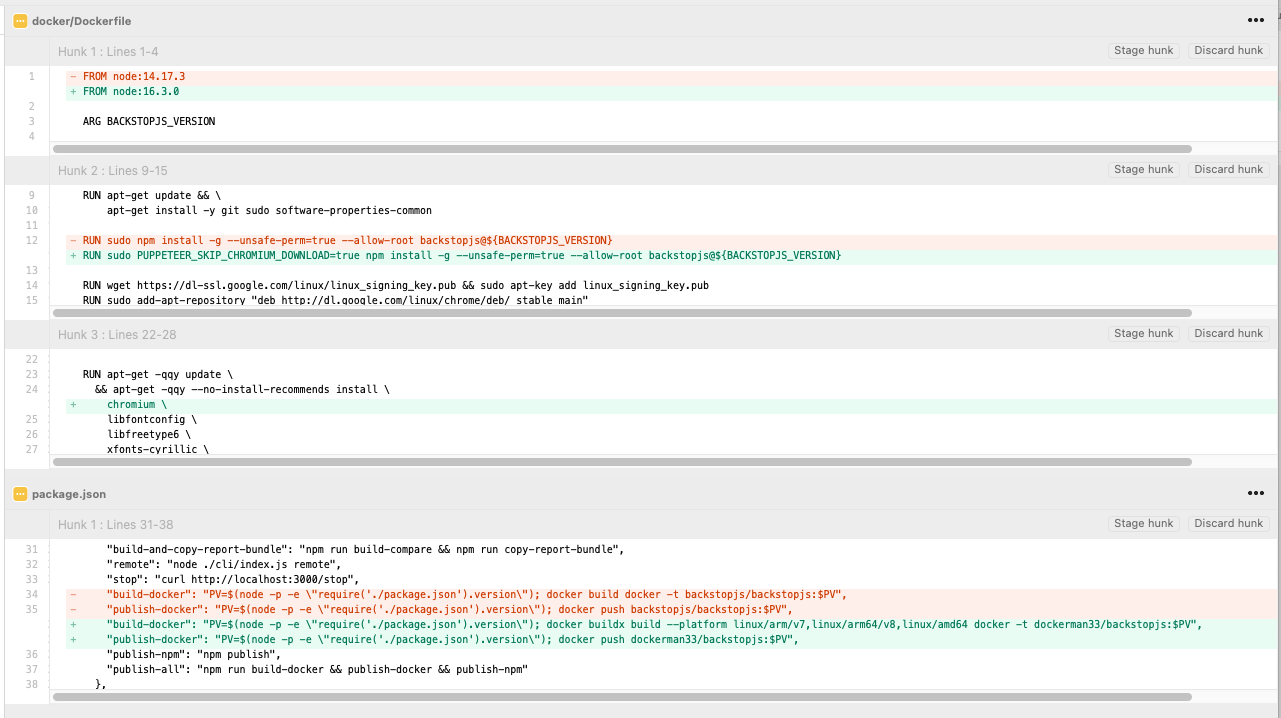
Here's what I changed vs commit 6a30f1f
Is there any headway on this issue? Trying to use an 2020 M1/linux/amd64/v8 MacBook Pro to run a BackstopJS/Puppeteer visual test suite and it's failing on the browser process.
COMMAND | Executing core for "test"
createBitmaps | Selected 52 of 52 scenarios.
      COMMAND | Command "test" ended with an error after [8.798s]
      COMMAND | Error: Failed to launch the browser process!
                [0316/121059.103496:ERROR:stack_trace_posix.cc(676)] Failed to parse the contents of /proc/self/maps
                [0316/121100.876341:ERROR:stack_trace_posix.cc(676)] Failed to parse the contents of /proc/self/maps
                [0316/121100.894221:ERROR:stack_trace_posix.cc(676)] Failed to parse the contents of /proc/self/maps
                [0316/121101.013268:FATAL:zygote_main_linux.cc(161)] Check failed: sandbox::ThreadHelpers::IsSingleThreaded().
                // ...
Any way to get this working without me having to manually modify the Docker image would be greatly appreciated.
