

 galaxyproject
Archive upload UI
This is an extension to John Chilton's https://github.com/galaxyproject/galaxy/issues/6202 so we can flesh out how the archive upload/extract feature will behave.
August 2023 update
After discussion with @ElectronicBlueberry and others after GCC2023, we have settled on a plan for implementation (see https://github.com/usegalaxy-au/elixir-biocommons-colab/issues/4). Before starting development on this feature, the upload UI needs to be refactored/Vueified (see https://github.com/galaxyproject/galaxy/issues/16407).
Proposed features:
v1 (MVP):
- Client-side zip archive upload
- Drilldown component to inspect/select zip content
- Inject selected archive elements in conventional upload rows (select datatype, genome, etc)
- Upload using API endpoint
v2+:
- Accept RO-crate spec, DRS and folder upload
- Backend web (URL) fetch (async; return archive tree to client, select, extract to datasets)
- Accept tar archives (backend and client?)
- Use of RANGE headers for partial web fetch of zip archives
In brief
There is currently no intelligent way to:
- Extract and upload elements of an archive (tar, zip etc)
- Extract an archive from the history
- Fetch and extract a remote archive (URL fetch)
This most likely requires a UI component to allow exploring and selection of archive contents. There will likely be a few functional variations to cover different use cases (e.g. local file, remote file, history dataset).
Current status
The API accepts tar/zip upload requests at /api/tools/fetch where target.extract_from = 'archive'.
Can also pass extract_from=bagit_archive to extract an archive (tar/zip) packaged in bagit format. See data_fetch.py.
However, we probably want to do the extraction in the client as much as possible (consider user wants to upload 2MB of files from 2 GB archive). Which means displaying a tree-view of the archive contents in the UI, extracting selecting datasets and uploading them with the standard dataset/collection upload API.
Things that we probably want to do
- [ ] Handle URL fetch (requires asyncronous download/extraction in backend)
- [ ] Set datatype explicitly (useful for URL fetch when filename is nonsense)
- [ ] Handle yaml description (I'm not even sure what this means, but John mentioned it)
- [ ] Handle zip archives in RO-crate spec (depends on development client-side RO-crate libs - speak to Dave Lopez)
- [ ] Allow upload to a collection (rather than dumping into history)
- [ ] Checkbox to upload into a new history
- [ ] Create an archive wizard flow, where user can explore the archive contents and selectively upload (see below)
- [ ] Accept history dataset (e.g.
tar) as an input (there's way to extract an archive in the history currently) - [ ] Extract and flatten entire archive to history datasets/collection
- [ ] Develop a partial fetch utility in the background that can fetch specified elements of a remote archive (stretch goal - this will be useful for RO-crate archives where the user knows which elements they require in advance). See library remoteZip.
Things that we might not want to do
- We don't want to upload a whole archive unless really necessary. As much client-side as possible.
- Upload multiple archives: not sure this makes sense with the "extract wizard" flow unless we use a rule-builder approach
Features
Datatype select
Each datatype can be handled in multiple ways (e.g. zip can be either bagit/RO-crate spec). We probably want a format select component with options None, BagIt, RO-crate, DRS etc that could apply to either a zip/tar upload.
Extract wizard
- Blindly dumping an entire archive into the current history will often create a horrible UX
- Assume that the user might want to extract archive elements to multiple collections/histories
- Either examine and display archive content in the client, or have the backend return a dir tree that the user can explore in the frontend (the latter is probably required for URL fetch)
- The user can then checkbox-select files/dirs and choose to send them to a history as datasets or collection
- As above, but use the rule-builder
URL fetch
- This would be enabled implicitly if we allow history datasets as archive input.

If we do a URL fetch is there any way to avoid fetching an entire archive (especially RO crate) when the user only wants a few files/collections from them?
If you can figure out how to do that in python then sure, we could add that, assuming there's a reasonable UI you could build.

Seems to be not possible unless the remote accepts the RANGE header (probably most do not - I only checked Zenodo).
byte-range ? that seems possible, https://github.com/zenodo/zenodo/issues/1599#issuecomment-971539126
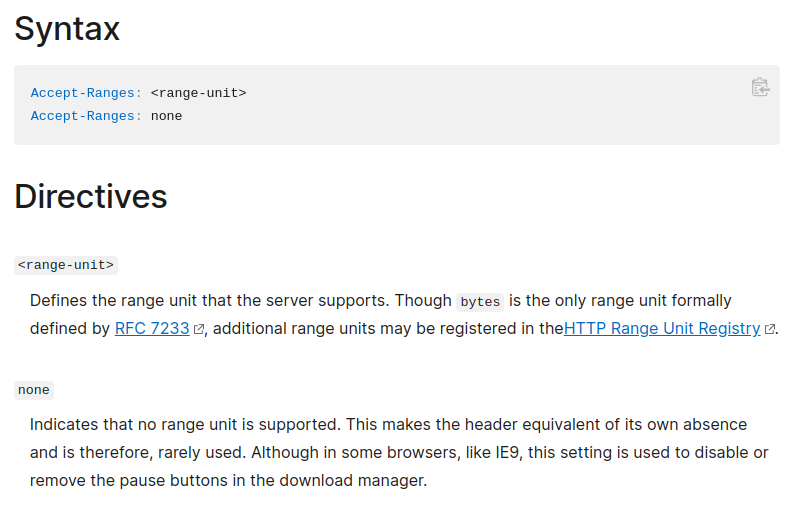
Weirdly... they return Accept-Ranges: none
$ curl -I https://zenodo.org/record/5702574/files/articles_by_influence.csv

HTTP/1.1 200 OK
Server: nginx
Content-Type: text/plain; charset=utf-8
Content-Length: 37093571
Vary: Accept-Encoding
Content-MD5: e0df4b883c2c36058577379468dec558
Content-Security-Policy: default-src 'none';
X-Content-Type-Options: nosniff
X-Download-Options: noopen
X-Permitted-Cross-Domain-Policies: none
X-Frame-Options: sameorigin
X-XSS-Protection: 1; mode=block
Content-Disposition: attachment; filename=articles_by_influence.csv
ETag: "md5:e0df4b883c2c36058577379468dec558"
Last-Modified: Thu, 23 Feb 2023 14:47:38 GMT
Date: Thu, 02 Mar 2023 22:11:27 GMT
Accept-Ranges: none
X-RateLimit-Limit: 60
X-RateLimit-Remaining: 59
X-RateLimit-Reset: 1677795147
Retry-After: 59
Strict-Transport-Security: max-age=0
Referrer-Policy: strict-origin-when-cross-origin
Set-Cookie: session=f20f6e71563f98b3_64011f0f.yKa-RiTSFrsTKo-fXBDL3_ThPEc; Expires=Sun, 02-Apr-2023 22:11:27 GMT; Secure; HttpOnly; Path=/
X-Session-ID: f20f6e71563f98b3_64011f0f
X-Request-ID: da5185b1a7620cb10dc36f5173bbe2cc
Yep, not sure why they do that, but it does work:
curl -i -r -180 https://zenodo.org/record/5702574/files/articles_by_influence.csv SIGINT(2) ↵ 10159 11:19:58 .venv (miniconda3)
HTTP/1.1 206 Partial Content
Server: nginx
Date: Fri, 03 Mar 2023 10:20:13 GMT
Content-Type: text/plain; charset=utf-8
Content-Length: 180
Content-Disposition: attachment; filename=articles_by_influence.csv
Accept-Ranges: none
Set-Cookie: session=33bb8dab337a4d39_6401c9dd.Dk4UQQHnEXuqZcGzwgv_DrVO09M; Expires=Mon, 03-Apr-2023 10:20:13 GMT; Secure; HttpOnly; Path=/
Content-Range: bytes 37093391-37093570/37093571
Accept-Ranges: bytes
Content-Type: text/plain; charset=utf-8
Content-MD5: e0df4b883c2c36058577379468dec558
Content-Security-Policy: default-src 'none';
X-Content-Type-Options: nosniff
X-Download-Options: noopen
X-Permitted-Cross-Domain-Policies: none
X-Frame-Options: sameorigin
X-XSS-Protection: 1; mode=block
Last-Modified: Thu, 23 Feb 2023 14:47:38 GMT
ETag: "md5:e0df4b883c2c36058577379468dec558"
X-RateLimit-Limit: 60
X-RateLimit-Remaining: 58
X-RateLimit-Reset: 1677838873
Retry-After: 59
Strict-Transport-Security: max-age=0
Referrer-Policy: strict-origin-when-cross-origin
7 0 -1
N/A PMC8555485 10.1007/s00337-021-00842-2 1.31989630514e-06 0.0 9.82215740599e-07 0 -1
N/A PMC8555486 10.1007/s41480-021-0842-z 1.31989630514e-06 0.0 9.82215740599e-07 0 -1
See that Accept-Ranges is sent twice ?
Nice! Yeah that is misleading. Thanks for checking that out, I'll have a think about how we can use this.
I guess some of these ideas were implemented in https://github.com/galaxyproject/galaxy/pull/20054. Just leaving the reference here for documenting.
