

 g1eb
g1eb
Tooltip positioning and content needs to be generalised.
Tooltip positioning logic is not considering relative position of the element within which heatmap is rendered. Its y position is computed on the basis of week-day and x position is computed based on the week number. But no consideration is made about the parent element position within which heat map is rendered. This causing me issues while rendering the tooltip because in my case heatmap component is added in between the page and its not even using 100% width.
Also, tooltip content is very tightly coupled. Is there a way we can customise tooltip. May be you can provide one more handler and we can handle on our own what to display in tooltip box when we hover on element.

If I understand correctly - there are two things here that need to be done, first one is a layout related issue with the tooltip position. It should take the parent element into consideration.
Second issue has to do with the format of the tooltip content. This one is a little bigger and will require some restructuring. Main concern here is to add this feature without a breaking change. How would that work with a handler function? What do you recommend as a fallback?

Hi, yes you are correct these are two separate issues.
For 1: I think we both are on same page i.e. our understandings are correct. This is bit urgent for me.
For 2: My approach would be, with each hover on heatmap element, you can provide a handler with parameters such as html element for tooltip, and details(date, day, year) about item that is hovered. Now, user can can construct the tooltip content with its styling and add it as inner html to the element that was passed as a parameter. Please suggest what do you think.
Great, if first issue is more important then let's do that one first. I can take a look at that somewhere this week (maybe tonight, but more likely tomorrow).
With respect to the second issue, I can see how it could be a handler function (given the current overview and the data where user hovered) if that function would return html element to be used as a tooltip. Although I haven't given it too much thought yet, I think it should be a separate ticket as well. Let's deal with the alignment thing first and look into this one after, deal? :)
Yeah.. Will do. Even i think the 2nd one will need more thoughts before implementation. Let me know once you get hold of the 1st one. I will be waiting.
Heyy, I've updated tooltip position to be relative to the parent element.
v0.1.8
Hi.. we are almost there.. there is some issue with x/left position computation when we are close to right edge of the parent element. I think in below snippet if you remove the logic to subtract tootip_padding then this issue should be solved.
if ( this.width - x < (this.tooltip_width + this.tooltip_padding * 3) ) { x -= this.tooltip_width + this.tooltip_padding * 2; }
Attaching screenshot for your reference.

Hmm I'm not able to reproduce this locally or on the githubraw either. And if I remove the extra padding the tooltip moves over the cursor which is not what you want (i think).
For testing purposes, could you set the background color of the tooltip to something other than white to see if it's right edge aligns with the cursor?
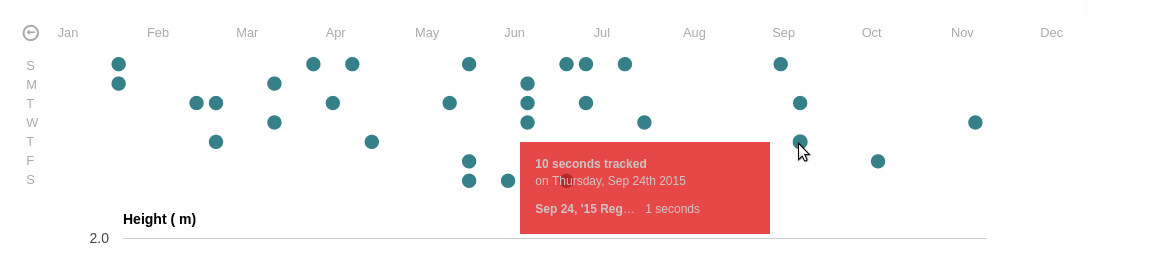
Hi... Please take a look @ new image with red background for tooltip. I was just playing with the styles in developer tool, And if I add 30px(2*15 which is tooltip_padding) more to the css left value, it works well. I still believe suggestion that i proposed will solve the issue. Please check.
That's very strange indeed, were you able to reproduce it with the version that's live on github raw?
Could this be some of your custom styling interfering with the tooltip? I've tried to reproduce this without any luck, see screenshot below
