

 furlongm
RHEL client reports failing to process due to yum multiline failure
Attempting to import reports from RHEL6/7 result in failure;
Traceback (most recent call last):
File "/usr/bin/patchman", line 687, in
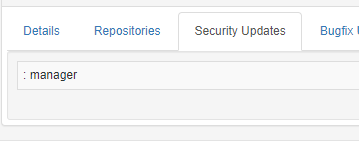
Because updates listed are;
Due to bug; https://bugzilla.redhat.com/show_bug.cgi?id=584525
Yum output vs piped yum output;

Works fine "most of the time" until you have an update for a package with a long name, or you include too many yum plugins (this issue specifically).
This workaround in the bugzilla above does work, just not sure if it will affect patchman. It essentially strips the newline from anything with blank spaces at the start, so the entries end up being longer. eg;


Thanks for the detailed bug report! Does the other workaround work too - using unbuffer?

Ha, completely missed that one!
Unbuffer does appear to work, but it adds some weird characters on anything that would have line wrapped;

OK, so I found a server with a few updates and tried the 2 commands;
- Unbuffer does break things quite a lot, those extra chars appear on everything in the patchman report. Not sure why/where.
- The 'tr/sed/tr' combo seems to work perfectly, I'm guessing you strip the extra whitespace somewhere else.
Also discovered that RHEL6 yum puts "Listing security packages only" in the output for 'yum --security', so I've tested with -q option, seems to all work well.
Hi,
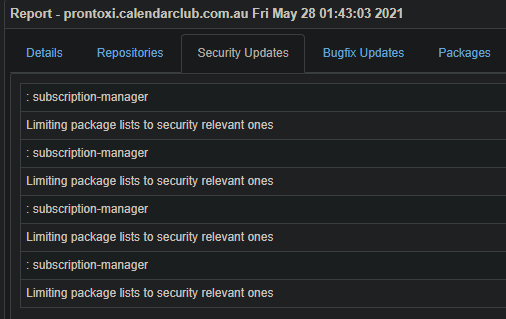
as a workaround, this error can be solved by adding following to patchman-client at get_yum_updates():
    | grep -v ': manager' \
    | grep -v ': subscription-manager' \
    | grep -v 'Limiting package lists to security relevant ones' \

@ryang-cvv does the workaround in https://github.com/furlongm/patchman/issues/324#issuecomment-850350418 fix the issue for you?
@ocnbb the below might be sufficient?
| grep -v ': ' \
| grep -v 'Limiting package lists to security relevant ones' \
I also did some testing with yum list updates | xargs -n3 | column -t but it requires the util-linux package, and still requires the above grep anyway.
@furlongm @ocnbb - both of those fix up the header issue, but the updates still return on multiple lines if too long.
You can strip out the plugin listing and all other junk with 'yum -q' - it still lists all the packages (but same bug obviously), so unless you need something else from yum, I think that's the better option.
As for the multiple lines, the 'tr/sed/tr' combo seems to work perfectly. I'm currently running;
    yum -q -C --security list updates --disablerepo="*" --enablerepo="${1}" 2>&1 \
    | tr "\n" "#" | sed -e 's/# / /g' | tr "#" "\n" \
    | grep -v 'excluded' \
    | grep -v 'Available Upgrades' \
    | grep -v 'Updated Packages' \
    | grep -v 'Last metadata expiration check' \
    | grep -v 'needed for security' \
    | grep -v 'Loaded plugins' \
    | grep -v 'Subscription Management' \
    >> "${tmpfile_sec}"
    yum -q -C list updates --disablerepo="*" --enablerepo="${1}" 2>&1 \
    | tr "\n" "#" | sed -e 's/# / /g' | tr "#" "\n" \
    | grep -v 'excluded' \
    | grep -v 'Available Upgrades' \
    | grep -v 'Updated Packages' \
    | grep -v 'Last metadata expiration check' \
    | grep -v 'Loaded plugins' \
    | grep -v 'Subscription Management' \
    >> "${tmpfile_bug}"
The '-q' should let you strip out most of those grep's though.
the below might be sufficient?
| grep -v ': ' \
| grep -v 'Limiting package lists to security relevant ones' \
@furlongm Probably, but I haven't tested it.
You can strip out the plugin listing and all other junk with 'yum -q' - it still lists all the packages (but same bug obviously), so unless you need something else from yum, I think that's the better option.
@ryang-cvv You are right, that's a better solution to the basic problem.
Hi @furlongm,
first of all I'm new to this topic and I'm sorry if my question is redundant.
I have a similar problem as shown above and I want to ask if I can solve it somehow by myself or if a fix can be integrated into the patchman-client? It is a RHEL 7.9 system.
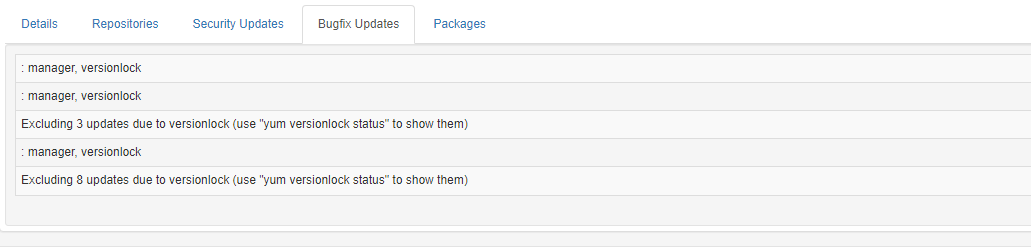
I get this error while executing patchman -p
Traceback (most recent call last):
  File "/usr/bin/patchman", line 686, in <module>
    main()
  File "/usr/bin/patchman", line 680, in main
    showhelp = process_args(args)
  File "/usr/bin/patchman", line 640, in process_args
    process_reports(args.host, args.force)
  File "/usr/bin/patchman", line 472, in process_reports
    report.process(find_updates=False)
  File "/usr/lib/python3/dist-packages/reports/models.py", line 159, in process
    process_updates(report=self, host=host)
  File "/usr/lib/python3/dist-packages/reports/utils.py", line 105, in process_updates
    bug_updates = parse_updates(report.bug_updates, False)
  File "/usr/lib/python3/dist-packages/reports/utils.py", line 147, in parse_updates
    ulist[1],
IndexError: list index out of range
Thank you!
