

 fullcalendar
Delay and cancel AJAX requests on event sources when month changed
I can't seem to find an issue about this which I am surprised by. Sorry if this is a duplicate.
I have this issue where if the current month is October and you want to go back to say February. Every time you click to view the previous month, it does an AJAX call (multiple if you have many event sources) and as a result slows down loading while it ques a bunch of AJAX calls.
It would be great if we could do two things:
- Specify a delay on how long before it starts to do the AJAX call when a month/view is changed.
- If AJAX calls are in progress when you choose another month/view, cancel those AJAX calls and start the new AJAX calls for the new month.

For number 2, there is no way to cancel an AJAX request. it probably already made it to the server at that point and there's no point in stopping it.
For number 1, it would be possible to add a delay. though I'd have to see if there's more demand for this feature before implementing it. my gut tells me that if someone needs to navigate through many many months like that, they should use another means of navigating, like what is described in #438

I ended up on this issue because I was looking for exactly the same thing, a delay before making the AJAX call.

+1. I'd like to see extra config variable 'delay'. Default value 500. Can be set to 0.


I've just been thinking about the same thing. @arshaw : I may miss something but why can the AJAX request be canceled as described here?
I actually tried to implement an abortAllReqs function that looks like this:
var abortAllAJAXReqs = function(){
   currentAJAXReqs.forEach(function (req,index,arr){
      req.abort();
    });
}
where I add a reference of a new AJAX call to the currentAJAXReqs when it is initiated and removed it from the array when it successfully returns. Thus only 'pending' reqs should be in the array. Note: for the latter I use the events (as a function), so that I can get the reference to the ajax call I initiate myself.
So far, it seems to work fine, the only issue I have found is that the fullcalendar loading cannot deal with aborted request since the isLoading will not jump to false on aborted reqs.

i understand the need for this. as @espen says, debounce is likely the solution to this, but should be handled internally and exposed through a simple option
agreed the lag this creates if a user flips 3 months ahead makes it seem for a few moments that there are no events, then as the multiple ajax's finally come back the events are rendered

Any updates on this issue? Rapidly clicking the next month buttons still fires multiple requests that do not get aborted. So if you want to go from January to July and you click the buttons really fast, there is going to be quite some delay because of all the started AJAX requests that are no longer needed but have yet to finish.

Another upvote for this issue. I've tried a couple of ways of handling this externally, but they all end up not updating the calendar view :/

You can use a function for events and in this function you can wrap your ajax call in a setTimeout then cancel it if needed

I'm my case, I have multiple event sources. I was able to make the debounce work using the eventSources and returning an array of functions. Created a getSources function for convenience:
eventSources: getSources()
And the functions code:
let source1Params = {};
let source2Params = {};

let debouncedSource1 = debounce(
  function () {
    $.ajax( {
      url: 'source/1/feed',
      dataType: 'json',
      data: {
        start: source1Params.start,
        end: source1Params.end
      },
      success: function( response ) {
        // Parse the response into an event list
        let eventList = ...
        source1Params.callback( eventList );
      }
    } );
  }, 200
);

let debouncedSource2 = debounce(
  function () {
    $.ajax( {
      url: 'source/2/feed',
      dataType: 'json',
      data: {
        start: source2Params.start,
        end: source2Params.end
      },
      success: function( response ) {
        // Parse the response into an event list
        let eventList = ...
        source2Params.callback( eventList );
      }
    } );
  }, 200
);

function getSources() {
  return [
    {
      id: 'source1',
      events: ( start, end, timezone, callback ) => {
        source1Params = {
          'start': start,
          'end': end,
          'timezone': timezone,
          'callback': callback
        };
        debouncedSource1();
      }
    },
    {
      id: 'source2',
      events: ( start, end, timezone, callback ) => {
        source2Params = {
          'start': start,
          'end': end,
          'timezone': timezone,
          'callback': callback
        };
        debouncedPlanned();
      }
    }
  ];
}
This works partially, i.e. if you click the next or prev buttons consecutively, it will prevent the multiple requests, sending only the last one as desired. However this also has multiple caveats:
- The
loadingcallback in the configuration will no longer work. This is because how theloadingLevelis implemented internally, it will be increased by the fast clicking, but not reduced, hence never reaching zero, that triggers the callback. - Clicking next, waiting for the debounce timer to end and the load to start, and clicking next again while it's loading will result in unpredictable results, with events not being rendered. My solution right now is disabling the navigation buttons while events are loading. This fixes the problem but makes navigation less responsive.
After all this, no, I don't think it's possible to get a satisfactory behaviour by using an external debounce function. For this to work seemingless it would require the functionality to be implemented internally in fullCalendar.
What I've done to solve this is build in a Timeout. I set a global variable "clipTimerId=0" and then when someone clicks, it hits "clearTimeout", then creates a new Timeout with the new call. If they don't click again within 1.5 seconds, the call goes through. If they rapid-click (like many of my users), then each time they click, it kills the previous Timeout call (before it goes to the server!) and creates a new one. That way, only the last one will actually go get events.
events: function (start, end, timezone, callback) {
		clearTimeout(clipTimerId);
		clipTimerId = setTimeout(function () {
			// go do your event-gathering here, then callback.
			callback(events);
		});
	}, 1500);
},

Any news on this?
I'm loading events from a JSON source with the dayView and need to prevent sending requests if the user is in progress of selecting a date with the prev/next buttons and only send one when the user settles on a specific date.

What I've also done is put a small calendar button on the top so people can use that to pick a date. When they select their date, the page refreshes to that date. This is much preferred by my users rather than repeatedly clicking "back" to get there. Which makes me happy too.
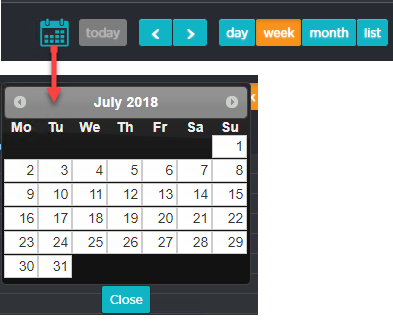
@JennMottram am I've done the same but some likes to spam the prev/next buttons as well :D I load the events with ajax though instead of reloading the whole page.
I solved this by creating 2 custom buttons for prev and next. And in their functions I am clearing my calendarTimeout and setting a new timeout where I use the .fullCalendar('gotoDate', date) function with the calculated amount of days based on how often the user clicks.
`myPrev: { text: '<', click: function(event, ui){ clearTimeout(calendarTimeout);
                        days = 1;
                        if($('#calendar').fullCalendar('getView').name == 'agendaWeek'){
                            days = 7;
                        }
                        calendarSkipCount -= days;

                        calendarTimeout = setTimeout(function(){
                            moment = $('#calendar').fullCalendar('getDate').add(calendarSkipCount, 'days');

                            $('#calendar').fullCalendar('gotoDate', moment.format('YYYY-MM-DD'));
                            calendarSkipCount = 0;
                        }, 500);
                    }
                }`
It seems that not aborting previous requests also causes the calendar to not render any events at all under special circumstances.
The following seems to be happening for me.
- Calendar has an event source configured.
- User changes the date.
- Request A is started.
- Old events get destroyed.
- User changes back to the original date.
- Request A is done.
- Old events get destroyed.
As you can see, request B is never made and thus the calendar is left empty. You can see a demo at https://imgur.com/a/9QOeaUQ.
Not sure if related to this or should be its separate issue?

It's been a long time since this issue was discussed, is there still no support for killing requests that are no longer used? I understand the thinking that debouncing can help but it also causes unnecessary UI lag that could be avoided by aborting requests that are no longer useful.
For number 2, there is no way to cancel an AJAX request. it probably already made it to the server at that point and there's no point in stopping it.
This was more true in 2015 but not so much today.
A request sent from the browser can be cancelled, and doing so will often abort the process on the server side due to the client connection closing. Consider a situation where the eventsource is a thin proxy that loads events via a 3rd party API, even if the 3rd party API is incapable of aborting based on a closed client connection, the proxy can abort thereby saving first party infrastructure resources.
In my mind there isn't really a great reason to not support this beyond developer bandwidth. Is that correct? Or is there more preventing fullcalendar from supporting killing requests?

What I've done to solve this is build in a Timeout. I set a global variable "clipTimerId=0" and then when someone clicks, it hits "clearTimeout", then creates a new Timeout with the new call. If they don't click again within 1.5 seconds, the call goes through. If they rapid-click (like many of my users), then each time they click, it kills the previous Timeout call (before it goes to the server!) and creates a new one. That way, only the last one will actually go get events.
events: function (start, end, timezone, callback) {
		clearTimeout(clipTimerId);
		clipTimerId = setTimeout(function () {
			// go do your event-gathering here, then callback.
			callback(events);
		});
	}, 1500);
},
I also used a workaround that did this, with an overlay while timer is running. It would be really nice to have this functionality in the library 👍
