fsmosca
[IMPROVE] Modularize project into packages. (v1.15)
WHAT
Improve project structure by modularizing different components.
WHY
- Improve the process of adding new features
- Improve maintainability
- I am Italian, but still I can't develop with this kind of spaghetti :)
HOW
- Create a separate package
python_easy_chess_gui - Move all constant global variables to
config - Move classes to 3 main sub-packages
-
engine_package -
play_package -
ui_package
- Parametrize with global variables the folder paths
-
Book -
Engines -
Icon -
Images


Started checking this PR.
- [x] Engine install
- [x] Engine edit
- [x] Engine delete
- [x] Set engine adviser
- [x] Set engine opponent
- [x] Set engine depth
- [x] Set book
- [x] Engine time
- [x] User time
- [x] Board flip
- [x] Board color
- [x] Board Theme
- [x] Settings/game
- [x] Engine play
- [x] Save to Mygames
- [x] Save to white repertoire
- [x] Save to black repertoire
- [x] Auto save games
- [x] Resign
- [x] User wins
- [x] User draws
- [x] New game
- [x] FEN paste
- [x] Engine go
- [x] Engine move now
- [x] Computer checkmates user
- [x] User checkmates computer
- [x] User stalemates computer
- [x] Draw by insufficient mating material
- [x] Draw by 3-fold repetition
- [x] Draw by 50-move draw rule
- [x] E.P. capture
- [x] Queen promotion
- [x] Minor promotion
- [ ] Compile to exe and test
@alfredo-f have you tried converting this to windows exe using pyinstaller? All my attempts so far in creating an exe were unsuccessful.
@alfredo-f have you tried converting this to windows exe using pyinstaller? All my attempts so far in creating an exe were unsuccessful.
Never mind, I got it now.
New issue, I can build an exe, but I cannot save the new installed engine in json. After restart, the new installed engine is not there. And I cannot find the engine json file. Perhaps the json files should be saved outside of the python_easy_chess_gui folder.
New issue, I can build an exe, but I cannot save the new installed engine in json. After restart, the new installed engine is not there. And I cannot find the engine json file. Perhaps the json files should be saved outside of the python_easy_chess_gui folder.
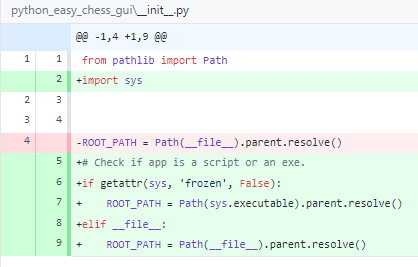
I can fix this now. This is due to ROOT_PATH definition. It has to be defined also with executable.
@alfredo-f
These are the issues that I found, the windows executable that I built complains about these issues.
- Define the string properly example.
engine_config_file = ROOT_PATH / 'pecg_engines.json'
With f string it should be:
engine_config_file = f'{ROOT_PATH}/pecg_engines.json'
A lot of these are in config.py.
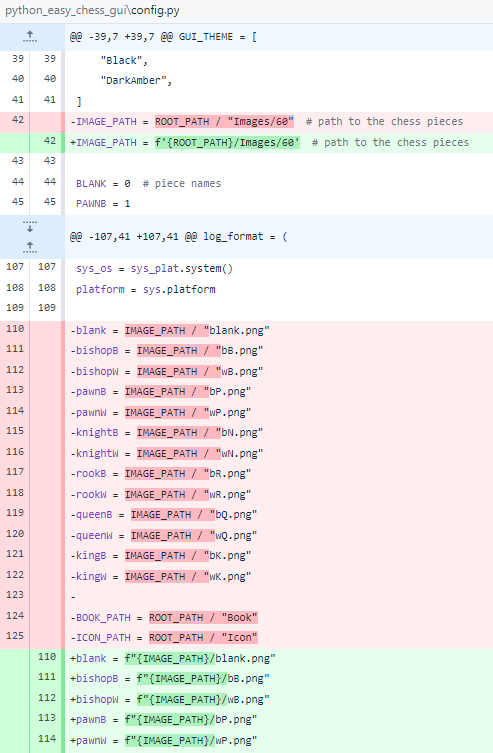
And here.
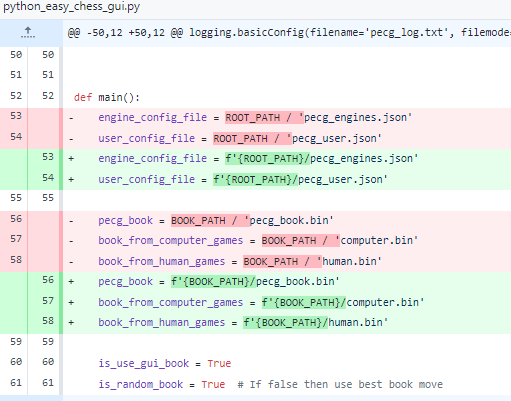
- In the init, detect if the app is an exe.