

 fritzing
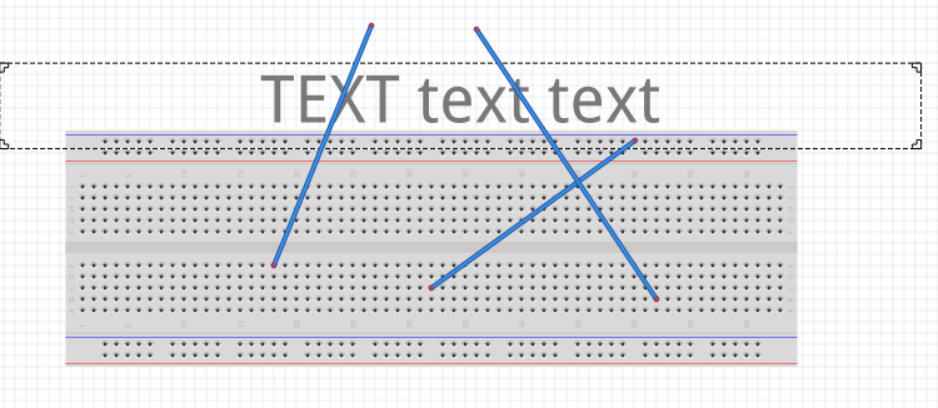
text is behind wires breadboard view
Problem
Text placed in the breadboard view can be hidden behind wires. It is not possible to move the text (Raise and Lower) to be above the wires.
Proposed Solution
From the symptoms, the text is being treated as a part, so it will always be above breadboard, and below wires. It could be better to treat the text as a wire, so that it will always be above parts and can be moved above the wires. Bonus to be able to control the opacity, to let the wires show through.
I do not see a scenario where having the text under a part makes sense. Unless trying to enhance the labelling of a part that is partially occluded.

 Same in sch view:
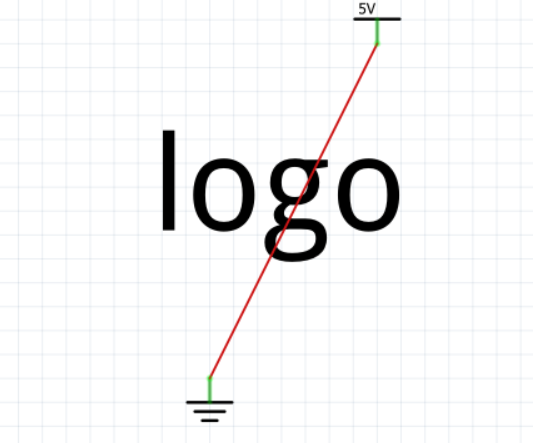 Add bug label?
I think that is a desirable default behavior.
However, in the PCB view we allow to select the "Layer" of a text or a graphic (Copper top, copper bottom, silk top, silk bottom).
Maybe we can add a similar option, a text could then moved to the "Part Labels Layer" or "Notes Layer". Not sure if this will automatically put them in the same rendering priority (easy implementation), but that is secondary.
Does it benefit the user?
- User can now choose
- We could keep the old behavior (existing projects would automatically use the parts layer)
- New projects could either keep the existing behavior, or use the part label layer by default (still would need to be decided, I tend towards putting text in the parts label layer, not the parts layer)
- Users likely would try the "Raise and Lower" feature first, and might overlook the layer property in the inspector. This could be a "Clippy" moment, were we would ask the user if they want to use a different layer instead.
This raises some questions about the "Layer" concept in the Breadboard view. I think it makes a lot of sense to use similar concepts in the different views. But are there any reasons a "Logo" must be in the parts layer, not in the notes layer or part label layer?

The text being in the parts layer was the problem that prompted the original report started. If it is in the parts layer, it is always 'under' the wires, which is (in my usage) not appropriate. I do not know where the notes and part label layers 'stack' (rendering order) compared to others, so have no basis to choose. The goal is (be able to) get the text above the wires.
I drafted a proof of concept. Extract the part (gunzip), then drag and drop to Fritzing. It should give you a text that is in the part label layer, which is rendered above the wire layer.
There is still a todo: Aligning it with the existing text logo part. So that Fritzing will offer to switch the layer in the Inspectors "Location" properties.
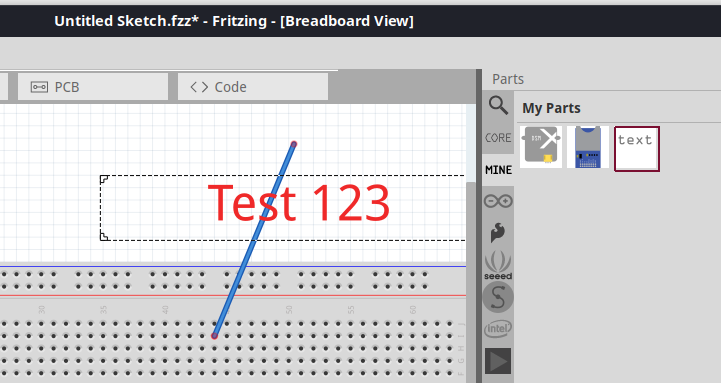
The text stacking looks fine. The 'aligning' should need an extra property in both this and the core part with different values. variant is commonly used. Here, something like stacking, z-ordering, layer, or similar is probably appropriate.
I don't think it matters to Fritzing, but I noticed that the core part is "logo" family, while the test part is "Logo" family (uppercase).
Another person found this issue in the forum: https://forum.fritzing.org/t/labels-for-wires-ensuring-text-stays-on-top-of-wires/24747 The raise and lower commands do not work as they only order items in the same layer and thus the text cannot be placed above the wires (the reported managed to that because he is using an old version, which has a bug). I do not see any situation where it would be interesting to keep the current behavior and I would fix this and not let users to select the layer. Users are not aware of layers in BB or SCH.
Regarding the forum post. It is already possible to set a "Title" for a wire. However, it is only visible with a mouseover.
It could make sense to a. just enable label items for wires, like for parts b. or even render the text on the wire itself (on high zoom levels)
But yes, I think a direct fix could be to always let the logo part use the Part Labels Layer , instead of the Part Layer.
Already possible in the PCB view (logo is in silk top layer)
But not with the default logo in the breadboard view. It uses the part layer, but should use the part label layer or similar.
I created #4179 for fully fledged labels on wires.
Open questions about showing logo text on top in the breadboard view (this issue):
How to deal with existing sketches. Should we just render them with the text on top? If not, do we want to add a flag to mark 'new' text logo items? Or add a new text layer, that is always on top?
Probably we can use the "label" layer for new text logo items by default, but still support text logo items that use the parts layer.
I have reviewed the history here. For my own usage, I do not see a case where I would not want the text to be rendered in the top most layer for breadboard view. That said, there could be others with use cases that are different. I just don't see them. It is also not nice to surprise users with a different behaviour of an existing sketch.