
StatusLive
 StatusLive copied to clipboard
 freejishu
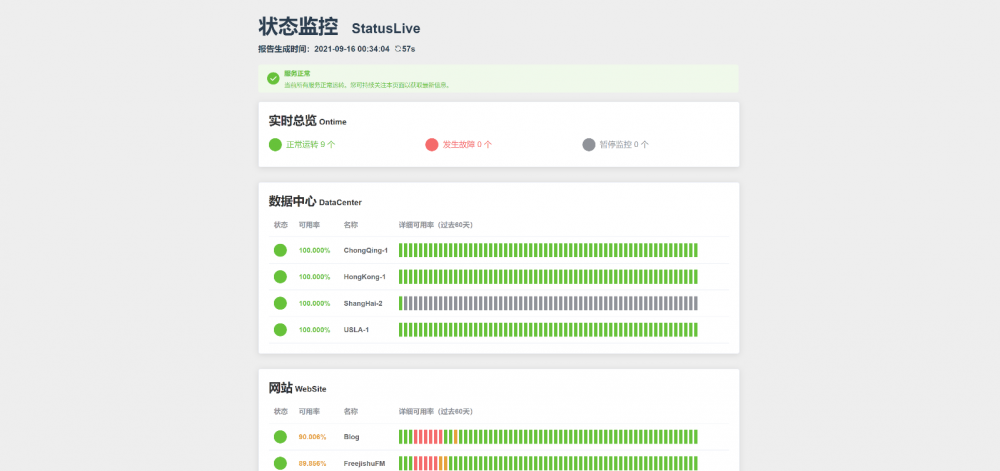
StatusLive is a status page based on Uptimerobot. The data is based on Uptimerobot API.Register an Uptimerobot account and add monitoring points to build your own status page. StatusLive 是一个基于 Up...
StatusLive 

简洁 · 快速 · 轻便
What's StatusLive?
StatusLive 是一个基于 Uptimerobot 的状态页,数据基于 Uptimerobot API 而来。
StatusLive is a status page based on Uptimerobot. The data is based on Uptimerobot API.
注册一个 Uptimerobot 账户并添加监测点,即可搭建属于自己的、高可用的状态页面。
Register an Uptimerobot account and add monitoring points to build your own status page.
Demo
https://status.freejishu.com/
How to use
-
注册一个
UptimeRobot账户并添加监控节点。 -
⭐Star 一下,然后从 Releases 下载最新版本并解压。
-
配置配置文件 conf.json
{
    "config_title": "状态监控",      //页面标题
    "config_title_english": "StatusLive",    //页面副标题

    "config_mode": 2,  //模式选项,1为公开模式,2为隐私模式(模式区别请看下方)
    "config_readonly_apikey": "USE_SERVER_APIKEY", //公开模式用,填写从UptimeRobot后台获得的ReadOnly-ApiKey
    "config_proxy_link": "/core.php", //隐私模式用,反代访问路径

    "config_history_time": 60, //获取过去 X 天的可用率,单位为天
    "config_logs_history_days": 30, //获取过去 X 天的状态日志,单位为天

    "config_success_min": 98, //合格(success)等级标准,低于此数字为警告(warning)等级
    "config_warning_min": 90, //警告(warning)等级标准,低于此数字为危险(danger)等级
    "config_auto_refresh_seconds": 60 //自动刷新时间,单位为秒,填写0为禁用自动刷新
}
-
公开模式(不推荐)
最简单、快速的开箱方式。系统会根据
conf.json内的config_readonly_apikey直接请求 UptimeRobot API 接口。此模式不需要core.php。conf.json内应该如此填写:"config_mode": 1, "config_readonly_apikey": "ur609264-xxxxxxxxxxxxxxxxxxxxxxxx",注意:一定要使用
只读ApiKey (Read-Only API Key)!如果觉得直接请求 UptimeRobot API 接口速度有些差,您也可以使用下面的隐私模式反代以提高速度。
-
隐私模式(推荐)
由于UptimeRobot API返回数据内包含
url、http_username、http_password、port等字段,直接请求可能会导致真实域名、IP等泄露,故推荐使用隐私模式。conf.json内应该如此填写:"config_mode": 2, "config_readonly_apikey": "USE_SERVER_APIKEY", "config_proxy_link": "/core.php", //填写你的core.php路径对反代文件
core.php,您需要先修改其中部分配置://在这里填入你的API_KEY,如果使用公开模式则置空避免key被更改。 $apikey = 'ur609264-xxxxxxxxxxxxxxxxxxxxxxxx'; //json缓存文件名,可自行配置 $file_name = 'uptime.json'; //缓存时间,单位为秒,因为UptimeRobotAPI免费用户调用限制为10次/分钟故不建议低于6 $cache_time = 10;接下来您可以将其放到任意服务器上,只需做好 CORS 和在
config_proxy_link中填写好地址即可。如果计划将
core.php用于如Vercel等 Serverless Functions 平台,请注释掉core.php的第49行避免写入错误。仍然计划提供一个供大家使用的反代,请期待后续版本。关于
core.php的更多玩法和常见问题,请参照 这里。 -
conf.json的其余字段根据上文提示填写即可。注意JSON文件不能存在注释。
- 上传到服务器,然后 Enjoy it!
Migration from v1.x
v1.x 使用参照:https://www.freejishu.com/statuslive-for-you/
基于各种各样的考虑,v2.x 采用了全新的技术栈,故 v1.x 不能直接迁移到 v2.x 。但是不用担心,基于开箱即用的特性,你会很快上手 v2.x 的。
注:v2.x 通过切换分支的形式实现过渡,即原 master 分支被重命名为 v1.x,而 v2.x 重命名为 master ,并切换了一次默认分支。如果之前 fork 过项目,可能需要重新 fork 或进行同步操作才能继续操作。
Licenses
MIT
How to Rebuild
-
Clone the code
-
Project setup
yarn install -
Compiles and hot-reloads for development & Compiles and minifies for production
yarn serve yarn build -
Customize configuration See Configuration Reference.
 freejishu