

 freeCodeCamp
Development setup not working. App doesn't start and listen at 8080
The development setup is not working for me. This is the log I get for the production environment script :
Log :
karuppiah@karuppiah ~/F/Mail-for-Good> export NODE_ENV=production ; ./node_modules/pm2/bin/pm2 start server/index.js --node-args=server/feedback-consumer/consumer.js --no-daemon
pm2 launched in no-daemon mode (you can add DEBUG="*" env variable to get more messages)
2017-07-16 10:08:58: Launching in no daemon mode
2017-07-16 10:08:58: [PM2] Starting /home/karuppiah/FOSS/Mail-for-Good/server/index.js in fork_mode (1 instance)
2017-07-16 10:08:58: Starting execution sequence in -fork mode- for app name:index id:0
2017-07-16 10:08:58: App name:index id:0 online
2017-07-16 10:08:58: [PM2] Done.
2017-07-16 10:08:58: ┌──────────┬────┬──────┬───────┬────────┬─────────┬────────┬─────┬───────────┬──────────┐
│ App name │ id │ mode │ pid   │ status │ restart │ uptime │ cpu │ mem       │ watching │
├──────────┼────┼──────┼───────┼────────┼─────────┼────────┼─────┼───────────┼──────────┤
│ index    │ 0  │ fork │ 15788 │ online │ 0       │ 0s     │ 14% │ 25.1 MB   │ disabled │
└──────────┴────┴──────┴───────┴────────┴─────────┴────────┴─────┴───────────┴──────────┘
2017-07-16 10:08:58:  Use `pm2 show <id|name>` to get more details about an app
2017-07-16 10:08:58: [--no-daemon] Continue to stream logs
2017-07-16 10:08:58: [--no-daemon] Exit on target PM2 exit pid=15778
2017-07-16 10:08:58: [STREAMING] Now streaming realtime logs for [all] processes
10:08:59 0|index    | Feedback consumer started: watching for feedback messages (bounces, complaints, etc) from SQS
10:08:59 0|index    | (node:15788) DeprecationWarning: Using the automatically created return value from client.query as an event emitter is deprecated and will be removed in [email protected]. Please see the upgrade guide at https://node-postgres.com/guides/upgrading

@zhakkarn @ZaynMalloc Is it working for you guys ? I tried in staging and even in master branch. Both of them don't work for me
Okay, looks like there have been some changes in the package.json file and I removed the node_modules folder and did a clean npm install
But even now, the start script doesn't work and also, the dev script did start the app but says URL not found for /login and other URLs too

It doesn't show any errors in the console, or I would paste it here. It only showed in the browser that the page is not found. No error or any other log in the console
I'm not able to reproduce this - I've used both Docker and npm run dev. @zhakkarn have you encountered anything like this?
I've changed the 'npm start' script as it shouldn't really use a process manager.
Double check you're running both redis & postgresql as services. Alternatively, docker-compose will handle this for you.
Yes, I double checked. The thing is, I don't get any errors too.
The thing is, I recently dropped my database to reproduce an issue in the repo for development setup. The issue was relating to an error about a relation not existing. That's the only thing I did. I did it again now and created a new database for the app, but still same behavior. You have to drop your database and create a new one to reproduce this bug (and the old "relation doesn't exist" bug still seems to exist for the start script but not for the dev script)
Also, for the "relation doesn't exist" error, if I run dev script first and then the start script, I get rid of those errors. This happened last time too
But last time, the app worked and served pages and did stuff. It doesn't work this time though
Thanks @karuppiah7890 - I've confirmed this bux and am working on a fix.
It is related to newer versions of npm.
This was related to #https://github.com/npm/npm/issues/17708, the nested node_modules folder in socket.io-client was not being handled by NPM v5.0 correctly. The socket-io lib contained its own node_modules folder containing libraries which were to be exported to ./node_modules. This was not happening, causing the error in question.
I think it's something to do with the lockfile, but it's all very unclear. By some manner of magic, I think this is now fixed.
@AndrewGHC Uh, I don't get you exactly. I will check more about the npm bug and about the exporting you just mentioned. I thought having the socket.io-client module explicitly was the only way to get it to work.
And by the way, I think you mixed up #167 and this ( #166 ) issue and posted some comments here
The socket.io-client module is included with the socket.io library. It is nested within this module's node_modules directory.
I did mix it up a bit with this issue. This one is also now fixed.
Please try out the latest staging branch and let me know if https://github.com/freeCodeCamp/mail-for-good/issues/167 persists.
@AndrewGHC Yes, I did see that in the socket.io repo issue you referred and checked it in my node_modules folder inside socket.io module. But I didn't know about exporting and stuff though.
And yes, I just tried it out. Still some issues due to unavailability of development dependencies. Some weird npm issues. I mentioned it even in #167 too
I just cloned the repo to try to make a contribution, and am running into the same issue. The server will start and serve pages, but I cannot logout/login, and the current user is "undefined." This happened for both the master and the staging branches. Also, adding a list seems to be broken.
Ubuntu 16.04 Node 8.1.3 NPM 5.0.3

@ZackWard Yes, sorry about that. The issue is regarding some login/logout thing in the dev mode, from what I see (I just tried it out too). I just found a workaround for you to start developing. First run the application in production mode like this :
$ npm run build
$ npm start
And then use the application in the browser and login. After this, don't logout. Now stop the npm start process with Cmd/Ctrl + C and then do npm run dev and you should be able to see the app already logged in and you can start developing now
@ZackWard The new version of NPM threw a bit of a wrench into the works, a few issues appear to have emerged. Next week I'll do another fresh install on an Ubuntu VM to debug this.
Hey guys.
Just installed the app myself and can confirm the login/logout issue is still happening. Any ideas when this will be fixed?

@omulmicsinegru Can you give more detail ? Logs and what error you saw in the browser, may be a snapshot

Okay, so you don't get the Google login screen at all. What do you get in the console ? Please paste the log
this is what i get in the terminal:
Mateis-Mac:Mail-for-Good matei$ npm run dev

> [email protected] dev /Users/matei/Work/GitProjects/Mail-for-Good
> DEV_SEND_RATE=200 NODE_ENV=development node server/index.js

Clickthrough tracking: Make sure that geoip data has been downloaded:
   $ cd node_modules/geoip-lite
   $ npm run-script updatedb

  ############################
  #   Mail 4 Good started    #
  ############################
  # Port: 8080
  ############################

(node:442) DeprecationWarning: Using the automatically created return value from client.query as an event emitter is deprecated and will be removed in [email protected]. Please see the upgrade guide at https://node-postgres.com/guides/upgrading
webpack: wait until bundle finished: /index.html
webpack built a0e0bd16e21712dc9a7b in 16823ms

webpack: Compiled successfully.
@karuppiah7890 I don't know where the logs are. Can you please tell me so i can paste those as well?
@omulmicsinegru I was asking for the above logs only actually :) Okay, can you check the Network logs in the browser and also check the Console tab for errors by refreshing the page ?
And do mention the node and npm version using this
node --version
npm --version
:smile:
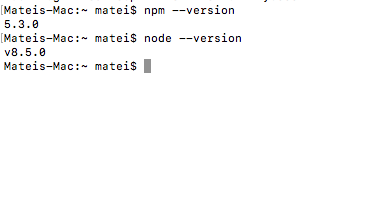

@omulmicsinegru Ah. It's the npm version I think ? I had issues when I used v5.3.0. Try using v5.0.3. I have to update my local repo and try too. Been long since I used the App