

 frangoteam
Using OPC UA with server certificates.
I ran into the following issue of FUXA (current master branch) not trusting the server certificate when using an OPC UA device with security policies that use the server certificate (e.g. Aes128-Sha256-RsaOaep). If I'm using None for the policy and security mode the issue does not appear. I'm not using client-side certificates, but username/password for client authentication.
I have the following log (omitted parts contain the server cert and related fingerprints:
14:08:15.351Z :client_base_impl              :168   serverCertificate =  <ommited by author of this issue>
2022-03-14T14:08:15.351277417Z 14:08:15.351Z :client_base_impl              :169   serverCertificate =  <omitted by author of this issue>
2022-03-14T14:08:15.351389007Z 14:08:15.351Z :client_base_impl              :1074  [NODE-OPCUA-W25] client's server certificate verification has failed  server Certificate verification failed with err BadCertificateRevocationUnknown (0x801b0000)
2022-03-14T14:08:15.351503407Z 14:08:15.351Z :client_base_impl              :1075                    /root/.config/node-opcua-default-nodejs/PKI
2022-03-14T14:08:15.351658087Z 14:08:15.351Z :client_base_impl              :1076                    <ommited by author of this issue>
2022-03-14T14:08:15.351683997Z  ...                                                                 <omitted by author of this issue>
2022-03-14T14:08:15.351735227Z  ...                                                                 <omitted by author of this issue>
2022-03-14T14:08:15.351750157Z  ...                                                                 <omitted by author of this issue>
2022-03-14T14:08:15.351754967Z  ...                                                                 <omitted by author of this issue>
2022-03-14T14:08:15.351759567Z  ...                                                                 <omitted by author of this issue>
2022-03-14T14:08:15.351763337Z  ...                                                                 <omitted by author of this issue>
2022-03-14T14:08:15.351777137Z  ...                                                                 <omitted by author of this issue>
2022-03-14T14:08:15.351781757Z  ...                                                                 <omitted by author of this issue>
2022-03-14T14:08:15.351786357Z  ...                                                                 <omitted by author of this issue>
2022-03-14T14:08:15.351803727Z  ...                                                                 <omitted by author of this issue>
2022-03-14T14:08:15.351807187Z  ...                                                                 <omitted by author of this issue>
2022-03-14T14:08:15.351929637Z  ...                                                                 <omitted by author of this issue>
2022-03-14T14:08:15.351945617Z  ...                                                                 <omitted by author of this issue>
2022-03-14T14:08:15.351952287Z  ...                                                                 <omitted by author of this issue>
2022-03-14T14:08:15.351957857Z  ...                                                                 <omitted by author of this issue>
2022-03-14T14:08:15.351962217Z  ...                                                                 <omitted by author of this issue>
2022-03-14T14:08:15.351967197Z  ...                                                                 <omitted by author of this issue>
2022-03-14T14:08:15.352015237Z 14:08:15.351Z :client_base_impl              :1077                   verify that server certificate is trusted or that server certificate issuer's certificate is present in the issuer folder
2022-03-14T14:08:15.352647437Z 2022-03-14T14:08:15.352Z [ERR] 	'PLC-OPCUA' connect failure! Error: server Certificate verification failed with err BadCertificateRevocationUnknown (0x801b0000)
2022-03-14T14:08:15.352842597Z 2022-03-14T14:08:15.352Z [ERR] 	'PLC-OPCUA' try to connect error! Error: server Certificate verification failed with err BadCertificateRevocationUnknown (0x801b0000)
So I figured I would add the CA certificate (used to sign the server certificate) and the CRL to the folder structure the following way:
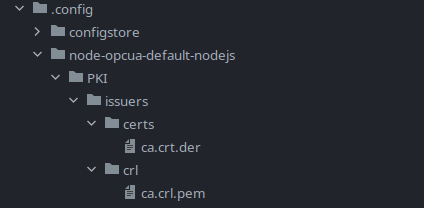
However, this has not resolved the issue.

Hi, I think you're right. I didn't use it, so I ignored it. :( I need to look at node-opcua how to add it, can you help me?

Update
To give a small update on this.
The files are actually read by node-opcua from ~/.config/node-opcua-default-nodejs/PKI/ (the default directory for everything PKI related) and partially processed (CA certs are read and added).
I'm pretty certain that the issue in node-opcua itself, which throws an shadowed exception while processing my CRL. So far I wasn't able to find the cause of that exception and will report the error there.
I will update if I find a solution or tracked the issue down further.
For people experiencing similar issues
If anyone wants to use server certificates you can probably put certificates and CRLs into ~/.config/node-opcua-default-nodejs/PKI/ and it might work without any modifications to the current OPC UA plugin.
Future Consideration
It might be a good idea to disable automatically trusting unknown server certificates:
- https://node-opcua.github.io/api_doc/2.32.0/classes/node_opcua.opcuacertificatemanager.html#constructor
- https://node-opcua.github.io/api_doc/2.32.0/interfaces/node_opcua.opcuaclientoptions.html
node-opcua has this enabled by default due to backwards compatibility, however I don't think it's wise to keep enabled.

