

 fralx
fralx
Version information missing
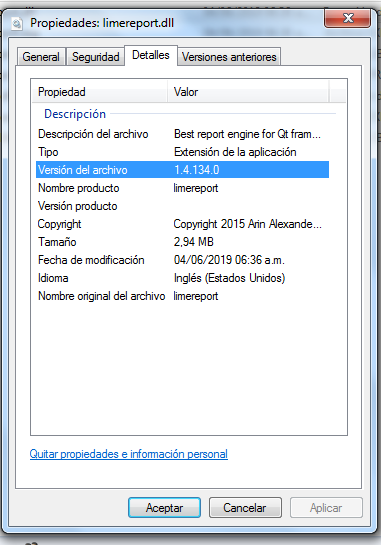
Greetings every body, Since Limereport is constantly evolving I thing is important to be able to check quickly what version of the library you are using without having to open Limereport designer, so I made some changes to limereport.pro inside limereport folder to add version information, created MyApp.rc file to add version info and I created a 48x48 verison of Limereport logo in .ico and .png formats, now in Windows if you right click on limereport.dll and click on properties you will see this:
I attached the modified version just in case you like to apply changes to Develop version.
Have a great day. limereport-with-Version-info.zip

Dear Arin,
Greetings and congratulations to you and all the Team at Github for such a good job, Limereport has improved a lot, but I still think is important be able to check quickly what version of the library you are using without having to open Limereport designer, so I made some changes to limereport.pro inside limereport folder to add version information based on common.pri version info, created MyApp.rc file to add version info and I created 16, 32, 48, 64 pixels versions of Limereport logo in .ico format, now in Windows if you right click on limereport.dll and click on properties you will see this:

I also corrected and update the spanish translations!
So here it is, if you can add it to develop or production releases will be great!
