
terraform-provider-fortios
 terraform-provider-fortios copied to clipboard
 fortinetdev
fortios_system_ha not working for FGSP config
We have configured the HA by CLI however we are not able to use resources.
The resource "fortios_system_ha" returns a 500 error and the JSON one we have a status 200 however we cannot see any configuration applied.
#resource "fortios_system_ha" "system_ha_group_fgsp" {

# mode                               = "standalone"
#     session_pickup                 = "enable"
#     session_pickup_connectionless  = "enable"
#     session_pickup_expectation     = "enable"
#     session_pickup_nat             = "enable"
#     override                       = "disable"
# }
Using Fortios API:
# resource "fortios_json_generic_api" "system_ha" {
#  path   = "/api/v2/cmdb/system/ha"
#  method = "PUT"
#  json   = <<EOF
# {
#     "mode":"standalone",
#     "session_pickup":"enable",
#     "session_pickup_connectionless":"enable",
#     "session_pickup_expectation":"enable",
#     "session_pickup_nat":"enable",
#     "override": "disable"

# }
# EOF
# }
Anyone can help?
Thanks"!

Hi @br1serrano , thanks for reaching out to us. I have tested your configuration and the issue has not reproduced. Can you please provide your FortiGate version?
# cat maintst.tf
provider "fortios" {
  hostname = "192.168.52.177"
  token = "rGqsgj9Qmh3dwfQdc8hd3t3G6xG3N5"
  insecure = "true"
}

resource "fortios_system_ha" "trname" {
  mode                           = "standalone"
  session_pickup                 = "enable"
  session_pickup_connectionless  = "enable"
  session_pickup_expectation     = "enable"
  session_pickup_nat             = "enable"
  override                       = "disable"
}
# terraform plan ... # terraform apply
An execution plan has been generated and is shown below.
Resource actions are indicated with the following symbols:
  + create

Terraform will perform the following actions:

  # fortios_system_ha.trname will be created
  + resource "fortios_system_ha" "trname" {
      + arps                          = (known after apply)
      + arps_interval                 = (known after apply)
      + authentication                = (known after apply)
      + cpu_threshold                 = (known after apply)
      + encryption                    = (known after apply)
      + ftp_proxy_threshold           = (known after apply)
      + gratuitous_arps               = (known after apply)
      + group_id                      = (known after apply)
      + group_name                    = (known after apply)
      + ha_direct                     = (known after apply)
      + ha_eth_type                   = (known after apply)
      + ha_mgmt_status                = (known after apply)
      + ha_uptime_diff_margin         = (known after apply)
      + hb_interval                   = (known after apply)
      + hb_lost_threshold             = (known after apply)
      + hbdev                         = (known after apply)
      + hc_eth_type                   = (known after apply)
      + hello_holddown                = (known after apply)
      + http_proxy_threshold          = (known after apply)
      + id                            = (known after apply)
      + imap_proxy_threshold          = (known after apply)
      + inter_cluster_session_sync    = (known after apply)
      + l2ep_eth_type                 = (known after apply)
      + link_failed_signal            = (known after apply)
      + load_balance_all              = (known after apply)
      + memory_compatible_mode        = (known after apply)
      + memory_threshold              = (known after apply)
      + mode                          = "standalone"
      + monitor                       = (known after apply)
      + multicast_ttl                 = (known after apply)
      + nntp_proxy_threshold          = (known after apply)
      + override                      = "disable"
      + override_wait_time            = (known after apply)
      + pingserver_failover_threshold = (known after apply)
      + pingserver_flip_timeout       = (known after apply)
      + pingserver_monitor_interface  = (known after apply)
      + pingserver_slave_force_reset  = (known after apply)
      + pop3_proxy_threshold          = (known after apply)
      + priority                      = (known after apply)
      + route_hold                    = (known after apply)
      + route_ttl                     = (known after apply)
      + route_wait                    = (known after apply)
      + schedule                      = (known after apply)
      + session_pickup                = "enable"
      + session_pickup_connectionless = "enable"
      + session_pickup_delay          = (known after apply)
      + session_pickup_expectation    = "enable"
      + session_pickup_nat            = "enable"
      + session_sync_dev              = (known after apply)
      + smtp_proxy_threshold          = (known after apply)
      + standalone_config_sync        = (known after apply)
      + standalone_mgmt_vdom          = (known after apply)
      + sync_config                   = (known after apply)
      + sync_packet_balance           = (known after apply)
      + unicast_hb                    = (known after apply)
      + unicast_hb_netmask            = (known after apply)
      + unicast_hb_peerip             = (known after apply)
      + uninterruptible_upgrade       = (known after apply)
      + vcluster2                     = (known after apply)
      + vcluster_id                   = (known after apply)
      + vdom                          = (known after apply)
      + weight                        = (known after apply)
    }

Plan: 1 to add, 0 to change, 0 to destroy.

Do you want to perform these actions?
  Terraform will perform the actions described above.
  Only 'yes' will be accepted to approve.

  Enter a value: yes

fortios_system_ha.trname: Creating...
fortios_system_ha.trname: Creation complete after 0s [id=SystemHa]

Apply complete! Resources: 1 added, 0 changed, 0 destroyed.
You can add the following code to print the output of the generic resource:
output "response2" {
  value = "${fortios_json_generic_api.system_ha.response}"
}
Thank you!

Hello.
Thanks for the answer
Running on a Azure Fortigate 6.2.4
I have the same result on the terraform apply however the configuration is not applied on the device. My mistake I did not explain the problem correctly
I will update the output later
Thanks!
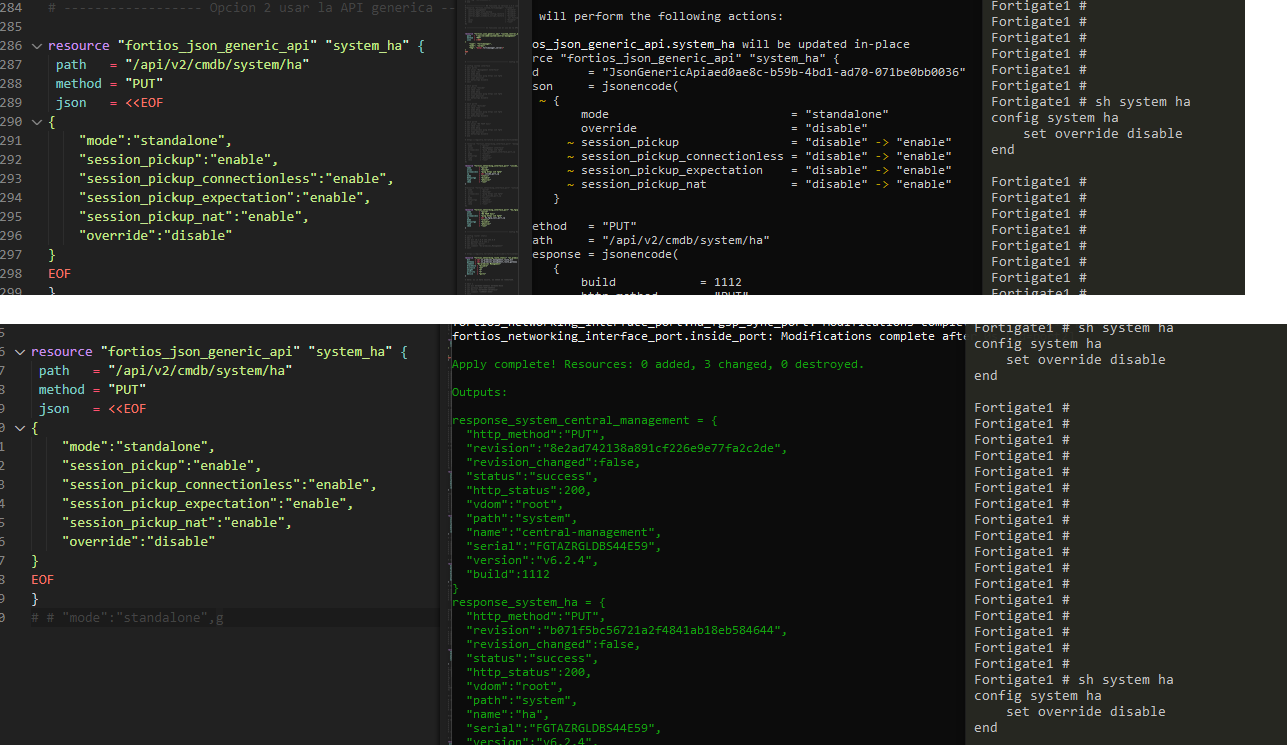
Here the application process. As you can see all changes are ignored.
Thanks! Bruno
Hi @br1serrano Bruno, thanks for the update and the information! After analysis, we found the root cause is that FortiAPI cannot set the override attribute, subsequently, the entire resource delivery failed. We are in contact with the related team to find a solution, a bug ticket has been created internally to track this issue, will get back to you once it's resolved. By the way, the following resource can be used as an alternative to configure HA:
1 Show init HA Configuration
mytestFortiGate (ha) # show
config system ha
    set override disable
end
2 Config HA
resource "fortios_system_autoscript" "trname" {
  interval    = 1
  name        = "1"
  output_size = 10
  repeat      = 1
  script      = <<EOF
config system ha
    set session-pickup enable
    set session-pickup-connectionless enable
    set session-pickup-expectation enable
    set session-pickup-nat enable
    set override disable
end

EOF
  start       = "auto"
}
3 Show result
mytestFortiGate (ha) # show
config system ha
    set session-pickup enable
    set session-pickup-connectionless enable
    set session-pickup-expectation enable
    set session-pickup-nat enable
    set override disable
end
Let me know if you have any questions, thanks!
Hello!
It works but with a small change
resource "fortios_system_autoscript" "trname" {
  interval    = 1
  name        = "NAME1"    # NAME NEEDS TO HAVE MORE THAN 2 LETTERS
  output_size = 10
  repeat      = 1
  start       = "auto"
  script      = <<EOF
{
config system ha
    set session-pickup enable
    set session-pickup-connectionless enable
    set session-pickup-expectation enable
    set session-pickup-nat enable
    set override disable
end
}
EOF

}
Thanks for the tip!
BTW.... We found this just by luck... it will be nice to have these restrictions documented
Thank you for your suggestions! BTW: "# NAME NEEDS TO HAVE MORE THAN 2 LETTERS", it seems that there is no such limitation. I tested it on 6.2.4 on 6.2.0 with name = "1" and it all worked well. Maybe it’s because of duplicate names?
I will go ahead to close this case, if you still have questions, feel free to reopen it or another case.
