

 forsartis
tailwind.config.js file not generated on Windows
Hi! I'm having the same problem described on issue #26 , same error, I have updated the Vue CLI to verion 4.9.6 but it dit not fix the error. I'm running vue add tailwind on a freshly created project using the vue ui tool.

I'm having the same issue on Windows 10 inside Webstorm when I enter: vue add tailwind. Even after having installed tailwind css with "npm install tailwindcss". Also when I create the tailwind.config.js file manually, it says it's there, asks to overwrite, deletes it and brings the same error (no such file or directory). My vue cli version is 4.5.10.

I released a new version v2.0.5, can you check if this is still a problem.


Have this issue, fixed it by removing spaces from file path directory of my source code.

Have this issue, fixed it by removing spaces from file path directory of my source code.
how?

Have this issue, fixed it by removing spaces from file path directory of my source code.
how?
I just have this problem and after changing the folder name it works.
my previous path is E:\vue projects\project-1
after renaming folder,
E:\vue-projects\project-1\

Is there a workaround other than removing spaces? Why discriminate users with spaces in username so much?

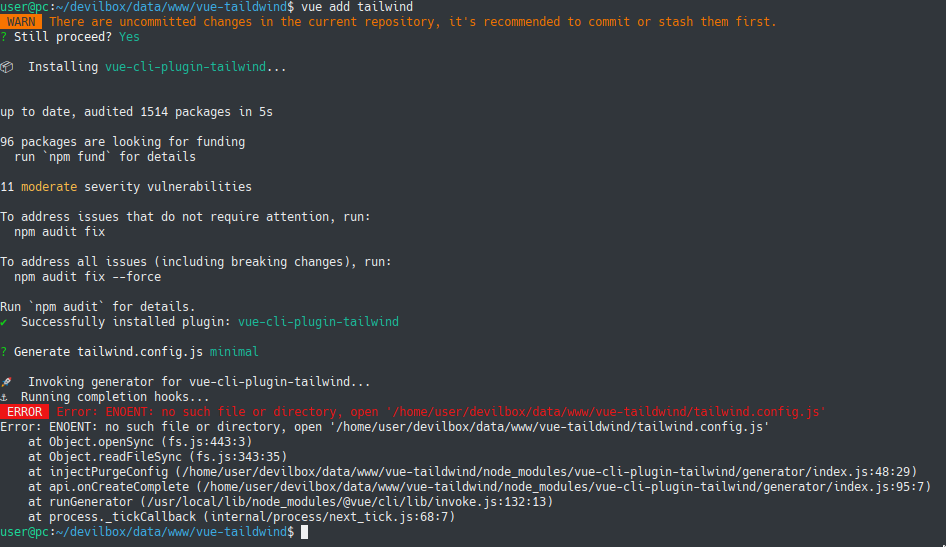

Same issue here. I have tried it on both PC and laptop, same error. No space in my path. Using Vue cli 4.5.13 on Ubuntu.
Steps:
- Created new vue project with vue create. Using Vue 3.
- cd into folder, run vue add tailwind
- error occurs
Note that if I create the config file manually, it actually deletes it first, then fails to create a new one and complains it doesn't exist. Clearly it has permission and the path is correct, or it couldn't delete it first. The generation is just failing. I have tried selecting both minimal and full in the options, both fail to generate.


I had this issue until I updated to the latest nodejs
Thanks, this was the problem!
The source of the problem is that apt-get does not install the latest version of nodejs. Since I had just ran apt-get, I thought I had everything up to date (and IMO its pretty dumb that it wasn't). Once I manually installed node version 14.18.0 (latest version here), everything worked.
Alright, to break this down, for everyone having this issue (especially on WSL or WSL 2) follow these steps:
- Update apt repository:
sudo apt update -y - Install Node's version manager
curl -o- https://raw.githubusercontent.com/nvm-sh/nvm/v0.38.0/install.sh | bash(Press :Q! do quit vim) - Sourcing NVM
source ~/.nvm/nvm.sh - Installing the latest version of Node.js
nvm install node - Checking your Node.js version
nvm ls - Install Tailwind CSS with Vue CLI 3
vue add tailwind
This should work. you're welcome.
PS: If you now think that Step 1, sudo apt upgrade -y was entirely useless, you are right, but I am drunk and I'm just gonna leave it there.
PS2: If you mess up your node installation follow through those steps before attempting steps 1-6:
sudo rm -rf /usr/local/bin/npm /usr/local/share/man/man1/node* ~/.npm
sudo rm -rf /usr/local/lib/node*
sudo rm -rf /usr/local/bin/node*
sudo rm -rf /usr/local/include/node*

sudo apt-get purge nodejs npm
sudo apt autoremove
PS3: I'm already regretting getting back into WebDev

Have this issue, fixed it by removing spaces from file path directory of my source code.
This worked for me, thanks. But it will be great if it can be fixed in the upcoming updates, as I would not like to rename my folders and sub-folders.

Have this issue, fixed it by removing spaces from file path directory of my source code.
This was the culprit! I'm using @vue/cli 5.0.8 and the vue add tailwind command will only properly finish running the vue-cli-plugin-tailwind generator to create the tailwind.config.js if I remove all spaces from the current project path. So yes, I had to rename my directory path of my project to be able to successfully finish adding tailwind to a @vue/cli scaffolded project.
@forsartis Could you please check the generator code? I've been trying to find the issue here https://github.com/forsartis/vue-cli-plugin-tailwind/blob/master/generator/index.js but not sure where the problem is yet. I'm suspecting line 47 the proper path is not resolved correctly:
const configPath = api.resolve(filenameTailwind);

I am not able to overcome from this problem, I have done everything you guys told, but I am not able to get that freaking config.js file. Please help !!!!!!

@PrajjwalR I recommend for you to switch from Vue CLI (webpack based) to Vite and you will not face this issue anymore.