

 formio
How to hide component's "Remove" button on form builder?
Environment
Please provide as many details as you can:
- Hosting type
- [x] Form.io
- [ ] Local deployment
- Version:
- Formio.js version: "^4.3.0"
- Frontend framework: react
- Browser:
- Browser version:
I am using react-formio
I am getting the formData object from API and the object looks like
const formData = {
        display: 'form',
        settings: {
            pdf: {
                id: '1ec0f8ee-6685-5d98-a847-26f67b67d6f0',
                src: 'https://files.form.io/pdf/5692b91fd1028f01000407e3/file/1ec0f8ee-6685-5d98-a847-26f67b67d6f0',
            },
        },
        components: [
            {
                label: 'First Name',
                tableView: true,
                key: 'firstName',
                type: 'textfield',
                input: true,
            },
            {
                label: 'Last Name',
                tableView: true,
                key: 'lastName',
                type: 'textfield',
                input: true,
            },
        ],
    };
I want to hide the above components (First Name and Last Name) Remove button on the form builder, the rest of the components should remain the same
<FormBuilder
        form={formData}
        onChange={(form: any) => {
            setFormSchema(form);
        }}
        options={options}

 />
Thanks for any insights.


thanks for the response @travist
The solution didn't work
I was able to see the edit options icons on hover of those components even after adding hidden: true property to them
Hi @travist,
I want to hide the Remove button for the above components
the above solution didn't workout
Thanks for any insights.
Hi @SaThViK81,
We have template responsible for rendering these buttons: https://github.com/formio/formio.js/blob/master/src/templates/bootstrap/builderComponent/form.ejs You can override it and make Remove button depend on component key/type/property. Save new template as JS string and then add this template to form options.
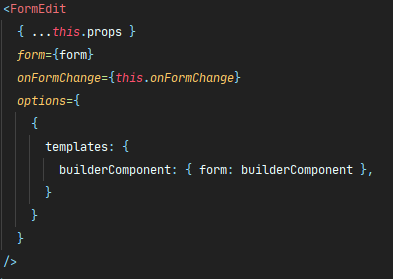

Hi @AlexeyDavyd , How would you make the 'Remove button' depend on component key/type/property ? For example I would like to display the 'Remove button' for components that are of type 'textfield' and not display the button for components that are of type 'number' .
Can this be achieved? Thank you.

We're currently addressing a backlog of GitHub issues. Closing this thread as it is outdated. Please re-open if it is still relevant. Thank you for your contribution!
