

 formio
[Custom Components] Multiple component schema info showing more than one component rather than allowing an array of values to be captured.
Hello , The "multiple":true is acting like I wanted multiple of that component in one space rather than If this component should allow an array of values to be captured.
Wanting to make a custom multiple select component , When I add in the "multiple":true into the object for the component it gets rendered out as :
 Yet without it I am getting an error that says the component can not be an array:
 In the custom component I have the the multiple option in select set to true , so the component returns the items selected as an array.
This is the custom component I am calling :
Json part :
 Registering it :
 Note: the comment out schema acts like the "multiple":true, in the Json.
I believe I left something out in registering it but I can not figure out what. I say that because the same behavior is seen when the "multiple":true is added to other components that normally do not return an array.


I found more of a work around
Registering it is mostly the same
 The Main change was that Form-io "sees" a single select but when the defaultValue gets to the custommultipleselect, Angular treats it like a multiple select .
It is not the best because it has to return a string so Form-io "sees" a single select, which you have to parse though it if you need to save the answer. That just has to be done before you save/send off the data from the component
See code below , I am open to ideas but this is what I come up with
custommultipleselect ts
The Main change was that Form-io "sees" a single select but when the defaultValue gets to the custommultipleselect, Angular treats it like a multiple select .
It is not the best because it has to return a string so Form-io "sees" a single select, which you have to parse though it if you need to save the answer. That just has to be done before you save/send off the data from the component
See code below , I am open to ideas but this is what I come up with
custommultipleselect ts
 custommultipleselect HTML
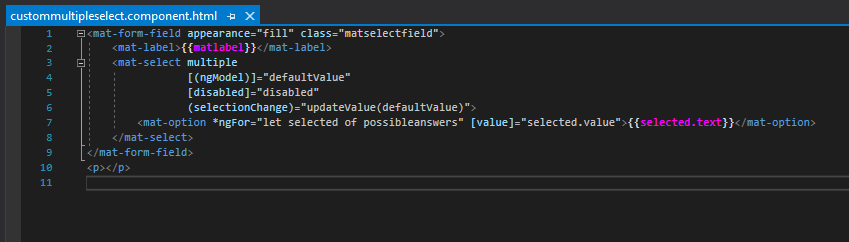 For the Json I just added in possibleanswers and defaultvalues to the component list , and those get passed into the Angular custommultipleselect ,those can be formatted however is needed
@BignallCyber Were you able to resolve it in any other way than using, toString()?
Actually sending an array instead of a string?
