

 formio
Select component shows Id instead of Text in Custom URL
I have a select component in my wizard. It's data source is custom, which is a function that gets data from a web service. I know I can use url but I needed to use custom function for some other reason. I was able to add options in the select box, however the issue is that when my model contains a value for the select component, it displays id instead of a text.
I declare my component as per below.
"components": [
      {
        "title": "Page 1",
        "label": "Page 1",
        "type": "panel",
        "key": "page1",
        "components": [
          {
            "label": "Cars",
            "widget": "choicesjs",
            "tableView": true,
            "dataSrc": "custom",
            "data": {
              "custom": "values = angularComponent.getCars() "
             // url: 'https://vpic.nhtsa.dot.gov/api/vehicles/getmodelsformake/honda?format=json'
            },
            "valueProperty": "Model_ID",
            "template": "<span>{{ item.Model_Name }}</span>",

            "key": "client.model_Id",
            "type": "select",
            "indexeddb": {
              "filter": {}
            },
            "input": true
          }
        ],
        "input": false,
        "tableView": false
      }
    ]
My custom function which gets data from the web service is:
carValues = [];
  getCars() {

    this.http.get('https://vpic.nhtsa.dot.gov/api/vehicles/getmodelsformake/honda?format=json').toPromise()
      .then(data => {
        this.carValues = [];
        console.log(data);
        for (var i = 0; i < data["Results"].length; i++) {
          if (data["Results"][i] != null).
            this.carValues.push({ "Model_Name": data["Results"][i].Model_Name, "Model_ID": data["Results"][i].Model_ID });

        }

      });
    return this.carValues;
  }
The model data for the form is
this.myFormData = {
      "data": {
        "client": {
          "id": 15,
          "model_Id": 1863,
          "title": "Miss",
          "forename": "Jo",
          "surname": "Smith"
        }
      }
    };
The select component shows 1863 instead of the associated text which is Civic. If I use url instead of custom then Civic is displayed. Please see screenshot below for both scenarios.
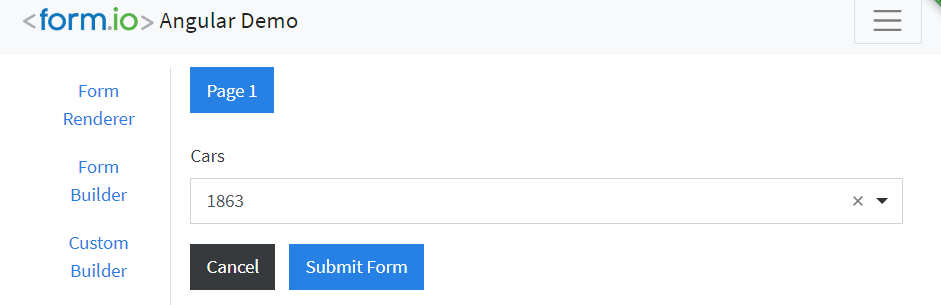

It seems that in the case of custom, the select box only shows text when you click on it to open it and in that case the Id changes to Text.
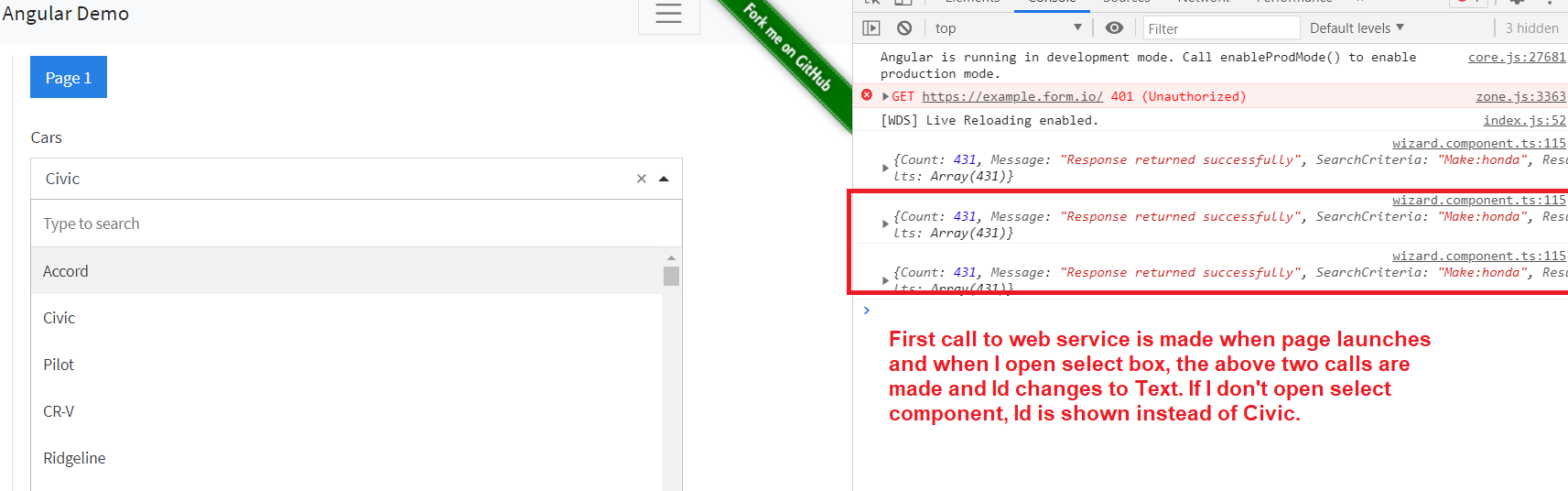
Can someone please help as I have been working on it for a couple of weeks on and off but unable to fix it?
It's worth mentioning that I had used custom functions in formio.js in a similar fashion without this issue. This isssue is only occurring in Angular version.
Thanks

This is probably because the custom value is expected to be synchronous and you are making an API call to make it synchronous. It may be the case that on initial load (when it works) it actually does a redraw with the values. You may be able to get this to work by performing a trigger update once the API call is finished like this this.triggerUpdate()

Is trigerUpdate() function built-in to formio? If yes, what is the scope of this and if no, what code should triggerUpdate() contain?
@travist I couldn't find triggerUpdate() method, but was able to find triggerChange(). I call this function in ready event handler but it is still not displaying the text. I have added below code.
readyHandler(event) {
        event.formio.triggerChange();
    }
We're currently addressing a backlog of GitHub issues, and as part of this effort, some inactive issues may be marked as closed. This isn't a dismissal, but a step toward more efficient tracking.
If you feel the issue is still relevant, please re-open and we'll ensure it gets the attention it deserves. Your understanding is appreciated as we work to enhance our open-source responsiveness.
