

 formio
[Custom Components] Custom Select component with data from a service
I have a working custom Select component for "States" following several examples. However, in trying to create an new select component I cannot figure out where/how to set the data from a external API call using a Angular service vs a static array. What is an example of a custom select component that gets it's data (with many properties, not just a key and display) from an angular service? Or at least can you point me down the right path?

If you are writing a custom component, then I would personally just extend the SelectComponent and then override the loadItems method.
https://github.com/formio/formio.js/blob/master/src/components/select/Select.js#L335
Something like this maybe.
class MyCustomSelect extends SelectComponent {
  loadItems(url, search, headers, options, method, body) {
    // here you would call your Angular Service instead of using Formio.makeRequest.
  }
}

Ok, that will work for some of my custom components. I have one that uses PrimeNGs autocomplete (https://www.primefaces.org/primeng/#/autocomplete). Works fine all the way up to submitting as the field value is not in the submitted data. How do I add a custom fields' value (not extending a built in field) data to the submitted data? My component options where kept simple:
const COMPONENT_OPTIONS: FormioCustomComponentInfo = {
type: 'customerSelect',
selector: 'customer-select', this selector
title: 'Customer Selector',
group: 'basic',
icon: 'fas fa-user-tag',
editForm: minimalEditForm,
};
The component: (some bits removed) export class SelectCustomersComponent implements OnInit { constructor( private CIM: CimService ){ } public set value(v: string) { this._value = v; } public get value(): string { return this._value; } val:MiniCustomer; Customers:MiniCustomer[]; results: MiniCustomer[]; loading=true; @Input() source:string; name:string; data=this.value; private _value:string; disabled: boolean;
@Input() updateValue(payload: string) { console.log("here") this._value = payload; console.log(payload); this.valueChange.emit(payload); }
@Output()
valueChange = new EventEmitter
async onRender(){
console.log(this.Customers);
}
async ngOnInit() { //this.Customers= await this.CIM.GetMiniCustomers(); this.Customers = JSON.parse(this.json); this.loading=false; console.log(this.Customers); }
I'll add a detailed example to the FAQ during the upcoming weeks.
Meantime I suggest to call the api inside of the custom Angular component using Angular services.
Also you may experience that the form builder re-renders the component many times which may cause multiple api calls too. To avoid that, I also suggest to use cache layer. Here is an example for that: https://github.com/formio/angular-formio/issues/397#issuecomment-557070209

Thanks for that. Also, when overriding the loadItems method, when setting the items as they do in their Formio.makeRequest ... (this.setItems(response, !!search)... do I simply run this.setItems(myjsonresponse, !!search)? Then define the data values and headers to match my json?
Hi @jjfellers can you please share more details about your custom component? How did you add your custom component as a property in your submission data of the form?

Has there been any update regarding this? This is the last task I have for a particular system I'm putting together. I need 3 custom components, each one populated by an external API call. That way a user can drag and drop those without additional customization and have them work while filling out the form.
Thanks!

Hopefully this helps someone. This is what my API driven custom component ended up looking like in the end (ignore the mess. Note that CIMService is my API calls):
`export class SelectCustomersComponent implements FormioCustomComponent
){ }
private _value: string;
@Input()
public set value(v: string) {
this._value = v;
}
public get value(): string {
return this._value;
}
val:MiniCustomer; Customers:MiniCustomer[]; results: MiniCustomer[]; loading=true; EISSupplier:MiniCustomer; VendorSites: VendoreSites[]; SiteContacts: SiteContacts[]; SiteID: number;
search(event) {
this.results = [];
for(let i = 0; i < this.Customers.length; i++) {
let C = this.Customers[i].CUSTOMER_NAME;
if(C.toLowerCase().indexOf(event.query.toLowerCase()) == 0) {
this.results.push(this.Customers[i]);
}
}
}
ongClick(disabled: boolean) {
if(disabled) {
event.stopPropagation();
}
}
@Input() source:string; name:string; data=this.value; disabled: boolean;
async updateValue(payload: string) { if (this.EISSupplier != null && this.EISSupplier.CUSTOMER_ID !=null){ this._value = this.EISSupplier.CUSTOMER_ID.toString(); this.valueChange.emit(this.EISSupplier.CUSTOMER_ID.toString()); } if (this.EISSupplier != null && this.EISSupplier.CUSTOMER_ID > 0){ this.VendorSites = await this.CIM.GetVendorSites(this.EISSupplier.CUSTOMER_ID); } }
async GetContact(id:any){
if (id.value != null){
this.SiteContacts = await this.CIM.GetSiteContacts(id.value);
this.SiteID = id.value;
}
}
SetContact(id:any){
var NewValue=this.EISSupplier.CUSTOMER_ID+","+this.SiteID+","+id.value;
this._value = NewValue;
this.valueChange.emit(NewValue);
}
@Output()
valueChange = new EventEmitter
async ngOnInit() { this.Customers= await this.CIM.GetMiniCustomers(); this.EISSupplier=null; this.loading=false; } }`
Thanks for sharing! I'm gonna give this a try today.
On Tue, May 5, 2020 at 4:16 AM JoshF [email protected] wrote:
Hopefully this helps someone. This is what my API driven custom component ended up looking like in the end (ignore the mess. Note that CIMService is my API calls):
`export class SelectCustomersComponent implements FormioCustomComponent{ constructor( private CIM: CimService ){ }
private _value: string; @input https://github.com/input() public set value(v: string) { this._value = v; } public get value(): string { return this._value; }
val:MiniCustomer; Customers:MiniCustomer[]; results: MiniCustomer[]; loading=true; EISSupplier:MiniCustomer; VendorSites: VendoreSites[]; SiteContacts: SiteContacts[]; SiteID: number;
search(event) { this.results = []; for(let i = 0; i < this.Customers.length; i++) { let C = this.Customers[i].CUSTOMER_NAME; if(C.toLowerCase().indexOf(event.query.toLowerCase()) == 0) { this.results.push(this.Customers[i]); } } } ongClick(disabled: boolean) { if(disabled) { event.stopPropagation(); } }
@input https://github.com/input() source:string; name:string; data=this.value; disabled: boolean;
async updateValue(payload: string) { if (this.EISSupplier != null && this.EISSupplier.CUSTOMER_ID !=null){ this._value = this.EISSupplier.CUSTOMER_ID.toString(); this.valueChange.emit(this.EISSupplier.CUSTOMER_ID.toString()); } if (this.EISSupplier != null && this.EISSupplier.CUSTOMER_ID > 0){ this.VendorSites = await this.CIM.GetVendorSites(this.EISSupplier.CUSTOMER_ID); } }
async GetContact(id:any){ if (id.value != null){ this.SiteContacts = await this.CIM.GetSiteContacts(id.value); this.SiteID = id.value; } }
SetContact(id:any){ var NewValue=this.EISSupplier.CUSTOMER_ID+","+this.SiteID+","+id.value; this._value = NewValue; this.valueChange.emit(NewValue); }
@output https://github.com/output() valueChange = new EventEmitter();
async ngOnInit() { this.Customers= await this.CIM.GetMiniCustomers(); this.EISSupplier=null; this.loading=false; } }`
— You are receiving this because you commented. Reply to this email directly, view it on GitHub https://github.com/formio/angular-formio/issues/478#issuecomment-623994648, or unsubscribe https://github.com/notifications/unsubscribe-auth/ALM6DBBBUV6NO5SFUX5T653RP7YSBANCNFSM4K4OEBVQ .
--
Hayden J. Baldwin
RARE PETRO Tech, Inc
Chief Technology Officer
714-253-4330
https://www.linkedin.com/in/hayden-baldwin/
1224 Washington Ave Ste 10 https://www.google.com/maps/place/1224+Washington+Ave+%2310,+Golden,+CO+80401/@39.7546162,-105.2232823,17z/data=!3m1!4b1!4m5!3m4!1s0x876b9ad318dd7ba3:0xf2b96ac31f6099a9!8m2!3d39.7546162!4d-105.2210936
www.rarepetro.com
https://www.linkedin.com/company/rare-petro/ https://twitter.com/rare_petro?lang=en This email and any files transmitted with it are confidential and intended solely for the use of the individual or entity to whom they are addressed. If you have received this email in error please notify the system manager. This message contains confidential information and is intended only for the individual named. If you are not the named addressee you should not disseminate, distribute or copy this e-mail. Please notify the sender immediately by e-mail if you have received this e-mail by mistake and delete this e-mail from your system. If you are not the intended recipient you are notified that disclosing, copying, distributing or taking any action in reliance on the contents of this information is strictly prohibited.
Hopefully this helps someone. This is what my API driven custom component ended up looking like in the end (ignore the mess. Note that CIMService is my API calls):
`export class SelectCustomersComponent implements FormioCustomComponent{ constructor( private CIM: CimService ){ }
private _value: string; @input() public set value(v: string) { this._value = v; } public get value(): string { return this._value; }
val:MiniCustomer; Customers:MiniCustomer[]; results: MiniCustomer[]; loading=true; EISSupplier:MiniCustomer; VendorSites: VendoreSites[]; SiteContacts: SiteContacts[]; SiteID: number;
search(event) { this.results = []; for(let i = 0; i < this.Customers.length; i++) { let C = this.Customers[i].CUSTOMER_NAME; if(C.toLowerCase().indexOf(event.query.toLowerCase()) == 0) { this.results.push(this.Customers[i]); } } } ongClick(disabled: boolean) { if(disabled) { event.stopPropagation(); } }
@input() source:string; name:string; data=this.value; disabled: boolean;
async updateValue(payload: string) { if (this.EISSupplier != null && this.EISSupplier.CUSTOMER_ID !=null){ this._value = this.EISSupplier.CUSTOMER_ID.toString(); this.valueChange.emit(this.EISSupplier.CUSTOMER_ID.toString()); } if (this.EISSupplier != null && this.EISSupplier.CUSTOMER_ID > 0){ this.VendorSites = await this.CIM.GetVendorSites(this.EISSupplier.CUSTOMER_ID); } }
async GetContact(id:any){ if (id.value != null){ this.SiteContacts = await this.CIM.GetSiteContacts(id.value); this.SiteID = id.value; } }
SetContact(id:any){ var NewValue=this.EISSupplier.CUSTOMER_ID+","+this.SiteID+","+id.value; this._value = NewValue; this.valueChange.emit(NewValue); }
@output() valueChange = new EventEmitter();
async ngOnInit() { this.Customers= await this.CIM.GetMiniCustomers(); this.EISSupplier=null; this.loading=false; } }`
Could I ask what your components HTML looks like? I think that a set up like yours is working but I cannot seem to get a rendered dropdown with it. I could very easily just be missing something simple but If you could share what the structure of your template looks like I would be super grateful.
<div class="card autoComplete">
        <div class="card-body" *ngIf="!loading">
            <h5>Customer</h5>
            <p-autoComplete
            [(ngModel)]="EISSupplier"
            [suggestions]="results"
            placeholder="Customer search by name."
            (completeMethod)="search($event)"
            [minLength]="1"
            field="CUSTOMER_NAME"
            [size]="32"
            name="Customer"
            autofocus="True"
            (change)="updateValue($event.target.value)"
            (click)="updateValue($event.target.value)"
            >
            <ng-template let-val pTemplate="item">
                <div class="ui-helper-clearfix">
                    <div *ngIf="val.DSVENDOR_NUMBER == 0 || val.DDSVENDOR_NUMBER == null" style="font-size:14px;margin:10px 10px 0 0">{{val.CUSTOMER_NAME}}</div>
                    <div *ngIf="val.DSVENDOR_NUMBER > 0" (click)="ongClick(val.DSVENDOR_NUMBER > 0)"
                        [ngStyle]="val.DDSVENDOR_NUMBER > 0? {'color': '#ccc', 'cursor': 'default'} : ''" style="font-size:14px;margin:10px 10px 0 0">
                        <i class="fas fa-check ok"></i>{{val.CUSTOMER_NAME}}
                    </div>
                </div>
            </ng-template>
            </p-autoComplete>
        </div>
        <div class="card-body" *ngIf="loading">
            Loading customers...<mat-spinner></mat-spinner>
          </div>
    </div>
    <mat-form-field *ngIf="VendorSites?.length > 0">
        <mat-label>Select Vendor Site</mat-label>
        <mat-select required (selectionChange)="GetContact($event)">
          <mat-option *ngFor="let site of VendorSites" [value]="site.ADDRESS_ID">
            {{site.ADDRESS}}
          </mat-option>
        </mat-select>
    </mat-form-field>
    <mat-form-field *ngIf="SiteContacts?.length > 0" style="margin-left:15px;">
        <mat-label>Select Site Contact</mat-label>
        <mat-select required (selectionChange)="SetContact($event)">
          <mat-option *ngFor="let site of SiteContacts" [value]="site.CONTACT_ID">
            {{site.FULL_NAME}}
          </mat-option>
        </mat-select>
    </mat-form-field>
Note there are three form inputs here. Because I am lazy, I return all three values as one separated by commas. You can only return one value form a custom form field.
Thank you again!
On Tue, May 5, 2020 at 9:11 AM JoshF [email protected] wrote:
Using
Customer
0"> Select Vendor Site {{site.ADDRESS}} 0" style="margin-left:15px;"> Select Site Contact {{site.FULL_NAME}} — You are receiving this because you commented. Reply to this email directly, view it on GitHub https://github.com/formio/angular-formio/issues/478#issuecomment-624149347, or unsubscribe https://github.com/notifications/unsubscribe-auth/ALM6DBHAS2VSA4PLJYF54H3RQA3DRANCNFSM4K4OEBVQ .
--
Hayden J. Baldwin
RARE PETRO Tech, Inc
Chief Technology Officer
714-253-4330
https://www.linkedin.com/in/hayden-baldwin/
1224 Washington Ave Ste 10 https://www.google.com/maps/place/1224+Washington+Ave+%2310,+Golden,+CO+80401/@39.7546162,-105.2232823,17z/data=!3m1!4b1!4m5!3m4!1s0x876b9ad318dd7ba3:0xf2b96ac31f6099a9!8m2!3d39.7546162!4d-105.2210936
www.rarepetro.com
https://www.linkedin.com/company/rare-petro/ https://twitter.com/rare_petro?lang=en This email and any files transmitted with it are confidential and intended solely for the use of the individual or entity to whom they are addressed. If you have received this email in error please notify the system manager. This message contains confidential information and is intended only for the individual named. If you are not the named addressee you should not disseminate, distribute or copy this e-mail. Please notify the sender immediately by e-mail if you have received this e-mail by mistake and delete this e-mail from your system. If you are not the intended recipient you are notified that disclosing, copying, distributing or taking any action in reliance on the contents of this information is strictly prohibited.
Last one I swear and thanks for being so helpful. I can get the component to initialize when I use the regular edit form, but not when I use my minimal version, could you share what you, set up for that? Thanks to your help everything is sort of working but when I try for a non-robust edit for the component doesn't get called at all. I really like the whole idea you're going with but in my case, I literally just want a drag and drop select with the only label as an editable field. when I put that as the edit form it breaks everything. After I get this working I'll probably post up what I've been able to put together so others can just c/p a simple working starting point.
Not sure what you mean by 'regular edit form'?
Did you create your custom configuration as well? Something like:

Then you have to add it to the app.module.ts like so:
export class AppModule {
  constructor(injector: Injector) {
    registerSelectCustomersComponent(injector);
  }
  ngDoBootstrap() {
  }
 }
Yeah, Ive got that. I seem to be having issues with the minimalEditForm, I created one, but when i use it (instead of the default, by commenting edtForm out) the ngOnInit doesnt fire. and even when it does the template isn't getting updated. I think this has to do with the value/input naming. But i'm not positive.
On Wed, May 6, 2020 at 12:15 PM JoshF [email protected] wrote:
Not sure what you mean by 'regular edit form'? Did you create your custom configuration as well? Something like: [image: image] https://user-images.githubusercontent.com/61521231/81218389-210f0200-8fac-11ea-9926-bdcd316b550a.png
Then you have to add it to the app.module.ts like so:
export class AppModule { constructor(injector: Injector) { registerSelectCustomersComponent(injector); } ngDoBootstrap() { } }
— You are receiving this because you commented. Reply to this email directly, view it on GitHub https://github.com/formio/angular-formio/issues/478#issuecomment-624837846, or unsubscribe https://github.com/notifications/unsubscribe-auth/ALM6DBAEFJPHJS4FLTTRRVLRQGZMHANCNFSM4K4OEBVQ .
--
Hayden J. Baldwin
RARE PETRO Tech, Inc
Chief Technology Officer
714-253-4330
https://www.linkedin.com/in/hayden-baldwin/
1224 Washington Ave Ste 10 https://www.google.com/maps/place/1224+Washington+Ave+%2310,+Golden,+CO+80401/@39.7546162,-105.2232823,17z/data=!3m1!4b1!4m5!3m4!1s0x876b9ad318dd7ba3:0xf2b96ac31f6099a9!8m2!3d39.7546162!4d-105.2210936
www.rarepetro.com
https://www.linkedin.com/company/rare-petro/ https://twitter.com/rare_petro?lang=en This email and any files transmitted with it are confidential and intended solely for the use of the individual or entity to whom they are addressed. If you have received this email in error please notify the system manager. This message contains confidential information and is intended only for the individual named. If you are not the named addressee you should not disseminate, distribute or copy this e-mail. Please notify the sender immediately by e-mail if you have received this e-mail by mistake and delete this e-mail from your system. If you are not the intended recipient you are notified that disclosing, copying, distributing or taking any action in reliance on the contents of this information is strictly prohibited.
Here is mine, however I am looking at it going "Whaaaat?" (selectedState is from a different custom one I did. So this is a copy n paste mess, but maybe it will you. -shrug-:
export function minimalEditForm() {
    return {
      components: [
        {
            weight: 0,
            type: 'textfield',
            input: true,
            key: 'label',
            label: 'Label',
            placeholder: 'Label',
            validate: {
            required: true,
            },
        },
        {
            weight: 0,
            type: 'textarea',
            input: true,
            key: 'tooltip',
            label: 'Tooltip',
            validate: {
            required: false,
            },
        },
        {
            weight: 0,
            type: 'textfield',
            input: true,
            key: 'key',
            label: 'Name',
            placeholder: 'name',
            defaultValue:'selectedState',
            validate: {
                required: true,
            },
            value:"Customer"
        }
      ],
    };
  }
Seriously, I can't thank you enough. Heres hoping that the missing piece. Literally three simple select options based on API values are the only thing holding back an entire project at this point. so you have been a freaking godsend at this point HAHA.
On Wed, May 6, 2020 at 12:58 PM JoshF [email protected] wrote:
Here is mine, however I am looking at it going "Whaaaat?" (selectedState is from a different custom one I did. So this is a copy n paste mess, but maybe it will you. -shrug-:
export function minimalEditForm() { return { components: [ { weight: 0, type: 'textfield', input: true, key: 'label', label: 'Label', placeholder: 'Label', validate: { required: true, }, }, { weight: 0, type: 'textarea', input: true, key: 'tooltip', label: 'Tooltip', validate: { required: false, }, }, { weight: 0, type: 'textfield', input: true, key: 'key', label: 'Name', placeholder: 'name', defaultValue:'selectedState', validate: { required: true, }, value:"Customer" } ], }; }
— You are receiving this because you commented. Reply to this email directly, view it on GitHub https://github.com/formio/angular-formio/issues/478#issuecomment-624858052, or unsubscribe https://github.com/notifications/unsubscribe-auth/ALM6DBGWGSPNOCMO5M2Z3HDRQG6NLANCNFSM4K4OEBVQ .
--
Hayden J. Baldwin
RARE PETRO Tech, Inc
Chief Technology Officer
714-253-4330
https://www.linkedin.com/in/hayden-baldwin/
1224 Washington Ave Ste 10 https://www.google.com/maps/place/1224+Washington+Ave+%2310,+Golden,+CO+80401/@39.7546162,-105.2232823,17z/data=!3m1!4b1!4m5!3m4!1s0x876b9ad318dd7ba3:0xf2b96ac31f6099a9!8m2!3d39.7546162!4d-105.2210936
www.rarepetro.com
https://www.linkedin.com/company/rare-petro/ https://twitter.com/rare_petro?lang=en This email and any files transmitted with it are confidential and intended solely for the use of the individual or entity to whom they are addressed. If you have received this email in error please notify the system manager. This message contains confidential information and is intended only for the individual named. If you are not the named addressee you should not disseminate, distribute or copy this e-mail. Please notify the sender immediately by e-mail if you have received this e-mail by mistake and delete this e-mail from your system. If you are not the intended recipient you are notified that disclosing, copying, distributing or taking any action in reliance on the contents of this information is strictly prohibited.
any github repo for this pls I am stuck with issue of emmiting an array from a custom component which is not captured

any github repo for this pls I am stuck with issue of emmiting an array from a custom component which is not captured
Did you try converting the array to a string (JSON.stringify), then on the other side, JSON.parse?
@jjfellers Yes i have tried with that.Let me explain what i am trying to do. I have been making a custom component of weedays picker with a custom entry of daily which will select all the days. For that i have used below code
TS file:- import { Component, EventEmitter, Input, OnInit, Output } from '@angular/core'; import { FormioCustomComponent, FormioEvent } from 'angular-formio';
@Component({
selector: 'app-custom-check-box',
templateUrl: './custom-check-box.component.html',
styleUrls: ['./custom-check-box.component.scss'],
})
export class CustomCheckBoxComponent implements FormioCustomComponent
@Output()
valueChange = new EventEmitter
@Input() disabled: boolean;
constructor() {}
private _value: any; @Input() setValue(v: any, flags = {}) { this._value = v; }
getValue(): any { return this._value; }
ngOnInit(): void {
}
activeSchedule = ['daily'];
schedules = [ { value: 'daily', label: 'Daily' }, { value: 'sunday', label: 'S' }, { value: 'monday', label: 'M' }, { value: 'tuesday', label: 'T' }, { value: 'wednesday', label: 'W' }, { value: 'thursday', label: 'T' }, { value: 'friday', label: 'F' }, { value: 'saturday', label: 'S' }, { value: 'onrequest', label: 'On Request' }, ];
setScheduleAsActive(schedule) { // if(schedule===this.schedules[0]){ // this.activeSchedule =[ // {value:'daily',label:'Daily'}, // {value:'sunday',label:'S'}, // {value:'monday',label:'M'}, // {value:'tuesday',label:'T'}, // {value:'wednesday',label:'W'}, // {value:'thursday',label:'T'}, // {value:'friday',label:'F'}, // {value:'saturday',label:'S'} // ] ; // } // else this.activeSchedule = [schedule.value]; this.value = this.activeSchedule; this.valueChange.emit(JSON.stringify(this.activeSchedule)); }
check(schedule) { var abc = this.search(schedule, this.activeSchedule); if (abc) return true; else return false; }
search(nameKey, myArray) { for (var i = 0; i < myArray.length; i++) { if (myArray[i] === nameKey) { return myArray[i]; } } } }
Html File:--
Formio file:-
import { Injector } from '@angular/core'; import { Components, FormioCustomComponentInfo, registerCustomFormioComponent } from 'angular-formio'; import { CustomCheckBoxComponent } from './custom-check-box.component';
const COMPONENT_OPTIONS: FormioCustomComponentInfo = {
type: 'customcheckboxes', // custom type. Formio will identify the field with this type.
selector: 'custom-checkboxes', // custom selector. Angular Elements will create a custom html tag with this selector
title: 'CheckBoxes', // Title of the component
group: 'basic', // Build Group
icon: 'fa fa-star', // Icon
//template: 'custom', // Optional: define a template for the element. Default: input
// changeEvent: 'valueChange', // Optional: define the changeEvent when the formio updates the value in the state. Default: 'valueChange',
// editForm: Components.components.select.editForm, // Optional: define the editForm of the field. Default: the editForm of a textfield
// documentation: '', // Optional: define the documentation of the field
// weight: 0, // Optional: define the weight in the builder group
//schema: {}, // Optional: define extra default schema for the field
// extraValidators: [], // Optional: define extra validators for the field
// emptyValue: null, // Optional: the emptyValue of the field
// fieldOptions: ['values'], // Optional: explicit field options to get as Input from the schema (may edited by the editForm)
};
export function registerRatingComponent(injector: Injector) { registerCustomFormioComponent(COMPONENT_OPTIONS, CustomCheckBoxComponent, injector); }
Also in app.module.ts:--
export class AppModule { constructor(injector: Injector) { registerRatingComponent(injector); // Register our custom components. // FormioForm.registerComponent('checkmatrix', CheckMatrix); }
please help me if i am missing something and thanku for such a quick response.
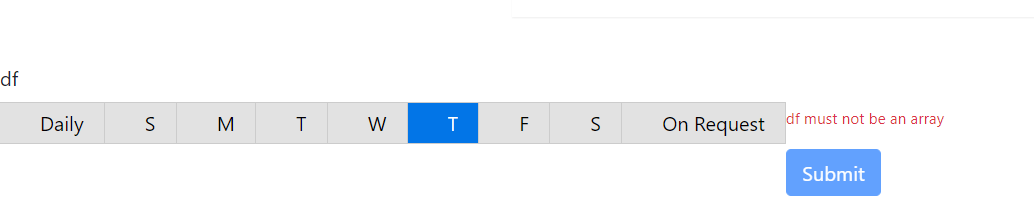 trying to create something like this
Here is a sample of a custom component I did that ends with an array. Hopefully it helps you in some way:
`export class SelectResponsibilitiesComponent implements FormioCustomComponent
){ }
disabled: boolean;
formioEvent?: EventEmitter<FormioEvent>;
private _value: string;
Resps:any[];
Tree:any;
selectedRespsonsibilities:any[];
@Input() public set value(v: string) { this._value = v; } public get value(): string { return this._value; }
@Input() data=this.value;
@Input()
async updateValue() {
if (this.selectedRespsonsibilities){
let value = this.selectedRespsonsibilities;
this._value = JSON.stringify(value);
this.valueChange.emit(value.toString());
}
}
@Output()
valueChange = new EventEmitter
async ngOnInit() { this.Resps = await this.CIM.GetResponsibilitiesRequestables();` ....blah blah }
@jjfellers Thanks it did work but while submitting i am getting empty string.

My TS Code is:-
import { Component, EventEmitter, Input, OnInit, Output } from '@angular/core'; import { FormioCustomComponent, FormioEvent } from 'angular-formio';
@Component({
selector: 'app-custom-check-box',
templateUrl: './custom-check-box.component.html',
styleUrls: ['./custom-check-box.component.scss'],
})
export class CustomCheckBoxComponent implements FormioCustomComponent
@Output()
valueChange = new EventEmitter
@Input() disabled: boolean;
constructor() {}
private _value: any;
@Input() public setValue(v: any) { this._value = v; } public getValue(): any { return this._value; }
ngOnInit(): void {
}
activeSchedule = ['daily'];
schedules = [ { value: 'daily', label: 'Daily' }, { value: 'sunday', label: 'S' }, { value: 'monday', label: 'M' }, { value: 'tuesday', label: 'T' }, { value: 'wednesday', label: 'W' }, { value: 'thursday', label: 'T' }, { value: 'friday', label: 'F' }, { value: 'saturday', label: 'S' }, { value: 'onrequest', label: 'On Request' }, ];
setScheduleAsActive(schedule) { // if(schedule===this.schedules[0]){ // this.activeSchedule =[ // {value:'daily',label:'Daily'}, // {value:'sunday',label:'S'}, // {value:'monday',label:'M'}, // {value:'tuesday',label:'T'}, // {value:'wednesday',label:'W'}, // {value:'thursday',label:'T'}, // {value:'friday',label:'F'}, // {value:'saturday',label:'S'} // ] ; // } // else this.activeSchedule = [schedule.value]; this._value = JSON.stringify(this.activeSchedule); this.valueChange.emit(this.activeSchedule.toString()); }
check(schedule) { var abc = this.search(schedule, this.activeSchedule); if (abc) return true; else return false; }
search(nameKey, myArray) { for (var i = 0; i < myArray.length; i++) { if (myArray[i] === nameKey) { return myArray[i]; } } } }
@jjfellers can you pls share the regestering component as well
import { Injector } from '@angular/core'; import { Components, FormioCustomComponentInfo, registerCustomFormioComponent } from 'angular-formio'; import { CustomCheckBoxComponent } from './custom-check-box.component';
const COMPONENT_OPTIONS: FormioCustomComponentInfo = {
type: 'customcheckboxes', // custom type. Formio will identify the field with this type.
selector: 'custom-checkboxes', // custom selector. Angular Elements will create a custom html tag with this selector
title: 'CheckBoxes', // Title of the component
group: 'basic', // Build Group
icon: 'fa fa-star', // Icon
//template: 'custom', // Optional: define a template for the element. Default: input
// changeEvent: 'valueChange', // Optional: define the changeEvent when the formio updates the value in the state. Default: 'valueChange',
// editForm: Components.components.select.editForm, // Optional: define the editForm of the field. Default: the editForm of a textfield
// documentation: '', // Optional: define the documentation of the field
// weight: 0, // Optional: define the weight in the builder group
//schema: {}, // Optional: define extra default schema for the field
// extraValidators: [], // Optional: define extra validators for the field
// emptyValue: null, // Optional: the emptyValue of the field
// fieldOptions: ['values'], // Optional: explicit field options to get as Input from the schema (may edited by the editForm)
};
export function registerRatingComponent(injector: Injector) { registerCustomFormioComponent(COMPONENT_OPTIONS, CustomCheckBoxComponent, injector); }
@jjfellers I have successfully captured the value and the array is stored in db but when i try to get the submission, my appropriate selection is not selected. For Ex:- While Submitting :-
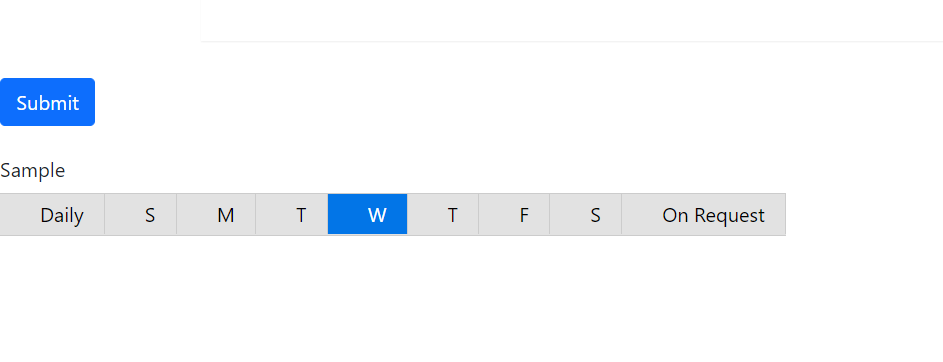
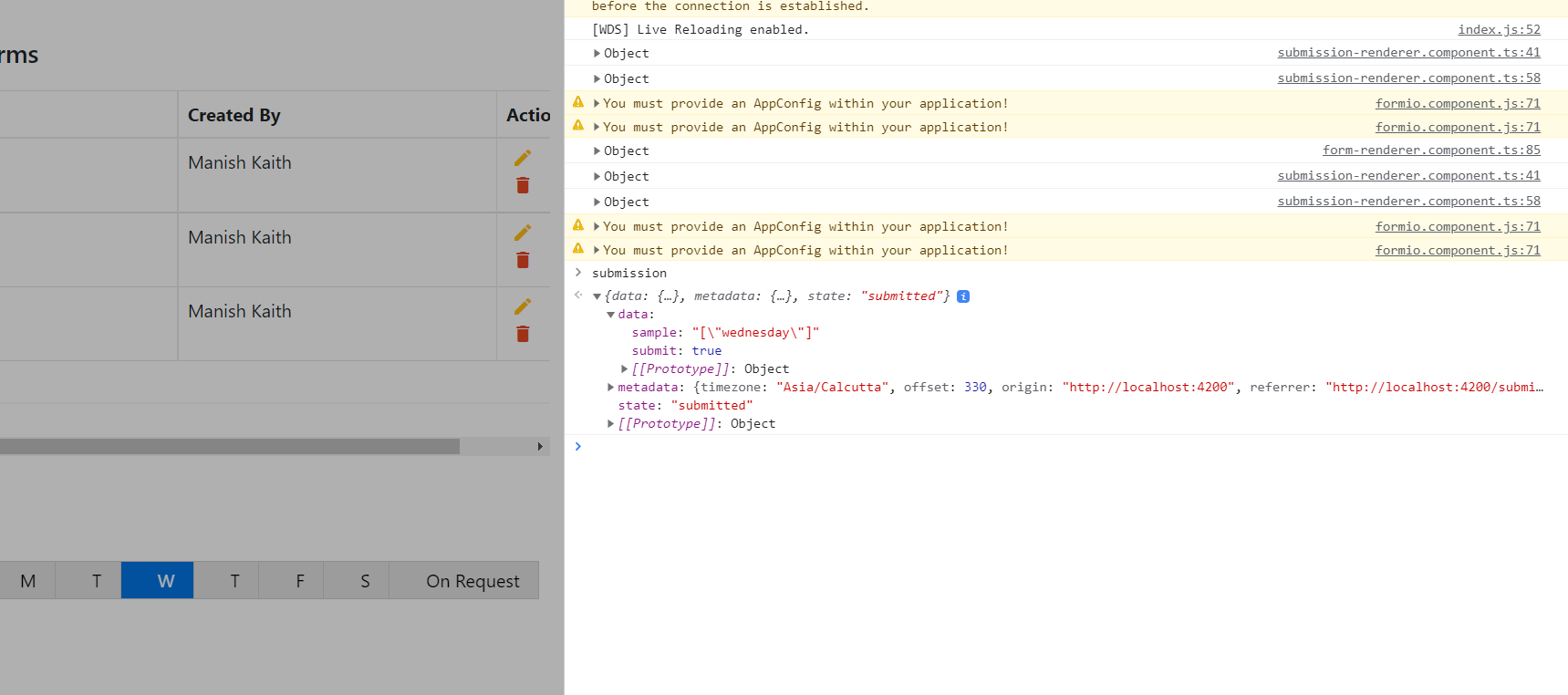
Data Retried while rendering:-

Rendered Output:-

I am afraid I can't help too much here. I never use Form.IO to display the data submitted in my use cases. I would guess you have to take the values and set them as the default values on the form on load - but just a guess and there may be a method available to do so.
@jjfellers Did you manage to solve the problem? I'm going through the same situation. From making a request on a custom component Could you share an example? I would be very grateful.

@adhonay What specific sample do you need? I provided samples above (though its a mess lol).
@jjfellers I would like to know how you stored the value that returns from the http request in a custom component, for example the customtextfield?
I saw that you used a request of your own, and not the native form.
How did you make it run only once? because the formrender emits several events and mine is making several equal calls.
Formio's native has the ignoreCache attribute for this problem, but I couldn't use it in the custom component.