

 formio
How can i trigger the submit event from external
Hi, I have tried to call the submit by using viewChild,
But it is not working,
Please help me how can i trigger the submit using the ts file externally,
I am attaching the code
<formio #form [form]="formranderData" (change)="onChange($event)" (submit)="onSubmit($event)">
in ts file
@ViewChild(FormioComponent, { static: false }) form: FormioComponent; this.form.submit.emit()

Try this.
@ViewChild(FormioComponent, {static: false}) form: FormioComponent;

this.form.submitForm({
  data: {
    ... YOUR DATA GOES HERE ...
  }
});

Thanks @travist for considering my request
It works fine..
but the validations are not working please help me
thanks in advance
@pankilkhatri, can you supply some details about what's not working with validation? A live example or some form JSON would help as well

@aiwebb
form Json :
{ "components":[ { "label":"Email", "spellcheck":true, "tableView":true, "validate":{ "required":true, "customMessage":"requied data", "unique":false, "multiple":false, "custom":"", "customPrivate":false, "strictDateValidation":false, "minLength":"", "maxLength":"", "pattern":"" }, "key":"email", "type":"email", "input":true, "question_id":345, "questionid":345, "pageId":173, "answerid":"", "user_input_id":0, "formhistory_id":0, "placeholder":"", "prefix":"", "customClass":"", "suffix":"", "multiple":false, "defaultValue":null, "protected":false, "unique":false, "persistent":true, "hidden":false, "clearOnHide":true, "refreshOn":"", "redrawOn":"", "labelPosition":"top", "description":"", "errorLabel":"", "tooltip":"", "hideLabel":false, "tabindex":"", "disabled":false, "autofocus":false, "dbIndex":false, "customDefaultValue":"", "calculateValue":"", "widget":{ "type":"input" }, "attributes":{ }, "validateOn":"change", "conditional":{ "show":null, "when":null, "eq":"" }, "overlay":{ "style":"", "left":"", "top":"", "width":"", "height":"" }, "allowCalculateOverride":false, "encrypted":false, "showCharCount":false, "showWordCount":false, "properties":{ }, "allowMultipleMasks":false, "mask":false, "inputType":"email", "inputFormat":"plain", "inputMask":"", "kickbox":{ "enabled":false }, "id":"enxtvq" }, { "label":"First name", "spellcheck":true, "tableView":true, "validate":{ "unique":false, "multiple":false, "required":false, "custom":"", "customPrivate":false, "strictDateValidation":false, "minLength":"", "maxLength":"", "pattern":"" }, "key":"firstname", "type":"textfield", "input":true, "question_id":350, "questionid":350, "pageId":173, "answerid":"", "user_input_id":0, "formhistory_id":0, "placeholder":"", "prefix":"", "customClass":"", "suffix":"", "multiple":false, "defaultValue":null, "protected":false, "unique":false, "persistent":true, "hidden":false, "clearOnHide":true, "refreshOn":"", "redrawOn":"", "labelPosition":"top", "description":"", "errorLabel":"", "tooltip":"", "hideLabel":false, "tabindex":"", "disabled":false, "autofocus":false, "dbIndex":false, "customDefaultValue":"", "calculateValue":"", "widget":{ "type":"input" }, "attributes":{ }, "validateOn":"change", "conditional":{ "show":null, "when":null, "eq":"" }, "overlay":{ "style":"", "left":"", "top":"", "width":"", "height":"" }, "allowCalculateOverride":false, "encrypted":false, "showCharCount":false, "showWordCount":false, "properties":{ }, "allowMultipleMasks":false, "mask":false, "inputType":"text", "inputFormat":"plain", "inputMask":"", "id":"exloiss" } ] }
Html Page :
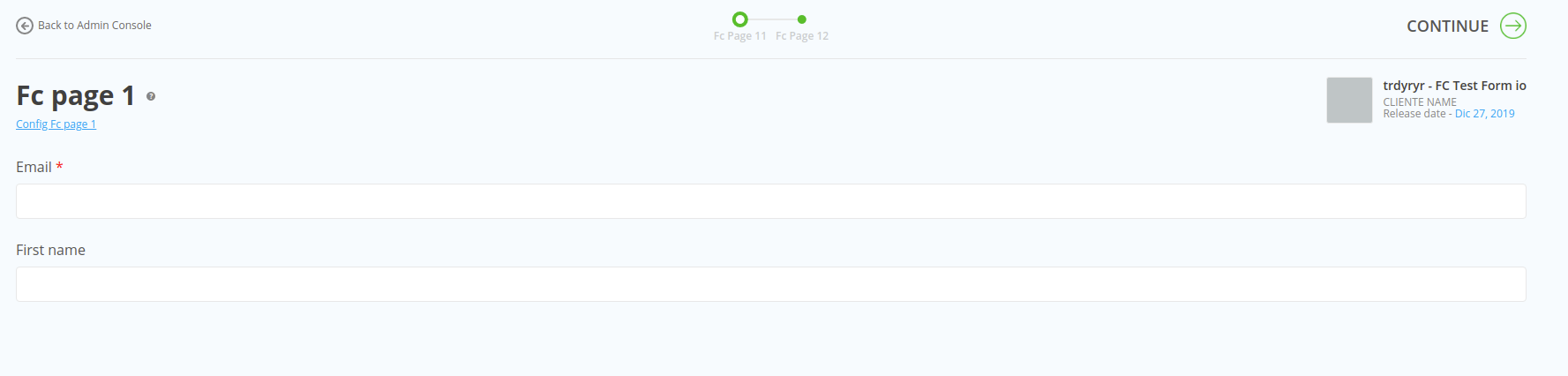
I want to validate and submit the form while click on the "CONTINUE" submit button
as per @travist said we use that but it can not validate the form

@talha48
For that, you have to add the hidden submit button on formio component and then you can trigger from outside
var submitButtonJson = { "label": "Submit", "showValidations": false, "customClass": "hidden", "hidden": false, "tableView": false, "key": "submit", "attributes": { "id": "submitButton" }, "type": "button", "input": true, "validate": { "unique": false, "multiple": false } }
For Trigger :
if ($('.hidden > button')) { $('.hidden > button').click(); }
Css :
.hidden { display: none; }

We're currently addressing a backlog of GitHub issues, and as part of this effort, some inactive issues may be marked as closed. This isn't a dismissal, but a step toward more efficient tracking.
If you feel the issue is still relevant, please re-open and we'll ensure it gets the attention it deserves. Your understanding is appreciated as we work to enhance our open-source responsiveness.
