
atom-python-run
 atom-python-run copied to clipboard
 foreshadow
F5 Command and F6 Command strings ignored on Ubuntu 18 (maybe others as well)
I just tried installing Atom+atom-python-run on a clean install of Ubuntu 18.04 and I'm experiencing a problem because Ubuntu 18.04 apparently does not symlink /usr/bin/python to /usr/bin/python3, hence there is no python command in PATH.
When I press F5 or F6 a new terminal window is opened with an error: There was an error creating the child process for this terminal Failed to execute child process "python" (No such file or dicrectory).
I tried writing python3 {file} in the [F5 Command] input field, but it appears to be ignored, because pressing F5 or F6 still cause the same error. I have tried with and without the checkmarks in [ ] Pause (F5) and [ ] Pause (F6).
See the two attached screenshots for error and settings.
I am not a daily Ubuntu user, I stumbled upon the issue testing various setups for teaching Python programming.
Edit: creating the symlink works though (ln -s /usr/bin/python3 /usr/bin/python).
Edit2: Atom v1.39.1 and atom-python-run v0.9.7
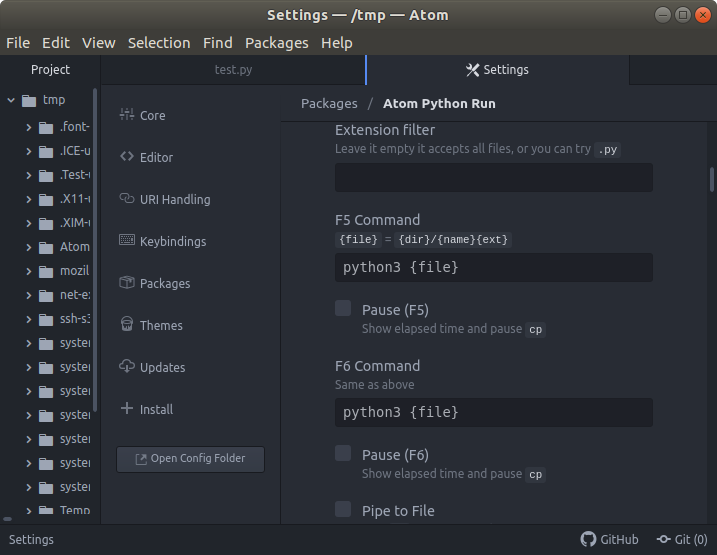
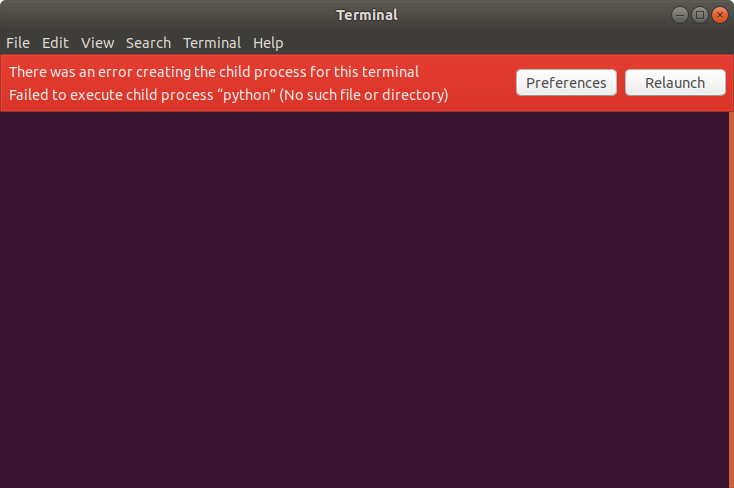

I have just tried what I tried above in Arch Linux (may daily driver) and Windows 10 (again for teaching testing purposes). In Windows 10 I can easily perform all the funny tricks with the F5/F6 Command command strings, e.g. notepad {file} and have atom-python-run open notepad with the file loaded, echo "whatever" to have atom-python-run print whatever etc.
I fail completely to do so on Arch Linux and Ubuntu 18. The command strings appear to be ignored, or I'm ignorant of what I should type there (see edit below also):
Edit:
~~The same goes for the terminal string. Apart from the python vs python3 issue atom-python-run works out of the box with Ubuntu 18, but on Arch Linux I use another terminal (termite) but it does nothing for me to specify termite in the terminal settings string. It still reports the same error atom-python-run: TerminalError: There was a problem opening xterm - seemingly ignoring the settings string.~~
The terminal thing was just me failing to read the settings description / thinking about the inner workings of atom-python-run. The terminal setting has to be <your-terminal>, <switch-to-tell-terminal-not-to-start-default-shell-but-run-command>, e.g. terminator, -x. I'll make a pull request making that description better in the interface, because right now it is written as "or try this: terminator, -x" but it should be "try this: terminator, -x.
the previous comment worked for me, thanks. el comentario anterior funciono para mi, gracias.
