

 forem
forem
See who reacted to my posts
Notes
This issue is blocked by #18277.
User story
📖 As an author, I should be able to see all people who reacted to my posts, and access their profiles.
To help authors see who has liked their post, we want to add a new piece of UI to the top of the post page. This UI is only visible to the author of the post.
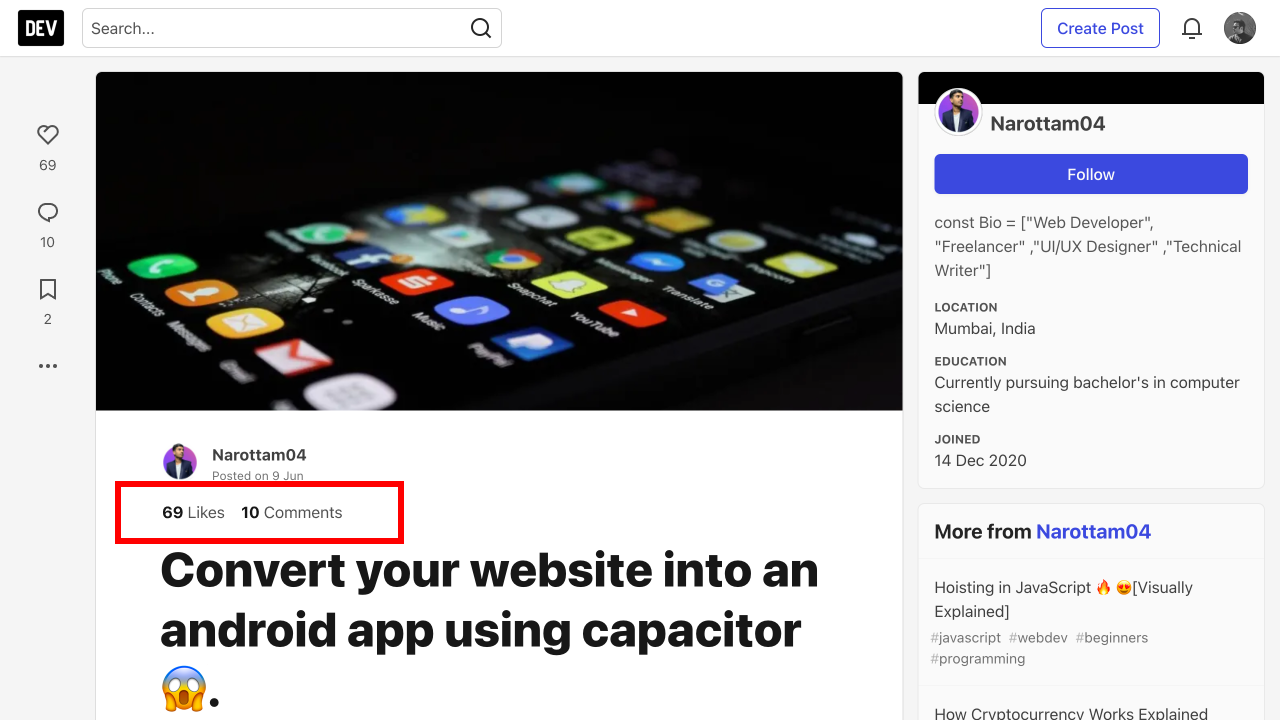
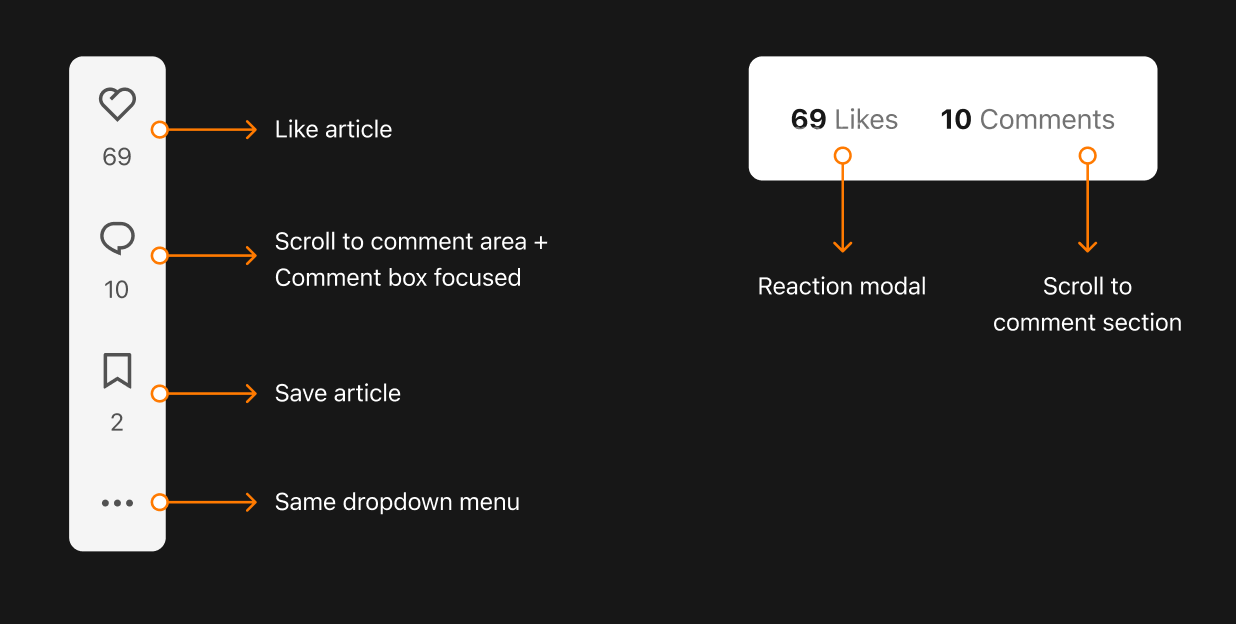
Interaction:
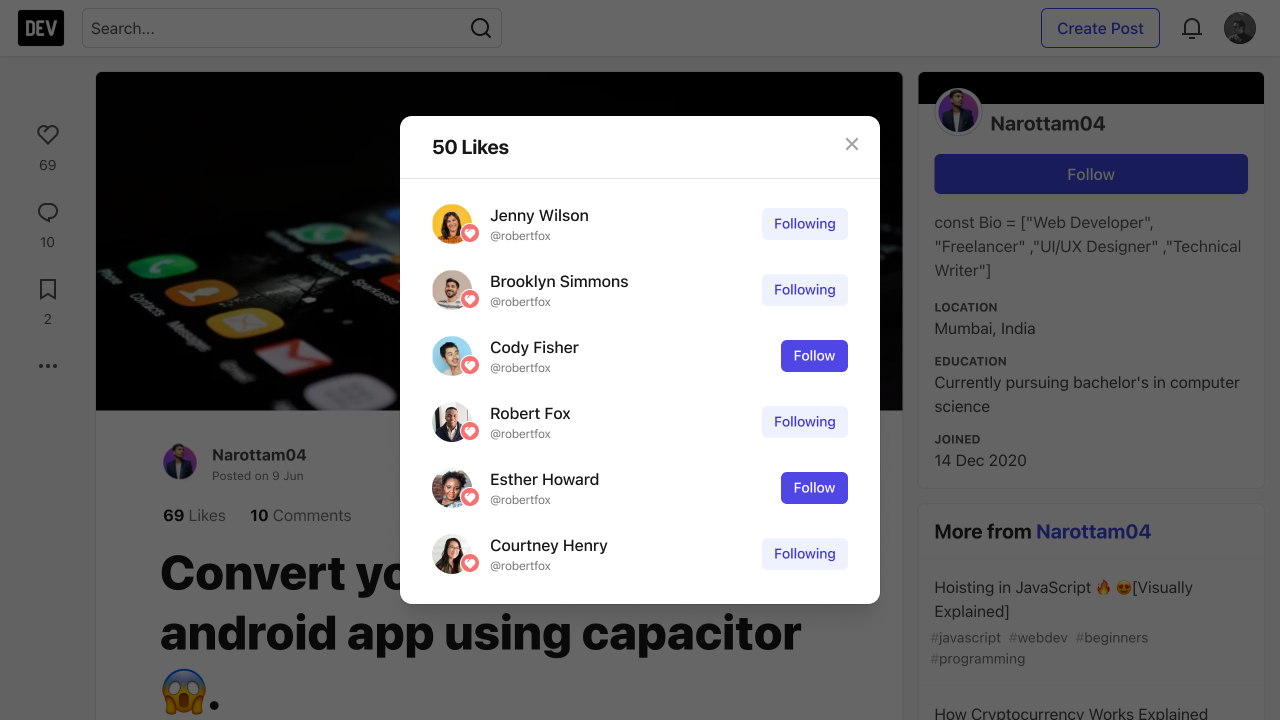
Design for the desktop modal:
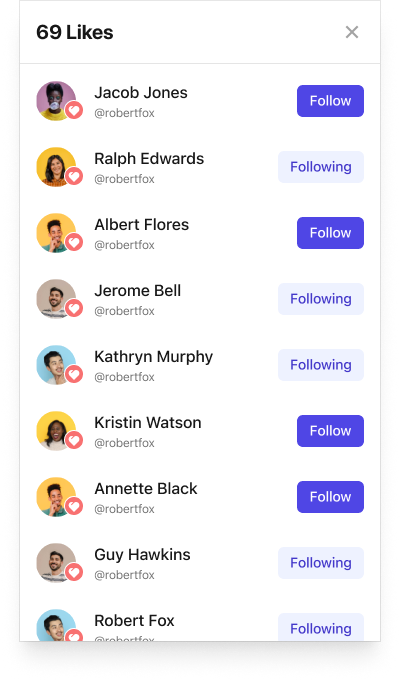
Design for the mobile modal:
Tasks
- [ ] Add the ability to fetch likes information for a post
- [ ] Create the modal, and show on button click
- [ ] Link the "X comments" text to the comments section
Add the ability to fetch likes information for a post
Given there's the potential for thousands of likes on a post, I don't think we want to bundle the likes modal HTML into the server-generated page (especially since not all authors will open the modal on every visit). Instead we can fetch likes information via an API call whenever a user requests it (by clicking on the modal trigger button).
As far as I know, the current reactions_controller only delivers the total count of each reaction for a post. We need to be able to retrieve the following for all likes:
- Username
- Profile image
- Name
- User ID (for follow button)
Given there could be thousands of likes, we will want to paginate this data, and control the display of information via infinite scroll (see below).
Note: There are close similarities between this task and the related one on https://github.com/forem/forem/issues/18126 - whichever is created first can be re-used for the other.
Create the modal, and show on button click
We can use the Preact modal, constructing the inner HTML with the data fetched from the backend.
We will likely want these rows to appear in an infinite scroll, so that we don't need to load/generate thousands of rows when the modal is first opened. Current approaches to infinite scroll can be found in initScrolling.js.
Follow buttons will need to be initialised with the correct follow state - current code for this is in followButtons.js.
Quick note: be aware of the similarities between the modal in https://github.com/forem/forem/issues/18126 - whichever is tackled first can be re-used 🙂
Link the "X comments" text to the comments section
We will also display the number of comments to the author in this same UI section. The comments text should just link the author to the comments section, to save them from scrolling down.
Product point person: @amywtlin.

Thanks for the issue, we will take it into consideration! Our team of engineers is busy working on many types of features, please give us time to get back to you.
Feature requests that require more discussion may be closed. Read more about our feature request process on forem.dev.
To our amazing contributors: issues labeled bug are always up for grabs, but for feature requests, please wait until we add a ready for dev before starting to work on it.
To claim an issue to work on, please leave a comment. If you've claimed the issue and need help, please ping @forem-team. The OSS Community Manager or the engineers on OSS rotation will follow up.
For full info on how to contribute, please check out our contributors guide.
![github-actions[bot] avatar](https://avatars.githubusercontent.com/in/15368?v=4 "Published by a pub.dev verified publisher")
Let's begin this task by only making the list of reactors available to the author of the comment/post (and not a separate reader).
That information is already public to the author and thus we don't have to consider any privacy considerations (someone might reasonably expect their reaction to be private to everyone but the receiver).

Assuming we will be removing the unicorn reaction option for now. This is how the interaction would look to see who reacted to my posts.
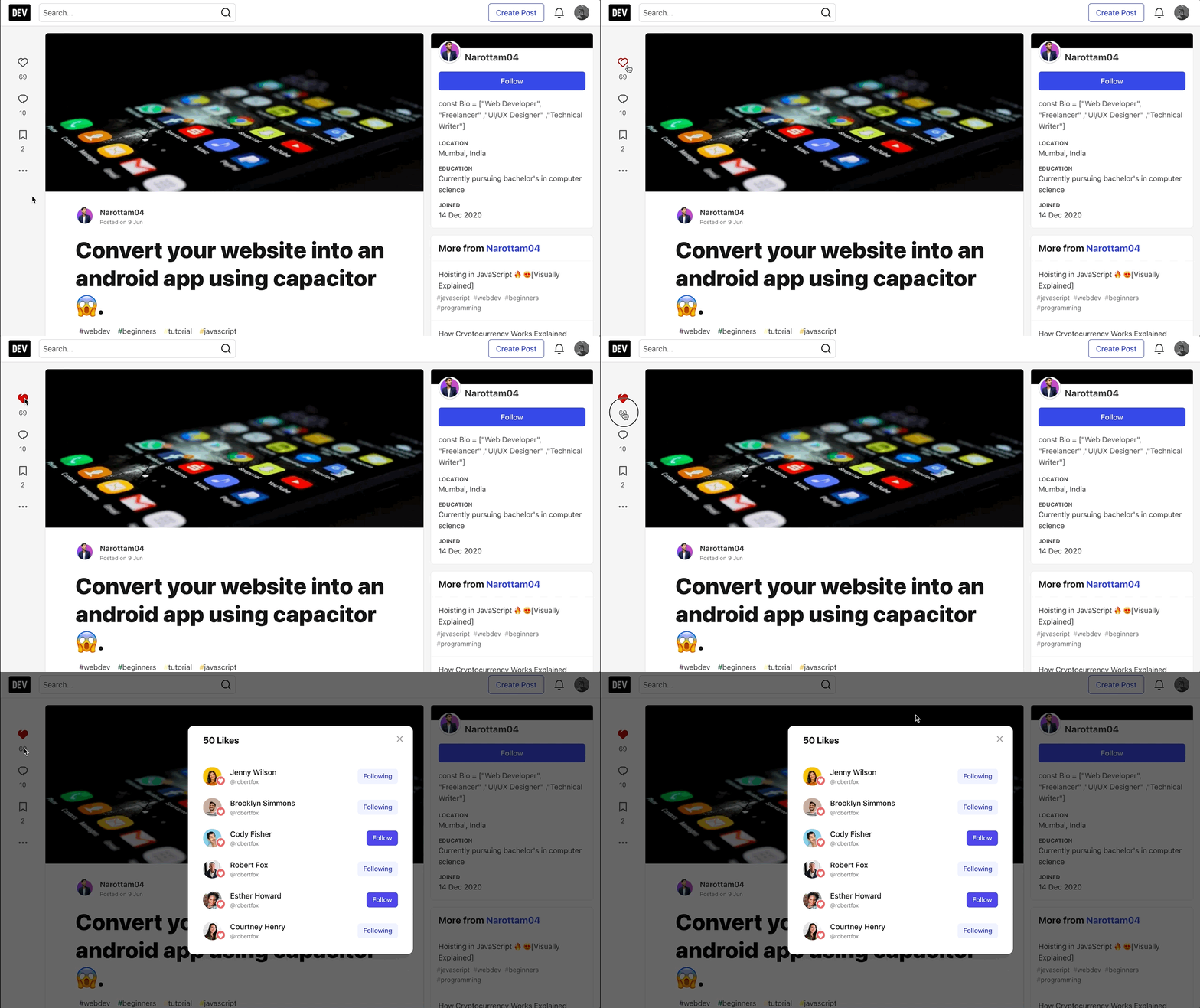
Here are Figma designs for it.
Mobile view
| Default view | Reaction modal |
|---|---|
 |
|
NOTE: Only authors can check who reacted to their posts.

@anujbhavsar96 I am not a social tools aficionado AT ALL, so excuse the basic question: How will users know to click on the count? I couldn't tell that it was clickable looking at it -- maybe this is just something that users know/expect based on using tik tok, instagram, etc so we're kind of an oddball for not making it clickable right now.
Also is this modal scrollable? What happens if there are 300 likes?

How will users know to click on the count? I couldn't tell that it was clickable looking at it.
Yes. It doesn't look clickable right now since there is no visual change. It's new interaction. We can educate users about this unique interaction with a few methods.
- DEV post about this new interaction
- Product guide modal/tooltip once an author publishes their post
IMO the easiest way, for now, is to go for the DEV post. What do you think @pkfrank ?
I agree a dev.to post would be the most straightforward. We can just embed the video @anujbhavsar96 provided here. I think we should bundle this one and also the ability to see who react to my comment one, too.
As not everyone reads announcement posts, for discoverability, one thing we could consider is to adding a tooltip when users hover over the number of likes. @anujbhavsar96 how do you feel about this or something along this line?
We can do that when the author is on the post-page ✨ I love how Figma shows a walkthrough tooltip with graphics and tiny details. If we can do something similar, it will look great.
As not everyone reads announcement posts, for discoverability, one thing we could consider is to adding a tooltip when users hover over the number of likes.
The only thing about a standard tooltip is that not all users can hover - anyone using a touch device will be missing this information 🙁
We can do that when the author is on the post-page ✨ I love how Figma shows a walkthrough tooltip with graphics and tiny details. If we can do something similar, it will look great.
This is more of a 'contextual onboarding' - I don't think we've ever done anything like this in the app, but I know we've discussed a few times in the past it could be a nice thing to do. Like the iOS/android app banners, it could just disappear once acknowledged.
Naturally, there's a bit more dev effort involved in doing this so it would be good to know what is needed from product/design POV.
I couldn't tell that it was clickable looking at it -- maybe this is just something that users know/expect based on using tik tok, instagram, etc so we're kind of an oddball for not making it clickable right now
I feel the same @mirie 😄 For what it's worth, Twitter doesn't distinguish the number from the 'like' button.
I'm really curious though, is it important that a user can 'like' their own post? We already shipped changes to stop authors bookmarking their own post. I'm wondering if we could simplify things here and have a single "Like" button which either opens the modal (if I'm the author) OR likes/unlikes the post (if I'm not the author)?

The only thing about a standard tooltip is that not all users can hover - anyone using a touch device will be missing this information 🙁
@aitchiss What would be a good way for us to facilitate feature discovery for touch device users in general? Any recommendations?
This is more of a 'contextual onboarding' - I don't think we've ever done anything like this in the app, but I know we've discussed a few times in the past it could be a nice thing to do. Like the iOS/android app banners, it could just disappear once acknowledged.
Naturally, there's a bit more dev effort involved in doing this so it would be good to know what is needed from product/design POV.
Yea, I am aware of this. It is unlike usual feature implementation and tends to be more short-lived, hence requiring more maintenance than it should have needed. I do know there are 3rd-party integrations like Chameleon - supposedly it's all set with an one-time setup, and afterwards all can be handled in a web UI by non-devs.
@pkfrank @mirie would we consider something like this for user onboarding? Contextual onboarding has proven to be much more effective for feature discovery. (well I don't have any studies handy but I know this from my own )
I'm wondering if we could simplify things here and have a single "Like" button which either opens the modal (if I'm the author) OR likes/unlikes the post (if I'm not the author)?
@anujbhavsar96 what do you think?
I'm wondering if we could simplify things here and have a single "Like" button which either opens the modal (if I'm the author) OR likes/unlikes the post (if I'm not the author)?
Not sure about this. It might become a huge mismatch of interaction. On the other hand, as a reader, it works as Like, and as an author, it opens up modal.
I have another idea ✨. How about we keep the left side action bar interaction as it is and include these two components with the post area? So clicking on 69 Likes opens up a modal with a list, and 10 Comments takes you to the comment area same as the left side comment icon. This is something that most platforms do to separate reactions and list of reactions.
This is more of a 'contextual onboarding' - I don't think we've ever done anything like this in the app, but I know we've discussed a few times in the past it could be a nice thing to do. Like the iOS/android app banners, it could just disappear once acknowledged.
Naturally, there's a bit more dev effort involved in doing this so it would be good to know what is needed from product/design POV.
What if we open an information modal after they publish the post? Is it less dev effort or more? @aitchiss . It has more friction, but since it's one-time only and it contains feature information It should be fine.
What would be a good way for us to facilitate feature discovery for touch device users in general? Any recommendations?
It's difficult in this case as the reactions in the actions bar have an established look/feel, and if we don't change how they look visually, there's probably not a great way to make the new functionality obvious (aside from the kind of contextual onboarding discussed here).
I have another idea ✨. How about we keep the left side action bar interaction as it is and include these two components with the post area?
I love this! Having it top of the post like this will help draw attention to the new feature, and we also don't need to worry about differing functionality for the author/reader ✨
What if we open an information modal after they publish the post? Is it less dev effort or more? @aitchiss . It has more friction, but since it's one-time only and it contains feature information It should be fine.
The complexity is tracking the state of whether the author has already seen this modal (so we don't show it every time they look at the post, but only directly after publishing). Would you want to show it every time they published a post, or just once? If just once then I think we'd need to track it in local storage, which would mean every time they switch browser they would see it again (like the mobile runtime banner). We could later remove the code, once we feel it's no longer necessary.
I've re-added the needs design tag as it sounds like we're leaning towards some kind of onboarding messaging for the feature / potentially adjusting where this info appears 🙂
Based on the above discussion, the above post looks like the most appropriate position where we can display the Like count, which will open up the modal with a list of who reacted, instead of having it together with the Like action on the sidebar.
Since it's new UI addition, we might not need a feature discovery popup. Maybe just a DEV post might be enough.
@amywtlin @pkfrank thoughts on this?
@anujbhavsar96 I like this new approach! I think the new comment count introduced would also serve as a good alternative entry point that allow users get to the comment section when they are on desktop: #18127
Anuj, as we have lots of discussions going on around this area simultaneously, please make sure we (at least you and I) have a final look at things to make sure if they are coherent and we can better decide the sequence of implementing these.
@amywtlin / @anujbhavsar96 - I've updated the description with what I think we've arrived at - does this all sound OK? Are we happy that this one is ready for dev?