
salesforcedx-vscode
 salesforcedx-vscode copied to clipboard
 forcedotcom
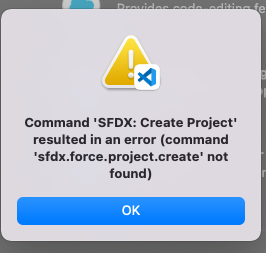
Getting Error: Command 'SFDX: Create Project' resulted in an error (command 'sfdx.force.project.create' not found)
Summary
In VS Code I'm getting this error Command 'SFDX: Create Project' resulted in an error (command 'sfdx.force.project.create' not found). I ran sfdx update from CMD and it says I'm up to date. I am able to create project directly via CMD but not via VSCode and unable to run any other SFDX commands in VSCode but I was able to 1 day ago). I've tried reinstalling VsCode and the Salesforce extensions and rebooted my laptop, but nothing changed. I still get the same error.
Steps To Reproduce:
-
- Open VS Code
-
- Type Ctrl-Ship-P, then start typing SFDX and select SFDX: Create Project
-
- then I get error message
Expected result
It should have taken me to the next step and let me put in my project name.
Actual result
Error message is already indicated
Additional information
Salesforce Extension Version in VS Code: v54.4.0
SFDX CLI Version: already on latest version: 7.141.1-4a1340e
OS and version: I'm on Mac OS Monterey 12.2.1.

I'm having the same issue. In addition, if I open an existing project, it seems like the extension doesn't recognize that I'm in a Salesforce project directory -- the only SFDX commands that show up in the command palette are those related to creating a new project (and those don't work). I've updated SFDX via command line, uninstalled and reinstalled the extensions, and re-installed VS Code but no change. This broke sometime in the last few weeks.
Salesforce Extension Version in VS Code: v 54.4.0
SFDX CLI Version: 7.141.1
OS and version: Mac OS v 12.2.1 (on an M1 Mac)


@paolinAGE , I just ran through this, and it worked for me. I have a few questions for you...
-
When I run the "SFDX: Create Project" command, a popup menu appears with 3 choices: Standard, Empty, and Analytics. Do you see this? Or are you getting the "command 'sfdx.force.project.create' not found" error here, before this popup menu even appears?
-
Please run the following, and let us know what results you get:
sfdx --version
(I get sfdx-cli/7.141.1 darwin-x64 node-v16.14.0)
and also run sfdx plugins
-
Could you please attach the log file.
-
In the log file, if you see the error, "Error: Could not locate the bindings file", this sounds like the same issue reported here (https://github.com/forcedotcom/salesforcedx-vscode/issues/3901). If this is the case, this is something we're looking into, and a temporary fix is to change "Salesforce CLI Integration" to v54.3.0.


@paolinAGE , I just ran through this, and it worked for me. I have a few questions for you...
- When I run the "SFDX: Create Project" command, a popup menu appears with 3 choices: Standard, Empty, and Analytics. Do you see this? Or are you getting the "command 'sfdx.force.project.create' not found" error here, before this popup menu even appears?
No popup menu, just the error message.
- Please run the following, and let us know what results you get:
sfdx --version(I get sfdx-cli/7.141.1 darwin-x64 node-v16.14.0)
I get 'sfdx-cli/7.141.1 darwin-x64 node-v16.14.0'
and also run
sfdx plugins
I get 'no plugins installed'
- Could you please attach the log file.
Please see attached log file below.
- In the log file, if you see the error, "Error: Could not locate the bindings file", this sounds like the same issue reported here (Extension fails to locate the bindings file #3901). If this is the case, this is something we're looking into, and a temporary fix is to change "Salesforce CLI Integration" to v54.3.0.
I have also had this error. But I fixed it by downgrading the VS code extension.It's working fine now.

I am getting the same error. Command-line is fine.
Machine/Chip - Apple M1 Pro Monterey - 12.1 (21C52)
Salesforce Extension Pack - 54.4 VS Code - Version: 1.65.1 Commit: 8908a9ca0f221f36507231afb39d2d8d1e182702 Date: 2022-03-08T02:20:04.372Z (2 days ago) Electron: 13.5.2 Chromium: 91.0.4472.164 Node.js: 14.16.0 V8: 9.1.269.39-electron.0 OS: Darwin arm64 21.2.0

downgrading Salesforce CLI Integration VS Code Extension by one version(from 54.4.0 to 54.3.0) will fix this.
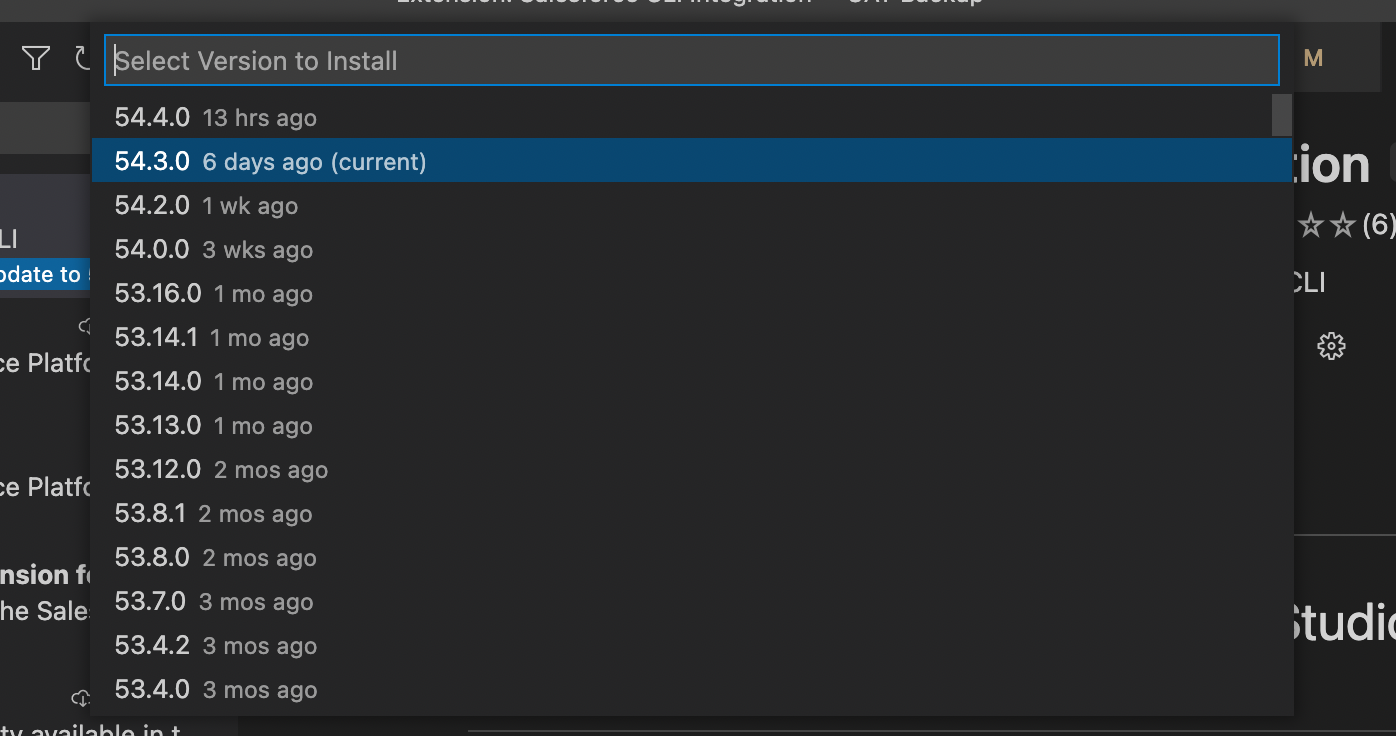
Having the same issue. It seems like it didn't recognize any SFDX Project at all anymore, neither new ones nor existing ones.
Apple M1 Pro, Monterey 12.1

downgrading Salesforce CLI Integration VS Code Extension by one version(from 54.4.0 to 54.3.0) will fix this.
Same for me. 53 is workiing.
Hi, Same for me after downgrading it is working now. Thanks for the follow up Who can we contact for that?

You guys also have to rollback your Apex extension version as well. Apex language server is also not working in the latest version.


Hi everyone! Thanks for reporting this and sorry about the issues you're facing. This is due to a known problem with the latest release of the Salesforce Extensions v54.4.0. This issue is being tracked by #3901 and the team is working on a fix. In the meantime, please downgrade to version v54.3.0 - let us know if you see any other issues or have any questions!

I've written an article regarding this problem. You basically need to open the developer logs to understand what's going on. For me, it was a problem of right of the .sfdx project
https://www.black-fox.org/sfdx-salesforce-cli/command-sfdx-create-project-resulted-in-an-error/

Same issue whether or not I downgraded. I successfully created a project in the command line using this command: sf project generate --name MyProject
from https://developer.salesforce.com/docs/atlas.en-us.sfdx_dev.meta/sfdx_dev/sfdx_dev_ws_create_new.htm

same issue, but successfully created the project with the command sf project generate --name MyProject.


Has anyone received this error message after creating the project "Unable to activate the Apex Language Server - Running java command C:\Program Files\Common Files\Oracle\Java\bin\java -XshowSettings:properties -version failed with error: spawn C:\Program Files\Common Files\Oracle\Java\bin\java ENOENT", please let me know.

hi @RBurrage , @SnehaPawar22, @sindhusreeaita and @VigneshIyer11888. Is SFDX: Create Project command from command palette with latest version of the extensions (v61.8.1) still causing you errors? If it's not and you're having a different problem, please create a new issue. I'll be closing this as there have been no recent reports of SFDX: Create Project command failing and I was not able to reproduce it.
