

 forcedotcom
Regression "SFDX: Deploy source to org" automatically runs test when deploying to prod
Summary
Using the "SFDX: Deploy source to org" command from the VS extension, and targeting a production environment, it now automatically run the tests.
Steps To Reproduce:
- Take an apex file
- Update it locally
- Set your default org to a production org
- Use the right click > "SFDX: Deploy source to org"
- Check the deploy status in the production org
Expected result
No tests runs
Actual result
"RunLocalTests" tests are run
System Information
{ "cliVersion": "sfdx-cli/7.110.0", "architecture": "win32-x64", "nodeVersion": "node-v14.17.3", "pluginVersions": [ "@oclif/plugin-autocomplete 0.3.0 (core)", "@oclif/plugin-commands 1.3.0 (core)", "@oclif/plugin-help 3.2.2 (core)", "@oclif/plugin-not-found 1.2.4 (core)", "@oclif/plugin-plugins 1.10.0 (core)", "@oclif/plugin-update 1.4.0-3 (core)", "@oclif/plugin-warn-if-update-available 1.7.0 (core)", "@oclif/plugin-which 1.0.3 (core)", "@salesforce/sfdx-diff 0.0.6", "@salesforce/sfdx-plugin-lwc-test 0.1.7 (core)", "@salesforce/sfdx-trust 3.6.0 (core)", "alias 1.1.10 (core)", "apex 0.2.2 (core)", "auth 1.7.1 (core)", "config 1.2.13 (core)", "custom-metadata 1.0.12 (core)", "data 0.5.2 (core)", "generator 1.1.7 (core)", "limits 1.2.1 (core)", "org 1.6.7 (core)", "salesforce-alm 52.1.0 (core)", "schema 1.0.8 (core)", "sfdx-cli 7.110.0 (core)", "telemetry 1.2.2 (core)", "templates 52.1.0 (core)", "user 1.3.1 (core)" ], "osVersion": "Windows_NT 10.0.19042" }
Additional information
Before clicking on "Deploy source to org" was not triggering any test, which was leading deploy to fails. This was acting has a guard for any miss click or in case you forgot you were targeting a production environment.
Purposed solution
Here are several solutions:
- Add a confirm popup when you deploy to production
- Add an option to allow the project to choose between old/new behavior

Thank you for filing this issue. We appreciate your feedback and will review the issue as soon as possible. Remember, however, that GitHub isn't a mechanism for receiving support under any agreement or SLA. If you require immediate assistance, contact Salesforce Customer Support.
![github-actions[bot] avatar](https://avatars.githubusercontent.com/in/15368?v=4 "Published by a pub.dev verified publisher")
@Bartheleway do you have the VS Code setting "Experimental: Deploy Retrieve" turned off? If yes can you try turning it on?

@xyc I don't see any difference on scenario I tried. For example deploying a static resource or a visualforce page is allowed. Maybe this is "as designed" since they can be edited directly in production (worst idea ever). But I remember this was impossible before so still a regression.
What change have you made ? A confirmation ?
@Bartheleway We are trying to confirm if the issue is happening with CLI or within VS Code. If the setting "Experimental: Deploy Retrieve" is off we are using the CLI for deployment, otherwise we are using a node library. Don't think I'm seeing "RunLocalTests" happening when deploying Apex. Did you see it in Output Panel > Salesforce CLI channel? If so does it happen after "Starting SFDX: Deploy Source to Org"?
Thanks for confirming. Could you also let us know where do you see "RunLocalTests"?
Did you see it in Output Panel > Salesforce CLI channel? If so does it happen after "Starting SFDX: Deploy Source to Org"?
This issue has been automatically closed because there has been no response to our request for more information from the original author. Currently, there is not enough information provided for us to take action. Please reply and reopen this issue if you need additional assistance.
![no-response[bot] avatar](https://avatars.githubusercontent.com/u/26350515?v=4 "Published by a pub.dev verified publisher")
Hi, I don't see it in the console, it's just that it runs with that mode when deploying to production and before it was running with no test run which makes deploy to fail and prevent miss click deploy.
@Bartheleway would you mind sending a screenshot (or even a gif) of where you're seeing that mode run? We'd like to make sure that we're looking at the same spot to check this issue.

What I see in Salesforce, deploy status page :
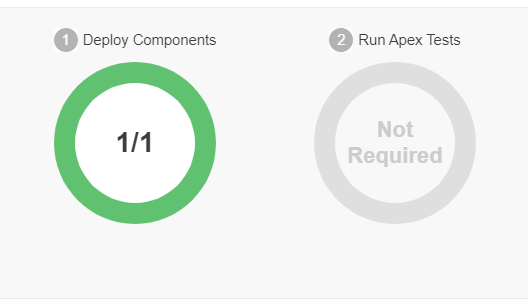
What I see in the console is :
- Starting SFDX: Deploy Source to Org
- [Some text saying what has been deployed
- ended SFDX: Deploy Source to Org
Before when I was doing such deploy, it was failing saying that we must specify test level to deploy in production.
@Bartheleway I'm seeing the same as what you reported on 9/30, and this seems to be fixed, so I'm going to close out this ticket.

Hi it is not fixed ! I can still right click -> deploy on prod without any confirmation nor error message
@Bartheleway I'm reopening this issue. The issue you initially reported was that tests automatically run when deploying, and they shouldn't be. That no longer seems to be the case, so it seems the initial issue reported was fixed. Not being prompted for confirmation is a different issue, and so I'm going to reopen this ticket.
Hi @jeffb-sfdc, as said the initial issue isn't fixed, tests are still running automatically. Thanks for reopening, do you have any idea when this will be fixed ? What solution are you planning to implement (a prompt, an error message, ...) ?
@Bartheleway I've spoken to a colleague about this... just to clarify, the steps to reproduce this is:
- Take an apex file
- Update it locally
- Set your default org to a production org
- Use the right click > "SFDX: Deploy source to org"
- When prompted that there are conflicts, I click the "Override Conflicts and Deploy" button
- Check the deploy status in the production org
Results: When I log into my org, navigate to Deployment Status, and then drill into the deployment that was just performed, I see that the components were deployed, but no tests were run. I've confirmed with other members on my team, as well as the team whose library we use to deploy the sources, and have confirmed that this is the correct behavior.
Are you seeing something else? The screenshot you posted on 9/30/2021 matches what I see, and it appears the tests are not automatically running for you as well. If you are seeing something else, I think I'll need better repro steps, as I haven't been able to reproduce the issue of, when the sources are deployed, the tests also run.
@jeffb-sfdc the steps are correct. Note that depending on which metadata you take (apex, visualforce, staticresource, ...) the result on step 6 will vary.
For an apex class I get :
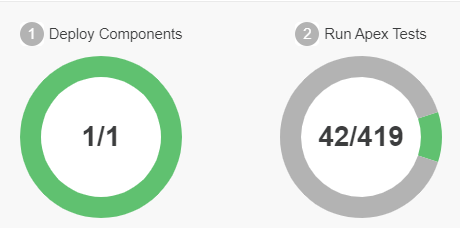
For a visualforce or static resourse, I get the previously shared screenshot (not required).
From what I suppose, the deployment is launched with no testLevel which according to documentation If you don’t specify a test level, the default test execution behavior is used.
Before we were getting an error message because I suppose the default was NoTestRun which is forbidden in production. This was great as it was preventing user to miss click and deploy in production. A solution could be to add a prompt when deploying to production environment as it is sensible.