

 fonttools
com.google.fonts/check/name/family_and_style_max_length is overly-strict
Observed behaviour
com.google.fonts/check/name/family_and_style_max_length is overly strict, as far as I can tell. This will make unnecessary work for people to figure out abbreviations for font naming. The check says:
Combined length of family and style must not exceed 20 characters.
...and bases this off a GlyphsApp tutorial recommendation.
Here's the issue this was first brought up in: Issue 1488. It references this tutorial, but the tutorial doesn't substantiate its claim.
Expected behaviour
I propose three changes to the check:
- I think the test should be changed to 29 characters (or 27 at the very minimum).
- The test check the value in
nameID="4", rather than do a simple concatenation of family and style names (nameID="1" + nameID="2"). - The test should also check the value in
nameID=6to verify that it is a maximum of 29 characters.
In this TypeDrawers thread, Mark Simonson describes how he keeps nameID 4 to 31 or fewer characters, in order to keep it working on MS Word 2011 for Mac. For what it's worth, this is also the value I've heard from other professional type designers, but specific references are difficult to locate.
In this Adobe Font Naming Issues PDF, the PostScript name (nameID 6) must have no spaces and be limited to 29 characters for old postscript printers (see page 8). If someone somehow had a super-long family and style name with no spaces in either, we couldn't count on spaces being removed for ID 6 (e.g. Supercalifragilistic SemiBold would become Supercalifragilistic-SemiBold, and thus my recommendation of 29 characters for both IDs 4 and 6.
The most strict naming limitation I've been able to find a reference for anywhere is this IE9 bug, which describes that IE9 can handle only up to 31 characters in a font-family declaration, meaning that after possible quotes and a semicolon and/or commas, the maximum working length of a name is 27 characters. If the GFonts CSS is automatically generated using ID 4, we could potentially limit ourselves to 27 characters instead of 29.
Is there anything concrete I've missed that really specifies 20 characters being a true limit, and where in what software there are problems beyond that? If so, we can follow that limitation. However, I believe the GlyphsApp tutorial may just be throwing that low number out as an easy guidline to remember, not as a verified limitation.
Why it matters to be accurate
Especially in fonts which have widths and weights (e.g. Encode Sans), a limit of 20 characters is unecessarily difficult to achieve.
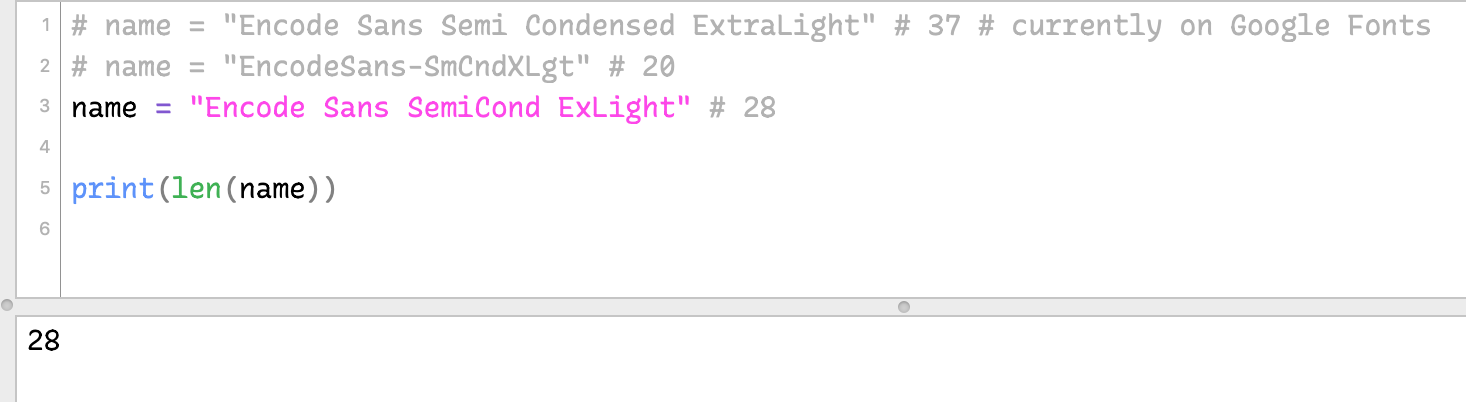
One of the font instance currently hosted on Google Fonts has a nameID 4 of Encode Sans Semi Condensed ExtraLight, which is 37 characters. That would need to be abbreviated in nameID 4 to show up in IE9 or in MSWord2011 for Mac. Right now, both cases are very likely failing.
To shorten that to 20 characters, it has to be something very cryptic, like EncodeSans-SmCndXLgt. It's hard to think of what characters to take out, and the problem would only be worse for something with a longer family name. If the check is this strict, people might end up ignoring it.
If we increase the limit to 29 characters, the same font could be something like Encode Sans SemiCond ExLight, which uses 28 characters (counting spaces) and is much more readable.
If no one objects to this update, I'd be happy to try updating the Font Bakery check according to my proposal. I just wanted to document my findings and get potential feedback before editing any code.


Cross-posted to:
https://forum.glyphsapp.com/t/overly-strict-font-name-max-length-recommendation-in-naming-tutorial/10164
27 seems good due to the msie9 bug you discovered, and Jeff's comment on win7 installation.
Minimizing the delta between ttf and cff is good to enable end user conversion between them
@davelab6 Sorry, where/what was Jeff's comment on win7? Based on answers in the GlyphsApp forum, installation on Windows does seem to be the hardest limitation.
27 could work, though it might still be more strict than we need. Do you expect there to be cases where the nameID 4 is used for in a @font-face font-family CSS declaration?
Looking at an example of CSS from Gfonts, the family name of nameID 1 (e.g. "Encode Sans Semi Condensed") is used in font-family, and the style (e.g. "ExtraBold") is simply gotten with font-weight: 800. So, that particular font should work well even in IE9, though it would most likely fail to be installed on older versions of Windows.
Related: we might want to start adding "Name Table Entries" as custom params to GlyphsApp sources, as described at https://glyphsapp.com/tutorials/naming. (Maybe others are already doing this).
If anyone comes across this issue, I've made a simple Python script that can be triggered from the command line to abbreviate name IDs 4 & 6 to avoid issues with installation.
As an example, it will take the file EncodeSansSemiCondensed-ExtraLight.ttf, which has a full name of Encode Sans SemiCondensed ExtraLight, and:
- abbreviate nameID
4toEncode Sans SemiCond ExLght(27 chars) - abbreviate nameID
6toEncodeSansSemiCond-ExLght(25 chars)
Here's the helper script: https://github.com/thundernixon/Encode-Sans/blob/c5eb4d08985e860abf8f7bceb6ce198604992714/scripts/helpers/shorten-nameID-4-6.py (This version is as of Nov 26, 2018 – you may also want to check if it's been updated with any fixes).
It can be run with a command like:
python SCRIPT/PATH/shorten-nameID-4-6.py FONT/PATH/font.otf
...where you update the script path, as well as the path you're passing in with a TTF/OTF file or a folder of TTF/OTF files. Of course, this is probably most useful when added to a build shell script, in a step following FontMake font generation.
This currently works from a dictionary of style names I chose to shorten in Encode Sans, but if you have other style names, you should add them in the script:
abbreviations = {
    "Condensed": "Cond",
    "Expanded": "Expd",
    "Extra": "Ex",
    "Light": "Lght",
    "Regular": "Reg",
    "Medium": "Med"
}
If you try it and face any issues or make any improvements, let me know!
@davelab6 Kind of ... their method is the reverse of what I would expect.
Per the simple naming tutorial, you do two things:
- Abbreviate the Family Name and the Style Names
- Add custom params
preferredFamilyName&preferredSubfamilyName, which will be used where possible
Looking at the more in-depth naming tutorial, I see that it is also possible to add a specific custom parameter postscriptFontName to meet the 29-character limit.
For nameID 4, you must use the custom parameter Name Table Entry twice:
-
4 3; Encode Sans Cond ExLght(Windows English Full Name) -
4 1; Encode Sans Cond ExLght(Mac English Full Name)
@Felipe this is probably a pretty quick change. I say we change the limit from 20 to 27 characters, as per discussion above.
27 is still on the very strict side, but if we want to raise it later, we can circle back.

oh! I said I would do it but ended up not doing it. I am sorry! Will try to do it now :-)
A user reports this check is misleadiing them.
When they shorten their names, the fonts do not work. But the fonts do work with long names.
Therefore this check needs to be carefully reviewed and tested in various environments.
@felipesanches I will connect you with the user privately.
@thundernixon has been in contact with the users while I was away. Did you figure out what were the issues they were facing?
(Bah, wrote some stuff, then killed it. It was correct ancient history as far as it went, but there are indeed other restrictions/issues by various apps, notably Word and IE9.)

@tphinney, Looking at the history of edits, the stuff you wrote seems useful information. Please authorize us to keep it explicitly listed here.
Sure, I’ll dust it off and clarify a few points....
This whole thing for NameID=4 being restricted even to 27 or 29 characters may have other reasons/restrictions with specific apps. Oddly, it was originally based on a long string of logic that starts with obsolete and believed-to-be-incorrect “fact” that has been abandoned by Adobe, who perpetrated it in the first place. They required that in OT-CFF, NameID=4 (ONLY) be = to the PostScript FontName (NameID=6). And, as I recall, only for the Windows platform. So, take the PS Fontname (NameID=6) and drop it into NameID=4, for Windows. Only.
AND that wasn’t just a length limitation! The two had to be literally identical. That means no spaces and no non-ASCII characters and all sorts of other restrictions.
So, the reason to do this in TTF is that it is done in OT-CFF, and you want to make sure you are compatible across OT flavors.
BUT (1) you are not respecting the original requirement if you stick spaces in!
And (2) Adobe stopped doing it in OT-CFF quite some years ago (5? 10?) because they determined that the original motivation for it in OT-CFF appeared to be mythical.
Oh, and if you want to know why it was possibly 27 instead of 29, that is because the PostScript FontName was being used to name font files in their various forms, and they wanted to be able to fit the whole thing in plus a ".AFM" extension in a filename in environments where filenames were limited to 31 characters.
All that said, I realize some apps (Word, IE9) may have relied on some of these things at some point since. So there may be other reasons. But the original reasons are a bit long-dead now.
One thing to call out from Thomas’s comment:
The restriction is only on name 4 & 6, if it is even relevant anymore.
However, this check is checking the total length of names 1 & 2. So, it often reports an issue when there is none.
Example: Encode Sans SC
Name 1: Encode Sans SC Cnd Th # 21 characters. GOOD.
Name 2: Regular # 7 characters. GOOD.
Name 4: Encode Sans SC Cnd Th # 21 characters. GOOD.
But Encode Sans SC Cnd Th + Regular = 29 characters and is reported as a WARN.
Would it be possible to this check to look at name 4, instead of 1+2?
Note that there also is a legacy issue (presumably not current?) for old versions of Word involving the total length of 1+2. Basically if it exceeded 32 characters, Word would not consider anything past that. So the first 32 chars of (name 1+2) had better be unique in the family, or else “fun” would ensue.
I would be surprised if this hasn’t already been fixed, likely many years ago.
there also is a legacy issue (presumably not current?) for old versions of Word involving the total length of 1+2
Ahh hmm, I didn’t quite realize those were separate, related issues. That clarifies a lot for me, actually. Thanks!
A few things here:
a) The above GitHub junk is a really good example of why we should not reference issue URLs in a report. :-) b) @vv-monsalve has recently been doing a lot of testing of the limits of font names. She can summarise her answers, but I think the current value of 27 causes problems. c) At any rate, we believe that elided subfamily names ("Regular") should not count in the total, but other subfamily names should. (Edit: This is #4104)

After performing extensive installation and use tests for fonts with different name ID 4 length these would be the main findings:
-
The definitive limit for name ID 4 in static fonts would be 32 characters. Beyond that, some accented letters in MS Word on Win10 and Win11, are displayed with a fallback font. E.g.
Fira Sans Extra Condensed ExtraLight -
Now, when it comes to variable fonts, the limit is still the same, but it's not directly linked to a single name field. This makes things more complicated. In such cases, the limit is applied to a combination of the nameID1 and the instance name found in the stat table. This is equivalent to the nameID4 found in static fonts.
That is, for a variable font with the following name IDs:
- name ID 4:
My Font Extra Condensed Regular= 31 characters - name ID 1:
My Font Extra Condensed= 23 characters - STAT instance name:
ExtraLight= 10 characters
The name ID 4 is only 31 characters long, which would be fine. However, when name ID 1 is combined with the instance name in the stat table, the resulting length is 34 characters. Which is causing issues with the shaping. The image above shows an
ExtraLightinstance, but the same problem occurred with e.g. aThininstance when the name ID 1 was too long. - name ID 4:
So, for a consistent approach, the check should use name ID4 on static fonts and the concatenation of nameID1 + instance names on the stat table for VFs.

Small update/edit. After another test abbreviating the instance name, I can confirm:
- The limit is applied to a combination of the nameID1 and the instance name found in the
fvartable.
Combining the information here and in #4104, I think we should make the test do the following:
- nameID4 (without RIBBI) > 31: WARN: problems with dropdown menu in old versions of Word
- nameID 6 > 27: WARN : problems with mac and postscript printers
- name ID 1 + fvar instance name > 31 : WARN : problems with Windows
- nameID4 (without RIBBI) > 31: WARN: problems with dropdown menu in old versions of Word
- name ID 1 + fvar instance name > 31 : WARN : problems with Windows
Please note that the actual limit would be ≤ 32. And I think it should have a FAIL result if it goes up that value.
Hello @vv-monsalve, @felipesanches, @thundernixon, @simoncozens I have just encountered a consequence from a 33-character font name in a Thai font: in WIN MSW, Thai displays as a fallback font. Unfortunately, I'm not able to share much info due to NDA. However, in a 16 style family with 8 weights of Roman and Italic, the ExtraBold exceeded the name limit by one (33 char). In WIN MSW, the Latin displayed just fine, but the Thai used a fallback font. All other styles displayed as expected.
Once I changed the Family Name ID 1 (Style Map Family Name in Glyphs) to use ExBold, Thai displayed properly.
Consider updating the rationale to WARN (or even FAIL) since a fallback font is used in non-Latin scripts if the name has >32 characters. Note that I haven't tested other scripts but can do so this week.

Thanks Glenda! I don't think an update is required, as this is consistent with what we now report - a FAIL for names > 32 characters because they cause weird inconsistencies in Word.
New question here, while we’re discussing it...
It is my impression that nameID 25 (variable font postscript prefix) is used to create static fonts from variable fonts, for PDF embedding. ~Does anyone know if this is really the case, and how this works? If it works as I’m imagining, should we check whether nameID 25 + fvar instance > 29, because presumably such PDFs will be printed, and many printers may have old tech?~
EDIT: Adobe describes the creation of postscript names from variable fonts, at https://adobe-type-tools.github.io/font-tech-notes/pdfs/5902.AdobePSNameGeneration.pdf. There, they say that the character limit of postscript names is 127 characters, and show how names should be constructed for both named instances and arbitrary axis values. Despite the much longer limit specified now, I would guess that resulting names that exceed 29 characters may still face printing issues.

@mgbella quick question: can you say specifically which version of Windows/Word you ran into this issue on? Did you happen to test it after a computer restart? (Not sure if the latter question is relevant, but it fixes a surprising number of font issues on Mac.)
@arrowtype I’ve been clearing my cache a lot in this project. Each time I do that, I restart. I use the subscription-based MS Office 365 in the cloud. I guess that means it’s always the latest version. It’s Version 16.0.17 in WIN 11, Version 23H2.
