fondberg
Can't install manually
Bug Ticket
I've copied the files from 'Spotcast\spotcast-master\spotcast-master\custom_components' to the 'Docker\HomeAssistant\config\custom_components\spotcast' folder. I'm running HA on an ASUSTOR NAS which is a Docker implementation.
I modified the configuration.yaml and secrets.yaml files and then went to restart HA. I get the error " Integration error: spotcast - Integration 'spotcast' not found."
Troubleshooting
Make sure to validate all the elements before submitting the ticket (Exception to the steps marked as optional)
- [x] Using latest version of spotcast
- [x] Using latest stable version of Home Assistant
- [x] I have setup the Spotify integration in Home Assistant
- [x] I have renewed my
sp_dcandsp_keyvalues and restarted Home Assistant (see README) - [ ] (optional) I have Spotify Premium
- [ ] (optional) I am using multiple accounts
- [ ] (optional) I'm attaching relevant logs with level debug for component spotcast (see README)
- [ ] (optional) I'm using entity_id in the service call and have tried device_name but the issue remains
Environment
- Docker installation - Installation type: [HA_OS|Container|Supervised|Core]
- HA version: [20230104.0 ]
- spotcast version: [ see above]
Configuration
# please remove any sensitive information like cookies and token keys
<insert configuration here>

spotcast:
  sp_dc: !secret sp_dc
  sp_key: !secret sp_key
Service Call
If relevant, provide a yaml of the service call or explain the action taken to replicate the issue.
<insert the yaml of the service call here>
Logs
- normal|debug
<please insert any relevent logs here>
Additional context

Can you check the actual contents of the files you copied? By the looks of it, it seems that the files weren't copied in the right way or location.
If the contents start with <html , you haven't downloaded the right files. You need the raw version

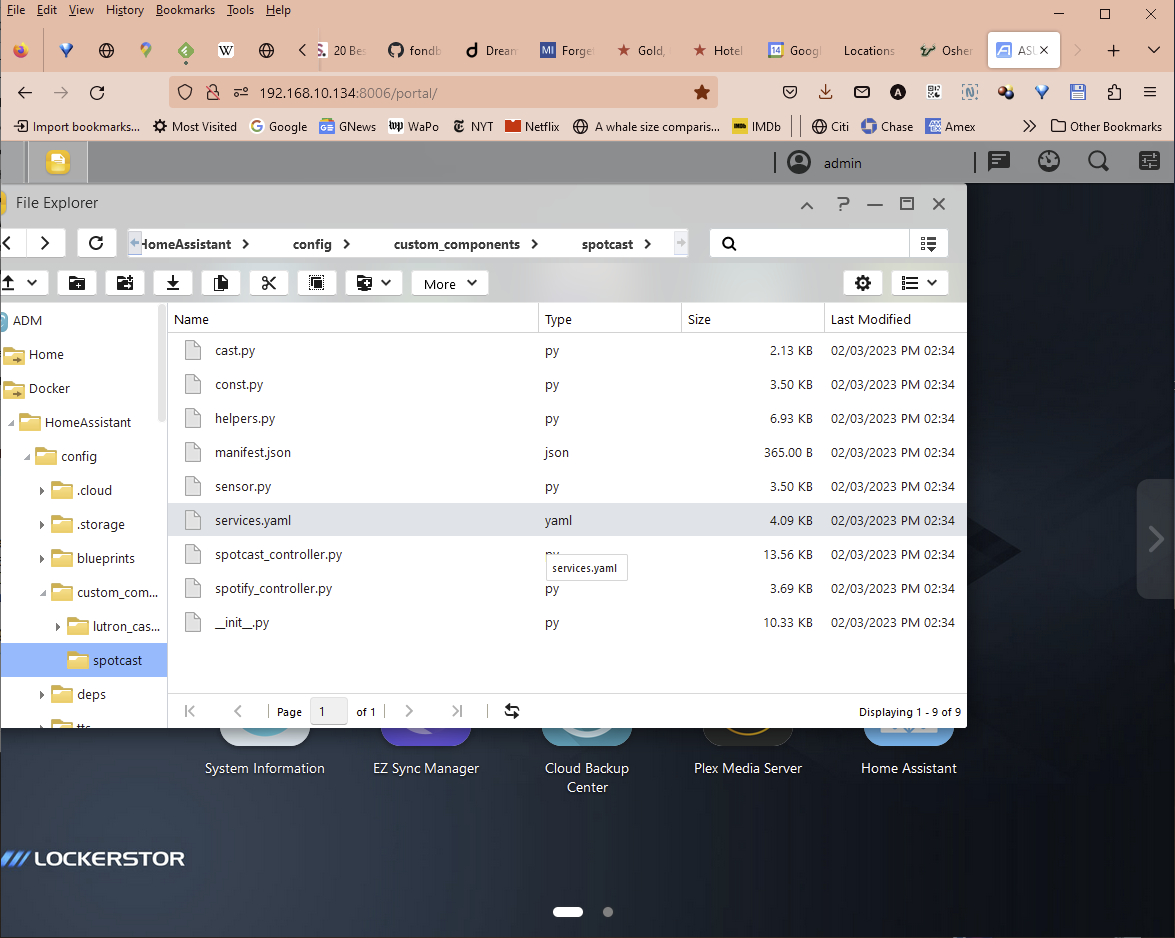
@AlanEisen the file are the correct ones, but you still might have an ownership or permission problem on the file.
I suppose the lutron integration is working. If that is the case, could you check the autorisation tab in the properties of the folder and one file (any file, I just want a sample) then do the same thing for the lutron integration. I want to compare them and check if you have a different set of permissions between the 2.

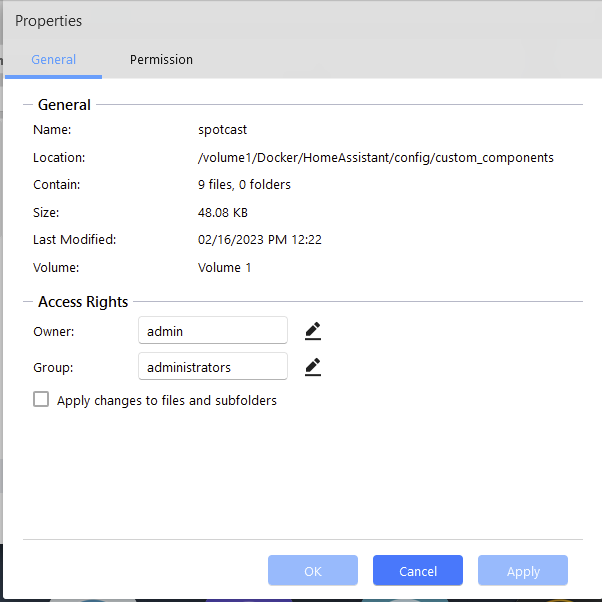
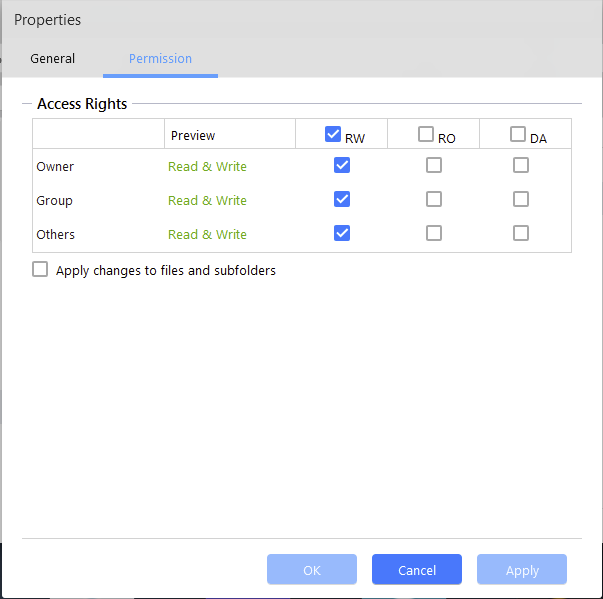
@AlanEisen Ok at least we can rule out any permission base problem. Does Asustor provide any way to connect directly to a docker container. I have a feeling the file is not getting ported correctly inside the docker container.
This page from asustor seems to indicate that in container detail you do have a console option. If so, can you run the following command in the terminal:
ls -alh /config/custom_components && ls -alh /config/custom_components/spotcast/
this should give you an output of the sort:
total 28K
drwxrwxr-x   14 1000     1000         269 Feb 18 15:10 .
drwxrwx--x   20 10003    1004        4.0K Feb 18 17:10 ..
drwxr-xr-x    4 root     root         181 Dec 14 08:06 adaptive_lighting
drwxr-xr-x    4 root     root        4.0K Jan 10 16:01 alarmdotcom
drwxr-xr-x    3 root     root         161 Feb  6 20:01 auto_backup
drwxr-xr-x    7 root     root        4.0K Feb  6 20:01 better_thermostat
drwxr-xr-x    2 root     root         101 Jan 16 14:34 dual_smart_thermostat
drwxr-xr-x    4 root     root        4.0K Feb  6 20:03 google_home
drwxr-xr-x   10 root     root        4.0K Jan 31 07:49 hacs
drwxr-xr-x    8 root     root         245 Aug  5  2022 hpprinter
lrwxrwxrwx    1 1000     1000          56 Jan  6 10:57 ical -> ../src/ical-sensor-homeassistant/custom_components/ical/
drwxr-xr-x    3 root     root          82 Jan 30 13:07 illuminance
drwxrwxr-x    2 1000     1000          64 Jun 13  2022 midea
drwxr-xr-x    5 root     root        4.0K Feb 18 17:10 smartthinq_sensors
lrwxrwxrwx    1 1000     1000          43 Jan 21 08:59 spotcast -> ../src/spotcast/custom_components/spotcast/
drwxrwx--x    4 10003    1004        4.0K Jan  9 15:39 zoom
total 72K
drwxr-xr-x    3 1000     1000        4.0K Feb  5 08:22 .
drwxr-xr-x    3 1000     1000          22 Jan 21 08:59 ..
-rw-rw-r--    1 1000     1000       10.3K Feb  5 08:22 __init__.py
drwxr-xr-x    2 root     root        4.0K Feb  5 08:37 __pycache__
-rw-r--r--    1 1000     1000        2.1K Feb  3 17:43 cast.py
-rw-r--r--    1 1000     1000        3.5K Feb  3 17:43 const.py
-rw-rw-r--    1 1000     1000        6.9K Feb  5 08:22 helpers.py
-rw-r--r--    1 1000     1000         365 Feb  3 17:43 manifest.json
-rw-r--r--    1 1000     1000        3.5K Feb  3 17:43 sensor.py
-rw-r--r--    1 1000     1000        4.1K Feb  3 17:43 services.yaml
-rw-rw-r--    1 1000     1000       13.6K Feb  5 08:22 spotcast_controller.py
-rw-r--r--    1 1000     1000        3.7K Feb  3 17:43 spotify_controller.py
disregard the -> near spotcast, I have a different setup than the normal install to test new build
edit: added mention of reporter
I used Putty to ssh into the server. Here's what I got:
admin@ASUSNAS:/volume1/Docker/HomeAssistant/config/custom_components/spotcast $ ls -alh total 72K drwxrwxrwx 2 admin administ 4.0K Feb 16 12:22 ./ drwxrwxrwx 4 admin administ 4.0K Feb 16 12:20 ../ -rwxrwxrwx 1 admin administ 10.3K Feb 3 14:34 init.py* -rwxrwxrwx 1 admin administ 2.1K Feb 3 14:34 cast.py* -rwxrwxrwx 1 admin administ 3.5K Feb 3 14:34 const.py* -rwxrwxrwx 1 admin administ 6.9K Feb 3 14:34 helpers.py* -rwxrwxrwx 1 admin administ 365 Feb 3 14:34 manifest.json* -rwxrwxrwx 1 admin administ 3.5K Feb 3 14:34 sensor.py* -rwxrwxrwx 1 admin administ 4.1K Feb 3 14:34 services.yaml* -rwxrwxrwx 1 admin administ 13.6K Feb 3 14:34 spotcast_controller.py* -rwxrwxrwx 1 admin administ 3.7K Feb 3 14:34 spotify_controller.py*
I used Putty to ssh into the server. Here's what I got:
that would be local inside your nice. You are not inside the docker container when you simply run through an ssh connection. From a standard linux server running docker you would run the following command to connect inside the docker first:
docker exec -it <name_of_your_container> bash
I believe I tried to do something like that to analyze a different problem and wasn't able to connect to Docker that way.
I believe I tried to do something like that to analyze a different problem and wasn't able to connect to Docker that way.
That's why I suggested you go to the terminal options in the web portal of your nas. The documentation I found shows a terminal icons in the quick action section. That should let you connect to a docker container directly.
I'm willing to try this, but I'd really need more detailed instructions in order to accomplish it.
I'm willing to try this, but I'd really need more detailed instructions in order to accomplish it.
@AlanEisen
Look at this page. In 4. Deploying Container, check STEP 3. You can see in the image a symbol that looks like >_. That's usually to reference a terimnal access. I am farily certain that it should connect you directly in the container.
From there simply run the command:
ls -alh /config/custom_components && ls -alh /config/custom_components/spotcast/
Finally was able to look at this. See the image for details. I don't think it's what you are looking for.