
aicoco

aicoco copied to clipboard
 fly51fly
When value field is programmatically cleared the props are updated but UI is not updated accordingly. <MotifSelect, MotifSearch,MotifVerticalNavigationMenuItem>
- What is your Service Line and Product Name?
Service line: CT Consulting
Product Name: EY Document Explorer
- Please provide information pertaining to your development environment in which the issue has occurred. For example: Angular 11 framework, @ey-xd/[email protected], Windows OS, and Edge browser
@ey-xd/[email protected]
- Which component(s) are impacted or are causing the issue you have encountered?
<Motif Select, Motif Search, MotifVerticalNavigationMenuItem>
- What steps can a developer take in order to reproduce the issue you are encountering?
Steps:1.Create a Motif Select along with a clear button, Provide some values to the select.
Step2: Programmatically clear the Motif select value on click of clear all button
- What is the expected result/ behaviour or result should be?
On click of ‘Clear’ the values must be cleared.
- What is the current/ actual behaviour or result?
On click of clear the value prop is updated, however the value is not cleared on the UI.
- Please provide any visual proof of the issue you have encountered. (screenshots, videos, text)
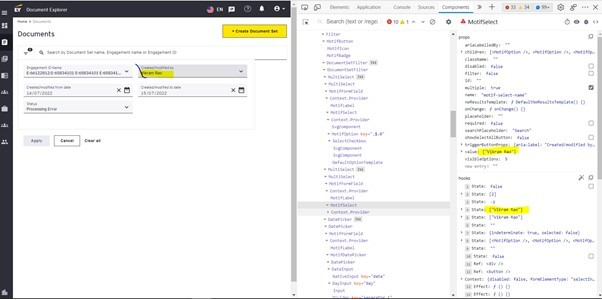
- After pressing the ‘Clear all’ button the value prop is value is cleared however the UI is not updated. PS: Created/modified date value is Cleared on press of Clear all button. Expected behaviour : When the value prop is set empty, the UI should also update with empty value Actual behaviour : The UI is not updated and the internal state of the component is also not updated.

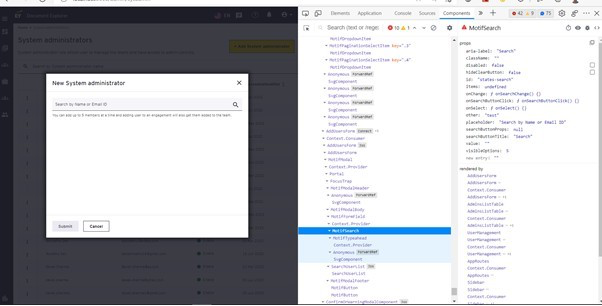
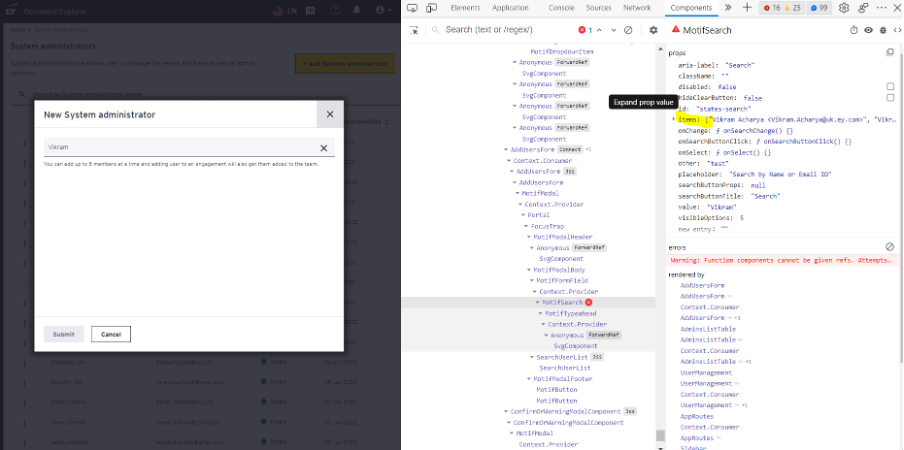
- What is the severity/priority of this issue?
Priority-1
