

 flutter
[video_player] ios picture in picture
Added support for picture in picture video playback
https://user-images.githubusercontent.com/21172855/185166814-b255753d-6f67-449f-a5b5-6335522c10b7.MP4
This feature is only available on iOS because android has a different implementation. simple_pip_mode can be used for Android
https://github.com/flutter/flutter/issues/60048
No migration needed this is an addon
Pre-launch Checklist
- [X] I read the Contributor Guide and followed the process outlined there for submitting PRs.
- [X] I read the Tree Hygiene wiki page, which explains my responsibilities.
- [X] I read and followed the relevant style guides and ran the auto-formatter. (Unlike the flutter/flutter repo, the flutter/plugins repo does use
dart format.) - [X] I signed the CLA.
- [X] The title of the PR starts with the name of the plugin surrounded by square brackets, e.g.
[shared_preferences] - [X] I listed at least one issue that this PR fixes in the description above.
- [X] I updated
pubspec.yamlwith an appropriate new version according to the pub versioning philosophy, or this PR is exempt from version changes. - [X] I updated
CHANGELOG.mdto add a description of the change, following repository CHANGELOG style. - [X] I updated/added relevant documentation (doc comments with
///). - [X] I added new tests to check the change I am making, or this PR is test-exempt.
- [X] All existing and new tests are passing.
If you need help, consider asking for advice on the #hackers-new channel on Discord.

Thanks already for your fast reviews!!! This is the first objective-c code I have ever written!! I will make the changes tomorrow!!
As a high-level note: as discussed in your previous PR, we require test coverage. There's currently no testing of the native part of this change, which is the most important part.
Do you have a plan in place to add native tests, so that this doesn't end up being eventually closed as incomplete like that previous PR?
We should hold off on detailed review until that has been addressed.

@stuartmorgan indeed I get that, in the meantime is there somebody at Flutter that can help me with that? Updating this plugin gave me some confidence in objective-c. So I will take a look at it after our deadline. For now we did manual testing. And everything seems to be working as expected.
Just to make sure that I a working on the correct thing. I should write the tests in video_player_avfoundation/example/ios/RunnerTest & video_player_avfoundation/example/ios/RunnerUITests Or is there another location where I should write them?
@stuartmorgan indeed I get that, in the meantime is there somebody at Flutter that can help me with that?
If you have specific questions, please ask them and someone can answer.
Just to make sure that I a working on the correct thing. I should write the tests in video_player_avfoundation/example/ios/RunnerTest & video_player_avfoundation/example/ios/RunnerUITests
Yes, for a case like this where integration tests can't inspect the results meaningfully, native tests would be needed.
Also, you need to follow https://github.com/flutter/flutter/wiki/Contributing-to-Plugins-and-Packages#changing-federated-plugins so that the PR can actually run tests.
@stuartmorgan thanks for the info. I will start with that! I will let you know when I need something else.
@stuartmorgan I created a UI test for opening & closing the pip. also for checking if pip is supported. That covers all 3 methods. isSupported, prepare, start/stop
Is there something else you would expect to be tested there?
If you removed all of the code from setPictureInPicture:, and hard-coded isPictureInPictureSupported: to return YES, would any of your tests fail?
I haven't tried running them, but it looks like the answer is no, in which case you aren't actually testing them, you're just calling them in a test.
This is the automated test.
https://user-images.githubusercontent.com/21172855/185431103-6d562ebf-fc8c-4c4c-86ac-2ba6c0b5734e.mp4
Indeed for isPictureInPictureSupported needs extra tests. I will write those as well.
This is the automated test.
I understand what actions the test is taking; that wasn't my question. Tests aren't just actions, they are also assertions about the outcomes of those actions.
Have you tried what I asked in my previous comment?
I understand what actions the test is taking; that wasn't my question. Tests aren't just actions, they are also assertions about the outcomes of those actions.
Yes indeed. I just followed the VideoPlayer UI tests. Unit test is something I should still do. But not sure what else I have to test other than, checking if the pip is supported text is there. And that the Start Pip changes to Stop Pip after pressing Start Pip as far as I can see that is all that is done in the UI tests. Nothing else is done there. Could you explain to me what else I should be testing in the UI tests?
Have you tried what I asked in my previous comment?
Do you mean about the federated plugins prs? I used all path dependency overrides. I first have to create 1 pr with all changes. Which is this one I guess? So how I understood is that this pr should first be approved. And after that we move on? Or am I missing something?
And that the
Start Pipchanges toStop Pipafter pressingStart Pip
That's pretty much only testing:
- that some Dart example code logic works as expected (which isn't directly useful because it's not actually part of the plugin), and
- that those methods don't crash.
It doesn't test that they work.
as far as I can see that is all that is done in the UI tests.
Existing video_player functionality isn't creating native UI, so there's not much to test via a native UI test (vs all of the other testing options.
Nothing else is done there. Could you explain to me what else I should be testing in the UI tests?
Since the purpose of those methods is to show and hide a new native UI element, I would expect UI tests to check that those things are happening.
Have you tried what I asked in my previous comment?
Do you mean about the federated plugins prs?
No, I mean this:
If you removed all of the code from
setPictureInPicture:[...] would any of your tests fail?
That's pretty much only testing:
- that some Dart example code logic works as expected (which isn't directly useful because it's not actually part of the plugin), and
- that those methods don't crash.
It doesn't test that they work.
But for UI testing that would be the only tests I could do right? That they would should be done in Unit tests, I think.
Existing
video_playerfunctionality isn't creating native UI, so there's not much to test via a native UI test (vs all of the other testing options.
But picture in picture is done by the OS itself. I'm not sure how I should test it in a UI test that it does work, other than how I did it right now, by opening and closing pip itself.
Since the purpose of those methods is to show and hide a new native UI element, I would expect UI tests to check that those things are happening.
But the new native UI is not created by this plugin. But by AVPictureInPicture controller itself. So by the OS itself.
If you removed all of the code from
setPictureInPicture:[...] would any of your tests fail?
In the UI tests it does uses the correct implementation already. All other tests is something I will be doing tomorrow!!
But for UI testing that would be the only tests I could do right? That they would should be done in Unit tests, I think.
I don't think that's probably the case (see below), but if you aren't going to do any meaningful testing with the UI tests you should just not do UI tests at all, and only unit test.
But picture in picture is done by the OS itself. I'm not sure how I should test it in a UI test that it does work, other than how I did it right now, by opening and closing pip itself.
I would expect that the floating view is visible to UI element queries, in which case you can test that it actually did open and close. Is that not the case?
But the new native UI is not created by this plugin. But by AVPictureInPicture controller itself. So by the OS itself.
I understand how the code works. But the purpose of the PR is to show that UI, regardless of who is actually instantiating the views, so an end-to-end test (which is generally what UI tests are) should actually validate that the thing it is supposed to do actually happens.
If you removed all of the code from
setPictureInPicture:[...] would any of your tests fail?In the UI tests it does uses the correct implementation already.
Again, I'm not saying that your tests aren't currently driving the correct code. I'm saying that they way they are currently written they don't validate that they are driving the correct code, and if instead that code did the wrong thing, or even absolutely nothing, the test would still pass. And if you can completely break the feature, and the (in theory) end-to-end tests wouldn't fail if you did so, then they are not meaningful tests.
The purpose of tests is to prevent regressions, and I don't see how what you've added to the UI tests would ever do that.
I don't think that's probably the case (see below), but if you aren't going to do any meaningful testing with the UI tests you should just not do UI tests at all, and only unit test.
I am validating that the isPipActive is set to true and set back to false so I think it is a valid test case. Because the pip is fully UI related. And it can only be shown in UI test. (But as you said here below. the best way would be to actually check if the view is there, not sure if it is possible)
I would expect that the floating view is visible to UI element queries, in which case you can test that it actually did open and close. Is that not the case?
I understand how the code works. But the purpose of the PR is to show that UI, regardless of who is actually instantiating the views, so an end-to-end test (which is generally what UI tests are) should actually validate that the thing it is supposed to do actually happens.
In our company we are doing UI & Unit test in Dart, in some projects 80 to 90% So I do understand what should be tested en how. But in that case, we always have access to the widget tree that we built ourselves. So for me, it is clear what that should be tested. End-to-end and in a closed environment with decent dependency injection. In this case. (Again I have no experience in objective-c, swift or iOS development in general) But I don't see how I can validate that that specific view is there. The floating view is a system overlay. But tomorrow I have a full day to figure that out :D
Again, I'm not saying that your tests aren't currently driving the correct code. I'm saying that they way they are currently written they don't validate that they are driving the correct code, and if instead that code did the wrong thing, or even absolutely nothing, the test would still pass. And if you can completely break the feature, and the (in theory) end-to-end tests wouldn't fail if you did so, then they are not meaningful tests.
The purpose of tests is to prevent regressions, and I don't see how what you've added to the UI tests would ever do that.
Tomorrow I will take a deeper look in what the other tests are doing. And try to do the same for this feature.
(Thanks already for your big support, this really helps, and will make me a better (iOS) developer in the end!! Much appreciated)
    t =   224.80s Requesting snapshot of accessibility hierarchy for app with pid 13326
    t =   225.29s Requesting snapshot of accessibility hierarchy for app with pid 13326
Attributes: Application, 0x105d11190, pid: 13326, label: 'video_player_example'
Element subtree:
 →Application, 0x105d11190, pid: 13326, label: 'video_player_example'
    Window, 0x105d10290, {{0.0, 0.0}, {183.0, 103.0}}
      Other, 0x105d11990, {{0.0, 0.0}, {183.0, 103.0}}
        Other, 0x105d11aa0, {{0.0, 0.0}, {183.0, 103.0}}
          Other, 0x105d11840, {{0.0, 0.0}, {183.0, 103.0}}
            Other, 0x105d103a0, {{0.0, 0.0}, {183.0, 103.0}}
              Other, 0x105d12030, {{0.0, 0.0}, {183.0, 103.0}}
                Other, 0x105d11bb0, {{0.0, 0.0}, {183.0, 103.0}}, identifier: 'PIPUIView', label: 'Video'
    Window (Main), 0x105b0b440, {{0.0, 0.0}, {390.0, 844.0}}
      Other, 0x105b0b550, {{0.0, 0.0}, {390.0, 844.0}}
        Other, 0x105b0b660, {{0.0, 0.0}, {390.0, 844.0}}
          Other, 0x105b0b770, {{0.0, 0.0}, {390.0, 844.0}}
            Other, 0x105b0b880, {{0.0, 0.0}, {390.0, 844.0}}
              Other, 0x105b0ac30, {{0.0, 0.0}, {390.0, 844.0}}
              Other, 0x105b0ad40, {{0.0, 0.0}, {390.0, 844.0}}
                Other, 0x105b0ae50, {{0.0, 0.0}, {390.0, 844.0}}
                Other, 0x105b0ba10, {{0.0, 0.0}, {390.0, 844.0}}
                  Other, 0x105b0bb20, {{0.0, 0.0}, {390.0, 844.0}}
                  Other, 0x105b0bc30, {{0.0, 0.0}, {390.0, 844.0}}
                    Other, 0x105b0bd40, {{0.0, 0.0}, {390.0, 844.0}}
                    Other, 0x105b0be50, {{0.0, 0.0}, {390.0, 177.0}}
                      Other, 0x105b0bf60, {{0.0, 0.0}, {390.0, 177.0}}
                      Other, 0x105b0c070, {{91.5, 63.0}, {207.0, 24.0}}, label: 'Video player example'
                      Other, 0x105b0c180, {{117.5, 103.0}, {155.0, 74.0}}
                        ScrollView, 0x105b0c290, {{117.5, 103.0}, {155.0, 74.0}}
                        Other, 0x105b0c3a0, {{117.5, 103.0}, {84.0, 74.0}}, label: 'Remote
Tab 1 of 2', Selected
                        StaticText, 0x105b0c4b0, {{201.5, 103.0}, {71.0, 74.0}}, label: 'Asset
Tab 2 of 2'
                    Other, 0x105b0c5c0, {{0.0, 177.0}, {390.0, 667.0}}
                      Other, 0x105b0c6d0, {{0.0, 177.0}, {390.0, 667.0}}
                      Other, 0x105b0c7e0, {{0.0, 177.0}, {390.0, 667.0}}
                        Other, 0x105b0c8f0, {{0.0, 177.0}, {390.0, 667.0}}
                        Other, 0x105b0ca00, {{0.0, 177.0}, {390.0, 667.0}}
                          Other, 0x105b0cb10, {{0.0, 177.0}, {390.0, 667.0}}
                          Other, 0x105b0cc20, {{0.0, 177.0}, {390.0, 667.0}}
                            ScrollView, 0x105b0cd30, {{0.0, 177.0}, {390.0, 667.0}}
                            StaticText, 0x105b0ce40, {{137.5, 197.0}, {115.0, 17.0}}, label: 'With remote mp4'
                            StaticText, 0x105b0cf50, {{141.0, 214.0}, {108.0, 17.0}}, label: 'Pip is supported'
                            Button, 0x105b0d060, {{151.0, 231.0}, {88.0, 48.0}}, label: 'Prepare'
                            Button, 0x105b0d170, {{150.0, 279.0}, {90.0, 48.0}}, label: 'Stop PiP'
                            Other, 0x105b0d280, {{20.0, 347.0}, {350.0, 196.9}}
                            StaticText, 0x105b0d390, {{312.0, 347.0}, {58.0, 41.0}}, label: 'Playback speed
1.0x'
                            Other, 0x105b0d4a0, {{20.0, 534.9}, {350.0, 9.0}}
                              Other, 0x105b0d5b0, {{20.0, 534.9}, {350.0, 9.0}}
                              Other, 0x105b0d6c0, {{20.0, 539.9}, {350.0, 4.0}}, value: 100%
                              Other, 0x105b0d7d0, {{20.0, 539.9}, {350.0, 4.0}}, value: 86%
Path to element:
 →Application, 0x105d11190, pid: 13326, label: 'video_player_example'
Query chain:
 →Find: Target Application 'dev.flutter.videoPlayerExample'
  Output: {
    Application, 0x105912050, pid: 13326, label: 'video_player_example'
  }
Aha, found something interesting. I printed out the element tree and found PIPUIView.
If you removed all of the code from
setPictureInPicture:, and hard-codedisPictureInPictureSupported:to returnYES, would any of your tests fail?I haven't tried running them, but it looks like the answer is no, in which case you aren't actually testing them, you're just calling them in a test.
@stuartmorgan Just tested this and Yes, If I remove the code from setPictureInPicture and hard-code isPictureInPictureSupported to YES my UI tests fail. So I would argue that even without the check of the PIPUIView it would still be a valid test. That tests if isPiPActive is set correctly. When removing the code it is never set to true which would fail the test. (PIPUIView test should certainly still be added though).
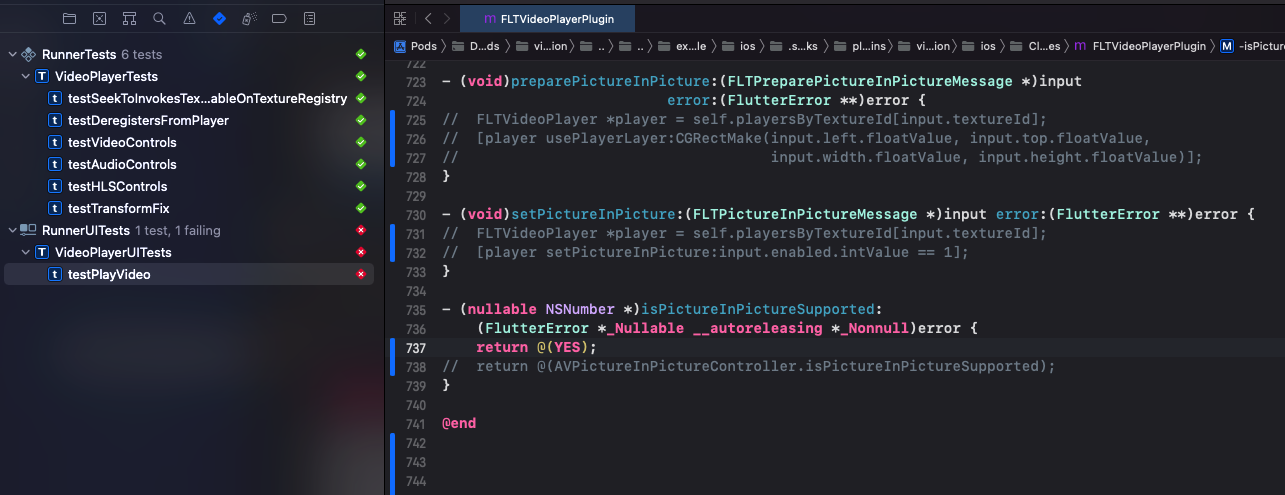
I have been looking at the current tests for the video_player plugin. All assertions are linked to the AVPlayer. For PiP that is not possible. Because we are calling another API that handles everything to show/hide the PiP we can only work with events. So I tried to use a similar event test structure that was already used in a previous test.
  // Set Picture In Picture Start
  FLTPictureInPictureMessage *setPictureInPictureStart =
      [FLTPictureInPictureMessage makeWithTextureId:textureId enabled:@true];
  XCTestExpectation *startingPiPExpectation = [self expectationWithDescription:@"startingPiP"];
  [player onListenWithArguments:nil
                      eventSink:^(NSDictionary<NSString *, id> *event) {
                        if ([event[@"event"] isEqualToString:@"startingPiP"]) {
                          [startingPiPExpectation fulfill];
                        }
                      }];
  [videoPlayerPlugin setPictureInPicture:setPictureInPictureStart error:&error];
  XCTAssertNil(error);
  [self waitForExpectationsWithTimeout:30.0 handler:nil];

  // Set Picture In Picture Stop
  FLTPictureInPictureMessage *setPictureInPictureStop =
      [FLTPictureInPictureMessage makeWithTextureId:textureId enabled:@false];
  XCTAssertNil(error);
  XCTestExpectation *stoppedPiPExpectation = [self expectationWithDescription:@"stoppedPiP"];
  [player onListenWithArguments:nil
                      eventSink:^(NSDictionary<NSString *, id> *event) {
                        if ([event[@"event"] isEqualToString:@"stoppedPiP"]) {
                          [stoppedPiPExpectation fulfill];
                        }
                      }];
  [videoPlayerPlugin setPictureInPicture:setPictureInPictureStop error:&error];
  [self waitForExpectationsWithTimeout:30.0 handler:nil];
When starting the pip a startingPiP event is triggered. I receive the startingEvent in the onListenWithArguments. But the stopped event is called when the AVPictureInPictureControllerDelegate calls pictureInPictureControllerDidStopPictureInPicture. Which as far as I can see will only be called in a UI test if the PIPUIView is actually added to the screen. Any ideal how I could test this or what else I should be doing? I will already push the tests without the stoppedPiP event check.
But picture in picture is done by the OS itself. I'm not sure how I should test it in a UI test that it does work, other than how I did it right now, by opening and closing pip itself.
I didn't check which process is handling PiP, but with an XCUITest this could be possible by launching the app, setting up PiP, dismissing the app, then checking that process (probably com.apple.springboard) for the right PiP view. You can see how we do something similar in quick_actions
https://github.com/flutter/plugins/blob/927d50680a10a7103e44705621a0d58c0e2dc210/packages/quick_actions/quick_actions_ios/example/ios/RunnerUITests/RunnerUITests.m#L60-L81

@vanlooverenkoen Just double check - there seems to be many updates since my last review but it's still in "Draft" mode. Let me know when it's ready for another review (you can click the "ready for review" button, then click request review)

@hellohuanlin I will still need to check what @jmagman posted earlier. After that I think we can start the review process. I'm also still waiting on some feedback from @stuartmorgan.
@stuartmorgan Just tested this and Yes, If I remove the code from
setPictureInPictureand hard-codeisPictureInPictureSupportedtoYESmy UI tests fail.
I missed that the enabled state was driven by an event emitted on the native side rather than tracked on the Dart side; sorry about that. At the time I thought the Dart string changes were just driven by the example Dart code that was calling the plugin.
I'm also still waiting on some feedback from @stuartmorgan.
Was there anything other than getting resolution that misunderstanding that you needed from me?
Was there anything other than getting resolution that misunderstanding that you needed from me?
@stuartmorgan The only thing that I was wondering was what I should still test. Because it looks to me that checking if the actual stopped event is not possible in testing (other than a UI tests that checks if the button changes to stopped). the UI test itself tests everything to verify that pip is not broken in the future. Please let me know if there is something else I should test? Otherwise the review process can restart I think.
Reviewers can provide feedback on whether there are additional elements that should be tested.
Reviewers can provide feedback on whether there are additional elements that should be tested.
@stuartmorgan does that mean this is ready for review?
Thanks for the review. I will process the feedback in the coming days.
I already saw some very good improvements. Especially on the iOS part, I will learn a lot from that!! Thanks a lot already!!!
final pip gif should be updated when final implementation is done!!
@stuartmorgan , @jmagman , @hellohuanlin I went through the feedback and gave comments where needed.
Is it possible to do another feedback round?