

 flutter
[in_app_purchase][ios] `AppStorePurchaseDetails.pendingCompletePurchase = true` after calling `completePurchase`
Steps to Reproduce
- Setup a sandbox environment for in app purchase on iOS with a subscription
- Log in to the sandbox account on a iOS device
- Purchase the subscription
- InAppPurchase.instance.purchaseStream emits PurchaseDetails for the subscription
- Call InAppPurchase.instance.completePurchase if pendingCompletePurchase is true
- Restore purchases
- PurchaseDetails.pendingCompletePurchase is still true
Expected results: PurchaseDetails.pendingCompletePurchase = false after call to completePurchase
Actual results: PurchaseDetails.pendingCompletePurchase = true after call to completePurchase
AppStorePurchaseDetails.pendingCompletePurchase returns _pendingCompletePurchase.
I have also tested on Android, there pendingCompletePurchase changes to false as expected.
Code sample
import 'dart:async';
import 'dart:io';
import 'package:flutter/material.dart';
import 'package:in_app_purchase/in_app_purchase.dart';
import 'package:in_app_purchase_android/in_app_purchase_android.dart';
import 'package:in_app_purchase_storekit/in_app_purchase_storekit.dart';

void main() {
  WidgetsFlutterBinding.ensureInitialized();

  runApp(_MyApp());
}

const String _kSubscriptionId = 'sku_monthly_level_1'; // TODO Set subscription id for your project here
const Set<String> _kProductIds = <String>{_kSubscriptionId};

class _MyApp extends StatefulWidget {
  @override
  _MyAppState createState() => _MyAppState();
}

class _MyAppState extends State<_MyApp> {
  final InAppPurchase _inAppPurchase = InAppPurchase.instance;
  late StreamSubscription<List<PurchaseDetails>> _subscription;
  List<ProductDetails> _products = [];
  List<PurchaseDetails> _purchases = [];
  bool _isAvailable = false;
  bool _purchasePending = false;
  bool _loading = true;
  String? _queryProductError;

  @override
  void initState() {
    final Stream<List<PurchaseDetails>> purchaseUpdated = _inAppPurchase.purchaseStream;
    _subscription = purchaseUpdated.listen((purchaseDetailsList) {
      _listenToPurchaseUpdated(purchaseDetailsList);
    }, onDone: () {
      _subscription.cancel();
    }, onError: (error) {
      // handle error here.
    });
    initStoreInfo();
    super.initState();
  }

  Future<void> initStoreInfo() async {
    final bool isAvailable = await _inAppPurchase.isAvailable();
    if (!isAvailable) {
      setState(() {
        _isAvailable = isAvailable;
        _products = [];
        _purchases = [];
        _purchasePending = false;
        _loading = false;
      });
      return;
    }

    ProductDetailsResponse productDetailResponse = await _inAppPurchase.queryProductDetails(_kProductIds);
    if (productDetailResponse.error != null) {
      setState(() {
        _queryProductError = productDetailResponse.error!.message;
        _isAvailable = isAvailable;
        _products = productDetailResponse.productDetails;
        _purchases = [];
        _purchasePending = false;
        _loading = false;
      });
      return;
    }

    if (productDetailResponse.productDetails.isNotEmpty) {
      setState(() {
        _queryProductError = null;
        _isAvailable = isAvailable;
        _products = productDetailResponse.productDetails;
        _purchases = [];
        _purchasePending = false;
        _loading = false;
      });
      return;
    }
  }

  @override
  void dispose() {
    if (Platform.isIOS) {
      var iosPlatformAddition = _inAppPurchase.getPlatformAddition<InAppPurchaseStoreKitPlatformAddition>();
      iosPlatformAddition.setDelegate(null);
    }
    _subscription.cancel();
    super.dispose();
  }

  @override
  Widget build(BuildContext context) {
    List<Widget> stack = [];
    if (_queryProductError == null) {
      stack.add(
        ListView(
          children: [
            _buildConnectionCheckTile(),
            _buildProductList(),
            _buildRestoreButton(),
          ],
        ),
      );
    } else {
      stack.add(Center(
        child: Text(_queryProductError!),
      ));
    }
    if (_purchasePending) {
      stack.add(
        Stack(
          children: [
            Opacity(
              opacity: 0.3,
              child: const ModalBarrier(dismissible: false, color: Colors.grey),
            ),
            Center(
              child: CircularProgressIndicator(),
            ),
          ],
        ),
      );
    }

    return MaterialApp(
      home: Scaffold(
        appBar: AppBar(
          title: const Text('IAP Example'),
        ),
        body: Stack(
          children: stack,
        ),
      ),
    );
  }

  Card _buildConnectionCheckTile() {
    if (_loading) {
      return Card(child: ListTile(title: const Text('Trying to connect...')));
    }
    final Widget storeHeader = ListTile(
      leading: Icon(_isAvailable ? Icons.check : Icons.block,
          color: _isAvailable ? Colors.green : ThemeData.light().errorColor),
      title: Text('The store is ' + (_isAvailable ? 'available' : 'unavailable') + '.'),
    );
    final List<Widget> children = <Widget>[storeHeader];

    if (!_isAvailable) {
      children.addAll([
        Divider(),
        ListTile(
          title: Text('Not connected', style: TextStyle(color: ThemeData.light().errorColor)),
          subtitle: const Text(
              'Unable to connect to the payments processor. Has this app been configured correctly? See the example README for instructions.'),
        ),
      ]);
    }
    return Card(child: Column(children: children));
  }

  Card _buildProductList() {
    if (_loading) {
      return Card(child: (ListTile(leading: CircularProgressIndicator(), title: Text('Fetching products...'))));
    }
    if (!_isAvailable) {
      return Card();
    }
    final ListTile productHeader = ListTile(title: Text('Products for Sale'));
    List<ListTile> productList = <ListTile>[];

    // This loading previous purchases code is just a demo. Please do not use this as it is.
    // In your app you should always verify the purchase data using the `verificationData` inside the [PurchaseDetails] object before trusting it.
    // We recommend that you use your own server to verify the purchase data.
    Map<String, PurchaseDetails> purchases = Map.fromEntries(_purchases.map((PurchaseDetails purchase) {
      if (purchase.pendingCompletePurchase) {
        _inAppPurchase.completePurchase(purchase);
      }
      return MapEntry<String, PurchaseDetails>(purchase.productID, purchase);
    }));
    productList.addAll(_products.map(
      (ProductDetails productDetails) {
        PurchaseDetails? previousPurchase = purchases[productDetails.id];
        return ListTile(
            title: Text(
              productDetails.title,
            ),
            subtitle: Text(
              productDetails.description,
            ),
            trailing: previousPurchase != null
                ? Icon(Icons.check)
                : TextButton(
                    child: Text(productDetails.price),
                    style: TextButton.styleFrom(
                      backgroundColor: Colors.green[800],
                      primary: Colors.white,
                    ),
                    onPressed: () {
                      PurchaseParam purchaseParam = GooglePlayPurchaseParam(
                        productDetails: productDetails,
                        applicationUserName: null,
                      );
                      _inAppPurchase.buyNonConsumable(purchaseParam: purchaseParam);
                    },
                  ));
      },
    ));

    return Card(child: Column(children: <Widget>[productHeader, Divider()] + productList));
  }

  Widget _buildRestoreButton() {
    if (_loading) {
      return Container();
    }

    return Padding(
      padding: const EdgeInsets.all(4.0),
      child: Row(
        mainAxisSize: MainAxisSize.max,
        mainAxisAlignment: MainAxisAlignment.end,
        children: [
          TextButton(
            child: Text('Restore purchases'),
            style: TextButton.styleFrom(
              backgroundColor: Theme.of(context).primaryColor,
              primary: Colors.white,
            ),
            onPressed: () => _inAppPurchase.restorePurchases(),
          ),
        ],
      ),
    );
  }

  void showPendingUI() {
    setState(() {
      _purchasePending = true;
    });
  }

  void deliverProduct(PurchaseDetails purchaseDetails) async {
    // IMPORTANT!! Always verify purchase details before delivering the product.
    setState(() {
      _purchases.add(purchaseDetails);
      _purchasePending = false;
    });
  }

  void handleError(IAPError error) {
    setState(() {
      _purchasePending = false;
    });
  }

  Future<bool> _verifyPurchase(PurchaseDetails purchaseDetails) {
    // IMPORTANT!! Always verify a purchase before delivering the product.
    // For the purpose of an example, we directly return true.
    return Future<bool>.value(true);
  }

  void _handleInvalidPurchase(PurchaseDetails purchaseDetails) {
    // handle invalid purchase here if  _verifyPurchase` failed.
  }

  void _listenToPurchaseUpdated(List<PurchaseDetails> purchaseDetailsList) {
    purchaseDetailsList.forEach((PurchaseDetails purchaseDetails) async {
      if (purchaseDetails.status == PurchaseStatus.pending) {
        showPendingUI();
      } else {
        if (purchaseDetails.status == PurchaseStatus.error) {
          handleError(purchaseDetails.error!);
        } else if (purchaseDetails.status == PurchaseStatus.purchased ||
            purchaseDetails.status == PurchaseStatus.restored) {
          bool valid = await _verifyPurchase(purchaseDetails);
          if (valid) {
            deliverProduct(purchaseDetails);
          } else {
            _handleInvalidPurchase(purchaseDetails);
            return;
          }
        }
        if (purchaseDetails.pendingCompletePurchase) {
          await _inAppPurchase.completePurchase(purchaseDetails);
        }
      }
    });
  }
}
Logs
No errors or analysis warnings

Hi @andaas4, thanks for filing the issue.
Please provide the output of flutter doctor -v as well as the version of in_app_purchase you're using.
Thank you

Sure, here you go: @danagbemava-nc
in_app_purchase: 2.0.1
flutter doctor -v
[✓] Flutter (Channel stable, 2.10.1, on macOS 11.5.2 20G95 darwin-x64, locale en-NO)
    • Flutter version 2.10.1 at /Users/asd/Documents/flutter/flutter
    • Upstream repository https://github.com/flutter/flutter.git
    • Framework revision db747aa133 (6 days ago), 2022-02-09 13:57:35 -0600
    • Engine revision ab46186b24
    • Dart version 2.16.1
    • DevTools version 2.9.2

[✓] Android toolchain - develop for Android devices (Android SDK version 30.0.3)
    • Android SDK at /Users/asd/Library/Android/sdk
    • Platform android-31, build-tools 30.0.3
    • Java binary at: /Applications/Android Studio.app/Contents/jre/Contents/Home/bin/java
    • Java version OpenJDK Runtime Environment (build 11.0.10+0-b96-7281165)
    • All Android licenses accepted.

[✓] Xcode - develop for iOS and macOS (Xcode 13.2.1)
    • Xcode at /Applications/Xcode.app/Contents/Developer
    • CocoaPods version 1.11.2

[✓] Chrome - develop for the web
    • Chrome at /Applications/Google Chrome.app/Contents/MacOS/Google Chrome

[✓] Android Studio (version 2020.3)
    • Android Studio at /Applications/Android Studio.app/Contents
    • Flutter plugin can be installed from:
      🔨 https://plugins.jetbrains.com/plugin/9212-flutter
    • Dart plugin can be installed from:
      🔨 https://plugins.jetbrains.com/plugin/6351-dart
    • Java version OpenJDK Runtime Environment (build 11.0.10+0-b96-7281165)

[✓] VS Code (version 1.46.0)
    • VS Code at /Users/asd/Downloads/Visual Studio Code.app/Contents
    • Flutter extension version 3.12.1

[✓] Connected device (1 available)
    • Chrome (web) • chrome • web-javascript • Google Chrome 98.0.4758.80

[✓] HTTP Host Availability
    • All required HTTP hosts are available

• No issues found!
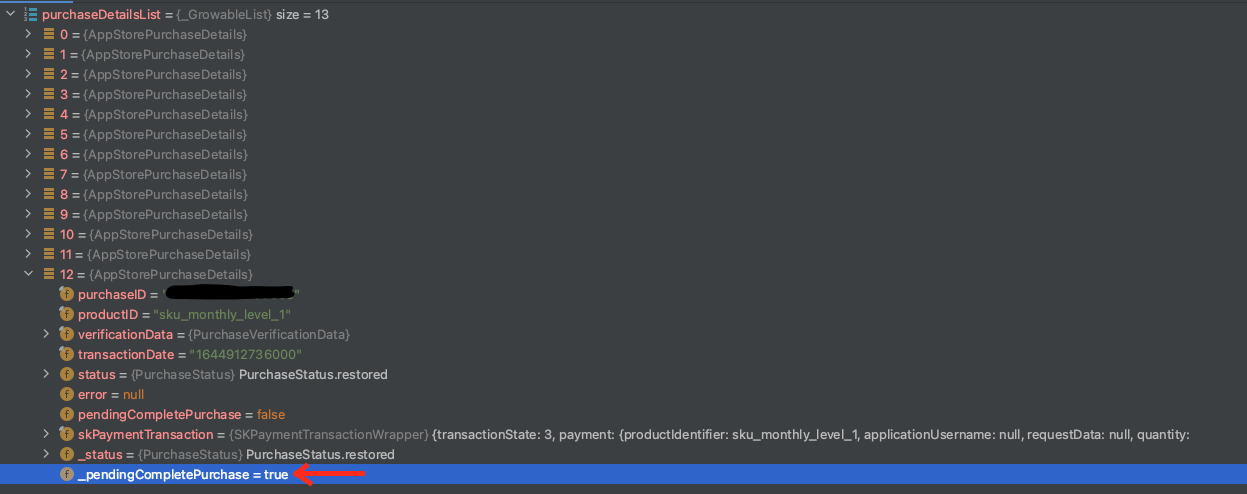
Hi @andaas4, I just noticed that the value you're referencing in your screenshot is a private setter, so that value shouldn't be accessible to you, but the public getter, pendingCompletePurchase which retrieves the value you'd need is actually showing the correct value.
Is your issue to point out the discrepancy between the two values?
Yeah, I know. If you look at app_store_purchase_details.dart the logic there is bool get pendingCompletePurchase => _pendingCompletePurchase;
I think the value for pendingCompletePurchase shown in the screenshot is from purchase_details.dart with defaults to false, as AppStorePurchaseDetails extends PurchaseDetails, but the actual value returned when accessing pendingCompletePurchase on AppStorePurchaseDetails is the value from _pendingCompletePurchase.
Sorry if that was misleading, just thought it was a good thing to point out. But the issue is still present in my testing, pendingCompletePurchase on AppStorePurchaseDetails is true after calling completePurchase multiple times. @danagbemava-nc

Sorry if that was misleading, just thought it was a good thing to point out.
I just wanted to make sure that we were on the same page. I am seeing something similar to what you're seeing. I don't think this is intended, but I'm not an expert on in_app_purchases. Labeling for further insight from the team. Steps to reproduce can be found in https://github.com/flutter/flutter/issues/98484#issue-1138421429
This can be reproduced with the plugin's example code as well.
code sample
import 'dart:async';
import 'dart:io';
import 'package:flutter/material.dart';
import 'package:in_app_purchase/in_app_purchase.dart';
import 'package:in_app_purchase_android/billing_client_wrappers.dart';
import 'package:in_app_purchase_android/in_app_purchase_android.dart';
import 'package:in_app_purchase_storekit/in_app_purchase_storekit.dart';
import 'package:in_app_purchase_storekit/store_kit_wrappers.dart';
import 'consumable_store.dart';

void main() {
  WidgetsFlutterBinding.ensureInitialized();

  runApp(_MyApp());
}

const bool _kAutoConsume = true;

const String _kConsumableId = 'com.nevercode.triage.test_consumable';
const String _kUpgradeId = 'com.nevercode.triage.test_upgrade';
const String _kSilverSubscriptionId =
    'com.nevercode.triage.silver_subscription';
const String _kGoldSubscriptionId =
    'com.nevercode.triage.gold_subscription'; // TODO Set subscription id for your project here
const Set<String> _kProductIds = <String>{
  _kConsumableId,
  _kUpgradeId,
  _kSilverSubscriptionId,
  _kGoldSubscriptionId,
};

class _MyApp extends StatefulWidget {
  @override
  _MyAppState createState() => _MyAppState();
}

class _MyAppState extends State<_MyApp> {
  final InAppPurchase _inAppPurchase = InAppPurchase.instance;
  late StreamSubscription<List<PurchaseDetails>> _subscription;
  List<String> _notFoundIds = [];
  List<ProductDetails> _products = [];
  List<PurchaseDetails> _purchases = [];
  List<String> _consumables = [];
  bool _isAvailable = false;
  bool _purchasePending = false;
  bool _loading = true;
  String? _queryProductError;

  @override
  void initState() {
    final Stream<List<PurchaseDetails>> purchaseUpdated =
        _inAppPurchase.purchaseStream;
    _subscription = purchaseUpdated.listen((purchaseDetailsList) {
      _listenToPurchaseUpdated(purchaseDetailsList);
    }, onDone: () {
      _subscription.cancel();
    }, onError: (error) {
      // handle error here.
    });
    initStoreInfo();
    super.initState();
  }

  Future<void> initStoreInfo() async {
    final bool isAvailable = await _inAppPurchase.isAvailable();
    if (!isAvailable) {
      setState(() {
        _isAvailable = isAvailable;
        _products = [];
        _purchases = [];
        _notFoundIds = [];
        _consumables = [];
        _purchasePending = false;
        _loading = false;
      });
      return;
    }

    if (Platform.isIOS) {
      var iosPlatformAddition = _inAppPurchase
          .getPlatformAddition<InAppPurchaseStoreKitPlatformAddition>();
      await iosPlatformAddition.setDelegate(ExamplePaymentQueueDelegate());
    }

    ProductDetailsResponse productDetailResponse =
        await _inAppPurchase.queryProductDetails(_kProductIds.toSet());
    if (productDetailResponse.error != null) {
      setState(() {
        _queryProductError = productDetailResponse.error!.message;
        _isAvailable = isAvailable;
        _products = productDetailResponse.productDetails;
        _purchases = [];
        _notFoundIds = productDetailResponse.notFoundIDs;
        _consumables = [];
        _purchasePending = false;
        _loading = false;
      });
      return;
    }

    if (productDetailResponse.productDetails.isEmpty) {
      setState(() {
        _queryProductError = null;
        _isAvailable = isAvailable;
        _products = productDetailResponse.productDetails;
        _purchases = [];
        _notFoundIds = productDetailResponse.notFoundIDs;
        _consumables = [];
        _purchasePending = false;
        _loading = false;
      });
      return;
    }

    List<String> consumables = await ConsumableStore.load();
    setState(() {
      _isAvailable = isAvailable;
      _products = productDetailResponse.productDetails;
      _notFoundIds = productDetailResponse.notFoundIDs;
      _consumables = consumables;
      _purchasePending = false;
      _loading = false;
    });
  }

  @override
  void dispose() {
    if (Platform.isIOS) {
      var iosPlatformAddition = _inAppPurchase
          .getPlatformAddition<InAppPurchaseStoreKitPlatformAddition>();
      iosPlatformAddition.setDelegate(null);
    }
    _subscription.cancel();
    super.dispose();
  }

  @override
  Widget build(BuildContext context) {
    List<Widget> stack = [];
    if (_queryProductError == null) {
      stack.add(
        ListView(
          children: [
            _buildConnectionCheckTile(),
            _buildProductList(),
            _buildConsumableBox(),
            _buildRestoreButton(),
          ],
        ),
      );
    } else {
      stack.add(Center(
        child: Text(_queryProductError!),
      ));
    }
    if (_purchasePending) {
      stack.add(
        Stack(
          children: [
            Opacity(
              opacity: 0.3,
              child: const ModalBarrier(dismissible: false, color: Colors.grey),
            ),
            Center(
              child: CircularProgressIndicator(),
            ),
          ],
        ),
      );
    }

    return MaterialApp(
      home: Scaffold(
        appBar: AppBar(
          title: const Text('IAP Example'),
        ),
        body: Stack(
          children: stack,
        ),
      ),
    );
  }

  Card _buildConnectionCheckTile() {
    if (_loading) {
      return Card(child: ListTile(title: const Text('Trying to connect...')));
    }
    final Widget storeHeader = ListTile(
      leading: Icon(_isAvailable ? Icons.check : Icons.block,
          color: _isAvailable ? Colors.green : ThemeData.light().errorColor),
      title: Text(
          'The store is ' + (_isAvailable ? 'available' : 'unavailable') + '.'),
    );
    final List<Widget> children = <Widget>[storeHeader];

    if (!_isAvailable) {
      children.addAll([
        Divider(),
        ListTile(
          title: Text('Not connected',
              style: TextStyle(color: ThemeData.light().errorColor)),
          subtitle: const Text(
              'Unable to connect to the payments processor. Has this app been configured correctly? See the example README for instructions.'),
        ),
      ]);
    }
    return Card(child: Column(children: children));
  }

  Card _buildProductList() {
    if (_loading) {
      return Card(
          child: (ListTile(
              leading: CircularProgressIndicator(),
              title: Text('Fetching products...'))));
    }
    if (!_isAvailable) {
      return Card();
    }
    final ListTile productHeader = ListTile(title: Text('Products for Sale'));
    List<ListTile> productList = <ListTile>[];
    if (_notFoundIds.isNotEmpty) {
      productList.add(ListTile(
          title: Text('[${_notFoundIds.join(", ")}] not found',
              style: TextStyle(color: ThemeData.light().errorColor)),
          subtitle: Text(
              'This app needs special configuration to run. Please see example/README.md for instructions.')));
    }

    // This loading previous purchases code is just a demo. Please do not use this as it is.
    // In your app you should always verify the purchase data using the `verificationData` inside the [PurchaseDetails] object before trusting it.
    // We recommend that you use your own server to verify the purchase data.
    Map<String, PurchaseDetails> purchases =
        Map.fromEntries(_purchases.map((PurchaseDetails purchase) {
      if (purchase.pendingCompletePurchase) {
        _inAppPurchase.completePurchase(purchase);
      }
      return MapEntry<String, PurchaseDetails>(purchase.productID, purchase);
    }));
    productList.addAll(_products.map(
      (ProductDetails productDetails) {
        PurchaseDetails? previousPurchase = purchases[productDetails.id];
        return ListTile(
            title: Text(
              productDetails.title,
            ),
            subtitle: Text(
              productDetails.description,
            ),
            trailing: previousPurchase != null
                ? IconButton(
                    onPressed: () => confirmPriceChange(context),
                    icon: Icon(Icons.upgrade))
                : TextButton(
                    child: Text(productDetails.price),
                    style: TextButton.styleFrom(
                      backgroundColor: Colors.green[800],
                      primary: Colors.white,
                    ),
                    onPressed: () {
                      late PurchaseParam purchaseParam;

                      if (Platform.isAndroid) {
                        // NOTE: If you are making a subscription purchase/upgrade/downgrade, we recommend you to
                        // verify the latest status of you your subscription by using server side receipt validation
                        // and update the UI accordingly. The subscription purchase status shown
                        // inside the app may not be accurate.
                        final oldSubscription =
                            _getOldSubscription(productDetails, purchases);

                        purchaseParam = GooglePlayPurchaseParam(
                            productDetails: productDetails,
                            applicationUserName: null,
                            changeSubscriptionParam: (oldSubscription != null)
                                ? ChangeSubscriptionParam(
                                    oldPurchaseDetails: oldSubscription,
                                    prorationMode: ProrationMode
                                        .immediateWithTimeProration,
                                  )
                                : null);
                      } else {
                        purchaseParam = PurchaseParam(
                          productDetails: productDetails,
                          applicationUserName: null,
                        );
                      }

                      if (productDetails.id == _kConsumableId) {
                        _inAppPurchase.buyConsumable(
                            purchaseParam: purchaseParam,
                            autoConsume: _kAutoConsume || Platform.isIOS);
                      } else {
                        _inAppPurchase.buyNonConsumable(
                            purchaseParam: purchaseParam);
                      }
                    },
                  ));
      },
    ));

    return Card(
        child:
            Column(children: <Widget>[productHeader, Divider()] + productList));
  }

  Card _buildConsumableBox() {
    if (_loading) {
      return Card(
          child: (ListTile(
              leading: CircularProgressIndicator(),
              title: Text('Fetching consumables...'))));
    }
    if (!_isAvailable || _notFoundIds.contains(_kConsumableId)) {
      return Card();
    }
    final ListTile consumableHeader =
        ListTile(title: Text('Purchased consumables'));
    final List<Widget> tokens = _consumables.map((String id) {
      return GridTile(
        child: IconButton(
          icon: Icon(
            Icons.stars,
            size: 42.0,
            color: Colors.orange,
          ),
          splashColor: Colors.yellowAccent,
          onPressed: () => consume(id),
        ),
      );
    }).toList();
    return Card(
        child: Column(children: <Widget>[
      consumableHeader,
      Divider(),
      GridView.count(
        crossAxisCount: 5,
        children: tokens,
        shrinkWrap: true,
        padding: EdgeInsets.all(16.0),
      )
    ]));
  }

  Widget _buildRestoreButton() {
    if (_loading) {
      return Container();
    }

    return Padding(
      padding: const EdgeInsets.all(4.0),
      child: Row(
        mainAxisSize: MainAxisSize.max,
        mainAxisAlignment: MainAxisAlignment.end,
        children: [
          TextButton(
            child: Text('Restore purchases'),
            style: TextButton.styleFrom(
              backgroundColor: Theme.of(context).primaryColor,
              primary: Colors.white,
            ),
            onPressed: () => _inAppPurchase.restorePurchases(),
          ),
        ],
      ),
    );
  }

  Future<void> consume(String id) async {
    await ConsumableStore.consume(id);
    final List<String> consumables = await ConsumableStore.load();
    setState(() {
      _consumables = consumables;
    });
  }

  void showPendingUI() {
    setState(() {
      _purchasePending = true;
    });
  }

  void deliverProduct(PurchaseDetails purchaseDetails) async {
    // IMPORTANT!! Always verify purchase details before delivering the product.
    if (purchaseDetails.productID == _kConsumableId) {
      await ConsumableStore.save(purchaseDetails.purchaseID!);
      List<String> consumables = await ConsumableStore.load();
      setState(() {
        _purchasePending = false;
        _consumables = consumables;
      });
    } else {
      setState(() {
        _purchases.add(purchaseDetails);
        _purchasePending = false;
      });
    }
  }

  void handleError(IAPError error) {
    setState(() {
      _purchasePending = false;
    });
  }

  Future<bool> _verifyPurchase(PurchaseDetails purchaseDetails) {
    // IMPORTANT!! Always verify a purchase before delivering the product.
    // For the purpose of an example, we directly return true.
    return Future<bool>.value(true);
  }

  void _handleInvalidPurchase(PurchaseDetails purchaseDetails) {
    // handle invalid purchase here if  _verifyPurchase` failed.
  }

  void _listenToPurchaseUpdated(List<PurchaseDetails> purchaseDetailsList) {
    purchaseDetailsList.forEach((PurchaseDetails purchaseDetails) async {
      if (purchaseDetails.status == PurchaseStatus.pending) {
        showPendingUI();
      } else {
        if (purchaseDetails.status == PurchaseStatus.error) {
          handleError(purchaseDetails.error!);
        } else if (purchaseDetails.status == PurchaseStatus.purchased ||
            purchaseDetails.status == PurchaseStatus.restored) {
          bool valid = await _verifyPurchase(purchaseDetails);
          if (valid) {
            deliverProduct(purchaseDetails);
          } else {
            _handleInvalidPurchase(purchaseDetails);
            return;
          }
        }
        if (Platform.isAndroid) {
          if (!_kAutoConsume && purchaseDetails.productID == _kConsumableId) {
            final InAppPurchaseAndroidPlatformAddition androidAddition =
                _inAppPurchase.getPlatformAddition<
                    InAppPurchaseAndroidPlatformAddition>();
            await androidAddition.consumePurchase(purchaseDetails);
          }
        }
        if (purchaseDetails.pendingCompletePurchase) {
          await _inAppPurchase.completePurchase(purchaseDetails);
        }
      }
    });
  }

  Future<void> confirmPriceChange(BuildContext context) async {
    if (Platform.isAndroid) {
      final InAppPurchaseAndroidPlatformAddition androidAddition =
          _inAppPurchase
              .getPlatformAddition<InAppPurchaseAndroidPlatformAddition>();
      var priceChangeConfirmationResult =
          await androidAddition.launchPriceChangeConfirmationFlow(
        sku: 'purchaseId',
      );
      if (priceChangeConfirmationResult.responseCode == BillingResponse.ok) {
        ScaffoldMessenger.of(context).showSnackBar(SnackBar(
          content: Text('Price change accepted'),
        ));
      } else {
        ScaffoldMessenger.of(context).showSnackBar(SnackBar(
          content: Text(
            priceChangeConfirmationResult.debugMessage ??
                "Price change failed with code ${priceChangeConfirmationResult.responseCode}",
          ),
        ));
      }
    }
    if (Platform.isIOS) {
      var iapStoreKitPlatformAddition = _inAppPurchase
          .getPlatformAddition<InAppPurchaseStoreKitPlatformAddition>();
      await iapStoreKitPlatformAddition.showPriceConsentIfNeeded();
    }
  }

  GooglePlayPurchaseDetails? _getOldSubscription(
      ProductDetails productDetails, Map<String, PurchaseDetails> purchases) {
    // This is just to demonstrate a subscription upgrade or downgrade.
    // This method assumes that you have only 2 subscriptions under a group, 'subscription_silver' & 'subscription_gold'.
    // The 'subscription_silver' subscription can be upgraded to 'subscription_gold' and
    // the 'subscription_gold' subscription can be downgraded to 'subscription_silver'.
    // Please remember to replace the logic of finding the old subscription Id as per your app.
    // The old subscription is only required on Android since Apple handles this internally
    // by using the subscription group feature in iTunesConnect.
    GooglePlayPurchaseDetails? oldSubscription;
    if (productDetails.id == _kSilverSubscriptionId &&
        purchases[_kGoldSubscriptionId] != null) {
      oldSubscription =
          purchases[_kGoldSubscriptionId] as GooglePlayPurchaseDetails;
    } else if (productDetails.id == _kGoldSubscriptionId &&
        purchases[_kSilverSubscriptionId] != null) {
      oldSubscription =
          purchases[_kSilverSubscriptionId] as GooglePlayPurchaseDetails;
    }
    return oldSubscription;
  }
}

/// Example implementation of the
/// [`SKPaymentQueueDelegate`](https://developer.apple.com/documentation/storekit/skpaymentqueuedelegate?language=objc).
///
/// The payment queue delegate can be implementated to provide information
/// needed to complete transactions.
class ExamplePaymentQueueDelegate implements SKPaymentQueueDelegateWrapper {
  @override
  bool shouldContinueTransaction(
      SKPaymentTransactionWrapper transaction, SKStorefrontWrapper storefront) {
    return true;
  }

  @override
  bool shouldShowPriceConsent() {
    return false;
  }
}
consumable_store.dart
// Copyright 2013 The Flutter Authors. All rights reserved.
// Use of this source code is governed by a BSD-style license that can be
// found in the LICENSE file.

import 'dart:async';
import 'package:shared_preferences/shared_preferences.dart';

/// A store of consumable items.
///
/// This is a development prototype tha stores consumables in the shared
/// preferences. Do not use this in real world apps.
class ConsumableStore {
  static const String _kPrefKey = 'consumables';
  static Future<void> _writes = Future.value();

  /// Adds a consumable with ID `id` to the store.
  ///
  /// The consumable is only added after the returned Future is complete.
  static Future<void> save(String id) {
    _writes = _writes.then((void _) => _doSave(id));
    return _writes;
  }

  /// Consumes a consumable with ID `id` from the store.
  ///
  /// The consumable was only consumed after the returned Future is complete.
  static Future<void> consume(String id) {
    _writes = _writes.then((void _) => _doConsume(id));
    return _writes;
  }

  /// Returns the list of consumables from the store.
  static Future<List<String>> load() async {
    return (await SharedPreferences.getInstance()).getStringList(_kPrefKey) ??
        [];
  }

  static Future<void> _doSave(String id) async {
    List<String> cached = await load();
    SharedPreferences prefs = await SharedPreferences.getInstance();
    cached.add(id);
    await prefs.setStringList(_kPrefKey, cached);
  }

  static Future<void> _doConsume(String id) async {
    List<String> cached = await load();
    SharedPreferences prefs = await SharedPreferences.getInstance();
    cached.remove(id);
    await prefs.setStringList(_kPrefKey, cached);
  }
}
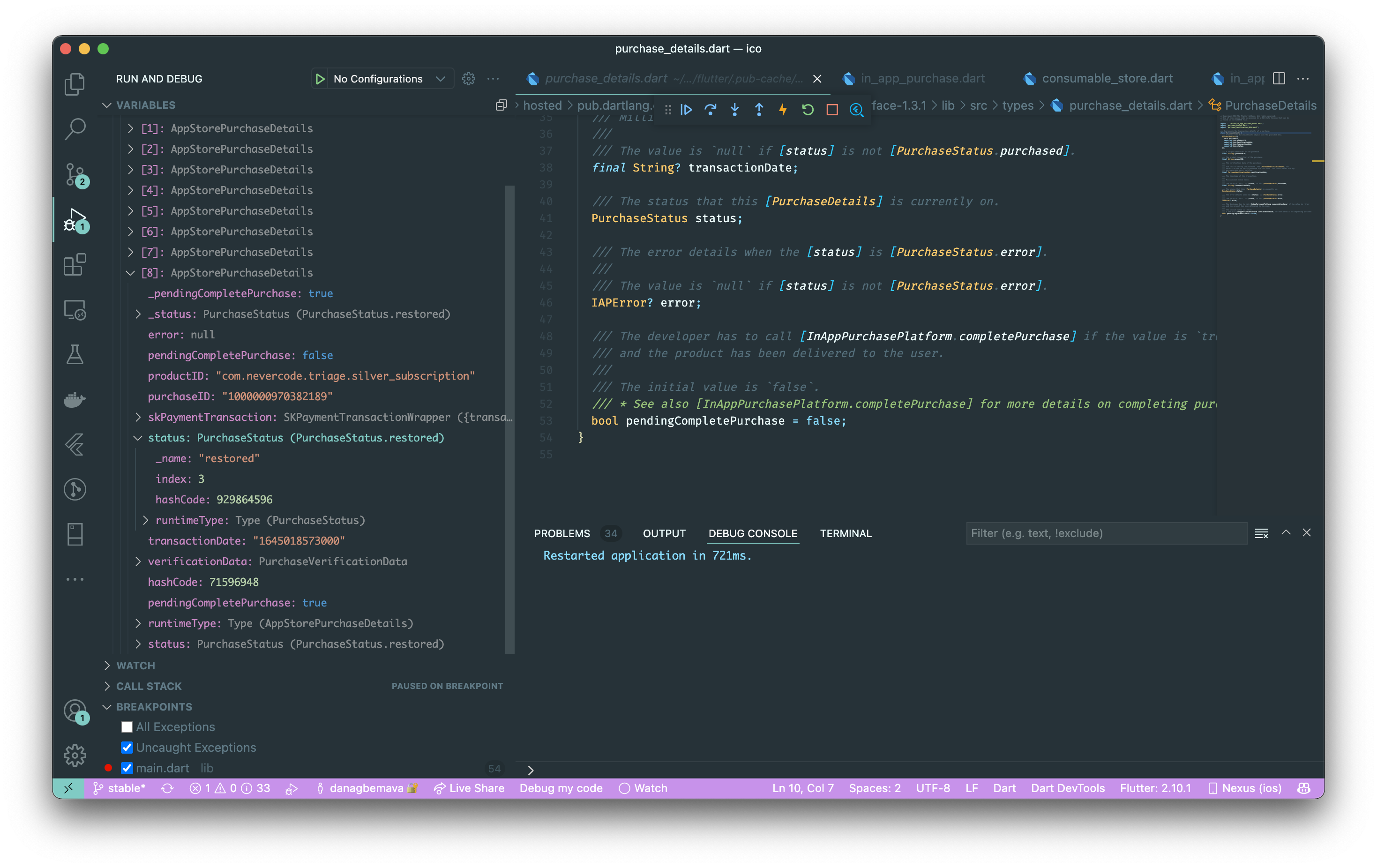
screenshot of debugger
Notice that there are 2 values for pendingCompletePurchase and they don't seem to match up with each other.
The private setter also seems to be true
flutter doctor -v
[✓] Flutter (Channel stable, 2.10.1, on macOS 12.2 21D49 darwin-arm, locale en-GB)
    • Flutter version 2.10.1 at /Users/nexus/dev/sdks/flutter
    • Upstream repository https://github.com/flutter/flutter.git
    • Framework revision db747aa133 (7 days ago), 2022-02-09 13:57:35 -0600
    • Engine revision ab46186b24
    • Dart version 2.16.1
    • DevTools version 2.9.2

[✓] Android toolchain - develop for Android devices (Android SDK version 31.0.0)
    • Android SDK at /Users/nexus/Library/Android/sdk
    • Platform android-31, build-tools 31.0.0
    • Java binary at: /Applications/Android Studio.app/Contents/jre/Contents/Home/bin/java
    • Java version OpenJDK Runtime Environment (build 11.0.11+0-b60-7772763)
    • All Android licenses accepted.

[✓] Xcode - develop for iOS and macOS (Xcode 13.2.1)
    • Xcode at /Applications/Xcode.app/Contents/Developer
    • CocoaPods version 1.11.2

[✓] Chrome - develop for the web
    • Chrome at /Applications/Google Chrome.app/Contents/MacOS/Google Chrome

[✓] Android Studio (version 2021.1)
    • Android Studio at /Applications/Android Studio.app/Contents
    • Flutter plugin can be installed from:
      🔨 https://plugins.jetbrains.com/plugin/9212-flutter
    • Dart plugin can be installed from:
      🔨 https://plugins.jetbrains.com/plugin/6351-dart
    • Java version OpenJDK Runtime Environment (build 11.0.11+0-b60-7772763)

[☠] IntelliJ IDEA Community Edition (the doctor check crashed)
    ✗ Due to an error, the doctor check did not complete. If the error message below is not helpful, please let us know about this issue at https://github.com/flutter/flutter/issues.
    ✗ FormatException: Unexpected extension byte (at offset 5)
    • #0      _Utf8Decoder.convertSingle (dart:convert-patch/convert_patch.dart:1789:7)
      #1      Utf8Decoder.convert (dart:convert/utf.dart:351:42)
      #2      InputStream.readString (package:archive/src/util/input_stream.dart:207:30)
      #3      new ZipDirectory.read (package:archive/src/zip/zip_directory.dart:40:30)
      #4      ZipDecoder.decodeBuffer (package:archive/src/zip_decoder.dart:19:30)
      #5      ZipDecoder.decodeBytes (package:archive/src/zip_decoder.dart:14:12)
      #6      IntelliJPlugins._findPluginXml (package:flutter_tools/src/intellij/intellij.dart:130:44)
      #7      IntelliJPlugins._readPackageVersion (package:flutter_tools/src/intellij/intellij.dart:141:40)
      #8      IntelliJPlugins.validatePackage (package:flutter_tools/src/intellij/intellij.dart:63:35)
      #9      IntelliJValidator.validate (package:flutter_tools/src/intellij/intellij_validator.dart:103:15)
      #10     asyncGuard.<anonymous closure> (package:flutter_tools/src/base/async_guard.dart:111:32)
      #11     asyncGuard.<anonymous closure> (package:flutter_tools/src/base/async_guard.dart:109:18)
      #12     _rootRun (dart:async/zone.dart:1426:13)
      #13     _CustomZone.run (dart:async/zone.dart:1328:19)
      #14     _runZoned (dart:async/zone.dart:1861:10)
      #15     runZonedGuarded (dart:async/zone.dart:1849:12)
      #16     runZoned (dart:async/zone.dart:1780:12)
      #17     asyncGuard (package:flutter_tools/src/base/async_guard.dart:109:3)
      #18     Doctor.startValidatorTasks (package:flutter_tools/src/doctor.dart:205:9)
      #19     Doctor.diagnose (package:flutter_tools/src/doctor.dart:309:47)
      #20     DoctorCommand.runCommand (package:flutter_tools/src/commands/doctor.dart:50:48)
      #21     FlutterCommand.verifyThenRunCommand (package:flutter_tools/src/runner/flutter_command.dart:1320:12)
      <asynchronous suspension>
      #22     FlutterCommand.run.<anonymous closure> (package:flutter_tools/src/runner/flutter_command.dart:1161:27)
      <asynchronous suspension>
      #23     AppContext.run.<anonymous closure> (package:flutter_tools/src/base/context.dart:150:19)
      <asynchronous suspension>
      #24     CommandRunner.runCommand (package:args/command_runner.dart:209:13)
      <asynchronous suspension>
      #25     FlutterCommandRunner.runCommand.<anonymous closure> (package:flutter_tools/src/runner/flutter_command_runner.dart:281:9)
      <asynchronous suspension>
      #26     AppContext.run.<anonymous closure> (package:flutter_tools/src/base/context.dart:150:19)
      <asynchronous suspension>
      #27     FlutterCommandRunner.runCommand (package:flutter_tools/src/runner/flutter_command_runner.dart:229:5)
      <asynchronous suspension>
      #28     run.<anonymous closure>.<anonymous closure> (package:flutter_tools/runner.dart:62:9)
      <asynchronous suspension>
      #29     AppContext.run.<anonymous closure> (package:flutter_tools/src/base/context.dart:150:19)
      <asynchronous suspension>
      #30     main (package:flutter_tools/executable.dart:94:3)
      <asynchronous suspension>


[✓] VS Code (version 1.64.2)
    • VS Code at /Applications/Visual Studio Code.app/Contents
    • Flutter extension version 3.34.0

[✓] Connected device (3 available)
    • Nexus (mobile)  • 00008020-001875E83A38002E • ios            • iOS 15.3 19D50
    • macOS (desktop) • macos                     • darwin-arm64   • macOS 12.2 21D49 darwin-arm
    • Chrome (web)    • chrome                    • web-javascript • Google Chrome 98.0.4758.102

[✓] HTTP Host Availability
    • All required HTTP hosts are available

! Doctor found issues in 1 category.
[✓] Flutter (Channel master, 2.11.0-0.0.pre.582, on macOS 12.2 21D49 darwin-arm, locale en-GB)
    • Flutter version 2.11.0-0.0.pre.582 at /Users/nexus/dev/sdks/flutters
    • Upstream repository https://github.com/flutter/flutter.git
    • Framework revision 9514106108 (9 hours ago), 2022-02-16 00:00:11 -0500
    • Engine revision b09cf53269
    • Dart version 2.17.0 (build 2.17.0-105.0.dev)
    • DevTools version 2.10.0

[✓] Android toolchain - develop for Android devices (Android SDK version 31.0.0)
    • Android SDK at /Users/nexus/Library/Android/sdk
    • Platform android-31, build-tools 31.0.0
    • Java binary at: /Applications/Android Studio.app/Contents/jre/Contents/Home/bin/java
    • Java version OpenJDK Runtime Environment (build 11.0.11+0-b60-7772763)
    • All Android licenses accepted.

[✓] Xcode - develop for iOS and macOS (Xcode 13.2.1)
    • Xcode at /Applications/Xcode.app/Contents/Developer
    • CocoaPods version 1.11.2

[✓] Chrome - develop for the web
    • Chrome at /Applications/Google Chrome.app/Contents/MacOS/Google Chrome

[✓] Android Studio (version 2021.1)
    • Android Studio at /Applications/Android Studio.app/Contents
    • Flutter plugin can be installed from:
      🔨 https://plugins.jetbrains.com/plugin/9212-flutter
    • Dart plugin can be installed from:
      🔨 https://plugins.jetbrains.com/plugin/6351-dart
    • Java version OpenJDK Runtime Environment (build 11.0.11+0-b60-7772763)

[✓] IntelliJ IDEA Community Edition (version 2021.3)
    • IntelliJ at /Applications/IntelliJ IDEA CE.app
    • Flutter plugin can be installed from:
      🔨 https://plugins.jetbrains.com/plugin/9212-flutter
    • Dart plugin version 213.5744.122

[✓] VS Code (version 1.64.2)
    • VS Code at /Applications/Visual Studio Code.app/Contents
    • Flutter extension version 3.34.0

[✓] Connected device (3 available)
    • Nexus (mobile)  • 00008020-001875E83A38002E • ios            • iOS 15.3 19D50
    • macOS (desktop) • macos                     • darwin-arm64   • macOS 12.2 21D49 darwin-arm
    • Chrome (web)    • chrome                    • web-javascript • Google Chrome 98.0.4758.102

[✓] HTTP Host Availability
    • All required HTTP hosts are available

• No issues found!
cc @mvanbeusekom
I also have the same issue still (with the version 3.0.7), isn't there any update on this


I have encountered the same situation. Completing a purchase using completePurchase doesn't have any effect on pendingCompletePurchase property. It stays true. Do we have an ETA for a fix?
New information here may be, that my non-consumable is a subscription.


As of 2023, I'm still experiencing this issue. I've a bunch of unfinished purchases stacked up that don't want to complete.

Just adding another voice to the list of people who have this issue... 190 unfinished purchases on one of my test devices!

@danagbemava-nc please this issue is essential it opened 1 year ago and there is no fix until now.

I have the same problem. It's strange that this hasn't been fixed yet. Please fix this problem

Can confirm the issue too.
This bug gets in the way of building "Restore Purchases" functionality properly.
Calling restorePurchases on iOS gets all the previous transactions and restoring them correctly, but expectation is that after completing such restored transactions those will be gone from the purchaseStream.
Completed transactions stay on the purchaseStream and get re-issued again, for example on hot-reload.

We are still experiencing the same issue. Does this problem happen on non-sandbox IOS users?

Title: "Issue with inapppurchase.instance.completePurchase and pendingCompletePurchase for iOS non-consumable purchase"
Description: After calling inapppurchase.instance.completePurchase for a non-consumable purchase on iOS, the pendingCompletePurchase property is consistently returning true, even though it should be set to false after successfully completing the purchase.
Steps to Reproduce:
Initialize the in-app purchase instance. Trigger a non-consumable purchase transaction using appropriate methods. Call inapppurchase.instance.completePurchase() to complete the purchase. Expected Behavior: After successfully completing the non-consumable purchase, the pendingCompletePurchase property should be set to false.
Actual Behavior: Upon calling inapppurchase.instance.completePurchase(), the pendingCompletePurchase property remains true, even though the non-consumable purchase has been completed.
Environment:
Operating System: [e.g., macOS] iOS Version: [e.g., iOS 14] Xcode Version: [e.g., Xcode 12] in_app_purchase Plugin Version: [e.g., 0.5.3] Additional Information:
This issue is specific to iOS non-consumable purchases and has not been observed on other platforms or purchase types. The issue is consistently reproducible on multiple iOS devices running various iOS versions. The application is utilizing the latest version of the in_app_purchase plugin. As this issue impacts the core functionality of our app and affects the user experience, we are actively seeking a resolution or any guidance to overcome this challenge. Any insights or suggestions on resolving this issue would be highly appreciated.
Thank you for your prompt attention to this matter, and we look forward to resolving this issue promptly.
in_app_purchase: 3.1.7 flutter doctor -v
[!] Flutter (Channel stable, 3.10.6, on macOS 13.1 22C65 darwin-arm64, locale en-IN) • Flutter version 3.10.6 on channel stable at /Users/ag/Desktop/flutter ! The flutter binary is not on your path. Consider adding /Users/ag/Desktop/flutter/bin to your path. ! The dart binary is not on your path. Consider adding /Users/ag/Desktop/flutter/bin to your path. • Upstream repository https://github.com/flutter/flutter.git • Framework revision f468f3366c (3 weeks ago), 2023-07-12 15:19:05 -0700 • Engine revision cdbeda788a • Dart version 3.0.6 • DevTools version 2.23.1 • If those were intentional, you can disregard the above warnings; however it is recommended to use "git" directly to perform update checks and upgrades.
[✓] Android toolchain - develop for Android devices (Android SDK version 33.0.0-rc1) • Android SDK at /Users/ag/Library/Android/sdk • Platform android-33, build-tools 33.0.0-rc1 • Java binary at: /Applications/Android Studio 2.app/Contents/jbr/Contents/Home/bin/java • Java version OpenJDK Runtime Environment (build 17.0.6+0-17.0.6b802.4-9586694) • All Android licenses accepted.
[✓] Xcode - develop for iOS and macOS (Xcode 14.2) • Xcode at /Applications/Xcode.app/Contents/Developer • Build 14C18 • CocoaPods version 1.12.1
[✓] Chrome - develop for the web • Chrome at /Applications/Google Chrome.app/Contents/MacOS/Google Chrome
[✓] Android Studio (version 2022.1) • Android Studio at /Applications/Android Studio.app/Contents • Flutter plugin can be installed from: 🔨 https://plugins.jetbrains.com/plugin/9212-flutter • Dart plugin can be installed from: 🔨 https://plugins.jetbrains.com/plugin/6351-dart • Java version OpenJDK Runtime Environment (build 11.0.15+0-b2043.56-8887301)
[✓] Android Studio (version 2022.2) • Android Studio at /Applications/Android Studio 2.app/Contents • Flutter plugin can be installed from: 🔨 https://plugins.jetbrains.com/plugin/9212-flutter • Dart plugin can be installed from: 🔨 https://plugins.jetbrains.com/plugin/6351-dart • Java version OpenJDK Runtime Environment (build 17.0.6+0-17.0.6b802.4-9586694)
[✓] VS Code (version 1.80.2) • VS Code at /Users/ag/Desktop/Software/macOS Setups/Visual Studio Code.app/Contents • Flutter extension can be installed from: 🔨 https://marketplace.visualstudio.com/items?itemName=Dart-Code.flutter
[✓] Connected device (4 available) • SM M336BU (mobile) • RZCT50GX81X • android-arm64 • Android 13 (API 33) • AG (mobile) • 00008030-000251D21A52802E • ios • iOS 16.2 20C65 • macOS (desktop) • macos • darwin-arm64 • macOS 13.1 22C65 darwin-arm64 • Chrome (web) • chrome • web-javascript • Google Chrome 115.0.5790.114
[✓] Network resources • All expected network resources are available.

As this issue is already more than a year old, has anyone found a workaround?

Still facing same issue. Any body successfully resolved this issue? Any suggestion or help?

I am stuck on same issue. Any news/updates or workaround? It shows up in development and on TestFlight. Does anyone know if the problem persists in the production environment?
Thank you for any advice


I've encountered this as well. For me it restores subscription purchases correctly at app startup, but when I switch to another app and then back into mine, it sends an entire purchase history as another restore batch



It's really frustrating to find issues that I'm running into documented throughout this forum, but most of the threads are years old. Do I need to use a different library entirely?

Is there a workaround? If this is expected behaviour, the documentation should reflect this as well

Same issue here. Topic opened months ago but there is not any solutions yet. Also someone closed topic #115241 as a duplicate of this topic but there is not any solutions in this topic too.
As i experienced, listening purchase updates returns current subscription renewals with status purchased and it triggers status.Purchased case of example code. So we need a workaround to this.


Hi everyone i'm facing the same issue. Is anyone knows if the problem is only with storekit/testflight or if it possibly be trigger in production mode ? Thanks for answer ! hope it was solved soon

Hi everyone i'm facing the same issue. Is anyone knows if the problem is only with storekit/testflight or if it possibly be trigger in production mode ? Thanks for answer ! hope it was solved soon
It only appears in storekit/testflight mode, I have never seen it be triggered in production mode.