

 flutter
[Android][Samsung]: Tapping on special characters button from virtual keyboard triggers `performPrivateCommand : onAppPrivateCommand @ EditableText: "_CastError (Null check operator used on a null value)"` error.
I have a Samsung Tab S2 version 7 android tablet.
I can't find anywhere a solution for this error, in the EditableText widget.
What happens is that in a TextFormField widget with its respective TextEditingController, I enter the name of my user, however I need this character " _ ", when I change to special characters on the keyboard to search for it... I get this error...

flutter doctor -v
[√] Flutter (Channel stable, 2.8.1, on Microsoft Windows [version 10.0.19044.1466], locale fr-FR)
    • Flutter version 2.8.1 at C:\src\flutter
    • Upstream repository https://github.com/flutter/flutter.git
    • Framework revision 77d935af4d (7 weeks ago), 2021-12-16 08:37:33 -0800
    • Engine revision 890a5fca2e
    • Dart version 2.15.1

[√] Android toolchain - develop for Android devices (Android SDK version 31.0.0)
    • Android SDK at C:\Users\Daniel ROLDAN\AppData\Local\Android\Sdk
    • Platform android-31, build-tools 31.0.0
    • ANDROID_HOME = C:\Users\Daniel ROLDAN\AppData\Local\Android\Sdk
    • Java binary at: C:\Program Files\Android\Android Studio\jre\bin\java
    • Java version OpenJDK Runtime Environment (build 11.0.10+0-b96-7249189)
    • All Android licenses accepted.

[√] Chrome - develop for the web
    • Chrome at C:\Program Files\Google\Chrome\Application\chrome.exe

[√] Android Studio (version 2020.3)
    • Android Studio at C:\Program Files\Android\Android Studio
    • Flutter plugin can be installed from:
       https://plugins.jetbrains.com/plugin/9212-flutter
    • Dart plugin can be installed from:
       https://plugins.jetbrains.com/plugin/6351-dart
    • Java version OpenJDK Runtime Environment (build 11.0.10+0-b96-7249189)

[√] VS Code (version 1.63.2)
    • VS Code at C:\Users\Daniel ROLDAN\AppData\Local\Programs\Microsoft VS Code
    • Flutter extension version 3.32.0

[√] Connected device (3 available)
    • SM T813 (mobile) • 3b8bea59055e2627 • android-arm64  • Android 7.0 (API 24)
    • Chrome (web)     • chrome           • web-javascript • Google Chrome 93.0.4577.63
    • Edge (web)       • edge             • web-javascript • Microsoft Edge 96.0.1054.62

• No issues found!
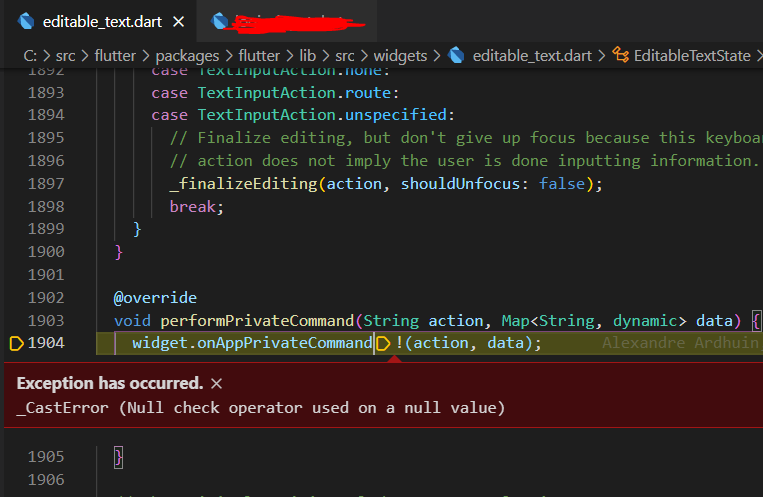

This is a small example because in all the fields where I can write I get this error...
TextEditingController accountController = TextEditingController();

   Padding(
      padding: EdgeInsets.fromLTRB(20, 0, 20, 0),
      child: TextFormField(
        scrollPadding: EdgeInsets.only(
          bottom: Device.screenHeight * 0.25,
        ),
        controller: accountController ,
        textInputAction:
            widget.isPassword ? TextInputAction.done : TextInputAction.next,
        onFieldSubmitted: () {},
        enableSuggestions: !widget.isPassword,
        autocorrect: !widget.isPassword,
        obscureText: widget.isPassword && this.isPasswordHidden!,
        validator: () {},
        style: TextStyle(
          fontSize: 20,
        ),
        decoration: InputDecoration(
          suffixIcon: IconButton(
                  icon: Icon(
                    Icons.visibility_off,
                    size: 30,
                    color: DesignConstants.loginFontColor,
                  ),
                  onPressed: (){},
                  splashRadius: 10,
                ),
          hintText: widget.labelText,
          helperText: widget.helperText,
        ),
      ),
    )

@kauzige Can you provide complete error log ? And If I understand correctly, you want to enter a username containing an underscore, and in order to do that you tap on the special char button which throws the null check error. Is that correct interpretation ? Also to confirm this behavior, can you also check the same on latest master and see if it persists ?

@darshankawar That's the weird thing here, when that happens it only happens when I use debug, and no errors appear in the console. The only thing that appears is this :

You are right, as the first image shows, when I click on the special characters I get that error.
On the other hand, I have already changed to the latest master version and changed some compile version parameters that it asked me for and it still keeps that error only on my tablet, because on the mobile phone that does not happen and yes, I have already updated my tablet to the latest version.
[√] Flutter (Channel master, 2.10.0-1.0.pre.375, on Microsoft Windows [version 10.0.19044.1466], locale fr-FR)
    • Flutter version 2.10.0-1.0.pre.375 at C:\src\flutter
    • Upstream repository https://github.com/flutter/flutter.git
    • Framework revision 13b8f5aa8f (2 hours ago), 2022-02-02 07:05:09 -0500
    • Engine revision 4ff105d625
    • Dart version 2.17.0 (build 2.17.0-75.0.dev)
    • DevTools version 2.10.0

[√] Android toolchain - develop for Android devices (Android SDK version 31.0.0)
    • Android SDK at C:\Users\Daniel ROLDAN\AppData\Local\Android\Sdk
    • Platform android-31, build-tools 31.0.0
    • ANDROID_HOME = C:\Users\Daniel ROLDAN\AppData\Local\Android\Sdk
    • Java binary at: C:\Program Files\Android\Android Studio\jre\bin\java
    • Java version OpenJDK Runtime Environment (build 11.0.10+0-b96-7249189)
    • All Android licenses accepted.

[√] Chrome - develop for the web
    • Chrome at C:\Program Files\Google\Chrome\Application\chrome.exe

[!] Visual Studio - develop for Windows (Visual Studio Build Tools 2017 15.9.42)
    • Visual Studio at C:\Program Files (x86)\Microsoft Visual Studio\2017\BuildTools
    • Visual Studio Build Tools 2017 version 15.9.28307.1759
    • Windows 10 SDK version 10.0.17763.0
    X Visual Studio 2019 or later is required.
      Download at https://visualstudio.microsoft.com/downloads/.
      Please install the "Desktop development with C++" workload, including all of its default components

[√] Android Studio (version 2020.3)
    • Android Studio at C:\Program Files\Android\Android Studio
    • Flutter plugin can be installed from:
       https://plugins.jetbrains.com/plugin/9212-flutter
    • Dart plugin can be installed from:
       https://plugins.jetbrains.com/plugin/6351-dart
    • Java version OpenJDK Runtime Environment (build 11.0.10+0-b96-7249189)

[√] VS Code (version 1.63.2)
    • VS Code at C:\Users\Daniel ROLDAN\AppData\Local\Programs\Microsoft VS Code
    • Flutter extension version 3.32.0

[√] Connected device (4 available)
    • SM T813 (mobile)  • 3b8bea59055e2627 • android-arm64  • Android 7.0 (API 24)
    • Windows (desktop) • windows          • windows-x64    • Microsoft Windows [version 10.0.19044.1466]
    • Chrome (web)      • chrome           • web-javascript • Google Chrome 93.0.4577.63
    • Edge (web)        • edge             • web-javascript • Microsoft Edge 96.0.1054.62

[√] HTTP Host Availability
    • All required HTTP hosts are available

! Doctor found issues in 1 category.
@kauzige
Thanks for the details. Can you also try a scenario wherein you input a text in TextFormField, enable debugger and try to delete one char at a time and see if you get the same _CastError or not ?
Also try the same on an Android device and see what you get.
The error you are getting [performPrivateCommand : onAppPrivateCommand](https://github.com/flutter/flutter/issues/97634#) indicates This is used to receive a private command from the input method.
@darshankawar I don't seem to have any error when deleting one character at a time with the debugger, I just get that error when I press the special characters button. I have an android phone and I don't have any problem, I can enter the special characters and I don't get that error.
What I understood with your answer is that the special characters button on the keyboard is a private method, isn't it? Do you know if there is a way to read that button in the code? Or what else could I do ?
On the other hand, in the TextInput widget, there is a switch that tells me the following :
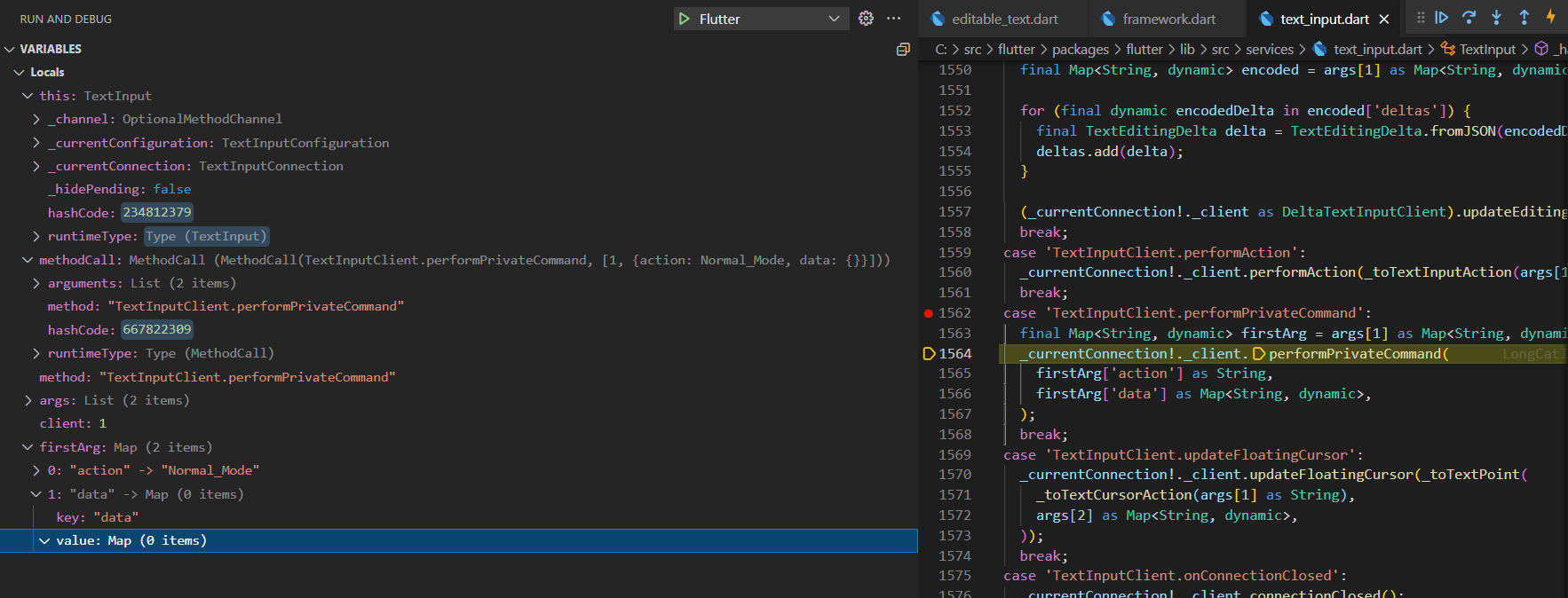
And this is where null data arrives, but I really don't understand why this happens on my tablet and not on my mobile phone cause in the phone does not fit in this case.

Thanks for further details.
From what I know, performPrivateCommand is used to receive a private command from the input method and is called when the result of TextInputClient.performPrivateCommand is received, but I am not sure if triggering special characters button is the only factor to it or not.
I am unable to verify this behavior since I don't have any Android Tablet to replicate, so I am going to label it for further input / investigation from the team.
I have the same issue on a Samsung Galaxy J7 (2017) (SMJ530F), when a keyboard appears with type TextInputType.numberWithOptions (decimal true/false doesn't matter). I don't even have to press a key, just focusing the textfield to make the keyboard appear is enough for the error to happen.
Other keyboard types work fine, but this one causes the error. The user can continue just fine though, so it's a minor issue, only annoying when debugging.

I have the same issue on a Samsung Galaxy MO3 (2017) (SM MO22G), when a keyboard appears with type TextInputType.number I don't even have to press a key, just focusing the textfield to make the keyboard appear is enough for the error to happen. If its in the default mode its works fine but when I specify the keyboard type the error pops.

Having the Same issue after upgrading to Flutter 3.3 ,Device is Samsung J2 2018 Android 7.1.

The same issue on Samsung S7 (Android 8.0, Flutter 3.3.2). Rolled back to 3.3.1. Seems like it fixed the issue.

I'm currently having the same issue on my Samsung Galaxy A5. I wasn't having this issue but after upgrading to the latest version of flutter, that is when i started getting this issue with the textfield. It crashes my app and it happens when i change my input type to accommodate numbers. I have downgraded to the previous version of 3.3.0 but still keeps on crashing the application.

This error is also frequently reported by Firebase Crashlytics. In 100% of my cases, Samsung devices are affected. To give some numbers for a priority rating: In the last 7 days there were 60 reports on about 2500 users.
Fatal Exception: io.flutter.plugins.firebase.crashlytics.FlutterError: Null check operator used on a null value. Error thrown Instance of 'ErrorDescription'.
       at EditableTextState.performPrivateCommand(editable_text.dart:2155)
       at TextInput._handleTextInputInvocation(text_input.dart:1821)
       at TextInput._loudlyHandleTextInputInvocation(text_input.dart:1701)
       at MethodChannel._handleAsMethodCall(platform_channel.dart:536)
       at MethodChannel.setMethodCallHandler.<fn>(platform_channel.dart:529)
       at _DefaultBinaryMessenger.setMessageHandler.<fn>(binding.dart:387)

This bug should be fixed 3 months ago in this https://github.com/flutter/flutter/pull/107683, I don't know why it's still not released.


I think it's fixed in 3.3.3, the
onAppPrivateCommandis invoked conditionally
No, that's not in 3.3.3.

Our app has 500,000 users, and we received 690 crash reports last night. Also using flutter 3.3.3. Same error on EVERY single crash report, and every device was Samsung:
#0 EditableTextState.performPrivateCommand (package:flutter/src/widgets/editable_text.dart:2155)
#1 TextInput._handleTextInputInvocation (package:flutter/src/services/text_input.dart:1821)
#2 TextInput._loudlyHandleTextInputInvocation (package:flutter/src/services/text_input.dart:1701)
#3 MethodChannel._handleAsMethodCall (package:flutter/src/services/platform_channel.dart:536)
#4 MethodChannel.setMethodCallHandler.<anonymous closure> (package:flutter/src/services/platform_channel.dart:529)
#5 _DefaultBinaryMessenger.setMessageHandler.<anonymous closure> (package:flutter/src/services/binding.dart:387)
#6 _invoke2 (dart:ui/hooks.dart:186)
#7 _ChannelCallbackRecord.invoke (dart:ui/channel_buffers.dart:42)
#8 _Channel.push (dart:ui/channel_buffers.dart:132)
#9 ChannelBuffers.push (dart:ui/channel_buffers.dart:329)
#10 PlatformDispatcher._dispatchPlatformMessage (dart:ui/platform_dispatcher.dart:599)
#11 _dispatchPlatformMessage (dart:ui/hooks.dart:89)
This issue needs to please be URGENTLY FIXED. The exact lines of code causing the crash are clearly shown in the error log, surely it isn't that hard to fix? We cannot afford to have hundreds of crashes every day due to flutter bugs.

https://github.com/flutter/flutter/blob/db51e5d944413df72f06110d1c7a420133ea83fd/packages/flutter/lib/src/widgets/editable_text.dart#L2311 with editing your local flutter codebase, it shall be a workaround for fixing this issue.

I asked to backport the fix into the stable branch but no response from the flutter team yet. https://github.com/flutter/flutter/pull/107683#issuecomment-1260829026


With these kind of new issues popping up in the new 'stable' releases, as a developer, I feel not to update flutter version, till the older version is deprecated. Can we at least have a better stable releases?


I guess this is a duplicate of https://github.com/flutter/flutter/issues/111095, fixed in 3.3.7 https://github.com/flutter/flutter/wiki/Hotfixes-to-the-Stable-Channel

@kinex thanks for reporting. I confirm that in 3.3.7 this issue was fixed.

Thanks for confirmation. Everyone else in this thread including OP @kauzige, please verify on latest stable version (3.3.7) and confirm, accordingly, I'll update the status of this issue. Thanks.
We can also confirm that we've seen no further reports of this issue since updating to 3.3.7 👍

Thanks for the update. Based on above recent confirmations, I am going ahead and closing this as fixed. If anybody disagrees, write in comments and I'll reopen it.
This thread has been automatically locked since there has not been any recent activity after it was closed. If you are still experiencing a similar issue, please open a new bug, including the output of flutter doctor -v and a minimal reproduction of the issue.
![github-actions[bot] avatar](https://avatars.githubusercontent.com/in/15368?v=4 "Published by a pub.dev verified publisher")