

 flutter
Keyboard issue on mobile Web platform
Steps to Reproduce
Create a simple app where text editing aligns at the bottom.
- After creating the app, upload it on the web and open the Flutter app on the iPhone mobile browser.
- Execute the command "flutter build web --web-renderer canvaskit" on the code sample and upload it to the server. You can also check it on https://api.de-team.com/flutter/.
- Open the app on the mobile browser. For example, open it on Safari. Tap on the blue editable field.
Expected results: The expectation is that the keyboard will show up and the blue field will align above the keyboard.
Actual results: However, the actual results are that all content has bottom insets and there exists extra space between the keyboard and the app content widget. You need to fix this issue to ensure the app performs as expected.
Sample code
import 'package:flutter/material.dart';

void main() {
  runApp(MaterialApp(
    builder: (context, child) => const MyApp(),
  ));
}

class MyApp extends StatefulWidget {
  const MyApp({super.key});

  @override
  State<StatefulWidget> createState() {
    return _MyAppState();
  }
}

class _MyAppState extends State<MyApp> {
  @override
  Widget build(BuildContext context) {
    return Container(
      color: Colors.blueAccent,
      child: Column(
        children: [
          const Spacer(),
          Text(
            'Media query inset vertical ${MediaQuery.of(context).viewInsets.vertical}',
            style: const TextStyle(fontSize: 14, color: Colors.black),
          ),
          Padding(
            padding: EdgeInsets.only(bottom: MediaQuery.of(context).viewInsets.vertical),
            child: Container(
              padding: const EdgeInsets.all(16),
              color: Colors.indigo,
              child: EditableText(
                controller: TextEditingController(),
                focusNode: FocusNode(),
                style: const TextStyle(fontSize: 14, color: Colors.black),
                cursorColor: Colors.white,
                backgroundCursorColor: Colors.transparent,
              ),
            ),
          ),
        ],
      ),
    );
  }
}
Another example, same result
import 'package:flutter/material.dart';

void main() {
  runApp(MaterialApp(
    builder: (context, child) => const MyApp(),
  ));
}

class MyApp extends StatefulWidget {
  const MyApp({super.key});

  @override
  State<StatefulWidget> createState() {
    return _MyAppState();
  }
}

class _MyAppState extends State<MyApp> {
  @override
  Widget build(BuildContext context) {
    return Scaffold(
      body: Column(
        children: [
          const Spacer(),
          Container(
            padding: const EdgeInsets.all(16),
            color: Colors.indigo,
            child: EditableText(
              controller: TextEditingController(),
              focusNode: FocusNode(),
              style: const TextStyle(fontSize: 14, color: Colors.black),
              cursorColor: Colors.white,
              backgroundCursorColor: Colors.transparent,
            ),
          ),
        ],
      ),
    );
  }
}
flutter doctor -v
[✓] Flutter (Channel stable, 3.7.9, on macOS 13.2.1 22D68 darwin-arm64, locale en-RU)
    • Flutter version 3.7.9 on channel stable at /Users/rain/Dev/sdk/flutter
    • Upstream repository https://github.com/flutter/flutter.git
    • Framework revision 62bd79521d (6 days ago), 2023-03-30 10:59:36 -0700
    • Engine revision ec975089ac
    • Dart version 2.19.6
    • DevTools version 2.20.1

[✓] Android toolchain - develop for Android devices (Android SDK version 33.0.2)
    • Android SDK at /Users/rain/Library/Android/sdk
    • Platform android-33, build-tools 33.0.2
    • Java binary at: /Applications/Android Studio.app/Contents/jbr/Contents/Home/bin/java
    • Java version OpenJDK Runtime Environment (build 11.0.15+0-b2043.56-8887301)
    • All Android licenses accepted.

[✓] Xcode - develop for iOS and macOS (Xcode 14.2)
    • Xcode at /Applications/Xcode.app/Contents/Developer
    • Build 14C18
    • CocoaPods version 1.12.0

[✓] Chrome - develop for the web
    • Chrome at /Applications/Google Chrome.app/Contents/MacOS/Google Chrome

[✓] Android Studio (version 2022.1)
    • Android Studio at /Applications/Android Studio.app/Contents
    • Flutter plugin can be installed from:
      🔨 https://plugins.jetbrains.com/plugin/9212-flutter
    • Dart plugin can be installed from:
      🔨 https://plugins.jetbrains.com/plugin/6351-dart
    • Java version OpenJDK Runtime Environment (build 11.0.15+0-b2043.56-8887301)

[✓] IntelliJ IDEA Community Edition (version 2022.3.3)
    • IntelliJ at /Applications/IntelliJ IDEA CE.app
    • Flutter plugin version 72.1.4
    • Dart plugin version 223.8888

[✓] VS Code (version 1.77.0)
    • VS Code at /Applications/Visual Studio Code.app/Contents
    • Flutter extension can be installed from:
      🔨 https://marketplace.visualstudio.com/items?itemName=Dart-Code.flutter

[✓] Connected device (3 available)
    • iPhone 14 Pro Max (mobile) • 6072A3F4-985F-4748-AC2E-9E71BE2C2C60 • ios            • com.apple.CoreSimulator.SimRuntime.iOS-16-2 (simulator)
    • macOS (desktop)            • macos                                • darwin-arm64   • macOS 13.2.1 22D68 darwin-arm64
    • Chrome (web)               • chrome                               • web-javascript • Google Chrome 111.0.5563.146

[✓] HTTP Host Availability
    • All required HTTP hosts are available

• No issues found!
https://user-images.githubusercontent.com/1499945/230101665-bec83ede-6ae3-4d3a-9884-d7cf5c42bb98.mov

Thanks for the detailed report @NelepovDmitry I tried the sample code on physical device (iPhone 6s, OS 15.3.1) in which, the app worked as expected. The keyboard opening and closing is aligned with the text field as shown below:
https://user-images.githubusercontent.com/67046386/230384376-ed044dad-e2ac-425b-a24c-4867ec83cd2e.MP4
I see that you tried on simulator. Can you try the same on physical device and confirm if you still get same behavior or not ?

Yes, i have same issue on iPhone 14, iPhone 10, Android Samsung S22 Ultra.
Here is video from Android.
https://user-images.githubusercontent.com/1499945/230385752-fa85a0c0-c8a4-4ce2-95ec-c0134ac25ee8.mp4
Can you try using this property and see if it helps ? https://api.flutter.dev/flutter/material/Scaffold/resizeToAvoidBottomInset.html
Already tried (
Looks like keyboard make offset whole viewcontroller or activity.
Thanks for the update. Are all iphone devices you tried on have OS 16 or lesser ?
All devices with OS 16+ I will check if i have some device with less OS version.
Also verified on iOS 16 simulator, but not seem to be replicating the behavior.
https://user-images.githubusercontent.com/67046386/231065101-29e0d1ad-eebc-476b-b0ab-3839187af36d.mov
Execute the command "flutter build web --web-renderer canvaskit", can you try with html rendering mode as well and see what behavior you get ?
Just now create a html build. Same result. Also bug exists on Android device (physical) - but very rarely
https://user-images.githubusercontent.com/1499945/231072222-34bb04f1-88f7-49ec-9f53-9036f1d0e3f4.mov

We encountered the same issue. When our website detects mobile Safari we swap the input and put it on top of the page. Of course, this was a workaround, but lately, we noticed the same happens on Chrome Android, but not on the emulator.
I'm really curious if you find out what causes this issue.

I am unable to replicate the reported behavior on iOS 15, 16 versions as mentioned previously and also on S2 galaxy device, so I'll keep the issue open for team's attention.
@darshankawar you don't see this error on this website. https://api.de-team.com/flutter/ ? For me I have repro on Pixel 6 Pro using latest Android and Chrome
I also can't reproduce this using the Flutter main channel + iOS simulator 16.2

I also can't reproduce this using the Flutter main channel + iOS simulator 16.2
Use Cmd+K
Bug very floating in real device, but 100% on simulator
I was eventually able to reproduce this on https://api.de-team.com/flutter/ on my physical Pixel 6 running Chrome, but I had to do a bunch of crazy tapping first:
https://user-images.githubusercontent.com/389558/232128806-41cf3ba4-f5da-4486-a21c-a7611e550735.mp4
I would say it reminds me of https://github.com/flutter/flutter/issues/102084, but that one is not web-specific.

When verifying https://github.com/flutter/flutter/issues/125095 with its sample code, I can reproduce this issue as well.
As Justin mentioned above, I also have to attempt taps for a while to see it. Below is the result on Android and iOS:
- Android: the probability to reproduce the issue is higher than iOS with https://api.de-team.com/flutter and 125095's sample code as below.
- iOS: the issue does not show up with https://api.de-team.com/flutter but it does one time with 125095's sample code.
Verifying the issue on:
- Samsung Galaxy Tab A7 Lite, Android 13
- iPhone 14 Pro, iOS 16.4 (emulator)
| Android sample 1 | Android sample 2 | iOS |
|---|---|---|
 |
 |
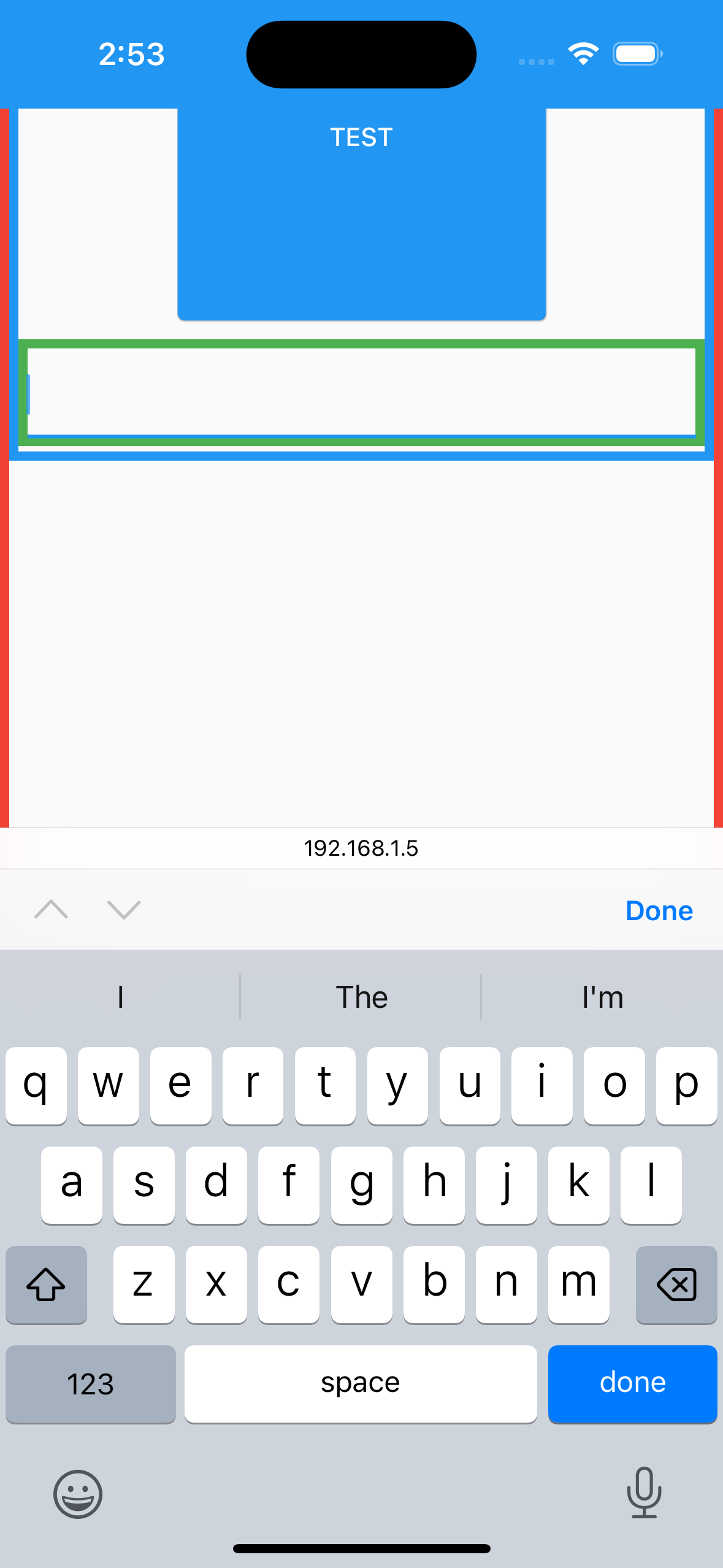 |
Another sample code (copy from 125095)
import 'package:flutter/material.dart';

void main() {
  runApp(MyApp());
}

class MyApp extends StatelessWidget {
  MyApp({super.key});

  final List<Widget> list = List.generate(
    10,
    (index) => Container(
      width: 200,
      height: 200,
      margin: const EdgeInsets.all(10.0),
      child: ElevatedButton(
        onPressed: () {},
        child: const Text("TEST"),
      ),
    ),
  );

  @override
  Widget build(BuildContext context) {
    return Container(
      decoration: BoxDecoration(
        border: Border.all(color: Colors.red, width: 5),
      ),
      child: MaterialApp(
        home: Scaffold(
          body: Container(
            decoration: BoxDecoration(
              border: Border.all(color: Colors.blue, width: 5),
            ),
            child: SingleChildScrollView(
              child: Column(
                children: [
                  ...list,
                  Container(
                    width: double.infinity,
                    decoration: BoxDecoration(
                      border: Border.all(color: Colors.green, width: 5),
                    ),
                    child: const TextField(),
                  ),
                  const SizedBox(height: 50),
                ],
              ),
            ),
          ),
        ),
      ),
    );
  }
}
flutter doctor -v (stable and master)
[✓] Flutter (Channel stable, 3.7.11, on macOS 13.0.1 22A400 darwin-x64, locale en-VN)
    • Flutter version 3.7.11 on channel stable at /Users/huynq/Documents/GitHub/flutter
    • Upstream repository https://github.com/flutter/flutter.git
    • Framework revision f72efea43c (31 hours ago), 2023-04-11 11:57:21 -0700
    • Engine revision 1a65d409c7
    • Dart version 2.19.6
    • DevTools version 2.20.1

[✓] Android toolchain - develop for Android devices (Android SDK version 32.0.0)
    • Android SDK at /Users/huynq/Library/Android/sdk
    • Platform android-33, build-tools 32.0.0
    • ANDROID_HOME = /Users/huynq/Library/Android/sdk
    • Java binary at: /Applications/Android Studio.app/Contents/jbr/Contents/Home/bin/java
    • Java version OpenJDK Runtime Environment (build 11.0.15+0-b2043.56-8887301)
    • All Android licenses accepted.

[✓] Xcode - develop for iOS and macOS (Xcode 14.3)
    • Xcode at /Applications/Xcode.app/Contents/Developer
    • Build 14E222b
    • CocoaPods version 1.11.3

[✓] Chrome - develop for the web
    • Chrome at /Applications/Google Chrome.app/Contents/MacOS/Google Chrome

[✓] Android Studio (version 2022.1)
    • Android Studio at /Applications/Android Studio.app/Contents
    • Flutter plugin can be installed from:
      🔨 https://plugins.jetbrains.com/plugin/9212-flutter
    • Dart plugin can be installed from:
      🔨 https://plugins.jetbrains.com/plugin/6351-dart
    • Java version OpenJDK Runtime Environment (build 11.0.15+0-b2043.56-8887301)

[✓] IntelliJ IDEA Community Edition (version 2022.1.1)
    • IntelliJ at /Users/huynq/Library/Application Support/JetBrains/Toolbox/apps/IDEA-C/ch-0/221.5591.52/IntelliJ IDEA CE.app
    • Flutter plugin can be installed from:
      🔨 https://plugins.jetbrains.com/plugin/9212-flutter
    • Dart plugin can be installed from:
      🔨 https://plugins.jetbrains.com/plugin/6351-dart

[✓] VS Code (version 1.77.1)
    • VS Code at /Applications/Visual Studio Code.app/Contents
    • Flutter extension version 3.62.0

[✓] Connected device (2 available)
    • macOS (desktop) • macos  • darwin-x64     • macOS 13.0.1 22A400 darwin-x64
    • Chrome (web)    • chrome • web-javascript • Google Chrome 112.0.5615.49

[✓] HTTP Host Availability
    • All required HTTP hosts are available

• No issues found!
[!] Flutter (Channel master, 3.10.0-7.0.pre.44, on macOS 13.0.1 22A400 darwin-x64, locale en-VN)
    • Flutter version 3.10.0-7.0.pre.44 on channel master at /Users/huynq/Documents/GitHub/flutter_master
    ! Warning: `flutter` on your path resolves to /Users/huynq/Documents/GitHub/flutter/bin/flutter, which is not inside your current Flutter SDK checkout at /Users/huynq/Documents/GitHub/flutter_master. Consider adding /Users/huynq/Documents/GitHub/flutter_master/bin to the front of your path.
    ! Warning: `dart` on your path resolves to /Users/huynq/Documents/GitHub/flutter/bin/dart, which is not inside your current Flutter SDK checkout at /Users/huynq/Documents/GitHub/flutter_master. Consider adding /Users/huynq/Documents/GitHub/flutter_master/bin to the front of your path.
    • Upstream repository https://github.com/flutter/flutter.git
    • Framework revision d9392f2e2a (3 hours ago), 2023-04-18 20:31:26 -0400
    • Engine revision 099ed6c62d
    • Dart version 3.1.0 (build 3.1.0-12.0.dev)
    • DevTools version 2.23.1
    • If those were intentional, you can disregard the above warnings; however it is recommended to use "git" directly to perform update checks and upgrades.

[✓] Android toolchain - develop for Android devices (Android SDK version 32.0.0)
    • Android SDK at /Users/huynq/Library/Android/sdk
    • Platform android-33, build-tools 32.0.0
    • ANDROID_HOME = /Users/huynq/Library/Android/sdk
    • Java binary at: /Applications/Android Studio.app/Contents/jbr/Contents/Home/bin/java
    • Java version OpenJDK Runtime Environment (build 11.0.15+0-b2043.56-8887301)
    • All Android licenses accepted.

[✓] Xcode - develop for iOS and macOS (Xcode 14.3)
    • Xcode at /Applications/Xcode.app/Contents/Developer
    • Build 14E222b
    • CocoaPods version 1.11.3

[✓] Chrome - develop for the web
    • Chrome at /Applications/Google Chrome.app/Contents/MacOS/Google Chrome

[✓] Android Studio (version 2022.1)
    • Android Studio at /Applications/Android Studio.app/Contents
    • Flutter plugin can be installed from:
      🔨 https://plugins.jetbrains.com/plugin/9212-flutter
    • Dart plugin can be installed from:
      🔨 https://plugins.jetbrains.com/plugin/6351-dart
    • Java version OpenJDK Runtime Environment (build 11.0.15+0-b2043.56-8887301)

[✓] IntelliJ IDEA Community Edition (version 2022.1.1)
    • IntelliJ at /Users/huynq/Library/Application Support/JetBrains/Toolbox/apps/IDEA-C/ch-0/221.5591.52/IntelliJ IDEA CE.app
    • Flutter plugin can be installed from:
      🔨 https://plugins.jetbrains.com/plugin/9212-flutter
    • Dart plugin can be installed from:
      🔨 https://plugins.jetbrains.com/plugin/6351-dart

[✓] VS Code (version 1.77.3)
    • VS Code at /Applications/Visual Studio Code.app/Contents
    • Flutter extension version 3.62.0

[✓] Connected device (3 available)
    • SM T225 (mobile) • R9JT3004VRJ • android-arm64  • Android 13 (API 33)
    • macOS (desktop)  • macos       • darwin-x64     • macOS 13.0.1 22A400 darwin-x64
    • Chrome (web)     • chrome      • web-javascript • Google Chrome 112.0.5615.121

[✓] Network resources
    • All expected network resources are available.

! Doctor found issues in 1 category.

I want to note that this problem affects not only the fields exclusively at the bottom of the screen, and not only the screens we write ourselves. When using the standard showDatePicker function in free date input mode, I observe the same behavior. I used the code example from the https://api.flutter.dev/flutter/material/showDatePicker.html page. It's not exactly the same function there, but the behavior is similar. All the changes I made: added ThemeData(useMaterial3: true) and removed the initialEntryMode line: DatePickerEntryMode.calendarOnly.
Recording from my pixel 6a, Android 14:
https://user-images.githubusercontent.com/68801789/235656149-56785136-b3a3-434c-87c8-3e7a3710e76d.mp4

Hi,
More and more of our clients write about having this issue. Is there any chance to boost the priority of this bug?

Hi,
We are able to reproduce this bug consistently on physical Galaxy A13, Android 12.
Recording of our app:
https://github.com/flutter/flutter/assets/37321068/345000c8-2e27-4d3d-9eb1-ad63fbb2d60a

Any update on this or a workaround until it's fixed? I will test focusing the TextField with a gesture detector or something else in the next days. It's really an annoying bug.

We are facing the same issue as well and in very rare occasions an input is focused, but the keyboard does not get displayed but the area where the keyboard would have been rendered gets freed (as in being a blank space).
Did anyone find a workaround, or is there a solution in sight?


I want to clarify that this issue occurs whenever the text field has to be pushed up at all, not specifically when it's aligned to the bottom of the screen.
I wonder if the reason for the strange inconsistency on different devices might be related to performance and dropping frames. For example, on my own more complex web app the issue is 100% reproducible on a budget Android device (Galaxy A13, Android 12), whereas on the minimal example linked above it is intermittent and sometimes not occurring for a dozen attempts.
It's almost as if the offset calculation is applied multiple times due to lag, but that's totally speculation.
resizeToAvoidBottomInset
The workaround didn't work for me. Il fact I have multiple Scaffold widgets in my app, I set resizeToAvoidBottomInset: false for all of them but still have the issue 😓

We've been experiencing this issue (or at least a version of it) in some of our projects. I created a sample project in this repository. While the behavior seems the same, not exactly sure if it's the same issue or just related. Some comments here suggest the issue is platorm independent, while in our case (and in the above demo), the issue only occurs on iOS in Safari. Saving the web app to home screen and launching from there 'fixes' the issue. Chrome on iOS, or Android does not reproduce the issue.

I was able to reproduce the issue (Android 11, Xiaomi Note 8, Chrome), but only when TextField is wrapped with SingleChildScrollView and it cannot fit the whole content, so it scrolls. Also, TextField should be in the bottom half of the screen, so scrollable widget will move it up. Even in this case, it happens not every time, but very often. It seems that the SingleChildScrollView (or maybe scrollable widgets in general) are causing the problem.
I have logged MediaQuery.of(context).viewInsets.bottom to the console, and it stays the same when the space is shown and when it is not, so this is not the case.

I have the same issue with 97% chances for android chrome and 30% chances for Safari.

I've encountered various versions of this issue in a project we're working on. We ended up taking an aggressive approach of utilizing HtmlElementView with a DivElement for input fields, which seemed the only way to get input fields to behave properly. Comes with its own quirks, but at least it resolves the behavior described in this -and similar tickets-. 🤷♂️