
flutter
 flutter copied to clipboard
 flutter
[Camera] Avoid microphone permissions request
Use case
My iOS application depends on the camera plugin, specifically video, but it does not require audio. I attempted using CameraController(..., enableAudio = false) to avoid having to request microphone permissions, but I learned from #106557 that enableAudio has no effect on mic permissions, as the hardware is accessed with the availableCameras() method.
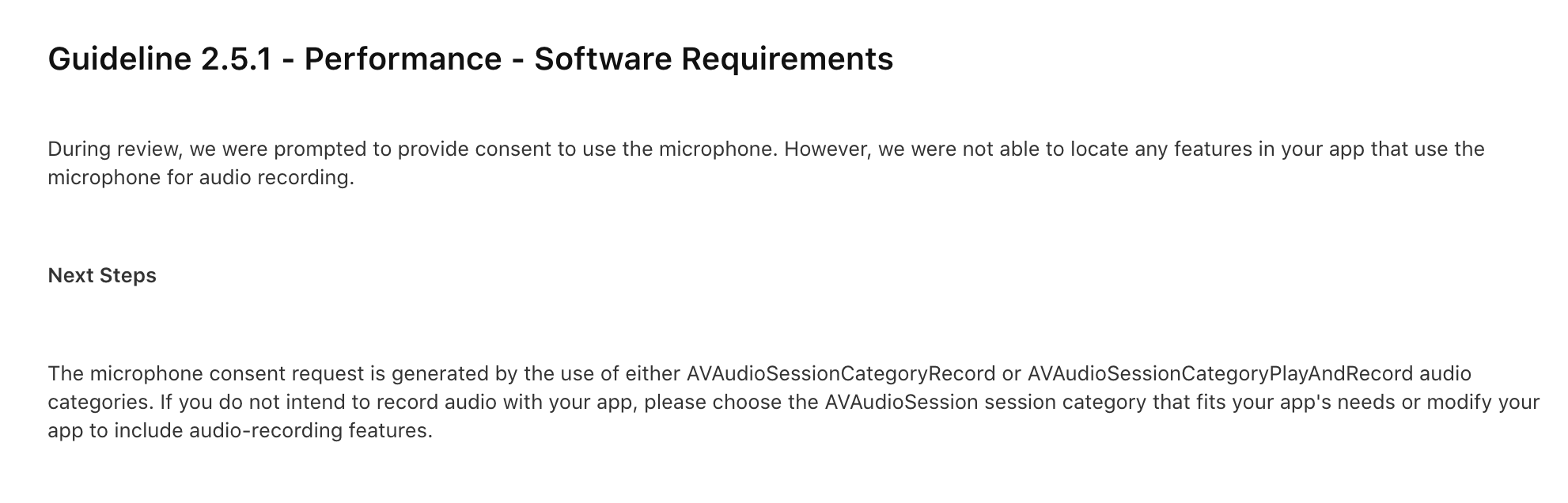
I have not found a workaround here, and the Apple App Review Team has rejected my submission due to this:
Proposal
Mimic the behavior of the enableAudio parameter from CameraController in the availableCameras() method... in other words:
Current: availableCameras()
Proposal: availableCameras({enableAudio=true})
This would not break existing implementations, as the default is set to true, but with the ability to set it to false, video could be recorded without requesting microphone permissions.
Urgency
I did not foresee this obstacle, and I have 4 days to get the application on the App Store. What previously was plenty of time to prepare the presentation, has now turned into a rush to submit the product in time... please help!
If someone has a workaround, that would be a blessing! I unfortunately do not have Swift experience (yet) to fork the plugin and solve the problem myself.

but I learned from #106557 that
enableAudiohas no effect on mic permissions, as the hardware is accessed with theavailableCameras()method.
You're referencing App Store review, but the issue you've linked to is about the web implementation of camera, not the iOS implementation. What is the exact plugin call in your application that is triggering an audio permission request? Please provide a reproducible test case.

@stuartmorgan thanks for getting back to me. As mentioned by @exaby73 on #106557 (comment)...
To me, this does not seem like a bug, but rather missing functionality.
it seems to be a platform-independent lack of plugin functionality. Regardless, here is my minimally reproducible code sample on iOS:
import 'package:camera/camera.dart';
import 'package:flutter/cupertino.dart';
import 'package:flutter_bloc/flutter_bloc.dart';

void main() => runApp(const Root());

class Root extends StatelessWidget {
  const Root({Key? key}) : super(key: key);
  @override
   Widget build(BuildContext context) => BlocBuilder<CameraCubit, CameraState>(
      bloc: CameraCubit()..initCamera(),
      builder: (context, state) => CupertinoApp(
          home: CupertinoPageScaffold(
              child: state is CameraStandby
                  ? CameraPreview(state.controller)
                  : const Center(child: CupertinoActivityIndicator()))));
}

class CameraCubit extends Cubit<CameraState> {
  CameraCubit() : super(CameraLoading());

  void initCamera() async {
    final cameras = await availableCameras();
    final cameraController = CameraController(
        cameras.firstWhere(
            (camera) => camera.lensDirection == CameraLensDirection.back),
        ResolutionPreset.high,
        enableAudio: false,
        imageFormatGroup: ImageFormatGroup.bgra8888);
    await cameraController.initialize();
    await cameraController.prepareForVideoRecording();
    emit(CameraStandby(controller: cameraController));
  }
}

abstract class CameraState {}

class CameraLoading extends CameraState {}

class CameraStandby extends CameraState {
  final CameraController controller;
  CameraStandby({required this.controller});
}
@charlieforward9 I think with iOS, this is different. When selecting a camera, the iOS plugin will request permissions, that too, microphone permissions will only be asked if enableAudio is set to true. See the code snippet from the plugin below:
https://github.com/flutter/plugins/blob/2a330bc0afd58900cbbc08471b9ea914914a3daa/packages/camera/camera_avfoundation/ios/Classes/CameraPlugin.m

@exaby73 Unfortunately, I am not proficient in Objective-C. However, I could vaguely understand that microphone permissions should only be requested if enableAudio = true. Despite this, if you test my code sample (see above), you'll see that although enableAudio = false, it still requests microphone permissions.
Therefore, I cannot tell if the code in the snippet is functioning improperly, or if I have a hard-to-find bug on my side. What do you think?
I have just verified that the permissions are requested in the CameraController(...) constructor call rather than the availableCameras() method call.
However, I have continued receiving microphone permissions requests with enableAudio = false.
Using the camera example, microphone permissions only appear to be requested with enableAudio = true. Could you provide a complete sample, preferably without any 3rd party libraries?
await cameraController.prepareForVideoRecording();...
The only method I use that the camera example does not.
Per the method docs:
Preparing audio can cause a minor delay in the CameraPreview view on iOS. If video recording is intended, calling this early eliminates this delay that would otherwise be experienced when video recording is started...
Removing this method from my code solves the microphone permissions issue. However, despite not using audio, I still experience a small delay. This significantly affects the usability of my application, which depends on the duration of the video, to the nearest millisecond.
Therefore, the intent of this issue remains the same, but the explanation and proposal have changed: prepareForVideoRecording() should not request microphone permissions if enableAudio = false in the parent CameraController.
Is editing the original (slightly misleading) proposal preferred? Or would opening a fresh issue help prioritize and clarify this issue?
I think we can close this issue as invalid. A new, fresh issue with a complete and minimal, reproducible example would be great :)
@exaby73 One final question to help me ask better questions. I see you referenced the SO link to proper examples. I would have to completely restructure my code to make it function the same without the 3rd-party package. This is the reason I chose to leave it in. Are you implying that I should have taken the time to do that?
I appreciate feedback, and thank you for helping on this issue.
Samples without 3rd party libraries able us to rule out any buggy code or side effects that that library may have. Unfortunately, people do not have the time to debug 3rd party libraries. You are welcome to use any libraries that Dart or Flutter officially support :)
The being said, your example was minimal enough, and it's a trusted library you used so I didn't ask you to remove it. But, in general, you should avoid using any libraries that the Flutter or Dart team don't control. It would be even better to use no library at all except the one in question, Flutter and the standard library that comes with Dart.
Hope this clears the confusion :)
This thread has been automatically locked since there has not been any recent activity after it was closed. If you are still experiencing a similar issue, please open a new bug, including the output of flutter doctor -v and a minimal reproduction of the issue.
![github-actions[bot] avatar](https://avatars.githubusercontent.com/in/15368?v=4 "Published by a pub.dev verified publisher")