

 flutter
Flutter Doctor warns about different paths after upgrading from beta 3.5 to beta 3.6
Edit by @christopherfujino
Please read https://github.com/flutter/flutter/issues/115651#issuecomment-1409619007 before commenting further.
Following situation (see picture below):
 Trying to follow suggestions, but this doesn't sort out.
BTW: Application seems to compile & run fine on both android & web. Have not tested iOS yet.
Full flutter doctor -v below:
PS C:\FlutterProjects\mwork> flutter doctor -v
[!] Flutter (Channel beta, 3.6.0-0.1.pre, on Microsoft Windows [Version 10.0.22621.819], locale nb-NO)
    • Flutter version 3.6.0-0.1.pre on channel beta at c:\Flutter\flutter
    ! Warning: `flutter` on your path resolves to C:\Flutter\flutter\bin\flutter, which is not inside your current Flutter SDK checkout at c:\Flutter\flutter. Consider adding c:\Flutter\flutter\bin to the front of your path.
    ! Warning: `dart` on your path resolves to C:\Flutter\flutter\bin\dart, which is not inside your current Flutter SDK checkout at c:\Flutter\flutter. Consider adding c:\Flutter\flutter\bin to the front of your path.
    • Upstream repository https://github.com/flutter/flutter.git
    • Framework revision 75927305ff (2 days ago), 2022-11-17 05:52:50 +0530
    • Engine revision b754eabc98
    • Dart version 2.19.0 (build 2.19.0-374.1.beta)
    • DevTools version 2.19.0
    • If those were intentional, you can disregard the above warnings; however it is recommended to use "git" directly to perform update checks and upgrades.

[√] Windows Version (Installed version of Windows is version 10 or higher)

[√] Android toolchain - develop for Android devices (Android SDK version 33.0.0)
    • Android SDK at C:\Users\RoarGronmo\AppData\Local\Android\sdk
    • Platform android-TiramisuPrivacySandbox, build-tools 33.0.0
    • Java binary at: C:\Program Files\Android Studio\Android Studio 2021.3.1.17\jre\bin\java
    • Java version OpenJDK Runtime Environment (build 11.0.13+0-b1751.21-8125866)
    • All Android licenses accepted.

[√] Chrome - develop for the web
    • Chrome at C:\Program Files\Google\Chrome\Application\chrome.exe

[√] Visual Studio - develop for Windows (Visual Studio Community 2019 16.11.3)
    • Visual Studio at C:\Program Files (x86)\Microsoft Visual Studio\2019\Community
    • Visual Studio Community 2019 version 16.11.31702.278
    • Windows 10 SDK version 10.0.19041.0

[√] Android Studio (version 2020.3)
    • Android Studio at C:\Program Files\Android Studio\Android Studio 2020.3.1.26
    • Flutter plugin can be installed from:
       https://plugins.jetbrains.com/plugin/9212-flutter
    • Dart plugin can be installed from:
       https://plugins.jetbrains.com/plugin/6351-dart
    • Java version OpenJDK Runtime Environment (build 11.0.10+0-b96-7249189)

[√] Android Studio (version 2021.1)
    • Android Studio at C:\Program Files\Android Studio\Android Studio 2021.1.1.23
    • Flutter plugin can be installed from:
       https://plugins.jetbrains.com/plugin/9212-flutter
    • Dart plugin can be installed from:
       https://plugins.jetbrains.com/plugin/6351-dart
    • Java version OpenJDK Runtime Environment (build 11.0.11+9-b60-7590822)

[√] Android Studio (version 2021.2)
    • Android Studio at C:\Program Files\Android Studio\Android Studio 2021.2.1.16
    • Flutter plugin can be installed from:
       https://plugins.jetbrains.com/plugin/9212-flutter
    • Dart plugin can be installed from:
       https://plugins.jetbrains.com/plugin/6351-dart
    • Java version OpenJDK Runtime Environment (build 11.0.12+7-b1504.28-7817840)

[√] Android Studio (version 2021.3)
    • Android Studio at C:\Program Files\Android Studio\Android Studio 2021.3.1.17
    • Flutter plugin can be installed from:
       https://plugins.jetbrains.com/plugin/9212-flutter
    • Dart plugin can be installed from:
       https://plugins.jetbrains.com/plugin/6351-dart
    • Java version OpenJDK Runtime Environment (build 11.0.13+0-b1751.21-8125866)

[√] Android Studio (version 2021.2)
    • Android Studio at C:\Program Files\Android Studio\Android Studio 2021.2.1.11
    • Flutter plugin can be installed from:
       https://plugins.jetbrains.com/plugin/9212-flutter
    • Dart plugin can be installed from:
       https://plugins.jetbrains.com/plugin/6351-dart
    • Java version OpenJDK Runtime Environment (build 11.0.12+7-b1504.28-7817840)

[√] Android Studio (version 2021.3)
    • Android Studio at C:\Program Files\Android Studio\Android Studio 2021.3.1.10
    • Flutter plugin can be installed from:
       https://plugins.jetbrains.com/plugin/9212-flutter
    • Dart plugin can be installed from:
       https://plugins.jetbrains.com/plugin/6351-dart
    • Java version OpenJDK Runtime Environment (build 11.0.13+0-b1751.21-8125866)

[!] Android Studio (version 2022.1)
    • Android Studio at C:\Program Files\Android Studio\Android Studio 2022.1.1.13
    • Flutter plugin can be installed from:
       https://plugins.jetbrains.com/plugin/9212-flutter
    • Dart plugin can be installed from:
       https://plugins.jetbrains.com/plugin/6351-dart
    X Unable to find bundled Java version.
    • Try updating or re-installing Android Studio.

[!] Android Studio (version 2022.2)
    • Android Studio at C:\Program Files\Android Studio\Android Studio 2022.2.1.8
    • Flutter plugin can be installed from:
       https://plugins.jetbrains.com/plugin/9212-flutter
    • Dart plugin can be installed from:
       https://plugins.jetbrains.com/plugin/6351-dart
    X Unable to find bundled Java version.
    • Try updating or re-installing Android Studio.

[√] Connected device (4 available)
    • sdk gphone64 x86 64 (mobile) • emulator-5554 • android-x64    • Android 13 (API 33) (emulator)
    • Windows (desktop)            • windows       • windows-x64    • Microsoft Windows [Version 10.0.22621.819]
    • Chrome (web)                 • chrome        • web-javascript • Google Chrome 107.0.5304.107
    • Edge (web)                   • edge          • web-javascript • Microsoft Edge 107.0.1418.42

[√] HTTP Host Availability
    • All required HTTP hosts are available

! Doctor found issues in 3 categories.
Suspects the letter capitalization of drive to be the culprit: 'C:' vs 'c:'

@RoarGronmo Thanks for filing the issue. This issue is reproducible on the latest beta and master channels.
flutter doctor -v (stable, beta, master)
[✓] Flutter (Channel stable, 3.3.8, on macOS 13.0 22A380 darwin-x64, locale en-VN)
    • Flutter version 3.3.8 on channel stable at /Users/huynq/Documents/GitHub/flutter
    • Upstream repository https://github.com/flutter/flutter.git
    • Framework revision 52b3dc25f6 (23 hours ago), 2022-11-09 12:09:26 +0800
    • Engine revision 857bd6b74c
    • Dart version 2.18.4
    • DevTools version 2.15.0

[✓] Android toolchain - develop for Android devices (Android SDK version 31.0.0)
    • Android SDK at /Users/huynq/Library/Android/sdk
    • Platform android-33, build-tools 31.0.0
    • ANDROID_HOME = /Users/huynq/Library/Android/sdk
    • Java binary at: /Applications/Android Studio.app/Contents/jre/Contents/Home/bin/java
    • Java version OpenJDK Runtime Environment (build 11.0.13+0-b1751.21-8125866)
    • All Android licenses accepted.

[✓] Xcode - develop for iOS and macOS (Xcode 14.0.1)
    • Xcode at /Applications/Xcode.app/Contents/Developer
    • Build 14A400
    • CocoaPods version 1.11.3

[✓] Chrome - develop for the web
    • Chrome at /Applications/Google Chrome.app/Contents/MacOS/Google Chrome

[✓] Android Studio (version 2021.3)
    • Android Studio at /Applications/Android Studio.app/Contents
    • Flutter plugin can be installed from:
      🔨 https://plugins.jetbrains.com/plugin/9212-flutter
    • Dart plugin can be installed from:
      🔨 https://plugins.jetbrains.com/plugin/6351-dart
    • Java version OpenJDK Runtime Environment (build 11.0.13+0-b1751.21-8125866)

[✓] IntelliJ IDEA Community Edition (version 2022.2.2)
    • IntelliJ at /Applications/IntelliJ IDEA CE.app
    • Flutter plugin version 70.0.5
    • Dart plugin version 222.4167.21

[✓] IntelliJ IDEA Community Edition (version 2022.1.1)
    • IntelliJ at /Users/huynq/Library/Application Support/JetBrains/Toolbox/apps/IDEA-C/ch-0/221.5591.52/IntelliJ IDEA CE.app
    • Flutter plugin can be installed from:
      🔨 https://plugins.jetbrains.com/plugin/9212-flutter
    • Dart plugin can be installed from:
      🔨 https://plugins.jetbrains.com/plugin/6351-dart

[✓] VS Code (version 1.73.0)
    • VS Code at /Applications/Visual Studio Code.app/Contents
    • Flutter extension version 3.52.0

[✓] Connected device (3 available)
    • iPhone 14 Pro Max (mobile) • 332079AF-E895-4685-910E-7B1E18B0C6B8 • ios            • com.apple.CoreSimulator.SimRuntime.iOS-16-0 (simulator)
    • macOS (desktop)            • macos                                • darwin-x64     • macOS 13.0 22A380 darwin-x64
    • Chrome (web)               • chrome                               • web-javascript • Google Chrome 107.0.5304.110

[✓] HTTP Host Availability
    • All required HTTP hosts are available

• No issues found!
[!] Flutter (Channel master, 3.6.0-6.0.pre.29, on macOS 13.0 22A380 darwin-x64, locale en-VN)
    • Flutter version 3.6.0-6.0.pre.29 on channel master at /Users/huynq/Documents/GitHub/flutter_master
    ! Warning: `flutter` on your path resolves to /Users/huynq/Documents/GitHub/flutter/bin/flutter, which is not inside your current Flutter SDK checkout at /Users/huynq/Documents/GitHub/flutter_master. Consider adding /Users/huynq/Documents/GitHub/flutter_master/bin to the front of your path.
    ! Warning: `dart` on your path resolves to /Users/huynq/Documents/GitHub/flutter/bin/dart, which is not inside your current Flutter SDK checkout at /Users/huynq/Documents/GitHub/flutter_master. Consider adding /Users/huynq/Documents/GitHub/flutter_master/bin to the front of your path.
    • Upstream repository https://github.com/flutter/flutter.git
    • Framework revision ee9bc784b5 (2 hours ago), 2022-11-20 19:32:24 -0500
    • Engine revision 271461837e
    • Dart version 2.19.0 (build 2.19.0-406.0.dev)
    • DevTools version 2.19.0
    • If those were intentional, you can disregard the above warnings; however it is recommended to use "git" directly to perform update checks and upgrades.

[✓] Android toolchain - develop for Android devices (Android SDK version 31.0.0)
    • Android SDK at /Users/huynq/Library/Android/sdk
    • Platform android-33, build-tools 31.0.0
    • ANDROID_HOME = /Users/huynq/Library/Android/sdk
    • Java binary at: /Applications/Android Studio.app/Contents/jre/Contents/Home/bin/java
    • Java version OpenJDK Runtime Environment (build 11.0.13+0-b1751.21-8125866)
    • All Android licenses accepted.

[✓] Xcode - develop for iOS and macOS (Xcode 14.0.1)
    • Xcode at /Applications/Xcode.app/Contents/Developer
    • Build 14A400
    • CocoaPods version 1.11.3

[✓] Chrome - develop for the web
    • Chrome at /Applications/Google Chrome.app/Contents/MacOS/Google Chrome

[✓] Android Studio (version 2021.3)
    • Android Studio at /Applications/Android Studio.app/Contents
    • Flutter plugin can be installed from:
      🔨 https://plugins.jetbrains.com/plugin/9212-flutter
    • Dart plugin can be installed from:
      🔨 https://plugins.jetbrains.com/plugin/6351-dart
    • Java version OpenJDK Runtime Environment (build 11.0.13+0-b1751.21-8125866)

[✓] IntelliJ IDEA Community Edition (version 2022.2.2)
    • IntelliJ at /Applications/IntelliJ IDEA CE.app
    • Flutter plugin version 70.0.5
    • Dart plugin version 222.4167.21

[✓] IntelliJ IDEA Community Edition (version 2022.1.1)
    • IntelliJ at /Users/huynq/Library/Application Support/JetBrains/Toolbox/apps/IDEA-C/ch-0/221.5591.52/IntelliJ IDEA CE.app
    • Flutter plugin can be installed from:
      🔨 https://plugins.jetbrains.com/plugin/9212-flutter
    • Dart plugin can be installed from:
      🔨 https://plugins.jetbrains.com/plugin/6351-dart

[✓] VS Code (version 1.73.1)
    • VS Code at /Applications/Visual Studio Code.app/Contents
    • Flutter extension version 3.52.0

[✓] Connected device (3 available)
    • SM T225 (mobile) • R9JT3004VRJ • android-arm64  • Android 12 (API 31)
    • macOS (desktop)  • macos       • darwin-x64     • macOS 13.0 22A380 darwin-x64
    • Chrome (web)     • chrome      • web-javascript • Google Chrome 107.0.5304.110

[✓] HTTP Host Availability
    • All required HTTP hosts are available

! Doctor found issues in 1 category.
[!] Flutter (Channel beta, 3.6.0-0.1.pre, on macOS 13.0 22A380 darwin-x64, locale en-VN)
    • Flutter version 3.6.0-0.1.pre on channel beta at
      /Users/huynq/Documents/GitHub/flutter_beta
    ! Warning: `flutter` on your path resolves to
      /Users/huynq/Documents/GitHub/flutter/bin/flutter, which is not inside your current
      Flutter SDK checkout at /Users/huynq/Documents/GitHub/flutter_beta. Consider adding
      /Users/huynq/Documents/GitHub/flutter_beta/bin to the front of your path.
    ! Warning: `dart` on your path resolves to /Users/huynq/Documents/GitHub/flutter/bin/dart,
      which is not inside your current Flutter SDK checkout at
      /Users/huynq/Documents/GitHub/flutter_beta. Consider adding
      /Users/huynq/Documents/GitHub/flutter_beta/bin to the front of your path.
    • Upstream repository https://github.com/flutter/flutter.git
    • Framework revision 75927305ff (4 days ago), 2022-11-17 05:52:50 +0530
    • Engine revision b754eabc98
    • Dart version 2.19.0 (build 2.19.0-374.1.beta)
    • DevTools version 2.19.0
    • If those were intentional, you can disregard the above warnings; however it is
      recommended to use "git" directly to perform update checks and upgrades.

[✓] Android toolchain - develop for Android devices (Android SDK version 31.0.0)
    • Android SDK at /Users/huynq/Library/Android/sdk
    • Platform android-33, build-tools 31.0.0
    • ANDROID_HOME = /Users/huynq/Library/Android/sdk
    • Java binary at: /Applications/Android Studio.app/Contents/jre/Contents/Home/bin/java
    • Java version OpenJDK Runtime Environment (build 11.0.13+0-b1751.21-8125866)
    • All Android licenses accepted.

[✓] Xcode - develop for iOS and macOS (Xcode 14.0.1)
    • Xcode at /Applications/Xcode.app/Contents/Developer
    • Build 14A400
    • CocoaPods version 1.11.3

[✓] Chrome - develop for the web
    • Chrome at /Applications/Google Chrome.app/Contents/MacOS/Google Chrome

[✓] Android Studio (version 2021.3)
    • Android Studio at /Applications/Android Studio.app/Contents
    • Flutter plugin can be installed from:
      🔨 https://plugins.jetbrains.com/plugin/9212-flutter
    • Dart plugin can be installed from:
      🔨 https://plugins.jetbrains.com/plugin/6351-dart
    • Java version OpenJDK Runtime Environment (build 11.0.13+0-b1751.21-8125866)

[✓] IntelliJ IDEA Community Edition (version 2022.2.2)
    • IntelliJ at /Applications/IntelliJ IDEA CE.app
    • Flutter plugin version 70.0.5
    • Dart plugin version 222.4167.21

[✓] IntelliJ IDEA Community Edition (version 2022.1.1)
    • IntelliJ at /Users/huynq/Library/Application
      Support/JetBrains/Toolbox/apps/IDEA-C/ch-0/221.5591.52/IntelliJ IDEA CE.app
    • Flutter plugin can be installed from:
      🔨 https://plugins.jetbrains.com/plugin/9212-flutter
    • Dart plugin can be installed from:
      🔨 https://plugins.jetbrains.com/plugin/6351-dart

[✓] VS Code (version 1.73.1)
    • VS Code at /Applications/Visual Studio Code.app/Contents
    • Flutter extension version 3.52.0

[✓] Connected device (5 available)
    • SM T225 (mobile)           • R9JT3004VRJ                              • android-arm64  • Android 12
      (API 31)
    • iPhone (mobile)            • d9a94afe2b649fef56ba0bfeb052f0f2a7dae95e • ios            • iOS 15.7
      19H12
    • iPhone 14 Pro Max (mobile) • 332079AF-E895-4685-910E-7B1E18B0C6B8     • ios            •
      com.apple.CoreSimulator.SimRuntime.iOS-16-0 (simulator)
    • macOS (desktop)            • macos                                    • darwin-x64     • macOS 13.0
      22A380 darwin-x64
    • Chrome (web)               • chrome                                   • web-javascript • Google
      Chrome 107.0.5304.110
    ! Error: iPhone is busy: Fetching debug symbols for iPhone. Xcode will continue when iPhone is
      finished. (code -10)

[✓] HTTP Host Availability
    • All required HTTP hosts are available

! Doctor found issues in 1 category.

@RoarGronmo thanks for filing this, I introduced this bug.
BTW, you can safely ignore these warning, the bug here is that I am case sensitively comparing the strings, which I shouldn't do on Windows.

@RoarGronmo Thanks for filing the issue. This issue is reproducible on the latest
betaandmasterchannels.flutter doctor -v (stable, beta, master)
[✓] Flutter (Channel stable, 3.3.8, on macOS 13.0 22A380 darwin-x64, locale en-VN)
    • Flutter version 3.3.8 on channel stable at /Users/huynq/Documents/GitHub/flutter
    • Upstream repository https://github.com/flutter/flutter.git
    • Framework revision 52b3dc25f6 (23 hours ago), 2022-11-09 12:09:26 +0800
    • Engine revision 857bd6b74c
    • Dart version 2.18.4
    • DevTools version 2.15.0

[✓] Android toolchain - develop for Android devices (Android SDK version 31.0.0)
    • Android SDK at /Users/huynq/Library/Android/sdk
    • Platform android-33, build-tools 31.0.0
    • ANDROID_HOME = /Users/huynq/Library/Android/sdk
    • Java binary at: /Applications/Android Studio.app/Contents/jre/Contents/Home/bin/java
    • Java version OpenJDK Runtime Environment (build 11.0.13+0-b1751.21-8125866)
    • All Android licenses accepted.

[✓] Xcode - develop for iOS and macOS (Xcode 14.0.1)
    • Xcode at /Applications/Xcode.app/Contents/Developer
    • Build 14A400
    • CocoaPods version 1.11.3

[✓] Chrome - develop for the web
    • Chrome at /Applications/Google Chrome.app/Contents/MacOS/Google Chrome

[✓] Android Studio (version 2021.3)
    • Android Studio at /Applications/Android Studio.app/Contents
    • Flutter plugin can be installed from:
      🔨 https://plugins.jetbrains.com/plugin/9212-flutter
    • Dart plugin can be installed from:
      🔨 https://plugins.jetbrains.com/plugin/6351-dart
    • Java version OpenJDK Runtime Environment (build 11.0.13+0-b1751.21-8125866)

[✓] IntelliJ IDEA Community Edition (version 2022.2.2)
    • IntelliJ at /Applications/IntelliJ IDEA CE.app
    • Flutter plugin version 70.0.5
    • Dart plugin version 222.4167.21

[✓] IntelliJ IDEA Community Edition (version 2022.1.1)
    • IntelliJ at /Users/huynq/Library/Application Support/JetBrains/Toolbox/apps/IDEA-C/ch-0/221.5591.52/IntelliJ IDEA CE.app
    • Flutter plugin can be installed from:
      🔨 https://plugins.jetbrains.com/plugin/9212-flutter
    • Dart plugin can be installed from:
      🔨 https://plugins.jetbrains.com/plugin/6351-dart

[✓] VS Code (version 1.73.0)
    • VS Code at /Applications/Visual Studio Code.app/Contents
    • Flutter extension version 3.52.0

[✓] Connected device (3 available)
    • iPhone 14 Pro Max (mobile) • 332079AF-E895-4685-910E-7B1E18B0C6B8 • ios            • com.apple.CoreSimulator.SimRuntime.iOS-16-0 (simulator)
    • macOS (desktop)            • macos                                • darwin-x64     • macOS 13.0 22A380 darwin-x64
    • Chrome (web)               • chrome                               • web-javascript • Google Chrome 107.0.5304.110

[✓] HTTP Host Availability
    • All required HTTP hosts are available

• No issues found!
[!] Flutter (Channel master, 3.6.0-6.0.pre.29, on macOS 13.0 22A380 darwin-x64, locale en-VN) • Flutter version 3.6.0-6.0.pre.29 on channel master at /Users/huynq/Documents/GitHub/flutter_master ! Warning: `flutter` on your path resolves to /Users/huynq/Documents/GitHub/flutter/bin/flutter, which is not inside your current Flutter SDK checkout at /Users/huynq/Documents/GitHub/flutter_master. Consider adding /Users/huynq/Documents/GitHub/flutter_master/bin to the front of your path. ! Warning: `dart` on your path resolves to /Users/huynq/Documents/GitHub/flutter/bin/dart, which is not inside your current Flutter SDK checkout at /Users/huynq/Documents/GitHub/flutter_master. Consider adding /Users/huynq/Documents/GitHub/flutter_master/bin to the front of your path. • Upstream repository https://github.com/flutter/flutter.git • Framework revision ee9bc784b5 (2 hours ago), 2022-11-20 19:32:24 -0500 • Engine revision 271461837e • Dart version 2.19.0 (build 2.19.0-406.0.dev) • DevTools version 2.19.0 • If those were intentional, you can disregard the above warnings; however it is recommended to use "git" directly to perform update checks and upgrades. [✓] Android toolchain - develop for Android devices (Android SDK version 31.0.0) • Android SDK at /Users/huynq/Library/Android/sdk • Platform android-33, build-tools 31.0.0 • ANDROID_HOME = /Users/huynq/Library/Android/sdk • Java binary at: /Applications/Android Studio.app/Contents/jre/Contents/Home/bin/java • Java version OpenJDK Runtime Environment (build 11.0.13+0-b1751.21-8125866) • All Android licenses accepted. [✓] Xcode - develop for iOS and macOS (Xcode 14.0.1) • Xcode at /Applications/Xcode.app/Contents/Developer • Build 14A400 • CocoaPods version 1.11.3 [✓] Chrome - develop for the web • Chrome at /Applications/Google Chrome.app/Contents/MacOS/Google Chrome [✓] Android Studio (version 2021.3) • Android Studio at /Applications/Android Studio.app/Contents • Flutter plugin can be installed from: 🔨 https://plugins.jetbrains.com/plugin/9212-flutter • Dart plugin can be installed from: 🔨 https://plugins.jetbrains.com/plugin/6351-dart • Java version OpenJDK Runtime Environment (build 11.0.13+0-b1751.21-8125866) [✓] IntelliJ IDEA Community Edition (version 2022.2.2) • IntelliJ at /Applications/IntelliJ IDEA CE.app • Flutter plugin version 70.0.5 • Dart plugin version 222.4167.21 [✓] IntelliJ IDEA Community Edition (version 2022.1.1) • IntelliJ at /Users/huynq/Library/Application Support/JetBrains/Toolbox/apps/IDEA-C/ch-0/221.5591.52/IntelliJ IDEA CE.app • Flutter plugin can be installed from: 🔨 https://plugins.jetbrains.com/plugin/9212-flutter • Dart plugin can be installed from: 🔨 https://plugins.jetbrains.com/plugin/6351-dart [✓] VS Code (version 1.73.1) • VS Code at /Applications/Visual Studio Code.app/Contents • Flutter extension version 3.52.0 [✓] Connected device (3 available) • SM T225 (mobile) • R9JT3004VRJ • android-arm64 • Android 12 (API 31) • macOS (desktop) • macos • darwin-x64 • macOS 13.0 22A380 darwin-x64 • Chrome (web) • chrome • web-javascript • Google Chrome 107.0.5304.110 [✓] HTTP Host Availability • All required HTTP hosts are available ! Doctor found issues in 1 category.[!] Flutter (Channel beta, 3.6.0-0.1.pre, on macOS 13.0 22A380 darwin-x64, locale en-VN) • Flutter version 3.6.0-0.1.pre on channel beta at /Users/huynq/Documents/GitHub/flutter_beta ! Warning: `flutter` on your path resolves to /Users/huynq/Documents/GitHub/flutter/bin/flutter, which is not inside your current Flutter SDK checkout at /Users/huynq/Documents/GitHub/flutter_beta. Consider adding /Users/huynq/Documents/GitHub/flutter_beta/bin to the front of your path. ! Warning: `dart` on your path resolves to /Users/huynq/Documents/GitHub/flutter/bin/dart, which is not inside your current Flutter SDK checkout at /Users/huynq/Documents/GitHub/flutter_beta. Consider adding /Users/huynq/Documents/GitHub/flutter_beta/bin to the front of your path. • Upstream repository https://github.com/flutter/flutter.git • Framework revision 75927305ff (4 days ago), 2022-11-17 05:52:50 +0530 • Engine revision b754eabc98 • Dart version 2.19.0 (build 2.19.0-374.1.beta) • DevTools version 2.19.0 • If those were intentional, you can disregard the above warnings; however it is recommended to use "git" directly to perform update checks and upgrades. [✓] Android toolchain - develop for Android devices (Android SDK version 31.0.0) • Android SDK at /Users/huynq/Library/Android/sdk • Platform android-33, build-tools 31.0.0 • ANDROID_HOME = /Users/huynq/Library/Android/sdk • Java binary at: /Applications/Android Studio.app/Contents/jre/Contents/Home/bin/java • Java version OpenJDK Runtime Environment (build 11.0.13+0-b1751.21-8125866) • All Android licenses accepted. [✓] Xcode - develop for iOS and macOS (Xcode 14.0.1) • Xcode at /Applications/Xcode.app/Contents/Developer • Build 14A400 • CocoaPods version 1.11.3 [✓] Chrome - develop for the web • Chrome at /Applications/Google Chrome.app/Contents/MacOS/Google Chrome [✓] Android Studio (version 2021.3) • Android Studio at /Applications/Android Studio.app/Contents • Flutter plugin can be installed from: 🔨 https://plugins.jetbrains.com/plugin/9212-flutter • Dart plugin can be installed from: 🔨 https://plugins.jetbrains.com/plugin/6351-dart • Java version OpenJDK Runtime Environment (build 11.0.13+0-b1751.21-8125866) [✓] IntelliJ IDEA Community Edition (version 2022.2.2) • IntelliJ at /Applications/IntelliJ IDEA CE.app • Flutter plugin version 70.0.5 • Dart plugin version 222.4167.21 [✓] IntelliJ IDEA Community Edition (version 2022.1.1) • IntelliJ at /Users/huynq/Library/Application Support/JetBrains/Toolbox/apps/IDEA-C/ch-0/221.5591.52/IntelliJ IDEA CE.app • Flutter plugin can be installed from: 🔨 https://plugins.jetbrains.com/plugin/9212-flutter • Dart plugin can be installed from: 🔨 https://plugins.jetbrains.com/plugin/6351-dart [✓] VS Code (version 1.73.1) • VS Code at /Applications/Visual Studio Code.app/Contents • Flutter extension version 3.52.0 [✓] Connected device (5 available) • SM T225 (mobile) • R9JT3004VRJ • android-arm64 • Android 12 (API 31) • iPhone (mobile) • d9a94afe2b649fef56ba0bfeb052f0f2a7dae95e • ios • iOS 15.7 19H12 • iPhone 14 Pro Max (mobile) • 332079AF-E895-4685-910E-7B1E18B0C6B8 • ios • com.apple.CoreSimulator.SimRuntime.iOS-16-0 (simulator) • macOS (desktop) • macos • darwin-x64 • macOS 13.0 22A380 darwin-x64 • Chrome (web) • chrome • web-javascript • Google Chrome 107.0.5304.110 ! Error: iPhone is busy: Fetching debug symbols for iPhone. Xcode will continue when iPhone is finished. (code -10) [✓] HTTP Host Availability • All required HTTP hosts are available ! Doctor found issues in 1 category.
Btw, this is not a reproduction--this is the validator correctly informing you that the Flutter binary that you are invoking is coming from a different version of the repo than the one on your path. This bug is tracking the case where the correct binary is on your path, but the validator thinks they're different paths because the case is different. Windows' file system is case insensitive, whereas on macOS and linux they are case sensitive.
@christopherfujino @huycozy
Today, I switched to the latest Flutter master channel from the latest stable channel. After upgrading, I got the warning on my MacBook 16" 2021 M1 Pro, that the 'dart' path resolves to a path, that is not inside my current Flutter SDK Path. I installed Flutter through homebrew. I added the export path below to my .zshrc file, reloaded the terminal and run flutter doctor -v but it didn't fix the issue. I also checked Android Studio for the Dart and Flutter SDK Path, both have the same path as i have posted below. After a search, I only found this post.
My warning I get
flutter doctor -v
[!] Flutter (Channel master, 3.7.0-14.0.pre.46, on macOS 13.1 22C65
    darwin-arm64, locale de-DE)
    • Flutter version 3.7.0-14.0.pre.46 on channel master at
      /opt/homebrew/Caskroom/flutter/3.0.1/flutter
    ! Warning: `dart` on your path resolves to
      /opt/homebrew/Cellar/dart/2.18.6/libexec/bin/dart, which is not inside
      your current Flutter SDK checkout at
      /opt/homebrew/Caskroom/flutter/3.0.1/flutter. Consider adding
      /opt/homebrew/Caskroom/flutter/3.0.1/flutter/bin to the front of your
      path.
    • Upstream repository https://github.com/flutter/flutter.git
    • Framework revision 36a1caf299 (vor 2 Stunden), 2023-01-05 13:25:43 -0500
    • Engine revision 74861f369a
    • Dart version 3.0.0 (build 3.0.0-85.0.dev)
    • DevTools version 2.20.0
    • If those were intentional, you can disregard the above warnings; however
      it is recommended to use "git" directly to perform update checks and
      upgrades.
added to .zshrc, but didn't fixed
export PATH=$PATH:$HOME/opt/homebrew/Caskroom/flutter/3.0.1/flutter/bin
Dart SDK Path in Android Studio
/opt/homebrew/Caskroom/flutter/3.0.1/flutter/bin/cache/dart-sdk

This issue is back when you update to the current version :D @christopherfujino

This issue is back when you update to the current version :D @christopherfujino
Which version is the "current version"?
This issue is back when you update to the current version :D @christopherfujino
Which version is the "current version"?
The version released today, I think it was 3.7
[!] Flutter (Channel stable, 3.7.0, on macOS 13.0 22A380 darwin-x64, locale en-DE)
! Warning: flutter on your path resolves to /Users/user1/Development/flutter/bin/flutter, which is not inside
your current Flutter SDK checkout at /Users/user1/Development/flutter. Consider adding
/Users/user1/Development/flutter/bin to the front of your path.
! Warning: dart on your path resolves to /Users/user1/Development/flutter/bin/dart, which is not inside your
current Flutter SDK checkout at /Users/user1/Development/flutter. Consider adding
/Users/user1/Development/flutter/bin to the front of your path.
[✓] Android toolchain - develop for Android devices (Android SDK version 31.0.0-rc3)
[✓] Xcode - develop for iOS and macOS (Xcode 14.1)
[✓] Chrome - develop for the web
[✓] Android Studio (version 2021.3)
[✓] VS Code (version 1.74.3)
[✓] Connected device (2 available)
[✓] HTTP Host Availability
This issue is back when you update to the current version :D @christopherfujino
Which version is the "current version"?
The version released today, I think it was 3.7
[!] Flutter (Channel stable, 3.7.0, on macOS 13.0 22A380 darwin-x64, locale en-DE) ! Warning:
flutteron your path resolves to /Users/user1/Development/flutter/bin/flutter, which is not inside your current Flutter SDK checkout at /Users/user1/Development/flutter. Consider adding /Users/user1/Development/flutter/bin to the front of your path. ! Warning:darton your path resolves to /Users/user1/Development/flutter/bin/dart, which is not inside your current Flutter SDK checkout at /Users/user1/Development/flutter. Consider adding /Users/user1/Development/flutter/bin to the front of your path. [✓] Android toolchain - develop for Android devices (Android SDK version 31.0.0-rc3) [✓] Xcode - develop for iOS and macOS (Xcode 14.1) [✓] Chrome - develop for the web [✓] Android Studio (version 2021.3) [✓] VS Code (version 1.74.3) [✓] Connected device (2 available) [✓] HTTP Host Availability
Ahh, thanks for this, re-opening
Same here
Flutter 3.7.0 • channel stable • https://github.com/flutter/flutter.git Framework • revision b06b8b2710 (23 hours ago) • 2023-01-23 16:55:55 -0800 Engine • revision b24591ed32 Tools • Dart 2.19.0 • DevTools 2.20.1
Running flutter doctor...
Doctor summary (to see all details, run flutter doctor -v):
[!] Flutter (Channel stable, 3.7.0, on macOS 13.1 22C65 darwin-arm64, locale pt-BR)
! Warning: dart on your path resolves to /opt/homebrew/Cellar/dart/2.18.4/libexec/bin/dart, which is not inside your current Flutter SDK checkout at /Users/user1/development/flutter. Consider adding /Users/user1/development/flutter/bin to the front of your path.
[✓] Android toolchain - develop for Android devices (Android SDK version 30.0.3)
[✓] Xcode - develop for iOS and macOS (Xcode 14.2)
[✓] Chrome - develop for the web
[✓] Android Studio (version 2021.3)
[✓] VS Code (version 1.74.3)
[✓] Connected device (3 available)
[✓] HTTP Host Availability
! Doctor found issues in 1 category.

! Warning:
darton your path resolves to /opt/homebrew/Cellar/dart/2.18.4/libexec/bin/dart, which is not inside your current Flutter SDK checkout at /Users/user1/development/flutter. Consider adding /Users/user1/development/flutter/bin to the front of your path.
@matiasdilettasolutions That is not the same, if you check the paths here the doctor warning is correct.
That is not the same, if you check the paths here the doctor warning is correct. @christopherfujino how can i fix this warning?
Per the doctor message:
Consider adding /Users/user1/development/flutter/bin to the front of your path.
Per the doctor message:
@christopherfujino thank you! It's working now.
EDIT Solution:
Type in nano ~/.zshrc:
export PATH="/Users/development/flutter/bin:$PATH"
Also facing the same error message since upgrade to 3.7
Doctor summary (to see all details, run flutter doctor -v):
[!] Flutter (Channel stable, 3.7.0, on macOS 13.1 22C65 darwin-arm64, locale en-US)
    ! Warning: `dart` on your path resolves to /opt/homebrew/Cellar/dart/2.19.0/libexec/bin/dart, which is not inside your current
      Flutter SDK checkout at /Users/development/flutter. Consider adding /Users/development/flutter/bin to the front of your
      path.
[✓] Android toolchain - develop for Android devices (Android SDK version 33.0.0-rc1)
[✓] Xcode - develop for iOS and macOS (Xcode 14.2)
[✓] Chrome - develop for the web
[✓] Android Studio (version 2021.1)
[✓] VS Code (version 1.74.2)
[✓] Connected device (2 available)
[✓] HTTP Host Availability
I already have in nano ~/.zshrc at the very top of the file:
export PATH="$PATH:/Users/development/flutter/bin"
~~What do they mean by the front of your path ?~~


EDIT Solution:
Type in
nano ~/.zshrc:export PATH="/Users/development/flutter/bin:$PATH"Also facing the same error message since upgrade to 3.7
Doctor summary (to see all details, run flutter doctor -v):
[!] Flutter (Channel stable, 3.7.0, on macOS 13.1 22C65 darwin-arm64, locale en-US)
    ! Warning: `dart` on your path resolves to /opt/homebrew/Cellar/dart/2.19.0/libexec/bin/dart, which is not inside your current
      Flutter SDK checkout at /Users/development/flutter. Consider adding /Users/development/flutter/bin to the front of your
      path.
[✓] Android toolchain - develop for Android devices (Android SDK version 33.0.0-rc1)
[✓] Xcode - develop for iOS and macOS (Xcode 14.2)
[✓] Chrome - develop for the web
[✓] Android Studio (version 2021.1)
[✓] VS Code (version 1.74.2)
[✓] Connected device (2 available)
[✓] HTTP Host Availability
I already have in
nano ~/.zshrcat the very top of the file:export PATH="$PATH:/Users/development/flutter/bin"~What do they mean by the front of your path ?~
I added export PATH="/Users/akshay/development/flutter/bin:$PATH" in .zprofile and sourced it but still its show the same message
Doctor summary (to see all details, run flutter doctor -v):
[!] Flutter (Channel stable, 3.7.0, on macOS 13.0.1 22A400 darwin-arm64, locale en-IN)
    ! Warning: `flutter` on your path resolves to /Users/akshay/Development/flutter/bin/flutter, which is not inside your current Flutter SDK checkout at /Users/akshay/development/flutter. Consider adding
      /Users/akshay/development/flutter/bin to the front of your path.
    ! Warning: `dart` on your path resolves to /Users/akshay/Development/flutter/bin/dart, which is not inside your current Flutter SDK checkout at /Users/akshay/development/flutter. Consider adding
      /Users/akshay/development/flutter/bin to the front of your path.
[✓] Android toolchain - develop for Android devices (Android SDK version 33.0.0-rc1)
[✓] Xcode - develop for iOS and macOS (Xcode 14.1)
[✓] Chrome - develop for the web
[✓] Android Studio (version 2021.1)
[✓] VS Code (version 1.74.3)
[✓] Connected device (2 available)
[✓] HTTP Host Availability```

I already have in
nano ~/.zshrcat the very top of the file:export PATH="$PATH:/Users/development/flutter/bin"
Note that on macOS, Development and development are different paths, so I believe the doctor is correct and your path is incorrect.
[!] Flutter (Channel stable, 3.7.0, on macOS 13.1 22C65 darwin-arm64, locale
en-EG)
! Warning: dart on your path resolves to
/usr/local/Cellar/dart/2.16.1/libexec/bin/dart, which is not inside your
current Flutter SDK checkout at /Users/elm3lam/Documents/flutter. Consider
adding /Users/elm3lam/Documents/flutter/bin to the front of your path.
Please Any help ??

[!] Flutter (Channel stable, 3.7.0, on macOS 13.1 22C65 darwin-arm64, locale en-EG) ! Warning:
darton your path resolves to /usr/local/Cellar/dart/2.16.1/libexec/bin/dart, which is not inside your current Flutter SDK checkout at /Users/elm3lam/Documents/flutter. Consider adding /Users/elm3lam/Documents/flutter/bin to the front of your path.Please Any help ??
i have this problem recently, since the dart sdk is on the flutter sdk, i remove the dart sdk from my env path and add flutter sdk to the path

I faced this same problem but have not resoled yet.
https://github.com/flutter/flutter/issues/115651#issuecomment-1403020015
[!] Flutter (Channel stable, 3.7.0, on macOS 13.1 22C65 darwin-arm64, locale en-US)
    ! Warning: `dart` on your path resolves to /opt/homebrew/Cellar/dart/2.18.0/libexec/bin/dart, which is not inside your current
      Flutter SDK checkout at /Users/development/flutter. Consider adding /Users/development/flutter/bin to the front of your
      path.
[✓] Android toolchain - develop for Android devices (Android SDK version 33.0.0-rc1)
[✓] Xcode - develop for iOS and macOS (Xcode 14.2)
[✓] Chrome - develop for the web
[✓] Android Studio (version 2021.1)
[✓] VS Code (version 1.74.2)
[✓] Connected device (2 available)
[✓] HTTP Host Availability
Though my comments may be not useful, I write comments as logs.
First, when I checked which dart in home directory, then /opt/homebrew/bin/dart returned.
By this result, I execute a command, brew upgrade dart.
Then, Warning: dart-lang/dart/dart 2.18.0 already installed returns.
Therefore I consider having a outside problem from flutter, for example brew. 😓

I faced this same problem but have not resoled yet.
[!] Flutter (Channel stable, 3.7.0, on macOS 13.1 22C65 darwin-arm64, locale en-US)
    ! Warning: `dart` on your path resolves to /opt/homebrew/Cellar/dart/2.18.0/libexec/bin/dart, which is not inside your current
      Flutter SDK checkout at /Users/development/flutter. Consider adding /Users/development/flutter/bin to the front of your
      path.
[✓] Android toolchain - develop for Android devices (Android SDK version 33.0.0-rc1)
[✓] Xcode - develop for iOS and macOS (Xcode 14.2)
[✓] Chrome - develop for the web
[✓] Android Studio (version 2021.1)
[✓] VS Code (version 1.74.2)
[✓] Connected device (2 available)
[✓] HTTP Host Availability
Though my comments may be not useful, I write comments as logs.
First, when I checked
which dartin home directory, then/opt/homebrew/bin/dartreturned. By this result, I execute a command,brew upgrade dart.Then,
Warning: dart-lang/dart/dart 2.18.0 already installedreturns.Therefore I consider having a outside problem from flutter, for example
brew. 😓
Check the paths. At first I had two paths, one with uppercase username and one with lowercase. I fixed the "Java bundle not found error" and then only the lowercase was listed. Then it showed "development" and "Development" but only with the lowercase username what is correct
After I fixed the part of the path to "Development" it worked.
@Sesa1988
Thank you for quoting my comment !!
Check the paths. At first I had two paths, one with uppercase username and one with lowercase. I fixed the "Java bundle not found error" and then only the lowercase was listed. Then it showed "development" and "Development" but only with the lowercase username what is correct
In my .zshrc file, it includes
...
export PATH="$PATH:/Users/ryotaiwamoto/development/flutter/bin"
...
And my warning is
(base) ryotaiwamoto@iwamotonoMacBook-Air ~ % flutter doctor
Doctor summary (to see all details, run flutter doctor -v):
[!] Flutter (Channel stable, 3.7.0, on macOS 13.0.1 22A400 darwin-arm64, locale ja-JP)
    ! Warning: `dart` on your path resolves to /opt/homebrew/Cellar/dart/2.18.0/libexec/bin/dart, which is
      not inside your current Flutter SDK checkout at /Users/ryotaiwamoto/development/flutter. Consider
      adding /Users/ryotaiwamoto/development/flutter/bin to the front of your path.
[✓] Android toolchain - develop for Android devices (Android SDK version 32.1.0-rc1)
[✓] Xcode - develop for iOS and macOS (Xcode 14.2)
[✓] Chrome - develop for the web
[✓] Android Studio (version 2021.2)
[✓] VS Code (version 1.67.2)
[✓] Connected device (4 available)
[✓] HTTP Host Availability
After I fixed the part of the path to "Development" it worked.
After I fixed the part of the path from "development" to "Development" it doesn't work.
@Sesa1988
Thank you for quoting my comment !!
After I fixed the part of the path from "development" to "Development" it doesn't work.
I think my $PATH was at the end like this and it worked:
export PATH="/Users/ryotaiwamoto/development/flutter/bin:$PATH"
I think my $PATH was at the end like this and it worked:
export PATH="/Users/ryotaiwamoto/development/flutter/bin:$PATH"
It works correctly!!
Thanks @Sesa1988!
In my case, I'm using fvm and previously I had added this in the .zshrc file.
export PATH=$PATH:"/Users/isuru/fvm/default/bin"
Since the upgrade to 3.7.0, I've been getting a similar error.
[!] Flutter (Channel stable, 3.7.0, on macOS 13.1 22C65 darwin-arm64, locale en-US) ! Warning:
darton your path resolves to /opt/homebrew/Cellar/dart/2.18.2/libexec/bin/dart, which is not inside your current Flutter SDK checkout at /Users/isuru/fvm/versions/3.7.0. Consider adding /Users/isuru/fvm/versions/3.7.0/bin to the front of your path.
But neither adding export PATH="/Users/isuru/fvm/default/bin:$PATH" or export PATH="/Users/isuru/fvm/versions/3.7.0/bin:$PATH" worked for me. Still getting the error message.

@Sesa1988 Still we are getting warning message. How come it working from your end?
[!] Flutter (Channel stable, 3.7.0, on macOS 13.2 22D49 darwin-x64, locale en-SG)
! Warning: dart on your path resolves to /usr/local/Cellar/dart/2.16.1/libexec/bin/dart, which is not inside your
current Flutter SDK checkout at /Users/Hello/Documents/Flutter_Development/flutter. Consider adding
/Users/Hello/Documents/Flutter_Development/flutter/bin to the front of your path.

for me [on windows] following steps fixed it:
- deleting my old dart folder outside the flutter folder
- changing the environment variables to the new path ..\flutter\bin\cache\dart-sdk\bin
- restart applications and run flutter doctor I testes some case sensititivy via D:/Flutter/flutter in my case and it worked aswell.

SOLVED!
I had a similar issue with the Dart SDK path:
[!] Flutter (Channel stable, 3.7.0, on Microsoft Windows [Version 10.0.19045.2546], locale en-US) ! Warning: dart on your path resolves to C:\tools\dart-sdk\bin\dart.exe, which is not inside your current Flutter SDK checkout at C:\src\flutter. Consider adding C:\src\flutter\bin to the front of your path.
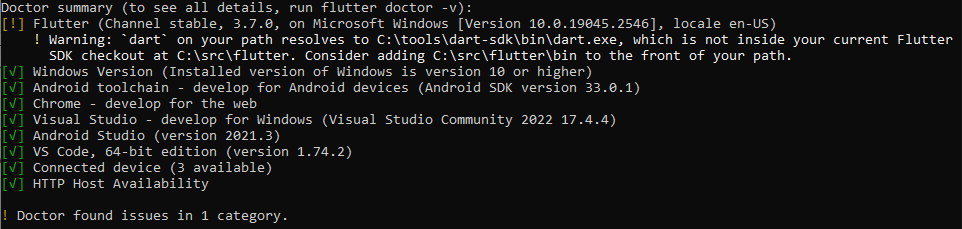
The solution worked for me was moving down the Dart SDK path in the Environment variables, below the Flutter SDK path...
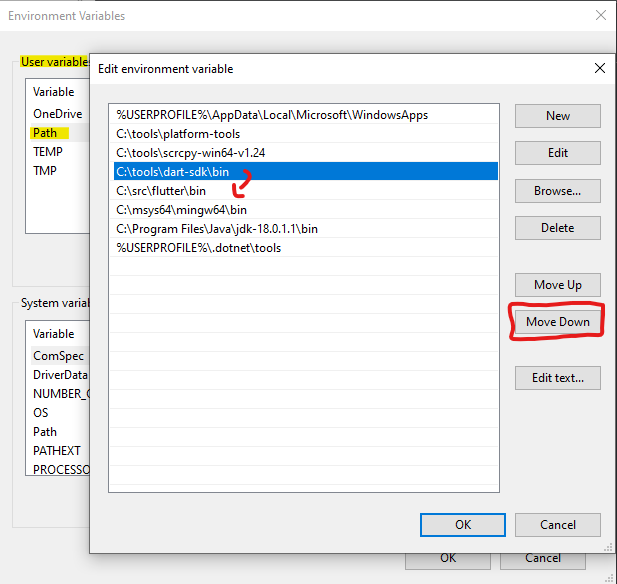
after moving it down and save, close the current CMD window and open a new one, run flutter doctor, you should be fine...

Also, you can delete the Dart SDK path from the Environment variables, it will fix the warning and it won't affect your projects as long as the Dart SDK path in your Android Studio settings is set to the Dart SDK inside the flutter folder as shown below:
file > settings > languages & frameworks > dart :

I hope you find it helpful!

So I went through all the comments here from users on version 3.7.0 (the original post was opened before that and was due to a legitimate bug in which file paths were treated case-sensitively on Windows), and I don't believe any of these cases are legitimate bugs in the Flutter SDK.
This is a warning, not an error
Let me first point out that this doctor validator is a warning--it is not an error. The Flutter SDK itself does NOT rely on the user's $PATH variable, so you can have whatever you want on your path. The motivation for adding this validator (introduced in https://github.com/flutter/flutter/pull/113106) was to avoid developer confusion where, for example, a developer is building their app with one version of the Flutter SDK, but then calls dart analyzeon the project, where dart on their path points to an older version of the Dart SDK than that used by their Flutter SDK. The older analyzer might then report errors when their app is actually fine. If you know what you are doing, and are fine with your path as is, it is safe to ignore this warning.
Windows paths are not case-sensitive, macOS/Linux are case-sensitive
Second, whether or not file system paths are case-sensitive is dependent on what operating system you are on. For the most part, Windows filesystems are NOT case-sensitive, while Unix-like (i.e. macOS and Linux) filesystems ARE case-sensitive. This bug was initially opened because I had forgotten to handle Windows filesystems correctly (this was fixed in https://github.com/flutter/flutter/pull/115889/files and present in our current 3.7.0 stable release: https://github.com/flutter/flutter/blob/stable/packages/flutter_tools/lib/src/doctor.dart#L635). If you are on macOS or Linux, when updating your path, you must ensure that the path you add has the correct case.
When modifying your path, add the new path BEFORE the previous $PATH variable
Third, Unix-like systems (that is, macOS and Linux) read the $PATH variable from left to right--as soon as they find a matching file name in a directory, it will stop searching. Thus, in a shell config file (e.g. .bashrc, .bash_profile, or .zshrc), it is important to add paths BEFORE interpolating the previous state of the $PATH variable, like:
export PATH="/path/to/flutter/bin:$PATH" # this is correct
If you already have a dart binary in the path, and get this flipped, like:
export PATH="$PATH:/path/to/flutter/bin" # this is incorrect
You would have added the Flutter SDK path AFTER whatever other system path contained a different dart binary, and thus dart in your shell will still resolve to that other dart binary, and not the one vendored with the Flutter SDK.
If you want to diagnose your $PATH further, you can run which -a dart on macOS or Linux, which will show all appearances of dart across your $PATH--however, note that whichever path appears first will be the one actually used when you type an unqualified dart in your shell.
Action Items
However, as there has been a lot of confusion over this validator, I plan to merge a change to make this message more clear, and probably link to some documentation further clarifying this. I am now leaving this issue open to track improving the validator message.
Any further comments made on this issue that examples of the cases I have covered in this comment will be hidden as "outdated". If you have carefully read this comment but believe there is still a bug here that I have not covered, please comment here.
I had a similar issue on macOS, my .zshrc was:
export PATH="/Users/julienlebren/library/flutter/bin:$PATH"
No problem until Flutter 3.7, but note the library instead of Library.
export PATH="/Users/julienlebren/Library/flutter/bin:$PATH"
This works, no more warning.
