

 flutter
Dart DevTools caching issues
Spinning this out from https://github.com/flutter/flutter/issues/100247, for investigation into #2 as described in https://github.com/flutter/flutter/issues/100247#issuecomment-1071517924. See also https://github.com/flutter/flutter/issues/100247#issuecomment-1071160197.

I haven’t been able to reproduce this issue since the first time (described here), so I’m not sure exactly what happened. But I do have a few theories about things that could be causing issues with caching.
-
[x] The
index.htmlfile has the response headercache-control: max-age=900. This means it is cached in the browser cache for 900 seconds/15 minutes (this is set here). As mentioned above, it is the version number inindex.htmlthat determines whether or not the service worker should update. This means that a user could switch to a new Flutter/DevTools version, but if they recently had DevTools open theindex.htmlwould still be cached and therefore the service worker would not update as expected. We should set this to 0 to make sure we are always using the newestindex.html. -
[ ] Other assets (for example,
main.dart.js) have alast-modifiedheader, which is set by the StaticHandler that the DevTools server uses to serve web assets (see here). The browser uses this to determine whether or not to use a copy cached in its cache, or request a new one. This means that the service worker might update, but the cache will still contain older assets because the browser doesn’t think they have been modified (this is probably often true, but I think it might make more sense to just request everything once the service worker updates to make sure we aren’t caching anything from the previous DevTools version). I think we should remove thelast-modifiedheader altogether. -
[x] Whenever a new service worker is activated, we have it claim all open DevTools tabs/windows (see here). This was added so that if there is a new DevTools available, it is used everywhere (and replaces older DevTools). Thinking more about this, I don’t think this is what we want, because it causes the Service Worker to take over DevTools that are connected to apps running older versions of Flutter. Conversely, if a user downgrades their Flutter, you can have older versions of DevTools now connected to apps running on a newer version of Flutter.
I think the changes #1 and #3 (checked in https://github.com/flutter/devtools/issues/3896#issuecomment-1072736745) should resolve the caching issues, but will keep this open for a while and if we are still having issues will look into #2. Since the last modified header is not added by the devtools server but instead by the shelf package's static_handler, we will likely need to add middleware to remove it.
I have not seen this issue in a while. We'll assume it is fixed and can re-open this issue if it comes up again.

Re-opening because I just noticed this while doing the DevTools roll into google3. It seems index.html is still being cached longer than it should be. I'm guessing this caching is happening on the server-side (might be the staticHandler logic mentioned above). I need to do more investigation into this.
I saw some more caching issues when wiring up VS Code to run the server from local code (see https://github.com/flutter/devtools/pull/4356). I made changes to local DevTools to make the background red so I could see that I was running from the local DevTools version. It worked, but when I reverted those changes and reloaded VS Code, I continued to see the red background until I hit Ctrl+Refresh (I was testing DevTools launched from VS Code in an external browser window).

Could we do something like generate a random hash for each release build, and check that from the browser to determine whether we should cache? I believe right now we check the DevTools version number, but this does not change frequently enough to completely solve the problem.
The issue at https://github.com/flutter/devtools/issues/4989 seems to be caching related. After loading DevTools inside VS Code from Flutter master and then switching to stable, I still see "DevTools version 2.20.0" in the console (instead of 2.15.0) and the inspector doesn't load correctly.
While reproducing this today, DevTools seems to load ok, but I suspect it might just be that there's less incompatibility between the two versions I'm using.
I switched to current stable and used DevTools embedded inside VS Code. Everything worked fine.
I then did git checkout 3.3.10 && flutter doctor and restarted VS code and did the same again. In the VS Code DevTools console, I see DevTools version 2.20.1. but this is not the version that's in Flutter 3.3.10 (it's 2.15.0). I can see in the source that the version in index.html is correct:

And I can see in the DevTools that the service worker that was loaded also contains that version in a querystring:
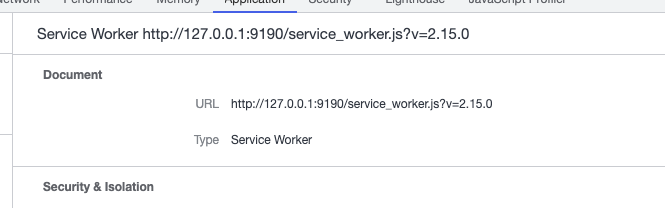
If I add a breakpoint in the service worker to getCacheName, I also see the expected version:

However, in the main.dart.js file that is loaded, I see the wrong version from stable:

If I look in cache.keys there's only the correct version (although, I couldn't find a way to easily see its contents.. most of the DevTools in VS Code is showing me stuff from the top-level VS Code frames and not this frame):
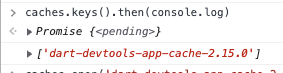
None if this really explains the problem. It makes it seem like the new 2.20 JS was somehow cached using the 2.15 key. So I'm wondering it the bug is not now, but when I went the other way (2.15 -> 2.20) if maybe my index.html was cached (with serviceWorker?version=2.15) which then fetched the 2.20 JS and cached it with that key. I'll try moving in that direction and see if I can find anything more useful.
To perhaps reduce this a little, in VS Code I'm now adding a &cacheBust= value to the querystring for index.html that includes the Dart+Flutter SDK versions. If there is any caching of index.html (which contains the DevTools version), this should at least ensure they're not cached across any SDK versions.
Based on https://github.com/Dart-Code/Dart-Code/issues/4388, it seems that my querystring to stop index.html being cached did not help.
I wonder if we should consider using random ports until we have a better idea of what's wrong? We previously avoided this because a) we used to use notifications with the external browser windows, and b) it allowed people to bookmark pages in DevTools. I don't know either of those considerations are that important now (because of mostly being embedded)?
I don't think bookmarking pages in devtools is something we should support. There is no guarantee that the port will be the same every time in other methods of launching devtools.
Ok, then I'll try making VS Code use a random port by default (still allowing the server to try a number of ports if the picked port is unavailable) and we can see whether this reduces the number of these kinds of issues. (@helin24 not sure if it makes sense to do the same for InteliJ?).
Although, it occurs to me that the caching done by the service worker is presumably deliberate to speed things up. Using a random port essentially bypasses that, and I wonder if it would be better to just bypass the service worker cache instead of changing the port? 🤔
Maybe it's also worth comparing the version number that's coded into the index.html file with the one that gets loaded from DevTools and writing a warning to the console if they don't appear to match to perhaps get some additional debugging info if this continues to happen. (@elliette I'm not particularly familiar with the service worker but I think you might be - wdyt?)
The service worker was added to speed things up, so there will be an IPL hit in trying to bypass it.
However, I think the issue described in https://github.com/flutter/devtools/issues/3896#issuecomment-1422711019 might not be due to the service worker, but to the open task in https://github.com/flutter/devtools/issues/3896#issuecomment-1072736745: the last-modified header. The older assets might be cached in the HTTP cache, and so when the service worker updates, its cache is cleared, and then repopulated with assets from the HTTP cache. Here is a nice diagram: https://web.dev/service-worker-caching-and-http-caching/#overview-of-caching-flow
The network tab in Chrome DevTools should show where the assets are coming from (service worker or not, and if not what the headers are). See https://github.com/flutter/devtools/pull/3325#issue-984388211. And the cache view in Chrome DevTools allows you to inspect what is in the service worker cache: https://developer.chrome.com/docs/devtools/storage/cache/#view
That being said, using a random port should also bypass the HTTP cache as well, so it could be a temporary solution until the last-modified header is removed.
but to the open task in https://github.com/flutter/devtools/issues/3896#issuecomment-1072736745: the
last-modifiedheader
Ah, thanks for the explanation - I think that makes sense and would match up with the behaviour I saw (where the index.html/service worker seemed new, but somehow the service worker cache got populated with a different version).
Is there a fix for that in progress? If there's likely value in using a random port in the meantime, I could add that to VS Code, and then once we think it's solved just stop using random ports if the version of the SDK is new enough to include the fix.
Adding a Cache-Control: no-store header may be easier than removing last-modified-date. It is also what I would recommend over the max-age: 0 solution for index.html.
Could we do something like generate a random hash for each release build, and check that from the browser to determine whether we should cache? I believe right now we check the DevTools version number, but this does not change frequently enough to completely solve the problem.
+1 for this solution. I this it would be a lot nicer if we could get a hash of the build output and use that as a cache busting URL, with indefinite caching. Loading the resources from localhost shouldn't be expensive, but letting the browser cache this stuff is a better practice if we can.

Thank you! Opened up https://dart-review.googlesource.com/c/sdk/+/286100 to use Cache-Control: no-store for now. This should help us identify if the caching issues are coming from the HTTP cache or the service worker.
I believe the default Flutter service worker does use a hash of the build output for cache busting, so more reason to switch to that: https://github.com/flutter/devtools/issues/4658
Marking this as fixed, we can re-open if more caching issues resurface in the future.