
fluent-bit
 fluent-bit copied to clipboard
 fluent
How add container name and image details to fluent-bit logs
Hi Team , i am running fluent-bit on docker runtime to scrape the logs from other containers and publish to splunk index as part of logs container should be present
Log file location : /data/docker/lib/containers//.log
metadata file contains all the container name and other additional information that i need , each container has its own metadata file
Metadata file location : /data/docker/lib/containers/*/config.v2.json
this is my current flunet-bit configuration
[INPUT] name tail Path /data/weiotadm/docker/lib/containers//.log Parser json Skip_Empty_Lines true Tag container_logs Docker_Mode true Read_from_Head true Mem_Buf_Limit 800MB Buffer_Chunk_Size 250k Buffer_Max_Size 500k Refresh_Interval 10
[FILTER] Name record_modifier Match * Record DeviceId ${DeviceId} Record Group ${EdgeGroup}
[OUTPUT] Name stdout Match *
i need help in how to fetch the container name from metadata file and to the fluent-bit logs

Could you check https://docs.fluentbit.io/manual/pipeline/inputs/docker-metrics https://docs.fluentbit.io/manual/pipeline/inputs/docker-events
Below log is an example of in_docker_events.
$ sudo bin/fluent-bit -i docker_events -o stdout
Fluent Bit v2.0.0
* Copyright (C) 2015-2022 The Fluent Bit Authors
* Fluent Bit is a CNCF sub-project under the umbrella of Fluentd
* https://fluentbit.io

[2022/07/28 07:01:41] [ info] [fluent bit] version=2.0.0, commit=ce66b748e3, pid=12809
[2022/07/28 07:01:41] [ info] [storage] version=1.2.0, type=memory-only, sync=normal, checksum=disabled, max_chunks_up=128
[2022/07/28 07:01:41] [ info] [cmetrics] version=0.3.5
[2022/07/28 07:01:41] [ info] [input:docker_events:docker_events.0] listening for events on /var/run/docker.sock
[2022/07/28 07:01:41] [ info] [sp] stream processor started
[2022/07/28 07:01:41] [ info] [output:stdout:stdout.0] worker #0 started
[0] docker_events.0: [1658959304.802031011, {"message"=>"{"status":"create","id":"9263fb8aa65f332cc68cc3ef46f35caa490e218b8b53d5dfe3f19ad5fa7fa6da","from":"ubuntu:20.04","Type":"container","Action":"create","Actor":{"ID":"9263fb8aa65f332cc68cc3ef46f35caa490e218b8b53d5dfe3f19ad5fa7fa6da","Attributes":{"image":"ubuntu:20.04","name":"admiring_antonelli"}},"scope":"local","time":1658959304,"timeNano":1658959304799708343}
"}]

@nokute78 Thanks for the response i am running fluent-bit as a side car container in IOT edge Environment it not scraping the logs from iotedge docker instances

[INPUT] Name docker_events
[OUTPUT] Name stdout Match *
docker run --rm -v /var/run/:/var/run/ ImageId
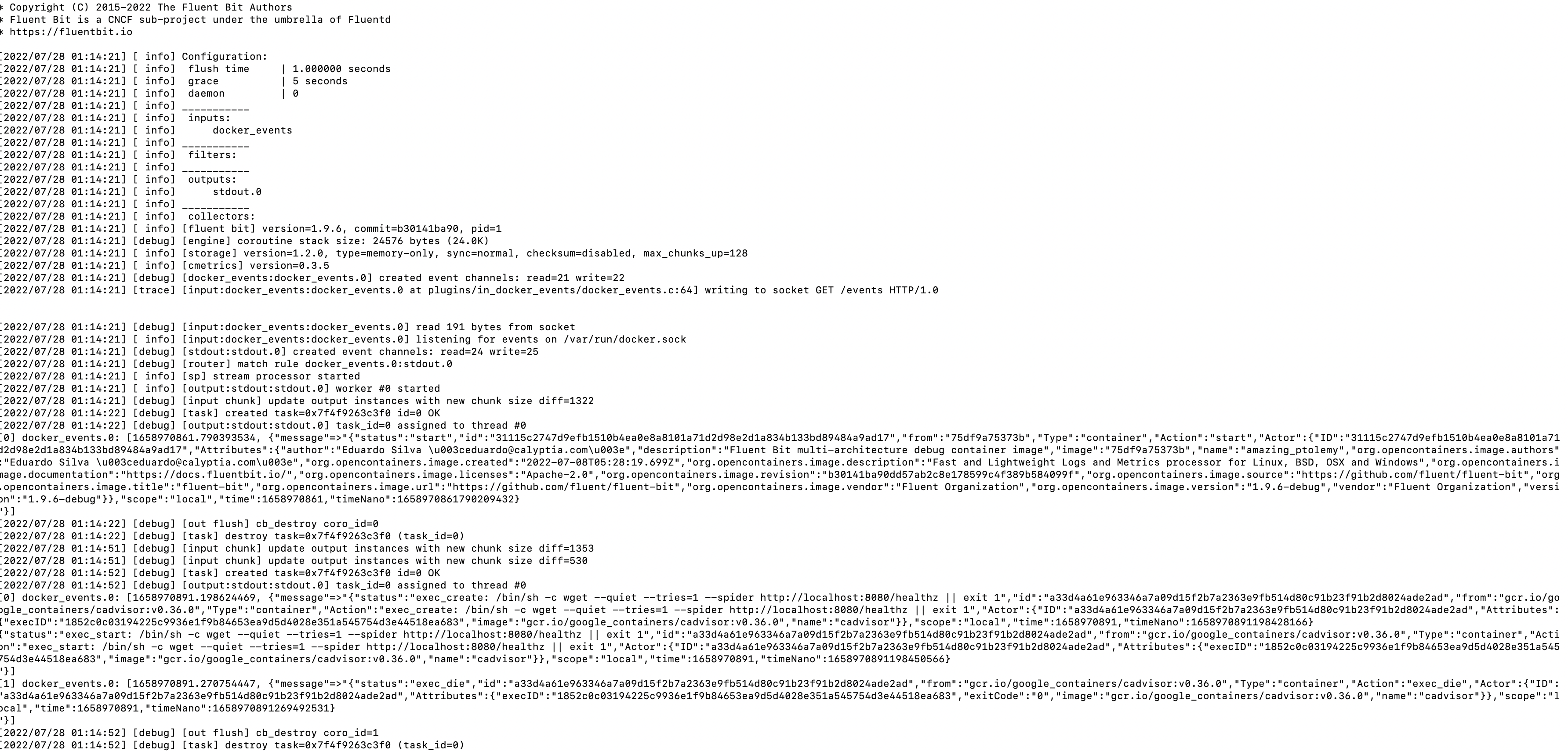
cloud you please help us here
Can you clarify these statements?
i am running fluent-bit as a side car container in IOT edge Environment
I presume you're not running a K8S sidecar, it sounds like you're just running another container?
it not scraping the logs from iotedge docker instances
Do you mean the command is not working or you do not want to do that?
Another option is a LUA filter to read your metadata file and associate things in your record stream: as a record comes through you can look it up in the file with your filter and add new data: https://docs.fluentbit.io/manual/pipeline/filters/lua
There are various resources around to show you LUA coding with examples loading files, etc. There are some example filters in the docs and in the repo:
- https://docs.fluentbit.io/manual/pipeline/filters/lua#code-examples
- https://github.com/fluent/fluent-bit/tree/master/scripts Calyptia also have this LUA playground: https://calyptia.github.io/sandbox/

Hi @patrick-stephens
Thanks for the Response
i am having 10 application containers are running in docker
i am using fluent-bit as side car container to scrap the logs from all the applications containers and publish to Splunk
i am trying to add additional metadata to log such as container name and container image from

fluentbit config: [INPUT] name tail Path /data/weiotadm/docker/lib/containers//.log Parser json Skip_Empty_Lines true Tag container_logs Docker_Mode true Read_from_Head true Mem_Buf_Limit 800MB Buffer_Chunk_Size 250k Buffer_Max_Size 500k Refresh_Interval 10
[FILTER] Name lua Match * script test.lua call get_container_name
[FILTER] Name record_modifier Match * Record DeviceId ${DeviceId} Record StoreNo ${StoreNo} Record EdgeGroup ${EdgeGroup}
[OUTPUT] Name stdout Match *
i tried writing a lua script :
function get_container_name(tag, timestamp, record) for key, val in pairs(record) do print(key,val) end return 1, timestamp, record end
but i did not find a way to read container and image info from config.v2.json path can you please help me here
You'll need to mount the file into the container then read it in some fashion with LUA. You'll then need to associate each record with the right container, I'm not really sure what your logs look like or the format of the JSON file to do this. As I say I would look at the LUA resources online for this.
Are you tailing the logs or using the forward protocol?
This allows you to send logs direct to fluent bit using a forward input: https://docs.docker.com/config/containers/logging/fluentd/
This issue is stale because it has been open 90 days with no activity. Remove stale label or comment or this will be closed in 5 days. Maintainers can add the exempt-stale label.
![github-actions[bot] avatar](https://avatars.githubusercontent.com/in/15368?v=4 "Published by a pub.dev verified publisher")
This issue was closed because it has been stalled for 5 days with no activity.
After talking with @patrick-stephens over at the slack we've figured that trying fluentd docker logging driver for docker was a good option.
And in fact for my scenario, docker-compose for couple apps and a logging stack EFK with fluent-bit, worked as far as I needed. Was able to retrieve respective application's container names for each log entry.
Fluent-bit.conf:
[INPUT]
    Name forward
    Listen 0.0.0.0
    Port 24224
    Buffer_Chunk_Size 1M
    Buffer_Max_Size 6M

[OUTPUT]
    Name es
    Host elasticsearch
    Match *
    Generate_ID On
Added following my app's service in docker-compose:
...
    logging:
      driver: "fluentd"
      options:
        fluentd-address: localhost:24224
        tag: my-app

Sources
- https://docs.fluentbit.io/manual/pipeline/inputs/forward
- https://docs.fluentd.org/v/0.12/container-deployment/docker-compose
- https://docs.docker.com/config/containers/logging/fluentd/
