

 florianfesti
Card game tray insert
Creating the PR as a draft because I still have to go and try to actually laser cut a prototype.
Basically I took the card tray from the Agricola kit and extracted it, adding a few more knobs to play with. It's kinda similar to the already existing DividerTray, and if I get to generate several rows, this generator would become a superset of it.

Well, the Tray in the AgricolaInsert was derived from the DividerTray AFAIK. Not sure if there is really room for another generator doing the same thing. While I like the angled back wall I wonder if that shouldn't just be an option for the DividerTray. Yes, it has too many options already. Still having multiple similar generators with slightly different feature sets is even worse.

This doesn't have to mean writing this generator is a bad idea. Adding features like this to a full fledged generator like DividerTray has a pretty steep learning curve and it can be much easier to get started with something that doesn't have all bells and whistles. The new feature can still be ported over to the DividerTray later on.
The main issue for doing this is that the DividerTray allows for multiple rows. This requires a different solution for the middle walls to join to the angled back wall. trapezoidWall should be a solution to that. You will probably need a CompoundEdge with a short piece of "e" edge and an "f" edge to join it to the back wall. Feel free to ask here if you run into any problems.
Well, the Tray in the AgricolaInsert was derived from the DividerTray AFAIK.
Aaah, I see. I thought it was the other way around, but that also makes sense.
Not sure if there is really room for another generator doing the same thing.
I hear ya. My long term goal is to have this generator supercede the DividerTray (or have the DividerTray absorbs the knobs that my generator has). My short term goal was to make a tray exactly like I want, and to get there stealing the Agricola version was the easiest way. :-)
This doesn't have to mean writing this generator is a bad idea.
Oh yeah, and I get that your job is to keep the library relatively generic, so no hard feelings there at all.
The main issue for doing this is that the DividerTray allows for multiple rows. This requires a different solution for the middle walls to join to the angled back wall. trapezoidWall should be a solution to that. You will probably need a CompoundEdge with a short piece of "e" edge and an "f" edge to join it to the back wall. Feel free to ask here if you run into any problems.
I'll try my hand at it. Wish me luck. ;-)
And just so you know what I'm gunning for: I'm mostly trying to get a card tray that can be adapted as an insert for game boxes. Which is why the two rows were not that important for me, as a box seldom has enough space for more than one row, and adjustable card height vs total height and the addition of a bottom were.
Well, the DividerTray does have options for both a bottom and angled separators although they are not that easy to find. The UI probably deserves a bit of love and may be better defaults. But it can do a lot of things already - may be too many actually...
Hello,
I'm the original contributor to both the DividerTray and the Agricola insert :-) Here are my 2 cents on the subject, if it can helps.
I agree with what @florianfesti said.
To give more context, I use mainly the DividerTray for card tray in game box inserts purposes, and I do use multiple rows more often than I don't. It's usefull for games which have a lot of cards (such as "Unlock", "Arkham Horror: The Card Game", "Timeline", etc.). But I also use the DividerTray for completely different purposes not related to games, such as a modular pillbox insert put inside an existing box.
I think the "CardGameTrayInsert" name would be misleading. If it was to supersede DividerTray, cardgame in the name would make it less obvious it's generic enough for pillbox and such. If it was another box next to DividerTray, it would not be obvious that DividerTray would be the go to box for card game insert, at least with multiple rows, or even a single card row with a second empty row (used without dividers) which takes all the remaining box space to keep steadily the first row in place, and where you can put the other game components (tokens, dice, etc.).
adjustable card height vs total height and the addition of a bottom
It's already supported in DividerTray, but not as clearly. The height of the box is the total height if outside=true, and the content (card) height if outside=false. I chose this before the bottom option was added, but now that a bottom exists it's less clear how the bottom and content height are both considered for the outside parameter. It should probably have it's own separated boolean option now. @florianfesti should I do a pull request about this?
To help find the right card height, angle, and total height, the debug option of DividerTray gives a lot of information, including both the Tray_height and Content_height (which is the card height in your case).
The DividerTray is complex, it has a lot of options, and personnaly I do use them. I like the idea of adding an angled back wall option on the DividerTray instead of a separated new box, I feel it would be better . But I also agree that having a lot of options can scare users. I feel this box could have a "simple" and "advanced" version of the UI where some options are hidden unless "advanced" mode is chosen by the user.

To illustrate how an empty row (without wall or divider) can be used in a game box insert. In the picture below, the third row doesn't use dividers, there's still an upper and lower wall which takes all the box lentgh (keeping it firmly in place), but there is no right wall (useless and wastefull without dividers in this row). We don't see it, but there are game tokens which are stored there.
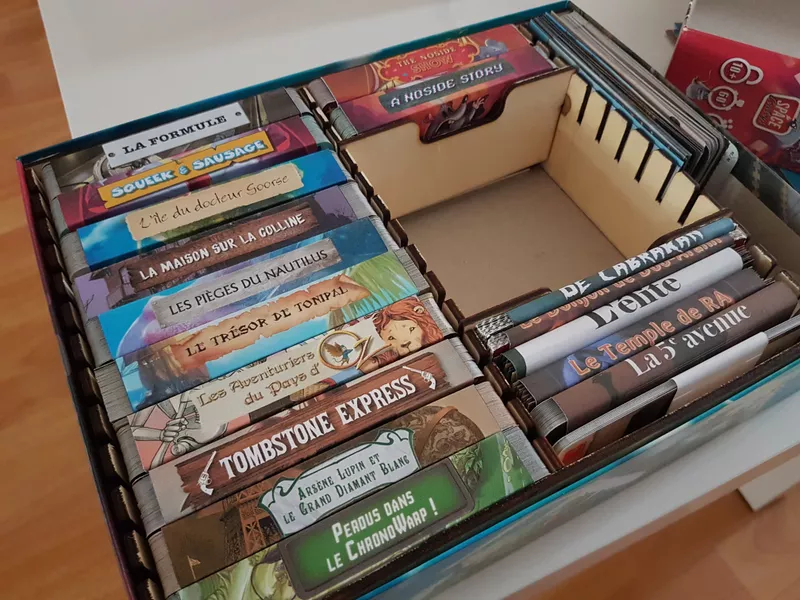
I'm the original contributor to both the DividerTray and the Agricola insert :-)
Ooooooh.... 8-o Bonjour! Your inserts are things of beauty, btw.
To give more context, I use mainly the DividerTray for card tray in game box inserts purposes, and I do use multiple rows more often than I don't. It's usefull for games which have a lot of cards (such as "Unlock", "Arkham Horror: The Card Game", "Timeline", etc.). But I also use the DividerTray for completely different purposes not related to games, such as a modular pillbox insert put inside an existing box.
I think one of the big takeaways is that there are many more parameters lying under the surface. I mostly looked at the web interface and thought that what I see is what I can get, but I should have thought of looking that's available under the bar as well. :-)
I think the "CardGameTrayInsert" name would be misleading. If it was to supersede DividerTray, cardgame in the name would make it less obvious it's generic enough for pillbox and such.
Point. My use-case is (for now) card trays, and the parameters I'm using -- card height and box height -- reflect that. But you are right that the tray can be used for much, much more.
adjustable card height vs total height and the addition of a bottom
It's already supported in DividerTray, but not as clearly. The height of the box is the total height if outside=true, and the content (card) height if outside=false.
Ah yes. But my version has a wee twist: I take both values and compute the angle of the slots based on them.
I chose this before the bottom option was added, but now that a bottom exists it's less clear how the bottom and content height are both considered for the outside parameter.
As long as it is documented, I'd say both are quite acceptable. In my mindset of box inserts, it makes sense to consider both, as my end-goal is to tell the generator "here is the inner size of my boardgame box, there are the cards dimensions, now you go figure it out and give me something that fits it all". :-)
To help find the right card height, angle, and total height, the debug option of DividerTray gives a lot of information, including both the Tray_height and Content_height (which is the card height in your case).
I'll check that, thanks!
The DividerTray is complex, it has a lot of options, and personnaly I do use them. I like the idea of adding an angled back wall option on the DividerTray instead of a separated new box, I feel it would be better . But I also agree that having a lot of options can scare users. I feel this box could have a "simple" and "advanced" version of the UI where some options are hidden unless "advanced" mode is chosen by the user.
A cheap, easy way to do that would be to create a new DividerTrayAdvanced generator that inherit from the original DividerTray and just surface more parameters. Another way would be to add a way to flag the parameters that are "advanced" and have the UI show them or not based on the user's temerity.
Thanks for the brainstorming!
OK, while there are several options for this to proceed there isn't really a chance of this PR being merged as is. So I am closing it here to not let it linger for ever.