
flipperzero-firmware
 flipperzero-firmware copied to clipboard
 flipperdevices
SD card needs to be reinserted
Describe the bug.
When performing update, the state changes to 'waiting for SD card' and nothing happens until card is ejected and reinserted.
After update the qFlipper status shows no card, fixed by ejecting and reinserting card.
Reproduction
- Switch on
- Connect to PC
- Run update
Target
No response
Logs
Issue is only present on device, no logs available.
Anything else?
No response

What firmware are you updating from, and what brand/type of SD card are you using? Would like to see if I can reproduce.

I don't remember what firmware version was preinstalled.
Is there some way to run update when the firmware is up-to-date?
The card is some ancient 8GB A-data.
Old: [DEV] Version: 0.64.3 commit: bf236f5e radio: 1.12.1 New: [DEV] Version: 0.74.2 commit: b60ba765 radio: 1.13.3
I would refer to the SD card setup page.
I'm going to bet your card is unsupported, since I don't have to eject/insert mine (a 32 GB Class 10 SDHC microSD) after flashing. You could try checking current draw and read/write speeds per SD card setup guide and see how you compare.
What is "not supported SD card"? Either it's a SD card, or it is not a SD card.
It says the power draw is 25mA, and besides flipper failing to access the card during and after update the card works.
It can be reproduced by switching between release and rc firmware.
The performance looks normal:
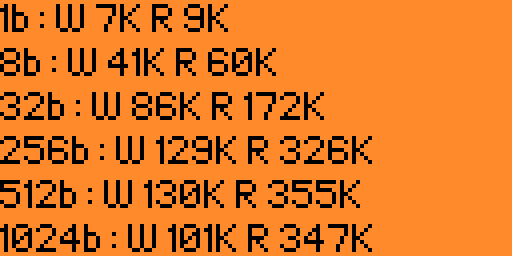
To clarify what I mean by "unsupported" - your card does not meet the documentation's recommended capacity and manufacturer (16GB/32GB Sandisk or Kensington).
Did you try to reproduce this issue with a different card? I don't have any 8GB Adata microSD's unfortunately.
It says specifically "it is important to use high-quality branded microSD cards such as SanDisk, Kingston, etc." and "supports microSD cards up to 128 GB, but we recommend using a microSD card with a maximum capacity of 16 GB or 32 GB." and "Flipper Zero's current consumption with a genuine branded microSD card is 24 mA. With a non-genuine microSD card, the overall current consumption can be up to 50 mA leading to a shorter battery life of your device."
It fulfills the maximum size, and the power consumption.
It is difficult to judge card quality by the label printed on it, different brands are available in different places. Also last time I looked into it Kingston was not a manufacturer, it was a rebrander selling variously sourced flash media so it does not say much having 'Kingston' printed on something. For practical reasons I buy cards branded differently so I can tell them apart, and most devices can accept all cards. There are some devices like Raspberry Pi that don't work with some specific cards but it's usually considered a bug in the device, not the card. There is a SD specification for a reason.
And sure, it is not reproducible with a different card, there is something special about this one.
fwiw working cards include:
Type: FAT32 3875328KiB total 27HP 40DSG 3.0
Type: FAT32 31150080KiB total 03DS 23CSG 8.0
broken:
Type: FAT32 8059392KiB total 1dDA DS 1.0
This behaviour is indeed symptomatic of an SD card that doesn't properly conform to the SPI standard.

In what way does it not conform, specifically?
It does work when flipper is powered on normally, it only fails during update.
Could you provide any additional info on the SD card that is failing during update? i.e. the Adata model/serial number?
 Type: FAT32
8059392KiB total
8052736KiB free
1dAD SD 1.0
SN:21100b8e 07/2011
Type: FAT32
8059392KiB total
8052736KiB free
1dAD SD 1.0
SN:21100b8e 07/2011
You could get different results from same original cards, if they are manufactured at different time, sometimes manufacturers produce different batches with different controllers, or depending on regions. Only real way to know is to try a card out.
With the amount of fake cards floating around, there is simply no way to recommend specific card or brand, so the simple option is just changing the card.

Sure, the simplest is just changing the card.
However, making more cards work is also an option which makes it more likely that a random card will work.
@DrZlo13 is currently working on new driver for SPI SD block devices, may be fixed in it. But in general it's better to find normally working card.

Tried to disable the peripherial power when probing the card, and it does not make any difference.
Either I am doing it wrong or powering it off is not sufficient.
@hramrach how about latest firmware? If it still got issues then there is nothing we can do about it and most likely card is either broken or does not conform to the standard.
It's built from git so it won't get any later. In particular it has the new SD code.
Can you also provide some photo of this SD? I'll forward it to support so they'll be able to help other customers.
Interestingly out of the cards in the photo the non-working one is the only right-handed card, all the others are left-handed.