

 flexible-collision-library
Strange results for penetration depth values in collision
Consider this scenario, where a 2x2x2 meter BVHModel has a trapezoidal BVHModel and both are checked for collision. Contact data is returned, and the penetration depth of each contact point is generally very close to zero, therefore correctly describing the scenario that both shapes are "touching" one another exactly.
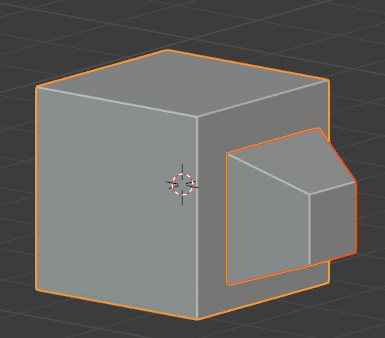
In a variation of this, I have embedded the trapezoidal shape 0.5m into the box shape. Now, I get contact data back, with a penetration depth of 0.5. This is also expected and describes the scenario correctly.
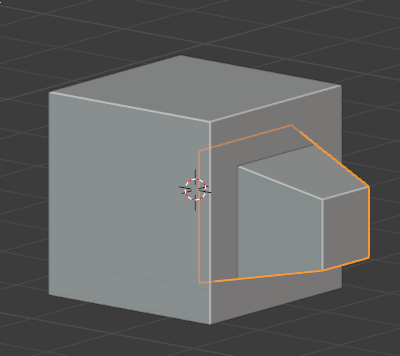
In this final variation, I have shifted the trapezoidal shape such that one edge is coincident with another edge of the box. Here, I get back contact data, but the penetration depths vary. Some are close to zero, and others are numbers like 0.33, 1.03, 1.84, 1.65, etc.
Why, in this scenario, do I get these penetration depths? Both objects are convex.
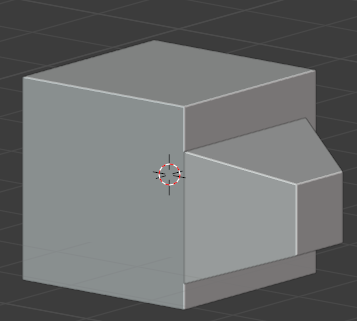

That is certainly strange. One wouldn't expect those values when the two shapes are clearly just in contact. I haven't played with the BVHModel code much at all, so I have no immediate insight. I had a number of questions which might be most easily addressed if you could provide your code.
- This is the result of calling
fcl::collide? - You've configured the
CollisionRequestfornum_max_contacts > 1? - What are the measures of the trapezoidal shape?
- Instead of penetrating at a depth of 0.5 m, what if you penetrated to a depth of 0.65 m? Same result? (This is related to my uncertainty about the measures of the trapezoidal shape.)
So, yeah....code and geometry seems the simplest way to get on the same page -- and turns into a very nice unit test. :)

This is the result of calling a managed internal collision, where the collision manager contains 2 objects only.
Num max contacts is greater than 1.
About the geometry ... I have a hunch that this is happening due to rounding errors in the geometry. Is there a way to set a geometrical tolerance level in fcl such that if I feed it a BVH model with a vertex coord of 0, 0, 0.00002 and another vertex coord of 0, 0, 0.00001, they both round to 0, 0, 0.00?
If I can set that and it fixes it, all good, if not, I'll throw up some code. It's with Python bindings, but the concepts should be the same.
This is the result of calling a managed internal collision, where the collision manager contains 2 objects only.
So, that's calling collide on a collision manager (with itself)?
0, 0.00002 and another vertex coord of 0, 0, 0.00001, they both round to 0, 0, 0.00?
What floating point type are you using? float or double? If double I wouldn't think that vertices on that magnitude would not cause problems. (On the other hand, right now I can't imagine why it's doing what it's doing, so I'm not going to close any doors yet. :D)
If I can set that and it fixes it, all good,...
I suspect there isn't (but have no certain knowledge). The tolerances I know about are for the GJK implementation, but collision with meshes don't use those tolerances; to the best of my knowledge, that's simply triangle-triangle pairwise intersection.. I suspect it's simply an error when edges are co-linear. Some assumption that is generally fine but horrendous when triangles are aligned like that.
Yes, colliding with itself. Here is some sample code to replicate it. I have simplified it to be only two cubes, both 2x2x2m.
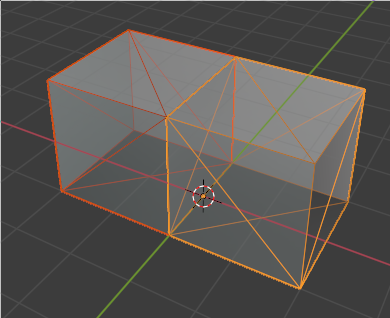
The code is as follows. I took the vertices and the face array from Blender.
import fcl
import numpy as np

class MyMesh():
    def __init__(self, o):
        if o == 'box1':
            self.vertices = [[-2.0, -1.0, 0.0], [-2.0, -1.0, 2.0], [-2.0, 1.0, 0.0], [-2.0, 1.0, 2.0], [-0.0, -1.0, 0.0], [-0.0, -1.0, 2.0], [-0.0, 1.0, 0.0], [-0.0, 1.0, 2.0]]
            self.faces = [[1, 2, 0], [3, 6, 2], [7, 4, 6], [5, 0, 4], [6, 0, 2], [3, 5, 7], [1, 3, 2], [3, 7, 6], [7, 5, 4], [5, 1, 0], [6, 4, 0], [3, 1, 5]]
        elif o == 'box2':
            self.vertices = [[-0.0, -1.0, 0.0], [-0.0, -1.0, 2.0], [-0.0, 1.0, 0.0], [-0.0, 1.0, 2.0], [2.0, 1.0, 2.0], [2.0, -1.0, 2.0], [2.0, -1.0, 0.0], [2.0, 1.0, 0.0]]
            self.faces = [[4, 2, 3], [7, 0, 2], [6, 4, 5], [6, 1, 0], [5, 3, 1], [3, 0, 1], [4, 7, 2], [7, 6, 0], [6, 7, 4], [6, 5, 1], [5, 4, 3], [3, 2, 0]]

cm = fcl.DynamicAABBTreeCollisionManager()
cm.setup()

for obj in ['box1', 'box2']:
    transform = np.eye(4)
    transform = np.asanyarray(transform, dtype=np.float64)
    mesh = MyMesh(obj)
    bvh = fcl.BVHModel()
    bvh.beginModel(num_tris_=len(mesh.faces),
                   num_vertices_=len(mesh.vertices))
    bvh.addSubModel(verts=mesh.vertices,
                    triangles=mesh.faces)
    bvh.endModel()
    t = fcl.Transform(transform[:3, :3], transform[:3, 3])
    o = fcl.CollisionObject(bvh, t)
    cm.registerObject(o)
    cm.update()

cdata = fcl.CollisionData()
cdata = fcl.CollisionData(request=fcl.CollisionRequest(
    num_max_contacts=1000))
cm.collide(cdata, fcl.defaultCollisionCallback)

print('Is collision:', cdata.result.is_collision)
for contact in cdata.result.contacts:
    print('Penetration depth', contact.penetration_depth)
Results - notice how many contact objects there are... I would've only expected, well, 4? Also, notice how some are zero, some are close to zero, and how some are larger values, both negative and positive.
Is collision: True
Penetration depth 0.0
Penetration depth 3.5e-323
Penetration depth 0.0
Penetration depth 5.4e-323
Penetration depth 4.4e-323
Penetration depth 0.0
Penetration depth -0.7071067811865476
Penetration depth -0.7071067811865475
Penetration depth 0.0
Penetration depth 3.5e-323
Penetration depth -0.8880738339771153
Penetration depth 0.0
Penetration depth 0.0
Penetration depth 9.4e-323
Penetration depth 0.0
Penetration depth 1.04e-322
Penetration depth 0.0
Penetration depth 0.0
Penetration depth 5.4e-323
Penetration depth 4.4e-323
Penetration depth -0.7071067811865475
Penetration depth 0.0
Penetration depth 3.5e-323
Penetration depth 0.0
Penetration depth 5.4e-323
Penetration depth 4.4e-323
Penetration depth -0.7071067811865475
Penetration depth 0.7071067811865476
Penetration depth 0.0
Penetration depth 3.5e-323
Penetration depth -0.11897933331668953
Penetration depth 0.0
Penetration depth 0.0
Penetration depth 3.5e-323
Penetration depth -0.11897933331668953
Penetration depth 0.0
Penetration depth 9.4e-323
Penetration depth 0.0
Penetration depth 1.04e-322
Penetration depth 0.0
Penetration depth -0.7690945006604258
Penetration depth -0.7071067811865476
Penetration depth 0.0
Penetration depth 9.4e-323
Penetration depth 0.0
Penetration depth 1.04e-322
Penetration depth 0.0
Penetration depth 0.0
Penetration depth 9.4e-323
Penetration depth 0.0
Penetration depth 1.04e-322
Penetration depth -0.7690945006604256
Penetration depth -0.7071067811865475
Penetration depth -0.7071067811865476
Penetration depth 0.0
Penetration depth 0.0
Penetration depth 0.0
Penetration depth 5.4e-323
Penetration depth 4.4e-323
Penetration depth -0.7071067811865475
Penetration depth -0.7071067811865476
Penetration depth 0.0
Thanks for posting this code. It's a great resource. I can use this as a basis for investigation.
@SeanCurtis-TRI cheers - sorry that it isn't in C++. If you'd like, I can post a small variation of that code that works in Blender so you can easily test the result of any shape.
@Moult A gracious offer, but don't worry about it. Ultimately, it'll be all about C++ unit tests and debugging. So, this is a great starting point and as I understand the issues in the current code, I'll flesh out the unit tests.
At this point, I'm taking personal time through the end of the year. I wasn't able to get to it before my scheduled time off. The odds are best that I'm not going to be able to tackle this until the beginning of the new year at the earliest.